Try it on your own data
Every report in this article is in the free plan. One snippet for web and apps, up to 10 sites.
Start freeProduct demos work when the buyer sees their own scenario, not a tour of every feature. Find out their problem first, show the end result, walk two or three matching workflows with realistic data and finish with a dated next step. Below: formats compared, a time-allocation example, discovery questions, structure and a worked look at how scheduling speed changes results.
What you will learn
- Build the demo from the buyer's problem; a feature tour answers a question nobody asked
- Show the end state first, then two or three workflows, then agree a dated next step
- Measure show rate, advance rate and time to first slot; speed to schedule can matter as much as content
What are product demos, and what are they for?
A product demo shows a buyer how your product would work for them, before they commit. The purpose is not to show everything the product can do. It is to let the person in front of you see their own situation in your product and decide whether the next step is worth taking.
Demos come in four common formats, and each fits a different moment:
| Format | Who runs it | Length | Best for |
|---|---|---|---|
| Live demo | A person, with the buyer present | 20–45 minutes | Larger deals, several stakeholders, questions you cannot predict |
| Recorded demo | Made once, watched any time | 2–10 minutes | Awareness, sharing inside the buyer's team |
| Interactive self-serve demo | The buyer clicks through a guided or sandboxed product | 3–10 minutes | Early interest, high volume, low-touch products |
| In-product walkthrough | Shown after sign-up | A few minutes | Activation of someone already trying the product |
This guide is about the live and guided kinds, where the common failure is the same: a tour of features. The sales funnel around the demo is covered in SaaS sales funnel, what happens to people who try the product in free trial conversion rate and the product-led alternative in product-led growth strategy. Here the question is what makes a demo itself work.
| Format | Length | Best for |
|---|---|---|
| Live demo | 20–45 min | Larger deals, several stakeholders |
| Recorded demo | 2–10 min | Awareness, forwarding |
| Interactive self-serve | 3–10 min | Early interest, high volume |
| In-product walkthrough | A few minutes | Activating someone already trying it |
Lengths are typical ranges; the more people must agree, the more live and tailored the demo should be.
Why does a scenario beat a feature tour?
The thesis of this article: a demo should let the buyer see their own scenario, not walk through every feature. A tour answers a question nobody asked ("what does it do?") while the buyer wants "would this solve my problem, and how hard is it?".
This is the same principle Nielsen Norman Group describes as progressive disclosure: put the features users frequently need on the initial display, keep that list short, and defer the rest to a secondary level, with an obvious path to reach it. In a demo, "the features they need" are the ones that match what they told you in discovery, and the secondary level is a clearly offered "I can show you X if it matters."
Sample data: the same 45-minute slot, two designs.
| Segment | Feature tour | Scenario demo |
|---|---|---|
| Introductions or discovery | 5 min (rapport) | 10 min (their problem) |
| Product | 14 features × 2.5 = 35 min | 3 workflows × 8 = 24 min |
| Questions | 5 min | 8 min |
| Agreed next step | 0 | 3 min |
| Total | 45 min | 45 min |
| Time the buyer speaks or decides | 5 min, 11.1% | 10 + 8 + 3 = 21 min, 46.7% |
The arithmetic: 5 ÷ 45 = 11.1% and 21 ÷ 45 = 46.7%. In the tour the buyer hears 14 things for 2.5 minutes each and has five minutes to react; in the scenario version they confirm their problem, see three workflows and leave with a dated next step. The figures are an illustrative design, not a measured result; the point is where the time goes.
What should you find out before the demo?
A scenario demo is built from the answers to a few questions, ideally before the call:
| Question | What you do with the answer |
|---|---|
| What are you trying to do, and what happens today? | Choose the workflow to show first |
| How do you measure that it is working? | Show the number they care about on screen |
| Who else will judge this? | Add their concern, or invite them |
| What would make this a no? | Address it in the demo, not after |
| What is the date that matters? | Anchor the next step to it |
If you cannot get these in advance, spend the first ten minutes of the call on them. A demo that starts by restating what the buyer said earns attention that a "let me share my screen" start does not.
How do you structure the demo itself?
- Restate their problem in one sentence. "You said approvals take about a week across three teams. Is that still right?" It confirms you listened and corrects misunderstandings early.
- Show the end state first. Open the finished report, the resolved ticket or the completed workflow, then show how you reach it. The buyer judges the outcome before the effort.
- Walk the shortest path. Use their data or realistic data from their industry, not placeholder names.
- Pause and check. After each workflow ask: "Is this how it works for you, or is it different?" The answers show what matters.
- Offer, do not unload. "There is also X; want to see it?" keeps depth available without spending time on it.
- Close with a dated next step. A trial setup, a call with their team, a security review. A demo that ends with "let me know" has no next stage.
Send a short written recap afterwards: their problem, what you showed, the next step and date. It travels inside the buyer's company when you are not in the room. If that recap is a marketing email, the CAN-SPAM rules apply to business email too.
Which demo format should you use?
| Situation | Format | Why |
|---|---|---|
| Visitor on a high-intent page (pricing, integrations) | Request a live demo, or a short interactive one | Interest is highest now |
| Early researcher, not ready to talk | Recorded or interactive demo | Lets them look without a meeting |
| Several stakeholders | Live demo with the champion's team | Questions appear in real time |
| Small deal, many leads | Interactive demo plus self-serve trial | A live demo costs more than the deal justifies |
| Buyer asks for something to forward | Recorded demo and written recap | Reaches people who will not attend |
A workable rule: the more people who must agree and the more the deal is worth, the more live and tailored the demo should be.
Match the length to the stage. A first conversation can be a 15-minute look at one workflow; a late-stage demo for a buying team can run longer, but only if each added segment answers a question someone raised. If you are adding a feature because you have time, take it out. Record the objections you hear in demos in one place, because they are the best input for your next discovery questions.
How do you measure whether demos work?
Track four numbers: demo requests, the share held, the share that advance to the next stage and the time from request to demo.
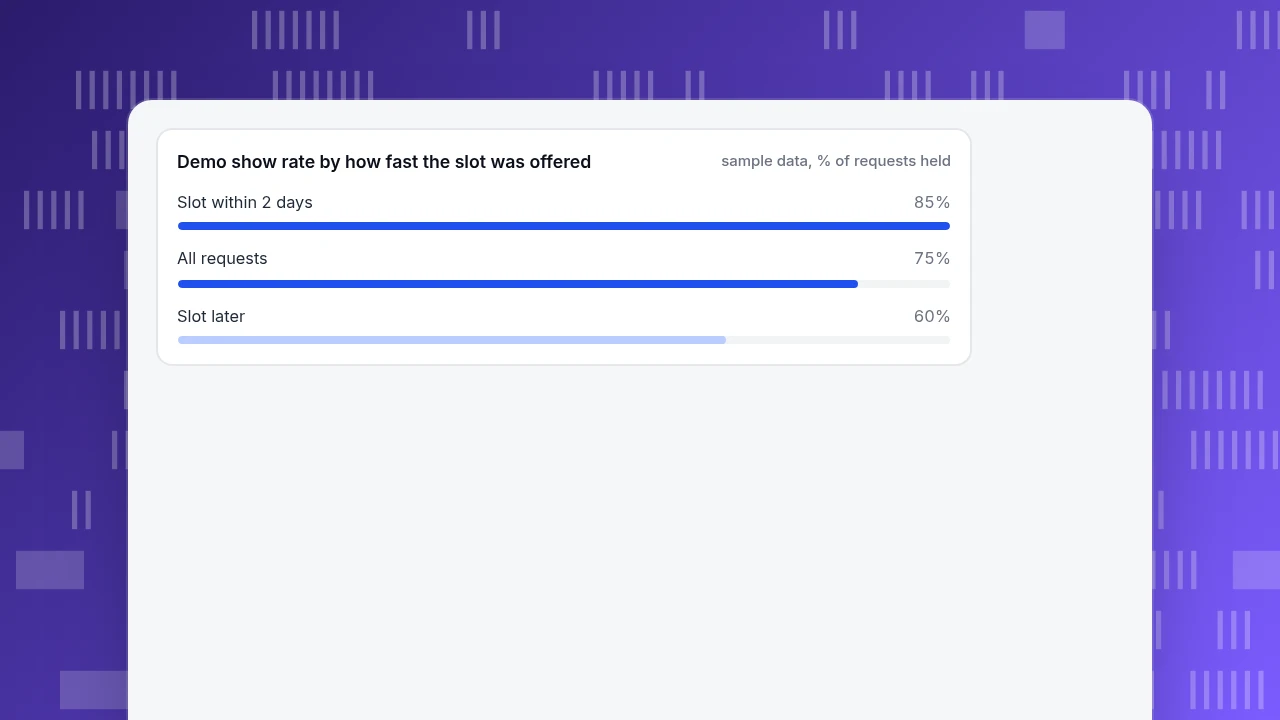
Sample data: 200 demo requests in a month, split by how quickly the first slot was offered.
| Slot offered | Requests | Held | Show rate |
|---|---|---|---|
| Within 2 days | 120 | 102 | 85% |
| Later | 80 | 48 | 60% |
| All | 200 | 150 | 75% |
150 ÷ 200 = 75% overall. If 40% of held demos advance to the next stage, that is 150 × 0.4 = 60 advancing. Now suppose every request got a slot within two days and the 85% show rate held for all of them: 200 × 0.85 = 170 held, 170 × 0.4 = 68 advancing, 8 more (+13.3%) without changing the demo at all. The speed of the first slot was costing as much as the quality of the demo. The rates are assumptions chosen to show the method; use your own.
Also record where requests come from (which page and channel) and which pages visitors read before asking; both tell you what to put in front of the next visitor.
Demo show rate by how fast the slot was offered
sample data, % of requests heldWhat do people get wrong about product demos?
- Showing every feature. A tour answers a question nobody asked.
- Starting without discovery. A demo for an imagined buyer fits nobody.
- Placeholder data. "Acme Corp" and "Test User" do not look like their world.
- No next step. "Let me know" is not a stage.
- Slow first response. In the example, delay cost more than the content did.
- Only counting demos held. Count how many advanced.
How do you see the website side of demos in TapCub?
TapCub does not host demos, schedule calls or record meetings, and it is not a CRM. It shows what happens on your site before and around a demo request:
- In Web analytics › Goals, define the demo request as a goal (a thank-you page, or an event sent with
tapcub.track('demo_request', {...})when the form is submitted). Open Web analytics › Sources to see which channels and UTM campaigns the requests came from. - In All-platform analytics › Behavior › Behavior analysis, build a funnel from the pricing page to the demo request. Each step shows count, drop-off and the median time from the previous step.
- In Live chat › Chat settings › Proactive invites, add an invite on the pricing page after a set number of seconds, for example "Comparing plans? Ask a person here." In Live chat › Inbox the agent sees the visitor's source and the pages they have browsed over the last two days, so the conversation can start from what they read.
- In All-platform analytics › Behavior › Heatmaps, check whether visitors reach and click the demo button; in Session replay (off by default) watch visits that reached the form and left.
- In All-platform analytics › Users › People, signed-in prospects have a day-by-day timeline you can read before the call. Everything after the request, from scheduling to deal stages, stays in your calendar and CRM.
FAQ
What is a product demo?
A product demo is a presentation that shows a buyer how a product works for their situation before they buy. It can be live, recorded, interactive or in-product. The best ones are built around the buyer's own scenario instead of a tour of every feature.
How long should a product demo be?
Live demos usually fit in 20–45 minutes, recorded or interactive ones in 2–10. Length matters less than how the time is used: discovery, a few workflows that match the buyer's problem, questions and a dated next step. Reserve time for the buyer to speak.
What should a good product demo include?
A restatement of the buyer's problem, the end result shown first, two or three workflows that match their needs using realistic data, checks that it fits their case, and an agreed next step with a date, followed by a short written recap.
How do you measure product demo success?
Track demo requests, the share that are held, the share that advance to the next stage and the time between request and demo. Compare by source and by how quickly the first slot was offered; speed to schedule can affect the numbers as much as demo quality.
Should you use a live demo or a recorded one?
Use live for larger deals, several stakeholders and questions you cannot predict. Use recorded or interactive for early research, high volume and sharing inside the buyer's team. Many teams use both: a recorded one to qualify interest and a live one to confirm fit.
Sources
- Nielsen Norman Group. Progressive Disclosure: defer advanced features to a secondary level; put the frequently needed ones first and make the path obvious. Verified 2026-11-19.
- Federal Trade Commission. CAN-SPAM Act: A Compliance Guide for Business: requirements apply to business-to-business email. Verified 2026-11-19.
Was this article helpful?
We use your answers to fix and expand this page.
Couldn’t send. Please try again in a minute.
Thanks for the feedback. We’ll use it to improve this page.You’ve already sent feedback on this page. Thanks.

Product Analyst
Focuses on event analysis, conversion funnels, and retention, using clear metric definitions and structured analysis to explain product performance.