Try it on your own data
Every report in this article is in the free plan. One snippet for web and apps, up to 10 sites.
Start freeTranslating a site is the easy part. Search engines also need a separate URL for each language, correct hreflang links between versions and no redirects that hide them. This guide covers structure, hreflang and localization, with a worked audit of a three-language site whose German and Japanese pages were barely indexed.
What you will learn
- Give every language its own URL; subdirectories are simplest
- Hreflang must be reciprocal and self-referencing
- Use ISO codes: ja, not jp; en-GB, not en-UK
- Do keyword research per language instead of translating keywords
- Never auto-redirect by IP or browser language
What is multilingual SEO?
Multilingual SEO is the practice of making a website rank in search results for more than one language: publishing each language version at its own URL, telling search engines which versions are equivalent, and researching and writing for how people actually search in each language.
It overlaps with, but is not the same as, multiregional SEO. Multilingual is about language (English, German, Japanese). Multiregional is about country (the US vs the UK, Germany vs Austria). A site can be one, the other, or both: de-DE and de-AT are two regional versions of the same language.
Choose a URL structure
Each language needs its own URL. Search engines do not reliably index content that changes language by cookie, browser setting or script on the same address.
| Structure | Example | Strengths | Weaknesses |
|---|---|---|---|
| Subdirectory | example.com/de/ | One domain, shared authority, easy to set up | Weaker country signal on its own |
| Subdomain | de.example.com | Separate hosting possible | Authority less clearly shared |
| Country domain (ccTLD) | example.de | Strong country signal | Costly, each domain builds authority alone |
| URL parameter | example.com?lang=de | — | Not recommended; easy to miss or duplicate |
For most companies, subdirectories are the simplest choice. Use country domains only when a market needs a strong local presence and has its own team.
| Structure | Use when |
|---|---|
| Subdirectory /de/ | Default for most sites |
| Subdomain de. | Separate hosting needed |
| Country domain .de | Strong local presence and team |
| Parameter ?lang= | Avoid |
Each language needs its own crawlable URL.
Hreflang: tell search engines which pages are equivalent
Hreflang annotations link the language versions of a page so search engines show the right one to each searcher. They can go in the HTML head, in HTTP headers or in the XML sitemap:
<link rel="alternate" hreflang="en" href="https://example.com/pricing" />
<link rel="alternate" hreflang="de" href="https://example.com/de/pricing" />
<link rel="alternate" hreflang="ja" href="https://example.com/ja/pricing" />
<link rel="alternate" hreflang="x-default" href="https://example.com/pricing" />
Rules that cause most errors:
- Every version lists every version, including itself. If the German page points to English but English does not point back, the pair is ignored.
- Use ISO 639-1 language codes and optional ISO 3166-1 region codes:
ja, notjp;en-GB, noten-UK. - Point to canonical, indexable URLs that return 200. Do not point hreflang at redirects or noindex pages.
- Add
x-defaultfor the fallback page shown when no language matches. - Keep canonicals per language. The German page's canonical is the German URL, not the English one.
Translate, then localize, then research
- Keywords do not translate one-to-one. Do keyword research in each language. A literal translation of your English keyword may have little search volume while locals use a different term.
- Localize what matters to buyers: currency, prices, date formats, examples, legal pages, support hours and payment methods.
- Translate metadata too: title tags, meta descriptions, image alt text, structured data and URL slugs where practical.
- Do not auto-redirect by IP or browser language. Crawlers mostly come from US IP addresses; an automatic redirect can hide your other languages from them. Show a language suggestion banner and let the user choose.
- Machine translation needs review. Unedited machine output can read as low-quality content. Have a fluent reviewer check at least the high-traffic pages.
Worked example: fixing hreflang on a three-language site
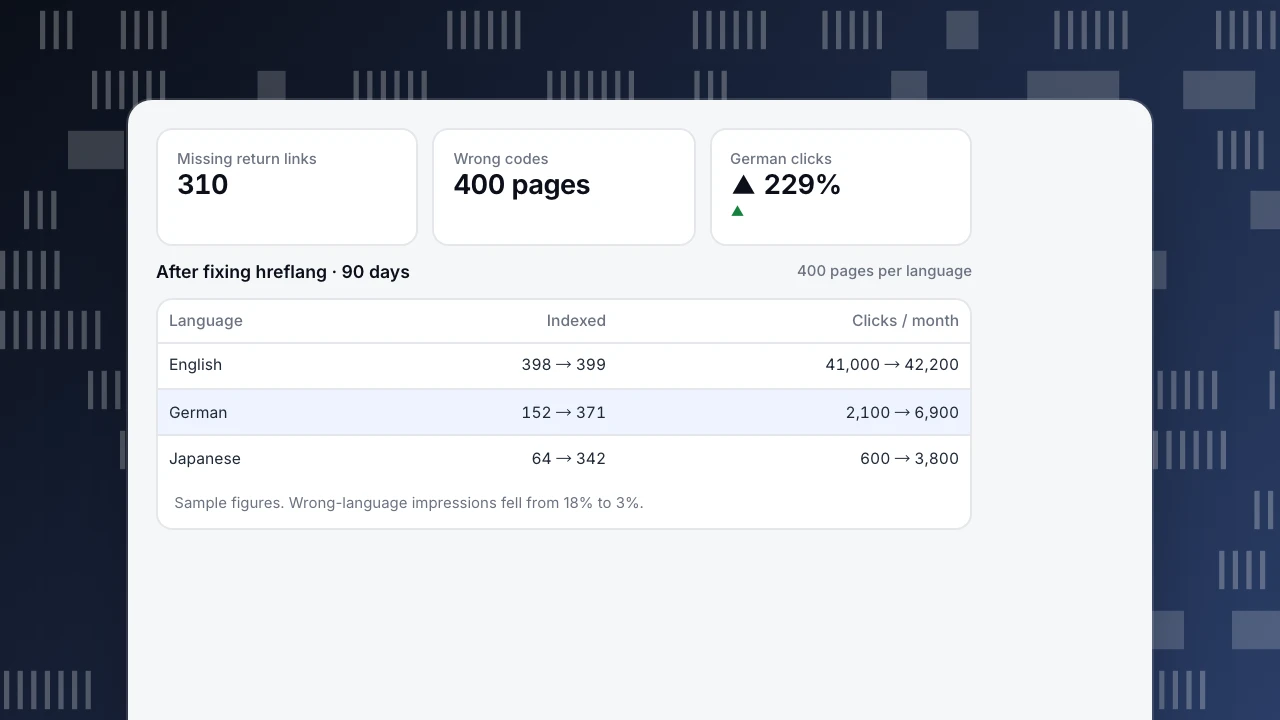
A SaaS company had 400 pages in English and launched German and Japanese in subdirectories, 1,200 URLs in total. Six months later German and Japanese traffic was far below plan. An audit found (sample figures):
- 310 pages without return links. The new German and Japanese templates linked to English, but the English template had not been updated to link back, so those pairs were ignored.
- A wrong language code on 400 pages. Japanese pages used
hreflang="jp", which is a country code, not a language code. - An IP redirect. Visitors from US IPs, including Googlebot, were redirected from
/de/and/ja/to English pages. - No
x-defaultand canonicals on 60 German pages pointing to the English original.
Ninety days after fixing all four:
| Language | Indexed pages, before | After | Organic clicks per month, before | After |
|---|---|---|---|---|
| English | 398 / 400 | 399 / 400 | 41,000 | 42,200 |
| German | 152 / 400 | 371 / 400 | 2,100 | 6,900 |
| Japanese | 64 / 400 | 342 / 400 | 600 | 3,800 |
The share of impressions where German searchers were shown an English page fell from 18% to 3%. English barely changed; the gain came from versions that search engines had not been able to find or match before.
Missing return links
310
Wrong codes
400 pages
German clicks
▲ 229%
▲
After fixing hreflang · 90 days
400 pages per language| Language | Indexed | Clicks / month |
|---|---|---|
| English | 398 → 399 | 41,000 → 42,200 |
| German | 152 → 371 | 2,100 → 6,900 |
| Japanese | 64 → 342 | 600 → 3,800 |
Sample figures. Wrong-language impressions fell from 18% to 3%.
Multilingual SEO checklist
- One URL per language, in subdirectories unless you have a reason not to.
- Reciprocal, self-referencing hreflang on every page, with
x-default. - Valid ISO codes; canonicals pointing to the same-language URL.
- Hreflang included in the sitemap for large sites.
- Keyword research per language before translating.
- Localized prices, examples, legal and support pages.
- Language switcher with links, no forced redirects.
- Report traffic and conversions per language, not only in total.
Measuring multilingual SEO in TapCub
In Web analytics › Pages, filter by a path prefix such as /de/ to see visitors, entries and conversions for one language version. Web analytics › Audience breaks visitors down by country and browser language, which shows whether people are landing on the version meant for them. With Google Search Console connected, Monitoring › Search performance splits clicks, impressions and position by page, query and country. For crawl problems such as pages that never get fetched, see Check crawl health. TapCub's own site runs in English and Chinese on this setup.
Sources
- Google Search Central, Managing multi-regional and multilingual sites.
- Google Search Central, Tell Google about localized versions of your page.
Was this article helpful?
We use your answers to fix and expand this page.
Couldn’t send. Please try again in a minute.
Thanks for the feedback. We’ll use it to improve this page.You’ve already sent feedback on this page. Thanks.

Customer Experience Consultant
Writes about live chat, visitor conversations, and self-service, sharing practical ways to make customer communication clearer and more effective.