Try it on your own data
Every report in this article is in the free plan. One snippet for web and apps, up to 10 sites.
Start freeA knowledge base chatbot answers visitor questions from your own docs and stored Q&A, and hands the chat to a person when the material has no answer. Build it by fixing the content first, testing with real questions and measuring resolved chats, not answered ones: in the sample below, 62.0% answered is only 55.4% resolved.
What you will learn
- Fix the source first: one page per fact, self-contained answers, conditions and dates; a wrong answer is fixed by editing content, not retraining
- Count a chat as deflected only if the bot answered, no person was requested and the visitor did not return within a week
- Read handoff reasons as a to-do list: filling 100 'no match' gaps lifted sample deflection from 55.4% to 63.4%
What is a knowledge base chatbot, and what is it not?
A knowledge base chatbot answers visitor questions from material you wrote: help articles, policy pages, product specs and the Q&A pairs your agents already type. It is not a bot that "knows" your business. If the answer is not in the material, a well-built bot hands the chat to a person instead of improvising.
That one rule changes how you build it. With a scripted bot you design conversation paths. With a knowledge base bot you maintain content, and the bot's quality is the quality of that content plus a handoff rule for the gaps. A knowledge base that is out of date, vague or split across five pages produces a bot that is out of date, vague and inconsistent, only faster.
Two boundaries are worth stating before you start:
- It answers; it does not act. A knowledge base bot can quote your refund policy. It cannot issue the refund, change an address or look up an order unless you build separate integrations. Plan the handoff for anything that needs an action.
- It is only as current as the last edit. If shipping times changed on Monday and the document still says "3-5 days", the bot will keep saying it with full confidence.
For how a bot like this fits into a support team alongside humans, see AI support agent. For the training side in more general terms, see how to train a chatbot.
How does a knowledge base chatbot find the answer?
Most knowledge base bots combine two mechanisms, and knowing which one answered a question tells you how to fix a wrong answer.
| Mechanism | What happens | Strength | Failure mode |
|---|---|---|---|
| Stored Q&A match | The visitor's line matches a question (or all of a set of keywords) and the stored answer is sent as written | Exact, predictable, no model call | Misses rephrasings you did not list |
| Retrieval plus generation | The bot searches your documents for the most relevant passages, then a language model drafts a reply from them | Covers questions nobody wrote a Q&A for | Wrong passage retrieved, or the model fills a gap |
The second row is retrieval-augmented generation, usually shortened to RAG. The idea comes from a 2020 paper by Lewis and colleagues: pair a language model's built-in memory with an external index of documents, so the answer is grounded in text that can be inspected and updated instead of being baked into the model (Lewis et al., NeurIPS 2020). The practical consequence is that you fix a wrong answer by editing the document or adding a Q&A, not by "retraining" anything.
Two checks follow from the table:
- If the bot gave a wrong answer from a stored Q&A, the Q&A is wrong. Edit it.
- If the answer came from retrieval, look at which passage was found. The usual causes are that the right passage does not exist, exists but is buried in a long page, or competes with an older page that says something different.
How good do your docs need to be before you switch it on?
Good enough that a stranger could answer a customer's question from one page without asking a colleague. The table lists the most common problems that make a knowledge base bot answer badly, what it looks like in a test, and the edit that fixes it.
| Problem in the source | What the bot does | Fix | Quick check |
|---|---|---|---|
| Two pages disagree (old and new policy) | Gives the old answer on some days and the new on others | Delete or redirect the old page; keep one source per fact | Search your docs for the key phrase; expect one hit |
| One long page covers ten topics | Retrieves the wrong part, or quotes an unrelated paragraph | Split into one question per section with its own heading | Each heading should be answerable on its own |
| Answer needs context ("see above") | Quotes a sentence that makes no sense alone | Rewrite so every answer is self-contained | Read the passage with the heading hidden |
| Question is phrased in your jargon | No match for how visitors really ask | Add the visitor's wording to the question or as keywords | Compare against 20 real chat openers |
| Numbers without dates or conditions | States a price or deadline as if universal | Add the condition and the "as of" date to the answer | Search for digits; each needs a condition |
| Exceptions live in a different place | Gives the rule but not the exception | Put the exception in the same answer | Ask the bot the edge case directly |
| Nothing about what the bot cannot do | Improvises on out-of-scope requests | Add an explicit "contact us for this" answer for each out-of-scope topic | Ask three things you do not support |
Fixing these before launch costs hours. Fixing them after launch costs customer trust, which is why a Canadian tribunal held an airline responsible for a policy its website chatbot stated incorrectly (Moffatt v. Air Canada, 2024 BCCRT 149, February 2024): the tribunal did not accept that the bot was separate from the company. Treat what the bot says as something you published.
| Problem in the source | What the bot does | Fix | Quick check |
|---|---|---|---|
| Two pages disagree | Gives old and new answers on different days | Delete or redirect the old page | Search the key phrase; expect one hit |
| One long page covers ten topics | Quotes an unrelated paragraph | One question per section with its own heading | Each heading answers alone |
| Answer needs context | Quotes a sentence that makes no sense alone | Rewrite so each answer is self-contained | Read the passage with the heading hidden |
| Your jargon, not the visitor's | No match for real wording | Add the visitor's phrasing as keywords | Compare with 20 real chat openers |
| Numbers without dates or conditions | States a price or deadline as universal | Add the condition and an as-of date | Search digits; each needs a condition |
| Exceptions elsewhere | Gives the rule but not the exception | Put the exception in the same answer | Ask the edge case directly |
| Nothing on what the bot cannot do | Improvises on out-of-scope requests | Add a 'contact us' answer per out-of-scope topic | Ask three unsupported things |
Fix these before launch; after launch the bot's wrong answer is your published statement.
How do you build one, step by step?
The order matters. People often start with the tool and finish with the content, then wonder why the answers are poor.
- Collect real questions first. Export the last 30 to 90 days of chat openers, offline messages and support emails. Group them by topic and count. Start with the 30 to 50 most frequent; the long tail will arrive as handoffs, which is fine.
- Write or edit one answer per question. Aim for 40 to 120 words, one fact set per answer, with conditions and dates. Stop at answers that two different people on your team would give the same way.
- Split content into the two kinds of entry. Frequent, stable questions (hours, shipping, returns window, password reset) become stored Q&A. Longer reference material (setup guides, specs) stays as documents the bot retrieves from.
- Write the handoff. Decide what a visitor sees when the bot cannot answer, who gets the chat, and what happens outside office hours (for example an offline message form). A good handoff states what will happen next.
- Test with questions you did not write the answers for. Use a list of 50 real questions, not the ones you wrote entries for. Score each as correct, partly correct or wrong (see the next section).
- Launch in the narrowest mode first. Let the bot answer only when no agent is online, or only on one page group, then widen after a week of reviewing transcripts.
- Review handoffs weekly. Every handoff is a gap list. The most common reason for handoff is your next entry.
How do you measure whether it actually deflects chats?
"Answered" and "resolved" are different numbers, and the gap between them is where most reports of bot success come from. Count a chat as deflected only if the bot answered, the visitor did not ask for a person, and the same visitor did not come back about the same issue within about a week.
Sample data: a store's bot handled 1,000 conversations in a month.
- 380 were answered by a stored Q&A match; 30 of those visitors came back with the same question within seven days, so they were not resolved: 380 − 30 = 350 resolved.
- 240 were answered by retrieval; the weekly review marked 36 as wrong or unhelpful: 240 − 36 = 204 resolved.
- 380 were handed to a person (50% no knowledge match, 25% the model judged the material insufficient, 18.4% the visitor asked for a person, 6.6% the turn limit was reached).
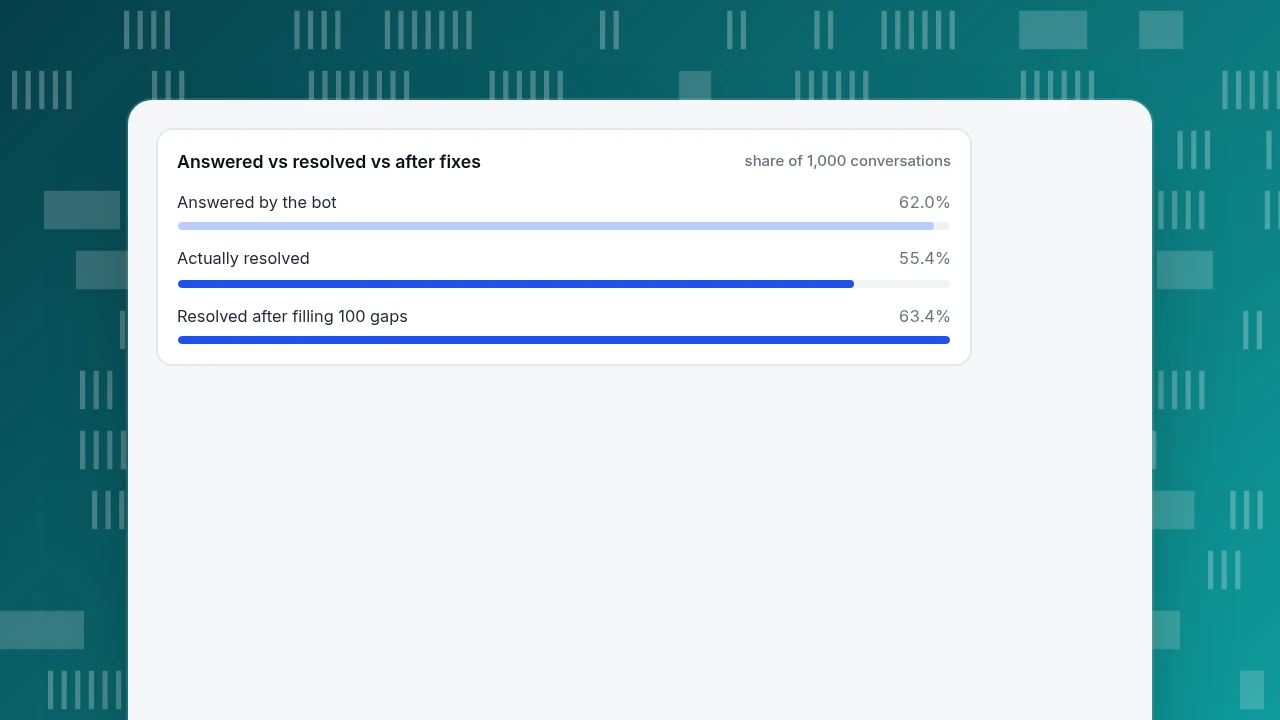
Naive deflection counts every answered chat: (380 + 240) ÷ 1,000 = 62.0%. Honest deflection counts only resolved chats: (350 + 204) ÷ 1,000 = 55.4%. The 6.6-point gap is 66 conversations that look like savings and are not.
At $4.00 of agent time per human-handled conversation (a sample figure: $28 an hour ÷ 7 chats an hour), 554 resolved chats save 554 × $4.00 = $2,216 a month, against $2,480 if you counted every answered chat. For how to turn that into a full return figure with costs, see chatbot ROI.
Now use the handoff reasons. Half the handoffs, 190 conversations, were "no knowledge match": a missing entry, not a model problem. If a set of new Q&A entries covers 100 of them and 80 of those visitors are resolved, resolved chats rise from 554 to 634, deflection from 55.4% to 63.4%, and savings by 80 × $4.00 = $320 a month. That is the loop: read the handoffs, write the entries, re-measure.
Separately, grade the answer quality with a fixed test set. Sample data: of 50 test questions, 38 were correct (76%), 7 partly correct (14%) and 5 wrong (10%). Count "partly correct" as a fail for anything involving money, deadlines or eligibility, because a partly right policy answer is a wrong one.
Answered vs resolved vs after fixes
share of 1,000 conversationsWhat should you review every week?
Reviewing 20 handoffs and 20 bot-answered chats takes about half an hour and catches most problems. Use these rules:
- If the reason is "no knowledge match" and the question repeats three or more times, write a Q&A entry.
- If the bot answered but the visitor then asked for a person, read the answer. It was probably true but unhelpful (too long, missing the condition).
- If the same wrong answer appears twice, correct the source entry immediately; do not wait for the weekly slot.
- If an answer cites a number, check it against the current policy page. Dated numbers drift first.
- If a question belongs to an action (refund, change, cancel), do not try to teach the bot; improve the handoff so the visitor reaches an agent with the context already stated.
Agent edits are the best source of material: when an agent rewrites a wrong bot answer, save that rewrite as the stored answer so the next identical question gets the corrected version.
What do you do about wrong answers?
Assume some answers will be wrong and design for it. Three controls keep the damage small:
- Disclose that it is a bot before the first reply, and label bot messages, so the visitor knows to double-check anything involving money.
- Limit the number of bot turns per conversation. A visitor who is still unsatisfied after a few exchanges should reach a person.
- Keep the bot out of decisions. It can state a policy. It should not promise exceptions, refunds or timelines that a person has not approved.
There is also evidence that the AI belongs next to people rather than instead of them. In a study of 5,179 customer support agents, access to an AI assistant raised issues resolved per hour by 14% on average, and by 34% for novice and low-skilled workers, with little change for the most experienced (Brynjolfsson, Li and Raymond, NBER Working Paper 31161). That study was about suggestions to agents, not unattended bots, but the lesson carries over: the material in your knowledge base helps most where a person still checks it.
How would this look in TapCub?
Take the sample month above: 1,000 conversations, 380 handoffs, half of them "no knowledge match". Here is how you would run that loop in TapCub, using only what the product does.
- Add the content. Open Live chat › Knowledge base. Add frequent, stable questions as Q&A entries; an exact question or keyword match is sent as stored and does not use an AI call. Add long reference material as Document entries, which are split into passages of about 600 characters and retrieved by full-text search (a database index, not a vector store) before the model drafts a reply.
- Test before launch. Use Playground on the same page. It runs the same path as a real visitor, spends no quota and creates no conversation, so you can run your 50-question test set freely.
- Choose the mode. In Live chat › Chat settings › AI assistant, pick Only when all agents are offline to start, then AI answers first once the answers hold up. Set Max AI turns per conversation (default 6) and write the Handoff message. The visitor is told they are talking to an AI before the first reply; that notice cannot be turned off. TapCub's AI only generates replies; it does not change orders, send email or call other systems.
- Pin the top questions. Pinned Q&A show in the visitor-facing FAQ. Opening an answer does not create a conversation and does not use quota; only Not solved or a request for a person opens one.
- Run the weekly loop. In the inbox, each handoff is labelled with its reason (no knowledge match, the model cannot answer, visitor asked, turn limit, or agent took over). Use Fix & save on a wrong answer to store it as Q&A, and use Generate from conversations on the draft inbox to get Q&A drafts from the last 30 days of resolved chats (one AI call per batch; once per 24 hours per site). Nothing goes live until you approve it.
- Read the numbers. Live chat › Reports shows the knowledge base hit rate (questions answered by a direct match or a retrieved answer) next to resolution rate. TapCub does not measure "repeat contact within seven days" for you, so for honest deflection compare resolved chats with the visitors who return in the visitor trail.
FAQ
What is a knowledge base chatbot?
A chatbot that answers from your own documents and stored Q&A instead of a fixed script. If the material does not contain the answer, it should hand the chat to a person. Its quality depends mostly on how current and specific your content is.
How do you train a chatbot on your documents?
You do not retrain a model. You add documents and Q&A to an index the bot searches, then test with real questions. Wrong answers are fixed by editing or adding content, which takes effect on the next question.
How many entries do you need to start?
Start with the 30 to 50 questions that make up most of your chat openers, written as self-contained answers. The long tail will show up as handoffs; add entries for any question that repeats three times.
What is a good deflection rate?
There is no universal figure, because it depends on how repetitive your questions are. Track your own: resolved chats divided by all chats, excluding repeats. Aim to raise it month on month by filling the top handoff reason.
Can a knowledge base chatbot give wrong answers?
Yes. It can retrieve the wrong passage or fill a gap from the model's general knowledge. Disclose that it is a bot, cap bot turns, keep it out of decisions and review handoffs weekly.
Sources
- Lewis et al., Retrieval-Augmented Generation for Knowledge-Intensive NLP Tasks, arXiv:2005.11401, first submitted 22 May 2020 (checked 2026-11-20).
- Brynjolfsson, Li and Raymond, Generative AI at Work, NBER Working Paper 31161, issued April 2023 and revised November 2023 (checked 2026-11-20).
- Civil Resolution Tribunal of British Columbia, Moffatt v. Air Canada, 2024 BCCRT 149, February 2024 (case citation confirmed through law-firm summaries on 2026-11-20).
Was this article helpful?
We use your answers to fix and expand this page.
Couldn’t send. Please try again in a minute.
Thanks for the feedback. We’ll use it to improve this page.You’ve already sent feedback on this page. Thanks.

Product Analyst
Focuses on event analysis, conversion funnels, and retention, using clear metric definitions and structured analysis to explain product performance.