Try it on your own data
Every report in this article is in the free plan. One snippet for web and apps, up to 10 sites.
Start freeTo find backlinks to your website for free, open the Links report in Google Search Console and Backlinks in Bing Webmaster Tools, then add referrers and server logs. Each source is a limited sample, so merge them. Below: the steps, a worked merge and what to do with the result.
What you will learn
- Google lists up to 1,000 rows per table and Bing up to 1,500 domains; neither is complete, so use at least two sources
- Referrers and logs find only links people click, and browsers send just the domain of the linking page by default
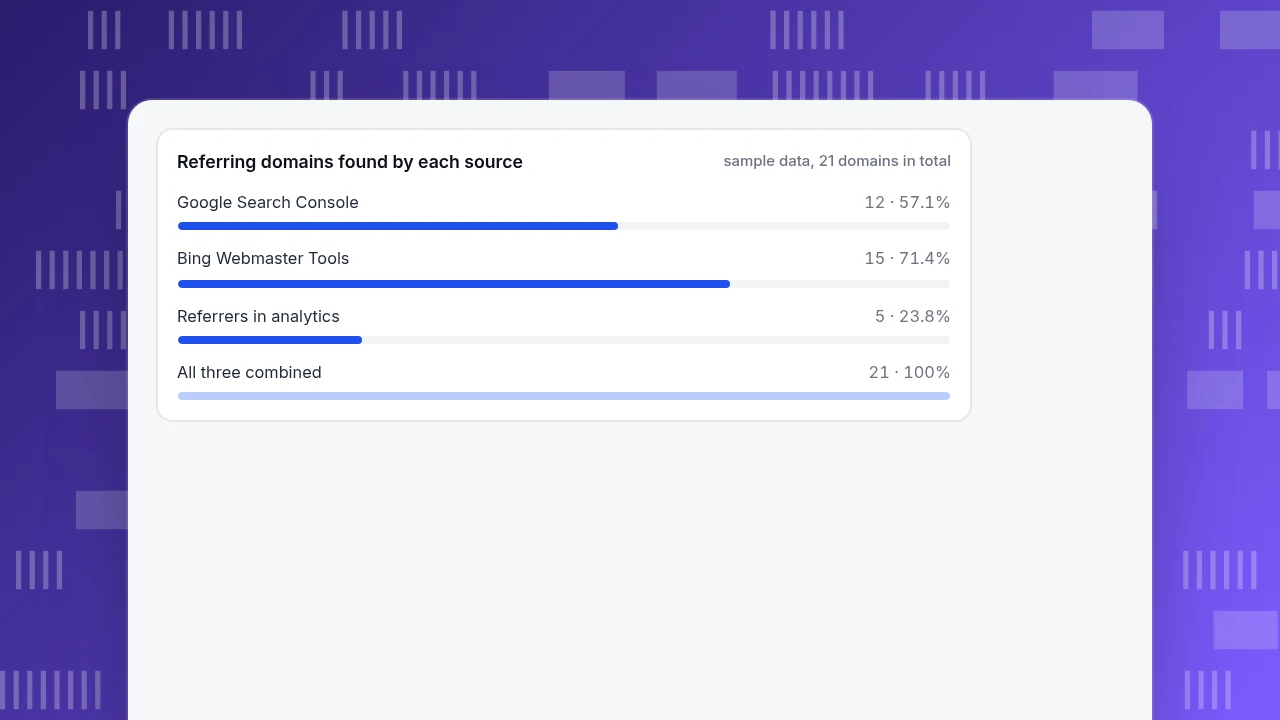
- In the example, Search Console alone would miss 9 of 21 referring domains and Bing alone 6; merging recovers them
Five free ways to find backlinks, and what each one misses
A backlink is a link from another website to yours. No free source lists all of them, so the practical method is to combine several and know each one's blind spot. Numbers below are from each tool's own help page.
| Method | What it shows | Documented limits | Blind spot |
|---|---|---|---|
| Google Search Console, Links report | Top linking sites, top linked pages and top linking text, for your verified site | Tables are limited to 1,000 rows; exports up to 100,000 rows per slice; it is a sample, not every link | Does not show whether a link is nofollow; only your own verified sites |
| Bing Webmaster Tools, Backlinks report | Referring domains, pages and anchor texts; can compare you with up to two other sites | Up to 1,500 domains, 10,000 backlinks per domain, 100,000 page URLs and 1,500 anchor texts; a representative set, not complete | Only a representative set; you must verify the site |
| Referrers in your analytics | The sites that actually sent a visitor to you | Only links that someone clicked | Links nobody clicked, and the exact page on the linking site |
| Server access logs | Every request with its Referer header, including bots | You must parse the log yourself | Same as referrers, but includes crawler traffic |
| Common Crawl web graph | An open host-level and domain-level link graph built from the crawl | Large files that need data tooling; periodic releases | Not your site's report; needs filtering for your domain |
Use at least two sources. A link that appears in Google's report and Bing's is almost certainly real; a link that appears only in your referrers is one people use.
| Source | Documented limit | Domains in the example |
|---|---|---|
| Google Search Console | 1,000 rows per table; sample | 12 |
| Bing Webmaster Tools | 1,500 domains; 10,000 backlinks each; representative set | 15 |
| Referrers in analytics | Clicked links only | 5 |
| Combined | — | 21 |
Sample data: domain lists are illustrative. 7 domains appear in both Google and Bing, and 12 of the 21 were found by only one source.
How to find backlinks in Google Search Console
You need a verified property first. Then:
- Open Links in the left menu.
- Under External links, read Top linking sites. This is the list of domains that link to you.
- Click a domain to see which of your pages it links to, and click again to see the actual linking pages.
- Open Top linked pages to see which of your own pages attract links, and Top linking text to see the anchors.
- Use Export to save a table; the Links report exports up to 100,000 rows in each of two slices, "Latest links" and "More sample links".
Two cautions from Google's own page. The report is "not a comprehensive list of every link", and each table is limited to 1,000 rows, so a site with many links will be truncated. It also does not show whether a link carries nofollow, so you cannot read it as a list of links that pass value.
How to find backlinks in Bing Webmaster Tools
Bing's report is free and goes further in two ways: it shows more rows, and it lets you look at other sites' links.
- Add and verify your site, then open Backlinks.
- Use Domains for unique linking domains and the number of backlinks from each (up to 1,500 domains; open a domain to see up to 10,000 backlinks), Pages for each linking URL and the page of yours it points to (up to 100,000 URLs) and Anchor texts for how people describe you (up to 1,500).
- Export with Download all.
- Use Backlinks to any site to compare your profile with up to two other sites. The result lists the top 10 referring domains and top 10 anchor texts of each, and the filter Show domains not linking to my site lists domains that link to the others but not to you. That list is the free answer to "how to find websites with backlinks" that your competitors have.
Bing says its report is "a representative set of links", not a complete profile.
How to find backlinks from referrers and server logs
Referrers find the links that send traffic, which are the ones worth most to you. There is one limit to know. Browsers' default Referrer-Policy is strict-origin-when-cross-origin: for a link from another site, the browser sends only the origin of the linking page, not its path or query string. So your analytics usually tells you the domain that linked to you, not the page; to find the page, open the linking site or look in Search Console.
To get the referrers from raw access logs, parse the Referer field. Sample data: 14 lines in the standard combined log format, from a site on www.example.com.
203.0.113.5 - - [12/Nov/2026:08:01:02 +0000] "GET /guide HTTP/1.1" 200 5120 "https://blog.partner.example/" "Mozilla/5.0"
203.0.113.7 - - [12/Nov/2026:09:15:44 +0000] "GET /pricing HTTP/1.1" 200 4096 "https://www.google.com/" "Mozilla/5.0"
198.51.100.8 - - [12/Nov/2026:12:30:00 +0000] "GET /guide HTTP/1.1" 200 5120 "https://spam-links.example/" "SomeCrawler/1.0"
... 11 more lines
A short script keeps the referrer host and drops what is not a backlink signal:
import re, collections
from urllib.parse import urlparse
OWN = {"www.example.com", "example.com"}
SEARCH = {"www.google.com", "www.bing.com"}
pat = re.compile(r'"[A-Z]+ (\S+) [^"]+" \d+ \d+ "([^"]*)" "([^"]*)"')
hosts = collections.Counter()
for line in open("access.log"):
    m = pat.search(line)
    if not m: continue
    path, ref, ua = m.groups()
    if re.search(r"bot|crawler|spider", ua, re.I): continue   # crawlers are not visitors
    if ref == "-": continue                                    # direct visit
    h = urlparse(ref).hostname
    if h in OWN or h in SEARCH: continue                       # internal or search
    hosts[h] += 1
print(hosts.most_common())
On the 14 sample lines the script drops 2 crawler requests, 1 direct visit, 1 internal click and 2 search visits, and keeps 8: blog.partner.example 4, forum.community.example 2, newsletter.example 1 and t.co 1. Note that the "spam-links" line is a crawler, so it is not a referral. A referrer in a log is easy to fake, so a host that appears only in logs and in no tool deserves a look before you trust it.
How to merge the lists
Each source finds some links and misses others. Sample data: a site's referring domains from three sources.
| Source | Domains found | Share of all 21 |
|---|---|---|
| Google Search Console | 12 | 57.1% |
| Bing Webmaster Tools | 15 | 71.4% |
| Referrers in analytics | 5 | 23.8% |
| All three combined | 21 | 100% |
Seven domains appear in both Google and Bing; 12 of the 21 (57.1%) were found by only one source. If you had used Search Console alone you would have missed 9 of the 21 domains (42.9%); with Bing alone, 6 (28.6%). Two of the referrer domains, a newsletter and a resources page, are also in Bing's list, while t.co, a link shortener, appears nowhere else.
Merging takes a few lines: export each list to a text file of domains and use sets.
gsc = set(open("gsc.txt").read().split())
bing = set(open("bing.txt").read().split())
ref = set(open("referrers.txt").read().split())
union = gsc | bing | ref
print(len(union), "domains;", len(gsc & bing), "in both Google and Bing")
Keep the merged file by date. Next month's merge shows new and lost links by comparing the two.
Referring domains found by each source
sample data, 21 domains in totalA free link graph for larger jobs
Common Crawl publishes host-level and domain-level web graphs, built from its crawl data, that include every link type, even links to scripts and fonts. The domain graph aggregates the host graph at the pay-level domain, using the Public Suffix List. The latest release listed is cc-main-2026-aug-sep-oct. The files are large and need data tooling, so this method suits analysts, not a quick check; filter the edge list for your domain to find the domains that link to it.
What to do with the list
A list of links is only useful if it changes what you do. Sort it with four rules:
| What you see | What it means | Action |
|---|---|---|
| A new domain that sends visitors | A link that works | Thank them; look for a relationship |
| A link to a page that returns 404 on your site | Value pointing at nothing | Redirect it to the nearest live page |
| A domain in last month's list but not this month's | A link was lost | Check whether the page was removed or the link edited |
| A cluster of links from unrelated spam domains | Probably ignorable | Do not chase them; Google says it typically ignores links from known spam sites |
For how to earn links, see how to get backlinks, and for the definition of a backlink, the backlink glossary page.
How to see which links send visitors in TapCub
TapCub does not crawl the web and does not list backlinks, including links nobody clicked. It shows the links that send people, which is the Referrers method above.
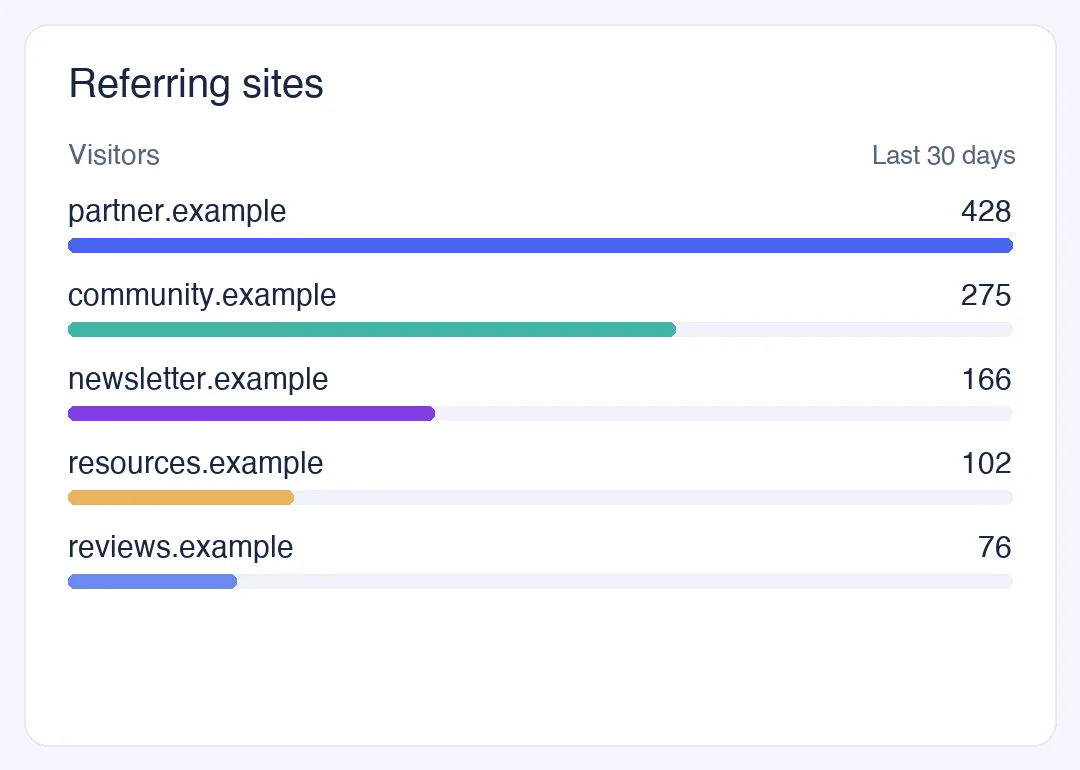
- Read the referrers. Open Web analytics › Sources and choose the Referrers tab. Each row has visitors, sessions, pageviews, bounce and duration. By default a session is credited to the source it arrived from; switch to Every arrival to count arrivals from an external site in the middle of a session too. A link from your own site is counted as internal, not as a referral.
- Filter to one referrer. Click a row to add it as a filter, and the other reports narrow with it, so you can see which pages that link sends people to and whether they convert.
- Spot the SEO tool crawlers. The crawlers that build backlink indexes show up in Web analytics › Bots, separate from visitors; see AhrefsBot and SemrushBot for what they do.
- Keep search data separate. Monitoring › Search performance, once Search Console is connected, shows clicks, impressions and positions by page and query; it is not a backlink report, but it shows whether the pages that gained links gained search traffic.
- Write the merged list down with the date and recheck monthly.
TapCub gives you the clicked half of the picture. Use Search Console and Bing for the rest. Sources and UTM explains how referrers and channels are grouped.
FAQ
How can I see who is linking to my website for free?
Use Google Search Console's Links report and Bing Webmaster Tools' Backlinks report. Both are free for sites you verify, list referring domains and pages, and export to files. Neither is complete, so combine them with the referrers in your analytics and compare the lists.
Why does Search Console show fewer backlinks than other tools?
Google's report is a sample, limited to 1,000 rows per table, and it says it is not a comprehensive list of every link. It may also omit non-indexed pages and duplicates. Paid tools run their own crawlers and report different counts, so no two tools agree exactly.
How do I find websites that link to my competitors but not me?
Bing Webmaster Tools' Backlinks to any site lets you compare your profile with up to two other sites and filter to domains that do not link to you. It lists the top 10 referring domains for each site, which is a list of places worth a pitch.
How do I find backlinks to a specific page?
In Search Console's Links report, open Top linked pages, click the page and then the linking sites. In Bing, the Pages view lists each linking URL with the page on your site it points to. You can also filter your analytics referrers by landing page.
Do backlinks with nofollow still show up?
They can. Search Console's Links report does not indicate whether a link is nofollow, so you cannot filter them from it. A nofollow link can still send visitors, so it appears in referrers regardless.
Sources
- Google, Links report, Search Console Help: sections, the 1,000-row table limit, the 100,000-row exports and the note that it is not comprehensive. Checked 2026-11-20.
- Microsoft, Backlinks, Bing Webmaster Tools Help: domains, pages and anchor texts limits, the representative-set note and Backlinks to any site. Checked 2026-11-20.
- MDN, Referrer-Policy: the default
strict-origin-when-cross-originand what it sends. Checked 2026-11-20. - Common Crawl, Web graphs: host-level and domain-level graphs and the latest release. Checked 2026-11-20.
Was this article helpful?
We use your answers to fix and expand this page.
Couldn’t send. Please try again in a minute.
Thanks for the feedback. We’ll use it to improve this page.You’ve already sent feedback on this page. Thanks.

Product Adoption Consultant
Explores customer onboarding, live conversations, and self-service, turning common usage questions into practical guidance and improvements.