Try it on your own data
Every report in this article is in the free plan. One snippet for web and apps, up to 10 sites.
Start freeTo get SERP features, first sort them by control. Featured snippets cannot be marked up and are chosen by Google; about 25 types such as Product, Review snippet, Video and Breadcrumb can be earned with structured data; FAQ rich results ended on May 7, 2026 and How-To in 2023. Below: a table of features, the page format for each and how to measure it, plus a worked example of a CTR rise from 2.1% to 3.0% (108 extra clicks).
What you will learn
- Sort features by what Google documents: featured snippets have no markup, about 25 types can be marked up, and FAQ and How-To rich results are gone
- Measure a feature on the same queries before and after, holding position within 0.5; 12,000 impressions at 2.1% then 3.0% is 108 extra clicks
- Rank projects by extra clicks per hour of effort, and replace the assumed gains with your own test results
Which SERP features can you actually influence?
A SERP feature is anything on a Google results page other than a plain blue link. Before spending effort, sort the features by how much control you have, because Google's own documentation draws a hard line between the two groups.
- Features you earn with page content, with no markup. The featured snippet is the main one. Google's documentation says its systems decide whether a page would make a useful featured snippet for a given search, and that you cannot mark a page up to become one. The same page notes that featured snippets can also appear inside a "People Also Ask" group of related questions.
- Features you earn by adding structured data. Google's search gallery lists 25 feature types you can mark up, among them Article, Breadcrumb, Product, Review snippet, Recipe, Event, Job posting, Software app, Video, Q&A and Discussion forum. Markup makes a page eligible; it does not guarantee display.
- Features that exist but are not yours to pursue. Some features are retired or restricted. Google announced on August 8, 2023 that FAQ rich results would show only for well-known government and health sites, and on September 14, 2023 that How-To rich results would no longer appear on desktop either, which made them deprecated. Google's FAQ documentation now states that FAQ rich results stopped appearing in Google Search on May 7, 2026. If a guide still tells you to add FAQ schema to win a rich result, it is out of date.
That is a shorter list than the "37 SERP features" posts suggest, and it is the honest one. Everything else on a results page, including ads, local packs and knowledge panels, is driven by query type and business data, not by how you format a blog post.
The table: feature, the page format that earns it, and how to measure it
Use this as a working checklist. "Format that earns it" is what you build; "evidence" is where the claim comes from.
| Feature | Page format that earns it | How to measure | Evidence |
|---|---|---|---|
| Featured snippet | A heading phrased as the question, followed by a direct 40-60 word answer, then a list or table where the query asks for steps or comparison | Impressions and clicks for the query in the performance report | Google: no markup, chosen by its systems; format advice is practitioner experience |
| People Also Ask | Short, self-contained answers to related questions under their own headings | Queries starting with who, what, how, why in the performance report | Google: featured snippets can appear in related questions groups |
| Product rich result | Product structured data with price, availability and review rating that match the visible page | Search appearance filter for product results | Google search gallery: Product |
| Review snippet | Review or AggregateRating markup for items you genuinely review | Search appearance filter for review snippets | Google search gallery: Review snippet |
| Breadcrumb | BreadcrumbList markup that matches the on-page trail | Rich results report for breadcrumbs | Google search gallery: Breadcrumb |
| Video result | A page where a video is the main content, with video markup and a crawlable file or embed | Search appearance filter for video | Google search gallery: Video |
| Article, Event, Recipe, Job posting | The matching structured data type, only where the page really is one | Rich results report per type | Google search gallery |
| FAQ and How-To rich results | Not obtainable: FAQ ended May 7, 2026, How-To deprecated in 2023 | None | Google blog post of August 8, 2023 and FAQ documentation |
Two rules sit under the table. First, structured data must describe what the visitor can see on the page; markup for content that is not there is a policy risk and a wasted effort. Second, a feature can reduce clicks as well as raise them: an answer shown in a featured snippet may satisfy the searcher without a visit. That is a trade-off to measure, not a certain win.
| Project | Impressions | Expected CTR gain | Extra clicks a month | Effort (hours) | Clicks per hour |
|---|---|---|---|---|---|
| Rewrite 5 headings as questions with direct answers | 9,000 | 1.0 point | 90 | 3 | 30 |
| Product markup on 40 pages | 12,000 | 0.9 point | 108 | 6 | 18 |
| Video markup on 3 pages | 5,000 | 0.8 point | 40 | 5 | 8 |
Sample data: the expected gains are assumptions to replace with your own test results.
How to find the features worth pursuing
Do not start from a list of features; start from your own queries and pages.
- Export queries. From the Google Search Console performance report, export queries for the last 3 months with impressions, clicks, CTR and average position.
- Filter for position 2 to 10 with real impressions. A page already ranking is the cheapest place to win a feature. Keep rows with at least 100 impressions.
- Check what the results page shows for each query. Search the query in a private window and note which features appear. If a featured snippet or a People Also Ask box appears and a competitor holds it, that is an opening. If none appears for the query, no amount of formatting will create one.
- Match the feature to your page type. A product page chases product markup; a how-to article chases a snippet answer and a video; a store-locator page chases local data. Do not force a mismatch.
Step 3 is manual and slow, so cap it: look at the 20 queries with the most impressions, not all 2,000.
How to write for featured snippets and People Also Ask
Google gives no markup for featured snippets, and its documentation does not prescribe a format, so the following is a drafting rule of thumb, not a Google requirement. Test it on your own pages.
- Put the question as a heading, using the searcher's words. Directly below it, answer in one paragraph of about 40 to 60 words that makes sense with no surrounding context.
- If the query asks for steps, follow the paragraph with a numbered list; if it compares things, follow it with a table. Keep list items short.
- Answer one question per heading. A related question belongs under its own heading, not buried in the middle of a long paragraph, which is also how you give People Also Ask something to find.
- Do not hide the answer behind a "read more" or a long introduction.
If you would rather not appear as a snippet on a page, Google documents the controls: nosnippet blocks all snippets, data-nosnippet excludes marked text, and a low max-snippet value lowers the chance of a featured snippet but does not guarantee it.
A worked measurement: did the feature pay?
Measure a feature as a before-and-after comparison on the same queries, controlling for position, because a rich result that arrives with a ranking jump proves nothing.
Sample data: 40 product pages get Product structured data. Compare 28 days before and 28 days after for the same product queries, only where average position stayed within 0.5 of its earlier value.
| Period | Impressions | CTR | Clicks |
|---|---|---|---|
| 28 days before | 12,000 | 2.1% | 252 |
| 28 days after | 12,000 | 3.0% | 360 |
The change is 360 − 252 = 108 extra clicks, and 3.0 ÷ 2.1 − 1 = a 42.9% relative increase in click-through at the same position. Google defines CTR as clicks divided by impressions, so the arithmetic is exact: 12,000 × 0.021 = 252 and 12,000 × 0.030 = 360.
Be careful about what this proves. Two periods are not an experiment: seasonality, demand and other changes move clicks too. A stronger version compares the pages that got the markup with similar pages that did not in the same weeks. Report the result as an estimate with that caveat.
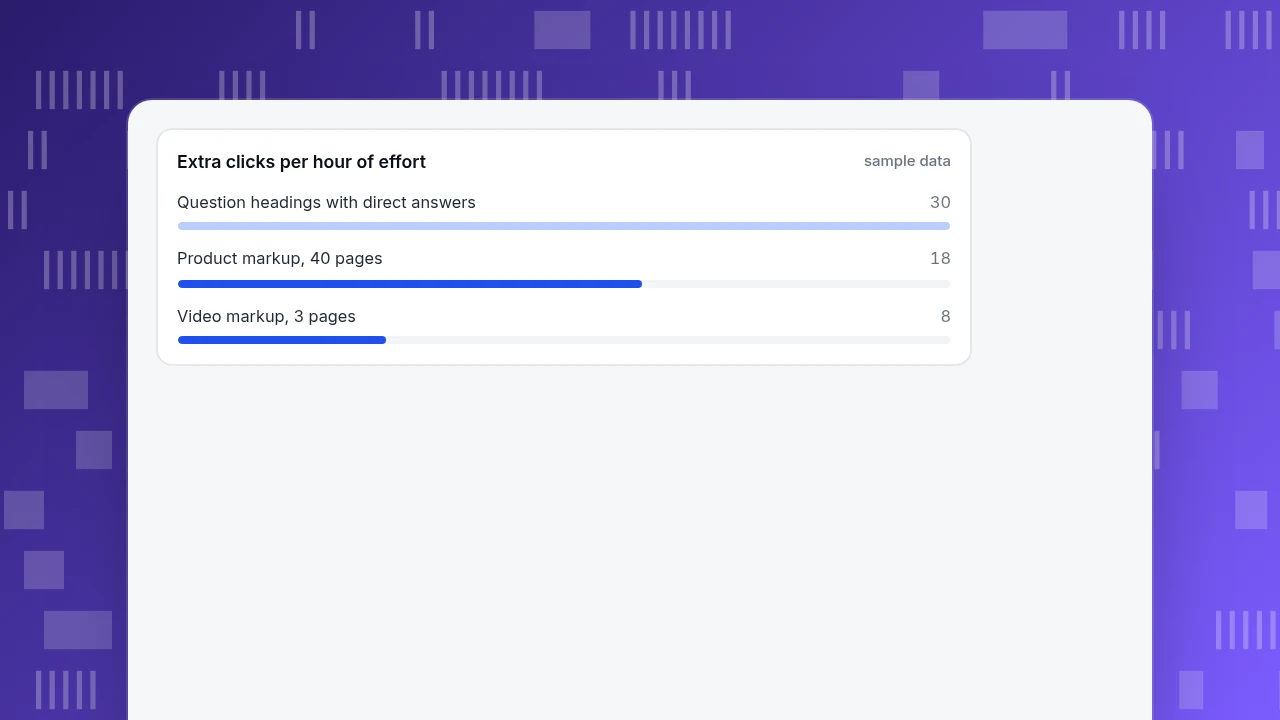
Then rank opportunities by clicks per hour of effort, so the work follows the return.
Sample data: three candidate projects.
| Project | Impressions | Expected CTR gain | Extra clicks a month | Effort (hours) | Clicks per hour |
|---|---|---|---|---|---|
| Rewrite 5 headings as questions with direct answers | 9,000 | 1.0 point | 90 | 3 | 30 |
| Product markup on 40 pages | 12,000 | 0.9 point | 108 | 6 | 18 |
| Video markup on 3 pages | 5,000 | 0.8 point | 40 | 5 | 8 |
The expected gains are assumptions you replace with your own estimates from past tests. The ranking shows the method: the snippet rewrite is cheap but uncertain because Google chooses; the product markup is steady because it is documented and verifiable; video is last because of effort. Revisit the estimates after each test.
Extra clicks per hour of effort
sample dataCommon mistakes
- Adding FAQ markup for a rich result. As above, it no longer appears. Write the questions for readers and People Also Ask, and skip the schema if its only purpose is a Google rich result.
- Marking up content that is not visible. Structured data must match the page.
- Chasing a feature for a query that never triggers it. Check the results page first.
- Judging by position alone. A feature changes click-through at the same position; track CTR.
- Treating one month as proof. Compare matched pages and repeat before you scale.
How to track SERP feature results in TapCub
TapCub does not show which SERP feature a result appeared with. What it does show is the effect: clicks, CTR, position and what visitors do afterwards. Here is the product-markup test from above.
- Connect Search Console. In Monitoring › Search performance, connect Google Search Console or Bing Webmaster. TapCub then shows clicks, impressions, CTR and average position by page, query and country. Data usually arrives 1 to 3 days late, and the page says through which day it is updated.
- Find pages ranking in the top 10 with low CTR. The scatter plot shows one dot per page. Pages in the top 10 whose CTR is below the median are marked as the best candidates for a better title and description first, which is cheaper than adding markup.
- Mark the change date. Add the markup release in Configuration › Annotations, so the before and after windows are clear in every chart.
- Check what the clicks do after the click. In Web analytics › Sources, look at the search engine channel; in Web analytics › Goals, check whether the extra visitors convert. More clicks that do not convert are not a win.
TapCub does not track rankings daily for chosen keywords or tell you who holds a snippet; use Search Console's own filters and a manual check for that. Baidu offers no click or impression interface, so this report is for Google and Bing.
FAQ
How do I get a featured snippet?
You cannot mark a page up to get one; Google's systems decide whether a page makes a useful snippet for a search. Improve your odds by ranking on the first page, putting the question as a heading and answering it directly in the text below.
Does FAQ schema still work in 2026?
FAQ rich results no longer appear in Google Search. Google's FAQ documentation says they stopped on May 7, 2026, after limiting them to government and health sites in August 2023. You may leave existing markup in place, but do not add it for a rich result.
What are the types of SERP features you can mark up?
Google's search gallery lists 25 types, including Article, Breadcrumb, Product, Review snippet, Recipe, Event, Job posting, Software app, Video, Q&A and Discussion forum. Markup makes a page eligible, but display is not guaranteed.
How do I measure whether a SERP feature increased clicks?
Compare clicks and CTR for the same queries before and after, only where average position stayed about the same. In the sample, CTR went from 2.1% to 3.0%, which is 108 extra clicks on 12,000 impressions. Confirm with similar pages that did not change.
Can I opt out of a snippet?
Yes. Use nosnippet to block all snippets, data-nosnippet to exclude marked text, or a low max-snippet value to make a featured snippet less likely, though it is not guaranteed.
Sources
- Google Search Central. Featured snippets and your website: chosen by Google's systems; no markup; appears in related questions; nosnippet, data-nosnippet and max-snippet controls. Checked 2026-11-20.
- Google Search Central. Search gallery: 25 feature types that can be marked up. Checked 2026-11-20.
- Google Search Central Blog. Changes to HowTo and FAQ rich results: August 8, 2023 FAQ restriction; September 14, 2023 How-To desktop removal. Checked 2026-11-20.
- Google Search Central. FAQ structured data: FAQ rich results stopped appearing on May 7, 2026. Checked 2026-11-20.
- Google Search Console Help. Performance report: clicks, impressions, CTR and average position definitions. Checked 2026-11-20.
Was this article helpful?
We use your answers to fix and expand this page.
Couldn’t send. Please try again in a minute.
Thanks for the feedback. We’ll use it to improve this page.You’ve already sent feedback on this page. Thanks.

Product Analyst
Focuses on event analysis, conversion funnels, and retention, using clear metric definitions and structured analysis to explain product performance.