Try it on your own data
Every report in this article is in the free plan. One snippet for web and apps, up to 10 sites.
Start freeA good headline is specific, relevant, honest about the page and understandable on its own, and you judge it by clicks and by what visitors do after the click, not by taste. Below: weak and stronger examples by format, seven formulas, a metric ladder, and a recomputed test where the headline with the higher click-through rate loses once engagement is counted.
What you will learn
- Name a number, a result or the reader's problem; avoid adjectives a visitor cannot check
- Judge on a ladder: click-through, then engaged click-through, then goal rate
- A significant CTR gap can still pick the wrong headline; read the next rung before declaring a winner
What makes a headline work?
A headline works if it earns the click and the page then delivers what it promised. Four checks cover most cases:
- Specific. It names the subject, the number or the outcome, not a vague category.
- Relevant. The reader recognises their own situation in it.
- Honest. The page answers exactly what the headline asks. A mismatch produces clicks that leave at once.
- Understood on its own. Nielsen Norman Group's guidance on microcontent is that headlines, page titles and subject lines are often read out of context, in a feed, a search result or an inbox, so they should make sense alone and begin with the words that carry information.
The order matters. People scan before they read; in Nielsen's classic study of how users read on the web, most test users scanned new pages rather than reading word by word. A headline therefore has seconds, and its first few words do most of the work.
What a headline does not need is cleverness. Puns and teasers can win attention, but if the reader cannot tell what the page is about, the click is a gamble for them and the bounce is a cost for you.
What do good headline examples look like by format?
The pairs below show a weak headline and a stronger one for the same content. They are written for this article, not taken from any site.
| Format | Weak | Stronger | What changed |
|---|---|---|---|
| Blog post | "Thoughts on email marketing" | "Email subject lines: 12 rewrites and what happened to opens" | Names the subject and a concrete payoff |
| Landing page hero | "The future of scheduling" | "Stop losing chair time to no-shows" | States the problem the visitor has |
| Product page | "Premium ergonomic chair" | "Ergonomic chair with adjustable lumbar support, 5-year warranty" | Adds the facts a buyer checks |
| Ad | "Best software for you" | "Invoice reminders that send themselves" | Replaces a claim with a function |
| Email subject | "Newsletter #42" | "3 changes to your dashboard this week" | A number and a reason to open |
| Help article | "Troubleshooting" | "Why your tracking code isn't sending data" | Matches the words a stuck reader searches |
The strongest rewrites do one of three things: name a number, name a result or name the reader's problem. The weakest rely on adjectives such as "best", "premium" or "powerful", which a visitor cannot check.
| Format | Weak | Stronger |
|---|---|---|
| Blog post | Thoughts on email marketing | Email subject lines: 12 rewrites and what happened to opens |
| Landing page hero | The future of scheduling | Stop losing chair time to no-shows |
| Product page | Premium ergonomic chair | Ergonomic chair with adjustable lumbar support, 5-year warranty |
| Ad | Best software for you | Invoice reminders that send themselves |
| Email subject | Newsletter #42 | 3 changes to your dashboard this week |
| Help article | Troubleshooting | Why your tracking code isn't sending data |
The stronger versions name a number, a result or the reader's problem.
Which headline formulas are worth trying?
Formulas save time, but they are only starting points. These seven are common because they give the reader a reason to click that is easy to verify:
- Number + subject: "7 checks before you publish a landing page."
- How to + outcome: "How to cut page load time below 2.5 seconds."
- Question the reader asks: "Why is my bounce rate so high?"
- Mistake to avoid: "5 funnel mistakes that make drop-off look worse than it is."
- Result + timeframe: "From [X]% to [Y]% sign-ups in [N] weeks: what we changed." Only use this if the result is real and the source is on the page.
- Comparison: "Monthly vs annual plans: which saves more at 10 seats."
- Proof first: "Form abandonment fell [X]% after we shortened it."
Test every formula against the honesty check, and against the reader's patience: a formula that fills the first screen with a promise the second screen does not keep trains visitors to ignore you. "How to double your traffic overnight" fails because the page cannot deliver it. A formula is only as good as the page behind it.
How do you rewrite a weak headline in four steps?
Take a weak headline, "Our new reporting feature", and improve it one step at a time:
- Name the reader's problem. Who needs reports and why? "Reports your boss will actually read."
- Add a number or a result. "Weekly reports in 3 clicks, not 3 hours." Use only a figure you have measured.
- Cut filler. Delete words that carry no information: "Weekly reports in 3 clicks."
- Check the promise against the page. If the page needs five clicks, the headline is false; change one of them.
Write three versions this way before you test, so the test compares real alternatives rather than one idea and a straw man.
How do you judge a headline? Use a metric ladder
"I like it" is the weakest evidence. Judge a headline on a ladder, from the cheapest signal to the one that matters most:
| Rung | Metric | What it tells you | Weakness |
|---|---|---|---|
| 1 | Click-through rate (CTR) | Did the headline earn the click? | Clickbait inflates it |
| 2 | Engaged click-through | Did the click lead to a real visit? | Needs engagement data per click |
| 3 | Goal rate | Did visitors do what you wanted? | Needs more traffic |
Engaged click-through is CTR multiplied by the share of clicks that became engaged visits. It catches headlines that over-promise. For the basic formula and its variants see how to calculate CTR, and for what counts as a normal CTR for search results see organic CTR.
How do you test two headlines? A worked example
Sample data: a page is shown with Headline A to 5,000 visitors and Headline B to 5,000 other visitors, split at random.
| Headline A | Headline B | |
|---|---|---|
| Visitors | 5,000 | 5,000 |
| Clicks to the next page | 200 | 245 |
| CTR | 200 ÷ 5,000 = 4.0% | 245 ÷ 5,000 = 4.9% |
| Share of clicks that engaged | 62% | 48% |
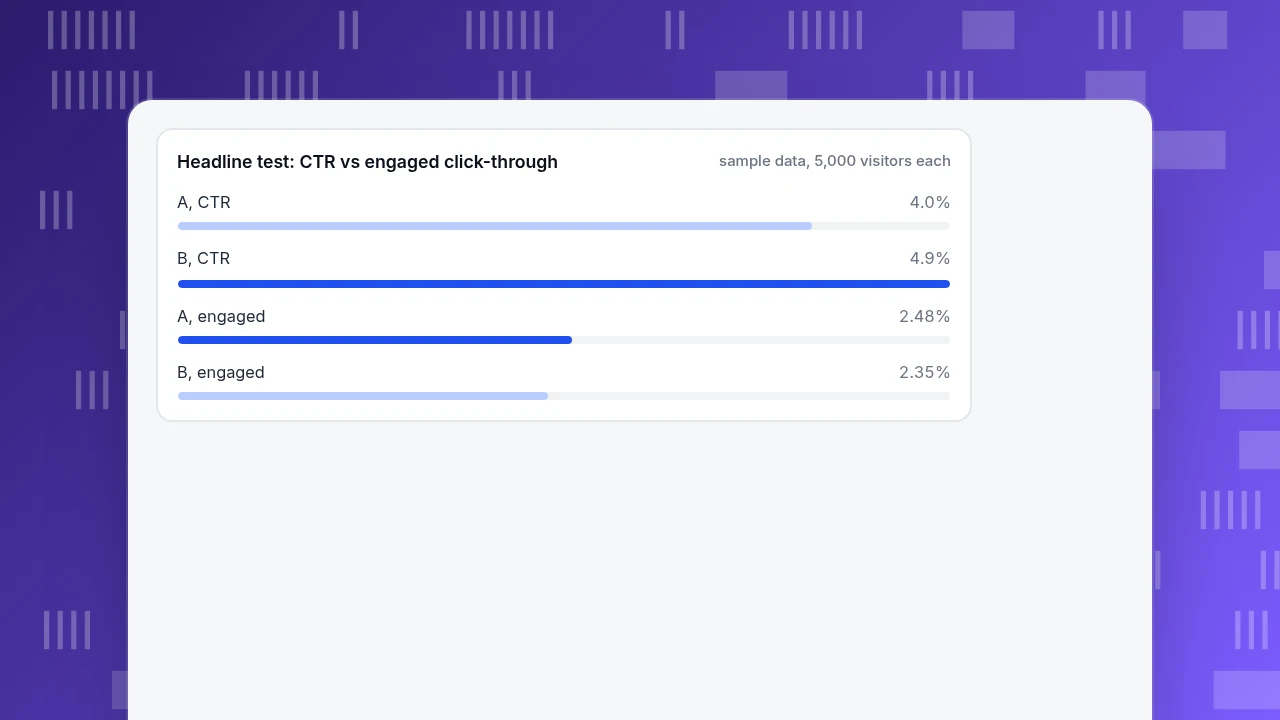
| Engaged click-through | 4.0% × 62% = 2.48% | 4.9% × 48% = 2.35% |
On raw CTR, B wins by 0.9 points (a 22.5% relative lift: 4.9 ÷ 4.0 − 1). A two-proportion z-test gives z ≈ 2.18, p ≈ 0.029, so the gap is unlikely to be chance. But on engaged click-through, A is ahead: 2.48% against 2.35%. Headline B promised more than the page delivered, so more people clicked and then left.
Two lessons. First, a statistically significant CTR gap can still be the wrong winner; always read the next rung. Second, the test needs enough visitors: at about 4% CTR, a gap of under a point needs thousands of visitors per version, which is why small sites often cannot detect anything. See statistical significance for how to size a test.
Headline test: CTR vs engaged click-through
sample data, 5,000 visitors eachHow do search results change headline writing?
For pages that rank in search, the headline in the results is the title link, and Google says it generates title links from several sources, not only the title element. It recommends titles that are descriptive and concise, avoid vague text and avoid stuffing keywords. Practical consequences:
- Keep the page's title element and its H1 saying the same thing; mismatches give the search engine reasons to rewrite.
- Put the information-carrying words first, since results may be cut short on narrow screens.
- Judge a title change on impressions and CTR over several weeks for the same query, because rankings move.
What are the most common headline mistakes?
- Promising more than the page delivers. It raises CTR and lowers everything after it.
- Vague category words. "Tips", "thoughts" and "update" say nothing about the content.
- All adjectives. "Amazing, powerful, simple" cannot be checked.
- Burying the point. The key words come last, where the reader has already stopped reading.
- Judging by taste. Teams pick the headline the loudest person likes.
- Declaring a winner too early. A few hundred visitors per version often cannot separate 4.0% from 4.9%.
- Changing several things at once. Headline, image and button together make the result impossible to attribute.
How to compare headlines in TapCub
Imagine the sample page above. The headline test needs random traffic splitting, and TapCub does not do that; it measures the pages and visits you send to it. So the test runs in your own testing or publishing setup, and TapCub tells you what happened afterwards. These steps work either way:
- Put each version at its own address, or tag its traffic. If you test with separate URLs, Web analytics › Pages compares them row by row: visitors, average time, bounce rate and downstream pageviews. For email or ad headlines, add a UTM campaign per version and compare them in Web analytics › Sources.
- Add the goal. Create the conversion you want, such as the sign-up or booking, in Web analytics › Goals. The rate is conversions divided by unique visitors, so read it per page or per campaign.
- Check the engaged rung. On the Overview and Pages reports, compare bounce rate and average time for the two versions. A higher click rate with a higher bounce rate is the over-promising pattern in the example.
- Watch search titles. After changing a title, read CTR and impressions for that page in Monitoring › Search performance (it needs Google Search Console or Bing Webmaster connected; data arrives one to three days late). Mark the change date with an annotation in Configuration › Annotations.
- Know the boundary. TapCub does not split traffic, run experiments or compute test significance. Use your own calculation, such as the one in the worked example.
FAQ
What makes a good headline?
It is specific, relevant to the reader, honest about what the page delivers and understandable on its own. Numbers, outcomes and the reader's own problem make it concrete. Judge it by clicks and by what visitors do after the click, not by taste.
How long should a headline be?
Long enough to carry the information, short enough to survive truncation. Search results and mobile screens cut long titles, so put the important words first. There is no single correct length; test against engaged click-through rather than character counts.
What are some examples of strong headlines?
"Stop losing chair time to no-shows", "Why your tracking code isn't sending data" and "3 changes to your dashboard this week" all name a problem, a result or a number. The weak versions of each, such as "The future of scheduling", rely on adjectives or broad categories.
How do you test headlines?
Show each version to a random share of similar visitors, compare click-through, then check engagement and goal rate. Run until you have enough visitors to separate the rates; at around 4% click-through, a sub-point gap needs thousands of visitors per version.
Do headlines affect SEO?
For search, the headline is the title link, and Google says it builds title links from several sources. Descriptive, concise titles help the reader choose your result; stuffing keywords does not. Compare CTR for the same query over several weeks.
Sources
- Nielsen Norman Group. Microcontent: How to Write Headlines, Page Titles, and Subject Lines. Headlines read out of context should start with information-carrying words.
- Nielsen Norman Group. How Users Read on the Web. Users scan pages rather than read word by word.
- Google Search Central. Influence your title links in search results. How title links are generated and what makes a good title.
Was this article helpful?
We use your answers to fix and expand this page.
Couldn’t send. Please try again in a minute.
Thanks for the feedback. We’ll use it to improve this page.You’ve already sent feedback on this page. Thanks.

Product Adoption Consultant
Explores customer onboarding, live conversations, and self-service, turning common usage questions into practical guidance and improvements.