Try it on your own data
Every report in this article is in the free plan. One snippet for web and apps, up to 10 sites.
Start freeA data taxonomy decides what you track and what everything is called, so that "sign-ups" means the same in every report. This guide explains the four layers, gives naming rules with examples, works through a cleanup of a four-year-old event list, and shows how to keep it from drifting.
What you will learn
- Name events as object + past-tense action, in one case style, with no values in the name
- Put variations in properties with controlled values, not in new event names
- Plan events before code, check them after release, and review the list every quarter
What a data taxonomy is
In analytics, a data taxonomy is the agreed structure and naming for what you track: which events exist, what they are called, which properties they carry and which values those properties may take.
Without one, the same action gets tracked as "Signup", "sign_up" and "user_registered" by three teams in three years, and every report needs a footnote.
Four layers
The table below lists the four layers of an analytics taxonomy with examples.
| Layer | What it defines | Example |
|---|---|---|
| Category | Groups of events by area | account, billing, reports |
| Event | A completed action, object + action | account_created, report_shared |
| Property | Context attached to events, shared names | plan, method, report_type |
| Value | Allowed values for each property | method: email, google, github |
Write each layer into the tracking plan, with an owner and an example.
Naming rules
Pick rules once, write them down, and apply them everywhere:
- Object + action, past tense:
account_created,report_shared,order_completed. The object first groups related events together in lists. - One case style: snake_case for events and properties is common. Never mix.
- No values in names: not
clicked_pricing_button_blue; usebutton_clickedwithbutton: pricingandvariant: blue. - Same property, same name everywhere:
planon every event, notplan,plan_nameandtier. - Controlled values for properties used in reports:
methodis one ofemail,google,github, in lower case. - Track the outcome, not the click, where possible:
account_createdafter the server confirms, notsignup_button_clicked.
A worked cleanup
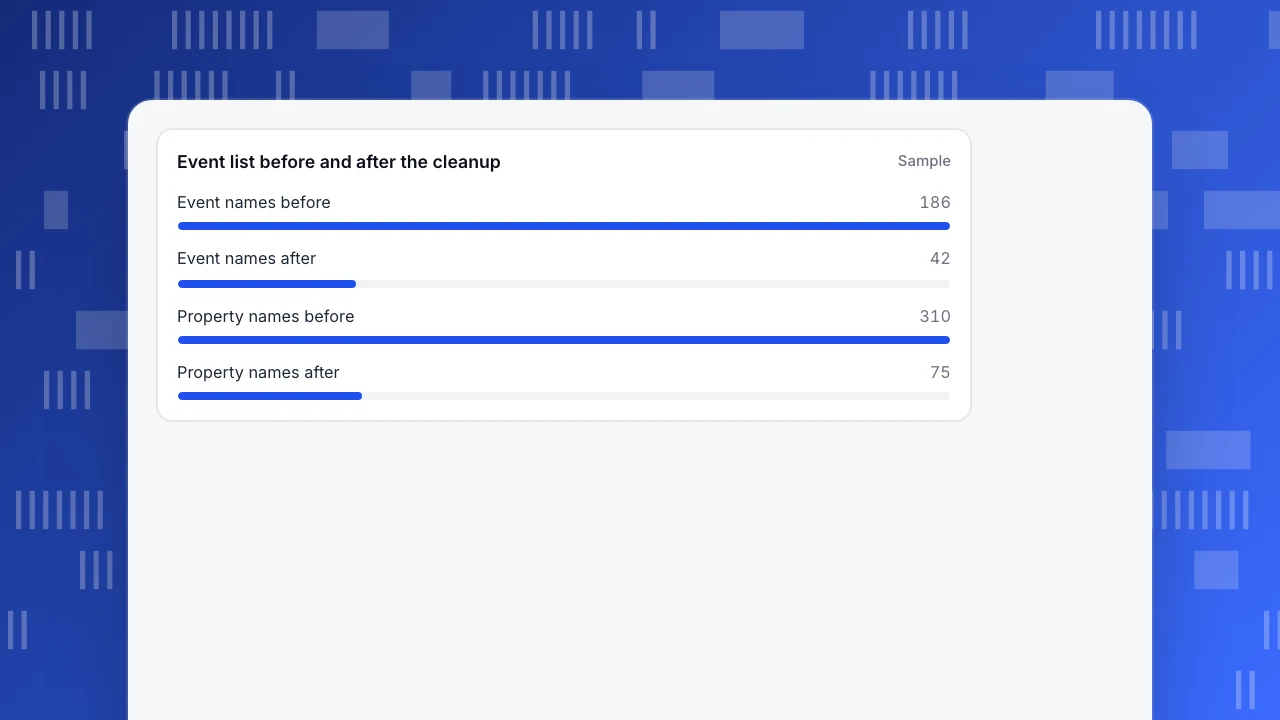
A product that had grown for four years had 186 distinct event names (sample numbers throughout). A review found:
- Nine names for creating an account:
Signup,sign_up,signUp,user_signed_up,register,Register Click,signup_google,signup_email,account_create. - 38 events with no hits in 90 days.
- 310 property names, many duplicates (
plan,planName,plan_tier).
After the cleanup:
- 186 → 42 events. The nine sign-up variants became one event,
account_created, withmethod: email | google | github. - 38 unused events marked deprecated, then removed from code.
- 310 → 75 property names, each with a type, description and example.
- Old names mapped to new ones for historical reports, so trends did not break.
The sign-up count now matches the database within 1%; before, depending on which event you picked, it was 40% too low or 15% too high.
Event list before and after the cleanup
SampleKeeping it clean
- One owner approves new events and properties.
- Plan before code: every new event is written into the tracking plan, with required properties, before it is built.
- Check after release: hits in the first 24 hours and completeness of required properties.
- Review quarterly: deprecate unused events, merge new duplicates.
Where TapCub stores and checks it
- All-platform analytics › Data › Tracking plan holds planned events with display name, category, platforms, properties (type, required, example), owner and status (Proposed, Developing, Accepting, Live, Deprecated). Live verification shows hits in 24 hours and required-property completeness. Plans import from CSV and export to XLSX.
- All-platform analytics › Data › Event inbox holds event definitions on its Definitions tab, plus new events waiting to be claimed.
- All-platform analytics › Data › Property dictionary documents properties.
- All-platform analytics › Data › Virtual events / props combines existing events, such as several old sign-up names, into one virtual event without changing code.
Related: tracking plan, data dictionary, event tracking and data quality.
Was this article helpful?
We use your answers to fix and expand this page.
Couldn’t send. Please try again in a minute.
Thanks for the feedback. We’ll use it to improve this page.You’ve already sent feedback on this page. Thanks.

Technical Engineer
Focuses on tracking code, SDKs, and API integrations, with practical guidance on implementation checks and troubleshooting.