Try it on your own data
Every report in this article is in the free plan. One snippet for web and apps, up to 10 sites.
Start freeA data protection strategy is a written plan that answers three questions for every dataset: what do we hold, who can see it, and how long do we keep it. Cutting what you collect protects better than encrypting it afterwards. This guide sets out six blocks with owners, a 12-field inventory example, a retention calculation and short request and breach procedures. It is not legal advice.
What you will learn
- Answer what you hold, who can see it and how long you keep it for every dataset; everything else supports one of the three
- Minimise first: in the sample, 7 of 12 collected fields (58.3%) had no purpose
- Shortening event retention from 730 to 180 days leaves 75.3% fewer rows exposed in a breach
What is a data protection strategy, and what should it answer?
A data protection strategy is a written plan for how an organisation keeps personal and sensitive data safe through its whole life: when it is collected, while it is used, and when it is deleted. Most guides turn it into a long list of tools. A shorter test works better: a strategy is only real if it answers three questions for every dataset.
- What do we hold? An inventory, not a guess.
- Who can see it? Named roles, not "the team".
- How long do we keep it? A number of days with an owner, not "as long as needed".
Everything else (encryption, backups, training, vendor reviews) supports one of those answers. This guide organises the work into six blocks and shows a worked example for analytics data, where the most common failure is collecting far more than anyone needs. It is not legal advice, and it does not repeat the article-by-article rules in the GDPR compliance checklist; it is the operating plan you run day to day.
Which six blocks make up the strategy?
| Block | Question it answers | Artefact to produce | Who owns it | Review rhythm |
|---|---|---|---|---|
| Inventory | What data, where, why? | A data map with purpose per field | Data or analytics lead | Quarterly |
| Minimisation | Do we need this field at all? | A keep / cut list | Product and privacy lead | At every new event or form |
| Access control | Who can see or export it? | Roles, masking rules, key list | Security or admin | Quarterly and at each leaver |
| Retention | How long do we keep it? | Day counts per dataset | Privacy lead | Yearly |
| Requests | How do we answer access and deletion requests? | A written procedure with a clock | Privacy lead | After each request |
| Incident response | What do we do if it leaks? | A one-page plan and contact list | Security lead | After each drill |
Notice the order. Inventory comes first because every later block needs it, and minimisation comes second because it is the cheapest control: data you never collected cannot be breached, subpoenaed or mishandled. GDPR states this directly: personal data must be "adequate, relevant and limited to what is necessary" for its purposes, and kept in identifiable form no longer than necessary (Article 5). See also data minimization for the concept in isolation.
| Block | Question it answers | Owner and rhythm |
|---|---|---|
| Inventory | What data, where and why? | Data or analytics lead, quarterly |
| Minimisation | Do we need this field at all? | Product and privacy lead, at every new event or form |
| Access control | Who can see or export it? | Security or admin, quarterly and at each leaver |
| Retention | How long do we keep it? | Privacy lead, yearly |
| Requests | How do we answer access and deletion requests? | Privacy lead, after each request |
| Incident response | What do we do if it leaks? | Security lead, after each drill |
Each block needs a named owner and a review date; without them the strategy is only a document.
How do you build the inventory and cut what you do not need?
Start with one system, such as your web analytics, and list every field it stores. For each field write the purpose. If you cannot, the field goes on the cut list.
Sample data: a site's analytics setup collects 12 fields.
| Field | Purpose | Keep? |
|---|---|---|
| Page path | Which pages are read | Keep |
| Referrer domain | Where visitors come from | Keep |
| Event name | What was done | Keep |
| Device type | Layout and speed decisions | Keep |
| Country | Regional reporting | Keep |
| Full IP address | None that aggregate counts need | Cut |
| Email in an event property | None | Cut |
| Full name from a form | None | Cut |
| Date of birth | None | Cut |
| Full user-agent string | Only the device type is used | Cut (derive device type) |
| Precise latitude and longitude | Country is enough | Cut |
| Free-text search query | Rarely reviewed; may contain personal detail | Cut |
Five fields have a purpose; seven do not: 12 − 5 = 7, so 58.3% of what was collected has no use. That figure is the quickest argument for minimisation to take to a stakeholder: more than half the exposure is pure liability.
When a cut field is truly needed for one use, do not keep it everywhere. Keep it in the one place that needs it, with narrower access and a shorter life. For examples of what counts as personal in a log or event, see PII examples.
Who should be able to see the data?
Access control is where most internal exposure happens, because it is about people, not attackers. Four rules cover most cases:
- Least privilege. Give each role the smallest view that lets it do the job. An analyst needs aggregates; an administrator needs settings, not personal values.
- Mask by default. Show identifiers partially or fully masked in lists and exports, and require a conscious step to reveal them.
- Treat keys like passwords. API keys and shared links are access too. List them, scope them to read-only where possible, rotate them, and remove them when the person or project leaves.
- Review on events, not only on a calendar. Check access when someone leaves, changes team or when a vendor is added.
GDPR's security article asks for measures such as pseudonymisation and encryption, ongoing confidentiality and integrity of systems, the ability to restore data after an incident, and a process to regularly test whether measures work (Article 32). Treat that last item as a calendar entry: a quarterly test that a leaver's access really was removed is worth more than a policy that says it should be.
How long should you keep it?
Retention is the control with the clearest numbers. Every extra day multiplies the number of records that a breach could expose.
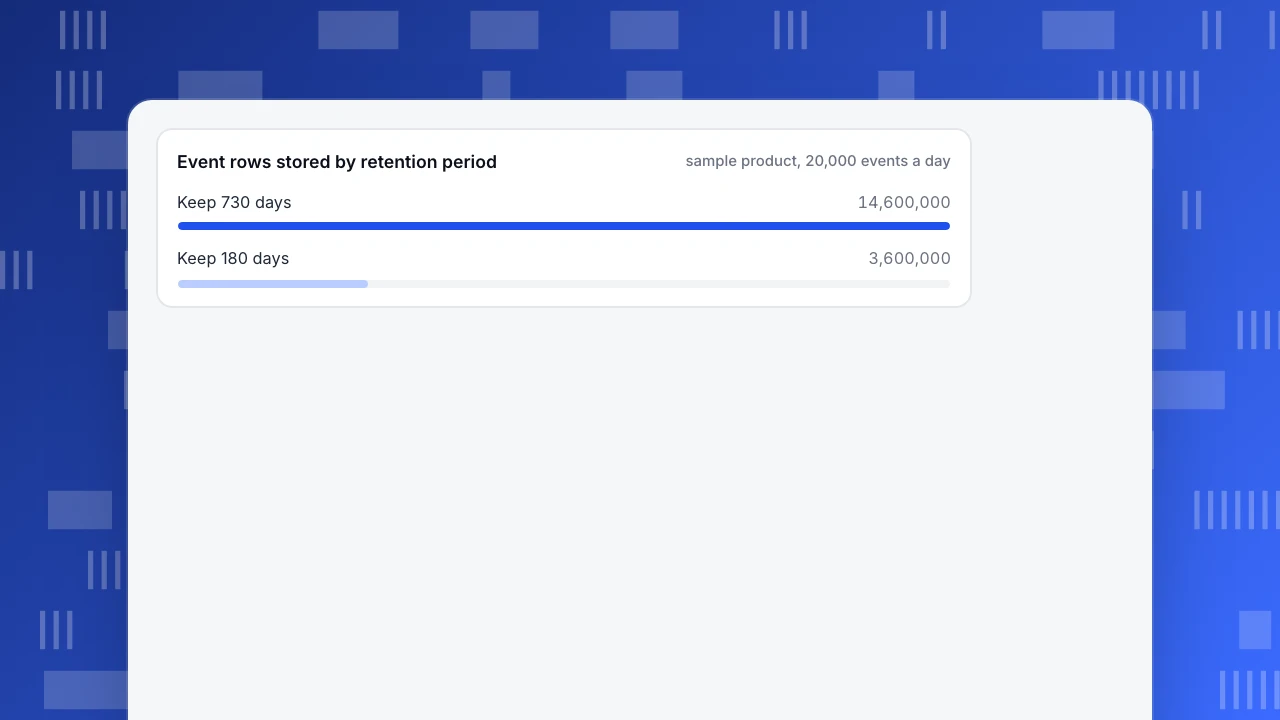
Sample data: a product records 20,000 analytics events a day.
- Keeping events for 730 days stores 20,000 × 730 = 14,600,000 rows.
- Keeping them for 180 days stores 20,000 × 180 = 3,600,000 rows.
- The shorter period holds 1 − 180 ÷ 730 = 75.3% fewer rows at risk.
Whether 180 days is enough depends on the question. Year-on-year comparisons need at least a year of aggregate data, but aggregates carry no personal values; only event-level rows need the short clock. The usual pattern is to keep daily aggregates for long-term trends and delete detailed rows quickly. Write the day count per dataset into a table with an owner, and make deletion automatic, not a task someone remembers. For policy wording and schedules, see the data retention policy guide.
Event rows stored by retention period
sample product, 20,000 events a dayHow do you answer access and deletion requests?
People can ask what you hold about them or ask you to erase it. Under GDPR you must respond without undue delay and in any event within one month, extendable by up to two further months for complex or numerous requests, with notice of the extension and reasons inside the first month (Article 12(3)). Other laws set other clocks, so record the ones that apply to you.
A workable procedure fits on one page:
- Intake. One address or form; log the date received as day 0.
- Verify identity in proportion to the risk before releasing anything.
- Locate the subject in every system in the inventory; this is why the inventory comes first.
- Act and record. Export or erase, then note what was done and in which systems.
- Reply inside the clock, with a calendar reminder at day 20 so there is time to chase a slow system.
If you cannot find a person in a dataset because it was collected anonymously, say so; that is a benefit of minimisation, not a failure.
What should you do when something leaks?
Plan the first hour before you need it. GDPR expects a controller to notify the supervisory authority where feasible within 72 hours of becoming aware of a breach, unless it is unlikely to risk people's rights and freedoms; the notice describes the breach, the approximate numbers affected, a contact point, likely consequences and measures taken, and every breach must be documented (Article 33).
A one-page plan names:
- Who decides that an event is a breach, and who can be reached outside office hours.
- First containment steps: revoke keys, disable shared links, rotate credentials.
- What to record from the first hour: time, systems, data types, approximate record count.
- Who is told, and when: regulator, customers, partners, with draft wording prepared.
Run it as a drill once a year with a made-up scenario, and update the plan with what was slow.
What are the common mistakes?
- Starting with tools. Buying encryption before an inventory protects data you may not need.
- Protecting everything equally. A strategy that treats a page path and a medical record the same spends effort in the wrong place.
- Keeping data "just in case". The case rarely arrives; the breach might.
- Treating the strategy as a document. If there is no owner and no review date, it is a PDF.
- Forgetting vendors. Every tool that receives your data is part of the inventory. Re-read how privacy by design frames vendor choices.
- Skipping the test. A restore or an access removal that has never been tried is a hope.
How would you apply this to analytics data in TapCub?
Using the 12-field example, the team wants the five useful fields and none of the rest. TapCub supplies controls for several blocks; the inventory, owners and incident plan remain yours. This is not legal advice.
- Minimise at collection. In Configuration › Privacy center, choose the collection tier. Tier 1 is anonymous aggregate with no persistent ID. The address is used for geography and a visitor hash and then discarded, not written on the event, and strings that look like an email or phone number are replaced by a placeholder when stripping is on, which is the default.
- Govern properties. In All-platform analytics › Data › Property dictionary, mark each key as direct identifier, indirect identifier or non-personal, and block the keys on your cut list so they are never stored.
- Control who sees what. Roles have mask levels (none, partial, full); viewers see direct identifiers fully masked by default, and the stricter of the property rule and the member rule wins. Create read-only API keys in Configuration › Settings › API keys, and public sharing links in Configuration › Settings › Public sharing can carry a password, limited modules and a day limit; visitor lists and sessions cannot be shared publicly.
- Set retention. In Configuration › Privacy center, set the day counts for event rows, autocapture, profiles and consent receipts. The project's value cannot exceed your plan's cap (check the retention cap of your plan); expired rows are deleted by a scheduled job, and daily aggregates contain no personal data.
- Run requests. Data subject requests (access, export, restrict, erasure) are created in the same page, and restrict and erasure wait out a cooling-off period that starts at 3 days and can be cancelled.
TapCub does not write your inventory, name your owners or run your breach response; those stay with you. See Privacy center for the setting definitions.
FAQ
What are the key components of a data protection strategy?
Inventory, minimisation, access control, retention, a procedure for data subject requests, and incident response. Encryption, backups and training support these. Each needs an owner and a review date.
What is the first step in building a data protection strategy?
Inventory one system: list every field it stores and the purpose of each. Fields without a purpose are cut candidates. Everything afterwards, from access to retention, depends on knowing what you hold.
How is a data protection strategy different from a data security strategy?
Security protects data from unauthorised access. Protection is wider: it also decides what to collect, how long to keep it, and how to honour individuals' rights. Security is one block inside the strategy.
How long should we keep analytics data?
Keep event-level rows only as long as a named question needs them, and write a day count per dataset. Aggregates without personal values can be kept longer. In the sample, cutting from 730 to 180 days held 75.3% fewer rows at risk.
Does a privacy tool make us compliant?
No. A tool can enforce choices such as masking and retention, but the inventory, purposes, owners and legal analysis are yours. Ask your privacy officer or counsel about your obligations.
See also: Data protection technology: the five types and how to choose.
Sources
- GDPR, Article 5, Principles relating to processing — data minimisation and storage limitation. Verified 2026-11-18.
- GDPR, Article 12, Transparent information and modalities — the one-month response period in paragraph 3. Verified 2026-11-18.
- GDPR, Article 32, Security of processing — measures including pseudonymisation, encryption and regular testing. Verified 2026-11-18.
- GDPR, Article 33, Notification of a personal data breach — the 72-hour notification and documentation duty. Verified 2026-11-18.
Was this article helpful?
We use your answers to fix and expand this page.
Couldn’t send. Please try again in a minute.
Thanks for the feedback. We’ll use it to improve this page.You’ve already sent feedback on this page. Thanks.

Data Analyst
Explores traffic sources, conversion funnels, and retention, using clear metric definitions and concrete examples to explain what the numbers mean.