Try it on your own data
Every report in this article is in the free plan. One snippet for web and apps, up to 10 sites.
Start freeData protection technology falls into five types: encryption, access control, masking (hashing and truncation), minimization and traceability. Each stops one kind of failure and misses another, so pick from the threat, not the tool. Below: what each type stops, a recomputed hashing and truncation example, a table to choose by threat, and where each shows up in TapCub.
What you will learn
- Choose the technology from the threat: each of the five types stops one kind of failure and misses another
- A hashed email is still personal data; a plain hash is guessable, while a keyed hash is not, and truncation protects but merges people
- Minimization is the cheapest control: keeping events 90 days instead of 365 stores 75.3% fewer rows
What data protection technology covers, and what it does not
Data protection technology is any technical control that reduces the chance that personal or business data is read, changed, lost or used by someone who should not. For analytics data, five types cover most of what you will meet: encryption, access control, masking (hashing and truncation), minimization and traceability. Backups, malware defence and endpoint security matter too, but they belong to general security rather than to the question analytics teams ask: what do we collect, and what can the people and systems that touch it do with it?
Two limits are worth stating before any tool is chosen.
- Technology is not compliance. Laws such as the EU General Data Protection Regulation (GDPR) ask for "appropriate technical and organisational measures" (Article 32), and name pseudonymisation and encryption as examples. A tool can support a measure; it cannot say whether your processing is lawful. This article is general information, not legal advice.
- No single control is enough. Each of the five stops a different kind of failure, and each has a case it does not cover. The thesis of this article: choose the technology from the threat, not the other way round. Start by writing down what you are protecting and from whom, and the table below will tell you where to look. For the policy layer that sits above this, see data protection strategy.
The five types at a glance
The table below compares the five types: what each stops, what it does not stop, and a typical analytics example.
Read the table by columns. The "does not stop" column is where teams get surprised: encryption does nothing against a legitimate user with the key, and masking does nothing if the masked value can be guessed. The next five sections give the decision rule for each.
| Type | Stops | Does not stop | Typical analytics example |
|---|---|---|---|
| Encryption | Reading data in transit or on a stolen disk | Misuse by someone who has the key or is logged in | HTTPS for collection, encrypted storage |
| Access control | Staff or keys seeing more than their job needs | Misuse inside the permitted scope | Viewer role sees totals; analyst sees profiles |
| Masking | Exposure of raw identifiers in lists, exports and logs | Re-identification if the mask is guessable | Hashed email, truncated IP, hidden phone digits |
| Minimization | Having data to lose or misuse in the first place | Risk on data you do need | Not collecting IPs; deleting events after 90 days |
| Traceability | Not knowing who changed or exported what | The first misuse itself | Audit log of member changes and exports |
Read the 'does not stop' column first: it is where teams get surprised.
Encryption: protect data in transit and at rest
Encryption turns readable data into ciphertext that only a holder of the right key can read. It has three common places to apply:
- In transit: HTTPS between browser and server. Any collection endpoint should use it; without it, anyone on the network path can read events.
- At rest: the disk or database storing events. It protects against a stolen disk or backup, not against someone who reaches the database through the application.
- Field level: individual sensitive values, such as an email address, encrypted inside the record. It protects against people with database access but without the key.
The decision rule: encryption is only as strong as the separation between data and key. If the key sits in the same place, or is readable by the same people, you have added ceremony, not protection. Ask where the key lives, who can read it, how it is rotated and what happens when someone leaves. Also note what it costs: an encrypted field cannot be searched or grouped by its plain value without decrypting it.
Access control: give people and keys only what the job needs
Access control decides who, or which API key, can see or do what. The principle is least privilege: the smallest permission that lets the job get done. NIST's guide to protecting the confidentiality of personally identifiable information recommends specific safeguards of this kind and asks organisations to match the level of protection to the sensitivity of each data set.
A practical role split for analytics data:
| Role | Needs | Should not have |
|---|---|---|
| Executive or client viewer | Totals, trends, shared reports | Individual profiles, raw exports |
| Marketing analyst | Aggregates and segments | Direct identifiers in clear text |
| Product analyst | Event-level data, pseudonymous profiles | Contact details unless a task needs them |
| Admin or owner | Settings, members, keys | Day-to-day report access beyond the task |
| Server key | Write events | Read reports |
Two rules matter more than the role names. Give API keys the narrowest scope that works, and keep secret keys on the server, never in code that runs in a browser. And review the list: permissions collect over time, and the person who changed teams a year ago is where a leak comes from.
Masking: hashing, truncation and the guessing problem
Masking replaces a sensitive value with something less revealing while keeping it useful. Common forms are hashing (a one-way function that turns an email into a fixed string), truncation (cutting off the end of an IP address), redaction (showing only the last four digits) and tokenisation (swapping the value for a random token kept in a separate table). Hashing is covered in hashing; the legal idea behind it is pseudonymization.
Under GDPR Article 4(5), pseudonymisation means processing data so that it can no longer be attributed to a specific person without additional information that is kept separately. Recital 26 adds that pseudonymised data which could be attributed to a person with that extra information is still information about an identifiable person. In plain words: a hashed email is still personal data. Masking reduces exposure; it does not take the data out of scope.
The weakness of plain hashing is guessability. If an attacker can try every plausible input, they can compute the same hashes and compare. Emails are plausible inputs: names, numbers and common domains give a short list. A keyed hash (a secret key mixed in, such as HMAC) or a secret salt stops that, because the attacker cannot reproduce the output without the key. Truncation has the opposite weakness: it cannot be reversed, but it merges people. Both are shown with numbers next.
Worked example: what hashing and truncation do to a unique count
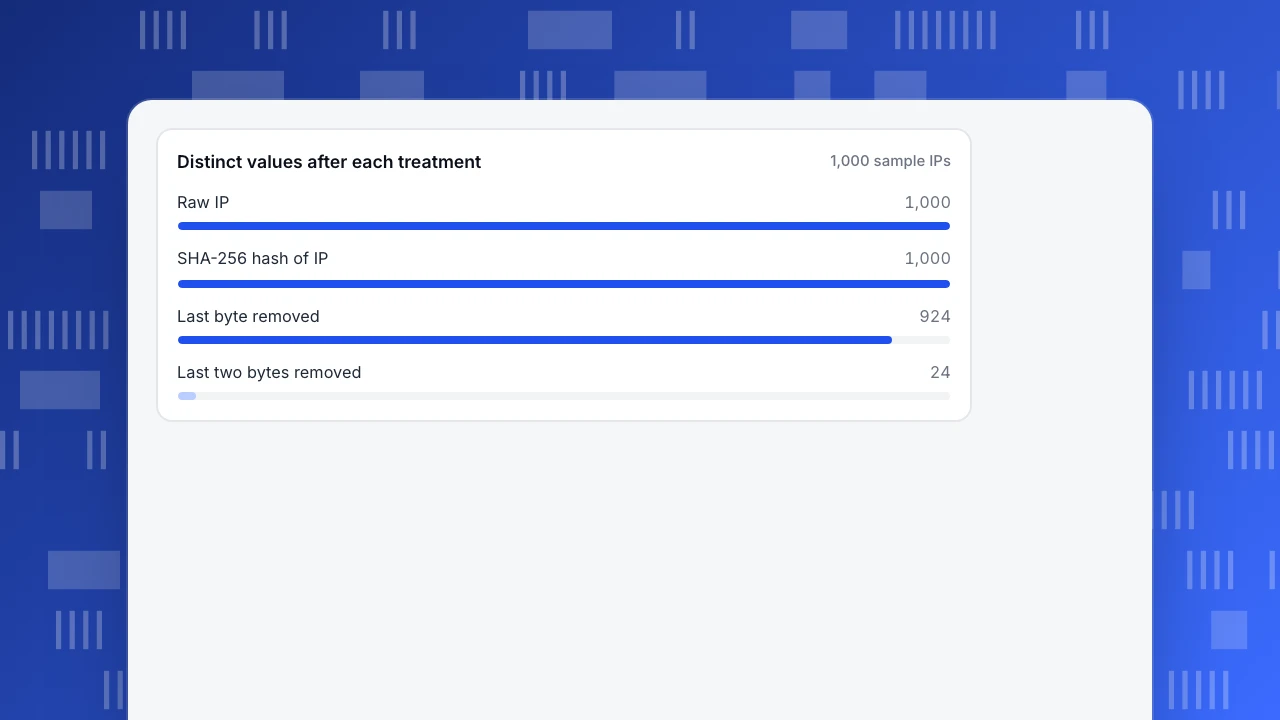
Sample data: 1,000 synthetic IPv4 addresses, drawn at random from 24 different /16 blocks (addresses sharing their first two numbers), and 10,000 synthetic email addresses of the form name123@example.com. All figures were computed in Python.
Unique counts after each treatment
| Treatment | Distinct values | Change |
|---|---|---|
| Raw IP address | 1,000 | baseline |
| Hash of the full IP (SHA-256) | 1,000 | 0% |
| IP with the last byte removed | 924 | −7.6% |
| IP with the last two bytes removed | 24 | −97.6% |
Hashing keeps the count intact because every distinct input gives a distinct output, so unique-visitor numbers survive. Truncation removes information, so counts shrink: dropping two bytes folds 1,000 addresses into 24 groups, and a unique-visitor figure based on that would be wildly low. That is the trade: hashing keeps counts but not secrecy against guessing; truncation keeps secrecy but not counts.
Guessing test. Take three target emails and an attacker who owns a list of 10,000 plausible emails (10 first names × numbers 1 to 1,000).
| Method | Targets recovered from the list |
|---|---|
| Plain SHA-256 of the email | 3 of 3 |
| HMAC-SHA-256 with a secret key the attacker lacks | 0 of 3 |
The plain hash looked unreadable and was undone in seconds; the keyed hash resisted the same list. If your identifiers are low-entropy (emails, phone numbers, short IDs), use a keyed hash or a secret salt, and keep the key out of the analytics store.
Distinct values after each treatment
1,000 sample IPsMinimization: data you never collect cannot leak
Data you never collect cannot leak, be subpoenaed or be misused. GDPR Article 5(1)(c) describes it as data that is adequate, relevant and limited to what is necessary. It is the cheapest control and the one with a clear arithmetic: if you keep events for 90 days instead of 365 and volume is steady, you store 90 ÷ 365 = 24.7% of the rows, 75.3% fewer, and every row you delete is a row no one can misuse. See data minimization.
Three habits implement it:
- Ask what decision a field supports before adding it. If nobody can name one, do not collect it.
- Set a retention period per data type, not one for everything. Raw events, profiles and consent records have different needs.
- Keep the lowest precision that works. Country instead of city, a day instead of a timestamp, an aggregate instead of a row.
The design principle behind this is privacy by design.
Traceability: know who touched what
Traceability means keeping a record of changes to access and data: who added a member, who changed a setting, who exported what, when. It does not stop a first misuse. It makes the second one detectable, shortens investigations and lets you prove what happened. Three things make it useful: the log is written automatically, it is hard to edit for the people being logged, and someone actually reads it on a schedule. Exports deserve special attention, because that is where data leaves the controlled system.
How to choose by threat
| If the worry is… | Start with… | Then add… |
|---|---|---|
| Someone on the network reads events | Encryption in transit | Certificate monitoring |
| A stolen disk, backup or laptop | Encryption at rest | Key management |
| An employee or client sees too much | Access control, least privilege | Masking of direct identifiers |
| A leaked export or log | Masking, shorter retention | Traceability on exports |
| A breach would be costly | Minimization | Everything above, on what remains |
If you can only do one thing this quarter, do minimization: it shrinks the problem for all the other controls.
Common mistakes
- Calling hashed data anonymous. Hashing is pseudonymisation at best. If the identifier is guessable, it is barely that.
- Encrypting without key management. The key beside the data is a lock with the key taped to the door.
- Masking only in the interface. If the export or the API returns the raw value, the mask protects nothing.
- Collecting everything and promising to mask later. Raw data still exists in logs, backups and caches.
- Treating a tool as a compliance statement. A control supports a legal obligation; it does not prove it is met.
- Forgetting the humans. The most common cause of exposure is a permission that nobody revoked.
How these controls show up in TapCub
Suppose you want to measure sign-ups without keeping raw personal data around. Here is where each of the five types appears in TapCub's documentation. TapCub does not claim any legal compliance for you; these are product behaviours you can check and configure.
- Minimize at collection. In Configuration › Privacy center, pick the collection tier. Tier 1 is anonymous aggregate: the salt changes daily, no persistent identifier is kept and autocapture is dropped. The IP address is not written to the event store: it is used only for the geographic lookup and for the visitor hash, and is truncated by 2 bytes by default before the city lookup. Geographic precision can be city, country or none.
- Mask identifiers. Strings in event properties that look like email addresses or phone numbers are rewritten into placeholders by default. When an email or phone number is used as identity at login, it is hashed before it is bound (an email is lower-cased first). The property dictionary under All-platform analytics › Data › Property dictionary classifies fields as direct identifiers, indirect identifiers or non-personal and masks direct identifiers in lists and exports.
- Limit retention. The Privacy center sets default retention: events 365 days, autocapture 90, user profiles 730, consent records 730, capped by your plan (the free plan default is 180). Expired data is deleted by a scheduled job.
- Limit who sees what. Project roles decide which pages a member can open, and reports can be narrowed per member to certain channels, platforms or hostnames, with attributes hidden and masking applied. API keys are created on Configuration › Settings › API keys with a scope list; a secret key belongs on the server and can be revoked.
- Keep a trail. Member changes, role changes, two-step verification changes and privacy configuration changes are written to the audit log on Configuration › Settings › Audit log, which you can export as CSV, NDJSON or JSON.
TapCub's security documentation describes the console, the collection script and the API as using HTTPS, depending on the deployment. For the reasoning of what each control does not cover, return to the table above: every item here narrows exposure, and none replaces your own review of purpose and lawful basis.
FAQ
What are examples of data protection technology?
Encryption in transit and at rest, access controls and roles, masking such as hashing and IP truncation, data minimization with retention limits, and audit logging. Backups, endpoint protection and loss-prevention tools are also used but are part of wider security.
What is the difference between encryption and hashing?
Encryption is reversible with a key: ciphertext can be turned back into the original. Hashing is a one-way function: the output cannot be turned back, but the same input always gives the same output, so a guessed input can be confirmed by comparing hashes.
Is hashed data still personal data?
Often yes. Under the GDPR, pseudonymised data that can be attributed to a person with additional information is still information about an identifiable person. A hash of an email that someone can reproduce from a list of emails is therefore still personal data. This is general information, not legal advice.
Which data protection technology should a small team start with?
Minimization first: collect less and delete earlier. Then access control with least privilege and a keyed hash or salt for identifiers. Encryption in transit usually comes with the tools you already use; check it is switched on rather than build it.
Does masking reduce the accuracy of analytics?
It depends on the type. Hashing preserves unique counts. Truncation merges records and lowers them, in the sample above from 1,000 to 24 distinct values when two bytes were removed. Choose the masking whose loss your question can tolerate.
Sources
Was this article helpful?
We use your answers to fix and expand this page.
Couldn’t send. Please try again in a minute.
Thanks for the feedback. We’ll use it to improve this page.You’ve already sent feedback on this page. Thanks.

Data Analyst
Explores traffic sources, conversion funnels, and retention, using clear metric definitions and concrete examples to explain what the numbers mean.