Try it on your own data
Every report in this article is in the free plan. One snippet for web and apps, up to 10 sites.
Start freePII examples fall into three groups: direct identifiers (name, email, phone, home address, national ID), indirect identifiers (IP address, device ID, date of birth, postal code, browser fingerprint) and sensitive categories (health, biometrics, ethnicity, religion). For analytics the default is simple: do not collect it, and where you must, generalise it. This guide lists 20 examples and a handling rule for each. It is not legal advice.
What you will learn
- Group fields as direct, indirect or sensitive; each group needs a different default handling
- Most PII reaches analytics by accident, through URLs, free-text boxes and event properties
- In the sample audit, 12 of 30 properties (40.0%) identified or linked to a person
What counts as PII, in one working rule?
PII, personally identifiable information, is any information that can identify a person, either on its own or when combined with other information. NIST's guide for US federal agencies puts it in two parts: information that can distinguish or trace an individual's identity, such as a name or Social Security number, and any other information that is linked or linkable to an individual, such as medical, educational, financial or employment information (NIST SP 800-122). The EU's GDPR uses a broader term, personal data: "any information relating to an identified or identifiable natural person" (Article 4(1)), with an identifier such as a name, location data or an online identifier as one way to identify someone.
This article does not re-define the term; for that see the PII glossary entry. It does something more useful for analytics work: it lists 20 concrete examples in three groups, shows which ones sneak into tracking data, and gives a handling rule for each. A working test for any field you are unsure about:
Could someone with reasonable effort, or with one other dataset, tell which person this belongs to?
If the answer is yes or maybe, treat it as personal until your privacy officer says otherwise. This is a practical guide, not legal advice, and the definition varies by law and country.
Which 20 examples fall into which group?
Three groups help because they call for different handling: direct identifiers name or reach a person; indirect identifiers point to a person only in combination; sensitive categories carry higher harm if exposed.
| # | Example | Group | Typically needed in analytics? | Default handling |
|---|---|---|---|---|
| 1 | Full name | Direct | No | Do not collect |
| 2 | Email address | Direct | Rarely | Do not collect; if a match key is needed, hash it |
| 3 | Phone number | Direct | No | Do not collect |
| 4 | Home address | Direct | No | Do not collect; keep country or region |
| 5 | National ID or Social Security number | Direct | No | Never collect |
| 6 | Passport number | Direct | No | Never collect |
| 7 | Payment card number | Direct | No | Never collect; mask if typed by mistake |
| 8 | IP address | Indirect | No | Truncate or discard after deriving country |
| 9 | Device or advertising ID | Indirect | Sometimes | Use only with consent and a purpose |
| 10 | Cookie or persistent visitor ID | Indirect | Sometimes | Prefer a rotating or cookie-free identifier |
| 11 | Date of birth | Indirect | Rarely | Keep year or age band |
| 12 | Postal code | Indirect | Rarely | Keep region or the first part only |
| 13 | Job title plus employer | Indirect | B2B only | Keep company-level fields |
| 14 | Precise location | Indirect | No | Round to city or country |
| 15 | Browser fingerprint (user agent plus screen plus fonts) | Indirect | No | Derive device type, drop the rest |
| 16 | Health condition or treatment | Sensitive | No | Never collect in properties |
| 17 | Biometric identifier (face, fingerprint) | Sensitive | No | Never collect |
| 18 | Racial or ethnic origin | Sensitive | No | Never collect |
| 19 | Religious belief | Sensitive | No | Never collect |
| 20 | Trade union membership | Sensitive | No | Never collect |
The sensitive group follows the special categories in the GDPR, whose Article 9(1) lists racial or ethnic origin, religious beliefs, trade union membership, biometric data used to identify someone, and data concerning health, among others (Article 9). Several of these (names, addresses, telephone numbers, email addresses, Social Security numbers, account numbers, device identifiers and IP address numbers) are also among the identifiers HIPAA lists for de-identification, which is why health sites need extra care (45 CFR 164.514(b)(2)).
| Option | What it does | Good for |
|---|---|---|
| Do not collect | Field never leaves the browser | Anything without a stated question |
| Truncate | Drops precision, such as the last IPv4 octet | Country-level geography |
| Generalise | Replaces a value with a band | Age, postcode, location |
| Hash | One-way transform; reversible by guessing if the input is guessable | Matching records without showing the raw value |
| Mask in display | Hides characters for viewers; the value is still stored | Limiting who sees it |
| Pseudonymise | Swaps the identifier for a code kept apart from its key | Analysis that needs per-person history |
Order of preference for analytics: not collecting, then generalising, then hashing.
Which of these sneak into analytics data by accident?
Teams rarely decide to collect a passport number. They collect it by accident, in places like these:
- URLs and query strings.
/reset?email=ana@example.com,/orders/48213?name=Ana. The path or the full URL ends up in a pageview. - Form and search boxes. Free-text fields capture whatever people type, including addresses, symptoms and card numbers.
- Event properties. A developer adds
user_emailorfull_nameto a "signup" event because it was handy. - Login identifiers. A user ID that is an email address or phone number is a direct identifier in disguise.
- Error logs and screenshots. Stack traces and replay recordings capture what was on screen.
- Referrers. A referring URL can carry a token or a name.
Run a quick search on your own data for @, long digit strings and common query keys such as email, phone and name. Expect to find something you did not plan to collect.
How do you audit your own properties?
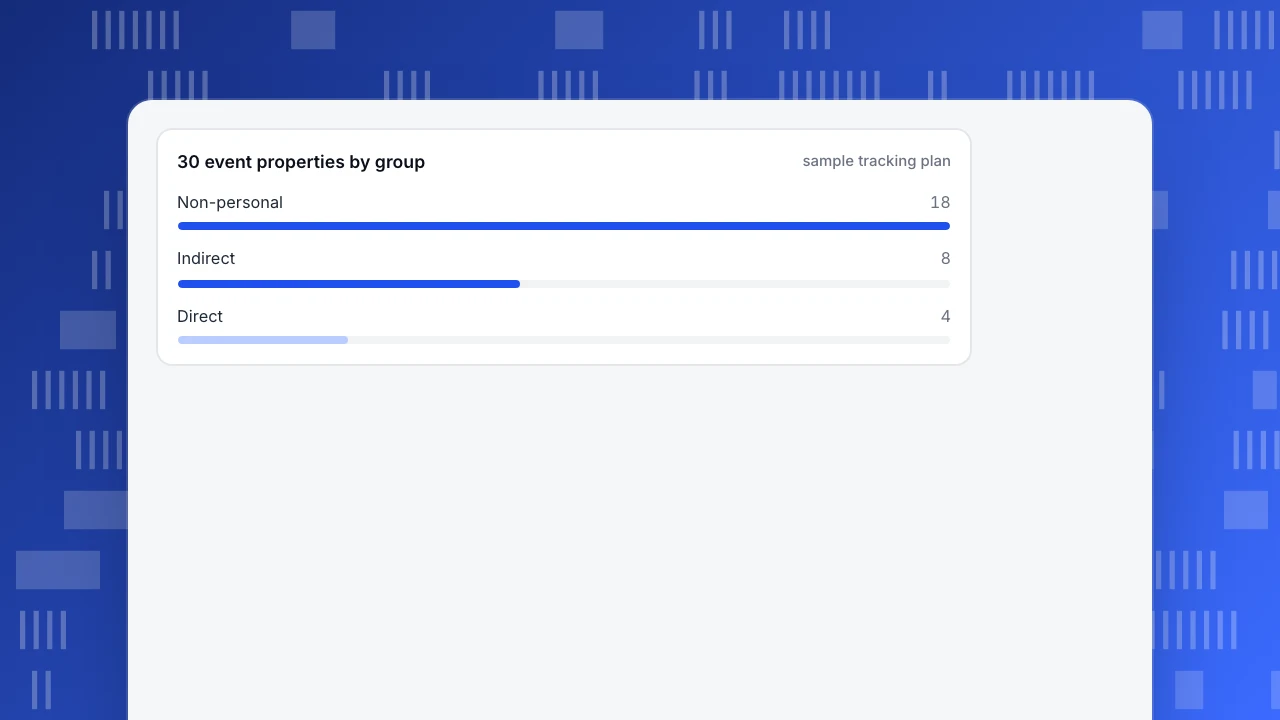
A worked example with sample data: a team exports the list of its 30 event properties and tags each one.
- Direct (4):
user_email,full_name,phone,shipping_address. - Indirect (8):
ip,device_id,login_id,postcode,birth_date,job_title,city_exact,user_agent_full. - Non-personal (18):
plan_tier,page_path,button_id,step_number,countryand thirteen like them.
The shares: 4 ÷ 30 = 13.3% direct, 8 ÷ 30 = 26.7% indirect, 18 ÷ 30 = 60.0% non-personal. Check: 4 + 8 + 18 = 30. Two in five properties are identifying or linkable, and the team had used only a handful of them in any report.
Then ask of every direct and indirect property: which question would break if it were gone? Where the answer is "none", cut it. Where there is one, replace it with a coarser field: birth_date → age_band, postcode → region, user_agent_full → device_type.
30 event properties by group
sample tracking planWhat are the options for handling a field you cannot cut?
| Option | What it does | Still personal? | Good for |
|---|---|---|---|
| Do not collect | Field never leaves the browser | No data, no risk | Anything without a stated question |
| Truncate | Drops precision (IPv4 203.0.113.42 → 203.0.113.0) | Weaker, but often still linkable | Country-level geography |
| Generalise | Replaces a value with a band (age 34 → 30–39) | Usually lower risk | Age, postcode, location |
| Hash | One-way transform of a value | Yes, if the input can be guessed | Matching records without showing the raw value |
| Mask in display | Hides characters for viewers | Yes, the value is stored | Limiting who sees it |
| Pseudonymise | Replaces the identifier with a code kept apart from the key | Yes, under GDPR | Analysis that needs per-person history |
Hashing deserves a warning because it is the most misused option. A hash of an email is the same every time: SHA-256 of ana@example.com begins 8e43ca37…, and anyone holding a list of email addresses can hash the list and compare. A different capitalisation gives a different hash (ANA@example.com begins b77b68e0…), so normalise to lowercase before hashing or your matches fail. A hashed email is pseudonymous, not anonymous; see the hashing glossary and the pseudonymization entry. The related question of how to label a person in your own system is covered in user ID.
The ranking for analytics is simple: not collecting beats generalising, generalising beats hashing, and hashing beats storing the raw value and hoping nobody opens the table. Data minimization is the principle behind that order.
A short checklist before you ship a new event
- Write the question the event answers. No question, no event.
- List each property and give it a group: direct, indirect, sensitive or non-personal.
- Cut every direct and sensitive property.
- Replace each indirect property with a coarser one, or write down why not.
- Check URLs and query strings that will be recorded for names, emails and tokens.
- Make sure free-text fields are not sent as properties.
- Test with a dummy account and read the stored row.
- Set a retention period and an owner.
What mistakes do people make with PII?
- "It's only an IP address." Under the EU rules an online identifier can identify a person, and HIPAA lists IP address numbers among its identifiers; see the table above.
- "We hash it, so it's anonymous." Hashes of guessable values can be reversed by comparison.
- "No name field, so no PII." The audit above found two in five properties identifying or linkable without a name.
- "We never see sensitive data." Free-text boxes and URLs see it for you.
- "PII is a US term, so it does not apply in the EU." The label differs; the idea of personal data is wider in the EU.
- "One audit is enough." Developers add properties every sprint. Re-run the audit when the tracking plan changes.
How would you apply this in TapCub?
Take the 30-property audit. The team wants to keep reporting while removing the 12 properties that identify or link.
- Classify each key. In All-platform analytics › Data › Property dictionary, the tabs User, Event and Account list every key with a PII column. A scan classes each as direct identifier, indirect identifier or non-personal; direct identifiers are masked by default. Your edit counts as a human confirmation, and later scans do not overwrite it.
- Block or limit keys. Governance rules can block a key so it is never stored, or set a whitelist where other values are stored as
__other. Use the block rule for the four direct properties. - Use the collection tier. In Configuration › Privacy center, strings that look like an email or phone number are rewritten to a placeholder when stripping is on, which is the default. The address is used for geography and a visitor hash and is not written on the event; truncation defaults to two bytes before the city lookup.
- Check what autocapture saw. Autocapture does not capture visible element text by default, and, when form tracking is turned on, submission events record only the form's id, name and action, not what people typed.
- Keep identity optional. If you identify users, email and phone are encrypted or dropped according to the profile setting, and members see them masked by role.
TapCub does not decide for you what counts as personal under your law; it classifies keys in a scan and lets you confirm, block and mask. Review the dictionary after every release.
FAQ
What are examples of PII?
Direct examples include full name, email, phone number, home address, national ID, passport number and payment card number. Indirect examples include IP address, device ID, date of birth and postal code. Sensitive examples include health data and biometric identifiers.
Is an IP address PII?
Often yes. GDPR names online identifiers as a way to identify a person, and HIPAA lists IP address numbers as an identifier. Treat it as personal, and truncate or discard it after deriving country.
Is an email address PII?
Yes. It reaches a specific person directly. If you only need it to match records, hash it after converting to lowercase, and remember a hashed email is still pseudonymous.
What is the difference between PII and personal data?
PII is the common US term. Personal data is the GDPR's broader legal term for any information relating to an identified or identifiable person. A field can be personal data even if a US checklist does not call it PII.
What is non-PII data?
Information that cannot reasonably be linked to a person, such as page path, button ID, plan tier or aggregate counts. Combine it with enough other fields and it may become linkable, so audit combinations too.
Sources
- NIST, SP 800-122, Guide to Protecting the Confidentiality of Personally Identifiable Information — the two-part description of PII and the principle that PII should be protected from inappropriate access, use and disclosure. Verified 2026-11-18.
- GDPR, Article 4, Definitions — personal data and identifiers. Verified 2026-11-18.
- GDPR, Article 9, Special categories of personal data. Verified 2026-11-18.
- Cornell Legal Information Institute, 45 CFR 164.514, De-identification — HIPAA's 18 identifiers. Verified 2026-11-18.
Was this article helpful?
We use your answers to fix and expand this page.
Couldn’t send. Please try again in a minute.
Thanks for the feedback. We’ll use it to improve this page.You’ve already sent feedback on this page. Thanks.

Data Analyst
Explores traffic sources, conversion funnels, and retention, using clear metric definitions and concrete examples to explain what the numbers mean.