Try it on your own data
Every report in this article is in the free plan. One snippet for web and apps, up to 10 sites.
Start freeChat solutions for business fall into two groups: internal team chat for staff and customer-facing chat for the people you sell to. Within customer-facing chat there are five types: human live chat, rule-based chatbot, AI assistant, asynchronous messaging and offline forms. They differ most in cost: a staffed seat is a fixed block of hours, so cost per conversation drops in steps, and an assistant pays back only when it removes a seat.
What you will learn
- Customer-facing chat has five types; choose by question mix and volume, not by channel
- Cost per conversation drops in steps as volume fills each seat, and an assistant saves money only when it removes a seat or shift
- Count only fully resolved conversations, and keep a person in the loop wherever an answer changes what you owe a customer
What are chat solutions for business?
"Chat solutions for business" means two different things, and mixing them up is the first mistake buyers make. Internal team chat is how your staff talk to each other (channels, direct messages, file sharing). Customer-facing chat is how customers talk to you: a chat window on your website, an assistant that answers from your help content, or a messaging thread. This guide is about the second kind. If you want the first, you are comparing workplace collaboration tools, a different category with different questions (seats, integrations, retention).
Customer-facing chat comes in five practical types: human live chat, rule-based chatbot, AI assistant with a knowledge base, asynchronous messaging, and offline message forms. They differ in who answers, how fast, what each conversation costs, and what can go wrong. The rest of this page compares them on use case, cost and response metrics, with one calculation you can redo with your own numbers. For a sharper human-versus-bot comparison, see chatbot vs live chat; for the bot categories themselves, see types of chatbots.
What are the types of chat solutions and when does each fit?
| Type | Who answers | Best for | Main cost driver | Main risk |
|---|---|---|---|---|
| Human live chat | A trained agent in real time | Pre-sale questions, complex or sensitive issues | Agent hours | Idle seats off-peak; visitors leave if nobody is on |
| Rule-based chatbot | Scripted flows and buttons | Narrow, predictable tasks such as order status or store hours | Building and maintaining the flows | Dead ends when the question is off-script |
| AI assistant with a knowledge base | A model drafting from your own content, with handoff | High-volume repeat questions | Content upkeep and AI usage | Confident wrong answers if content is stale |
| Asynchronous messaging | A person, replying when free | Follow-ups, appointments, customers who will not wait | Agent time, spread over hours | Slow replies feel like no reply |
| Offline message form | A person, next working day | Out-of-hours capture with an email address | Agent time to reply | Visitors rarely return after a day |
Pick by the question mix, not by the channel. If most questions are "where is my order" and "what are your hours", a knowledge base answers them cheaply. If most are "which plan fits my team", a person converts better. Most businesses end up with two types working together: an assistant for the repeat questions and a human for the rest.
| Type | Cost driver | Metric to track |
|---|---|---|
| Human live chat | Agent hours | Human first response time |
| Rule-based chatbot | Building and maintaining flows | Share ending without handoff |
| AI assistant | Content upkeep and AI usage | Knowledge base hit rate and handoff rate |
| Asynchronous messaging | Agent time over hours | Median time to first reply |
| Offline message form | Agent time to reply | Share answered within a working day |
Report human first response separately from a bot's instant greeting.
What does a chat conversation cost?
The cost that matters is the cost per resolved conversation, and it is driven by staffing steps, not by a smooth per-chat price. Here is a calculation you can redo.
The base is a wage. The US Bureau of Labor Statistics reports median pay for customer service representatives of $21.53 per hour (May 2025). Sample data and assumptions: add 30% for taxes, tools and management time, giving $27.99 an hour; one seat covers an 8-hour chat window for 22 days, which is 176 hours or $4,926 a month; a conversation takes 9 minutes of agent time; and a seat is only 60% usable because chats do not arrive evenly. That gives a seat a capacity of 704 conversations a month if the agent handles one chat at a time, or 1,408 if the agent handles two at once.
| Monthly conversations | Seats at 1 chat at a time | Cost per conversation | Seats at 2 chats at a time | Cost per conversation |
|---|---|---|---|---|
| 300 | 1 | $16.42 | 1 | $16.42 |
| 600 | 1 | $8.21 | 1 | $8.21 |
| 1,200 | 2 | $8.21 | 1 | $4.11 |
| 2,000 | 3 | $7.39 | 2 | $4.93 |
| 2,400 | 4 | $8.21 | 2 | $4.11 |
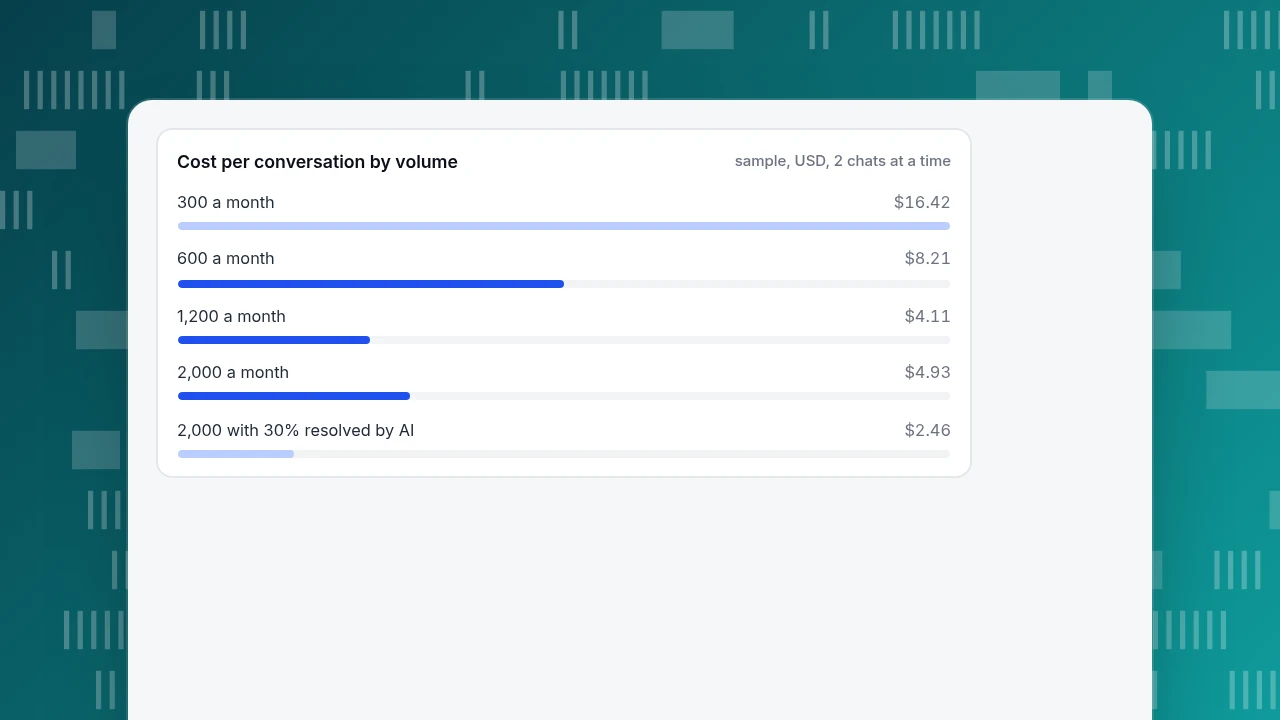
Two things stand out. First, at low volume the cost per conversation is high because a seat is a fixed block of hours: 300 conversations on one seat cost $16.42 each. Second, cost per conversation is flat between staffing steps and drops only when volume fills the next seat.
Now add an AI assistant that fully resolves 30% of conversations (sample assumption). At 2,000 conversations, humans handle 1,400, which fits one seat at two chats at a time (capacity 1,408). The cost per conversation falls from $4.93 to $2.46, because a whole seat disappeared, before counting the assistant's own price. At 1,200 conversations the same 30% saves nothing, because one seat was already enough. That is the practical rule: an assistant pays back when it removes a seat or a shift, not before. Add the software price and AI usage before concluding, and count only conversations that were fully resolved, not just touched (chatbot ROI shows how).
Cost per conversation by volume
sample, USD, 2 chats at a timeHow fast should each type respond?
Response expectations follow the type, and the metric you track should too:
| Type | What the channel is built for | Metric to track |
|---|---|---|
| Human live chat | A reply while the visitor is still on the page | First response time of the human (seconds to a minute or two) |
| Rule-based chatbot | An immediate answer | Share of conversations that end without a handoff, and dead-end rate |
| AI assistant | An immediate answer, handoff when unsure | Knowledge base hit rate, handoff rate, share needing repeat contact |
| Asynchronous messaging | A reply within hours, in the customer's own time | Median time to first reply, time to resolution |
| Offline message form | A reply the next working day | Share answered within a working day |
Be careful comparing first-response times across types. A bot's instant greeting is not a first response in the sense that an agent's answer is, so report human first response separately. For human chat, a short first response with a long resolution time usually means agents are replying quickly but lacking the answer, which points to missing knowledge or canned replies rather than staffing.
Speed also affects conversion, but be wary of the headline gap. People who start a chat were often closer to buying already, so the chatted-versus-not conversion gap overstates what chat caused. Does live chat increase conversions covers how to read that comparison.
Does AI make agents or customers better off?
Two pieces of evidence are worth knowing, one for each direction.
AI helping agents. In a study of 5,179 customer support agents, Brynjolfsson, Li and Raymond (NBER Working Paper 31161, 2023) found that access to a generative AI assistant raised issues resolved per hour by about 14% on average and about 34% for novice and low-skilled workers. For a team with high turnover, that is the case for AI suggestions inside the agent's reply box rather than AI talking to customers directly.
AI talking to customers. In Moffatt v. Air Canada (2024 BCCRT 149), a Canadian tribunal held an airline responsible for incorrect information its website chatbot gave a customer, rejecting the argument that the chatbot was a separate entity. The practical reading: what your assistant says is what your company said, so keep its content current, limit it to topics your content covers, and give customers an easy way to reach a person.
Neither result says AI always saves money. Both say where the value or risk sits: in agent speed for the first, in answer accuracy for the second.
How do you choose?
Use these rules in order; stop at the first one that fits.
- If you cannot staff a chat window for the hours you promise, do not run live chat. Use an offline message form or asynchronous messaging, and say when replies come.
- If more than a third of questions are repeats, build the knowledge base first. Repeat questions are what an assistant resolves safely; the cost table shows it only pays once it removes a seat, so check your volume against the seat capacity.
- If most questions are pre-sale or complex, staff humans and give them canned replies. Conversion is where human chat earns its cost; see live chat scripts for what to write first.
- If the answer to a question can change what you owe a customer (a refund, a price, a deadline), keep a human in the loop. The Air Canada decision is the reminder.
- If you are under about 700 conversations a month, start with one part-time human window. The cost table shows a single seat as the floor, and more types add upkeep without volume to justify it.
How would this look in TapCub?
Take the 2,000-conversation example and a small store deciding between a human window and an assistant.
- Turn chat on without touching the site. If the TapCub analytics script is already installed, open Live chat › Chat settings › Appearance and switch on live chat; the chat bubble appears with no code change. A standalone chat page link is also available for email signatures and social profiles.
- Set the human window honestly. In Live chat › Chat settings › Office hours, set the working hours and time zone; outside them, or with nobody online, visitors can leave an email address and a message, which you answer from Live chat › Chat settings › Offline messages.
- Add the assistant for repeat questions. Write question-and-answer entries in Live chat › Knowledge base; a matching question is answered word for word without an AI call. In Live chat › Chat settings › AI assistant, choose off, AI only when all agents are offline, or AI first, with handoff to an agent when it lacks material. The assistant only writes replies: it does not change orders, send email or call other systems.
- Measure by type. Live chat › Reports shows conversations, resolution rate, human first response time, satisfaction, agent workload and knowledge base hit rate. Compare the hit rate with the share you assumed an assistant could resolve, then check the seat arithmetic above.
- Check conversion cautiously. Live chat › Reports › Conversion attribution compares goal conversion of visitors who chatted with those who only browsed, and warns when fewer than 30 chatted. Read the lift as an upper bound, for the selection reason above.
TapCub's chat is a website chat widget and a chat page, not an internal team chat tool, and TapCub does not run experiments on your traffic.
FAQ
What is the best chat solution for a small business?
It depends on question mix and volume rather than size. A small team with mostly repeat questions can start with a knowledge base and a human window; a team with few chats can use an offline message form. Below roughly 700 conversations a month, one part-time human window is usually the cost floor.
What is the difference between live chat and a chatbot?
Live chat connects the visitor to a person in real time. A chatbot answers automatically from scripts or content. A chatbot is faster and cheaper per conversation at volume but only resolves what its content covers; live chat handles anything but costs agent hours.
How much does a chat conversation cost?
It depends on wages, handling time and how many chats an agent handles at once. In the sample above, using a $21.53 hourly median wage plus 30% on-cost and 9 minutes per chat, the cost ranged from $16.42 at 300 conversations a month to $4.11 at 2,400 with two chats at a time. Use your own figures.
Is internal team chat the same as customer chat?
No. Internal team chat (channels, direct messages) is for staff communicating with each other; customer-facing chat is for customers reaching your business. They are bought, measured and governed differently, and this guide covers only the customer-facing kind.
Sources
- U.S. Bureau of Labor Statistics, Occupational Outlook Handbook: Customer Service Representatives (median pay $21.53 per hour, May 2025), checked 2026-11-22.
- Brynjolfsson, E., Li, D. and Raymond, L. (2023). Generative AI at Work. NBER Working Paper 31161.
- Moffatt v. Air Canada, 2024 BCCRT 149, British Columbia Civil Resolution Tribunal.
Was this article helpful?
We use your answers to fix and expand this page.
Couldn’t send. Please try again in a minute.
Thanks for the feedback. We’ll use it to improve this page.You’ve already sent feedback on this page. Thanks.

Product Experience Specialist
Writes about product experience, practical workflows, and growth, turning complex processes into clear steps for everyday decisions.