Try it on your own data
Every report in this article is in the free plan. One snippet for web and apps, up to 10 sites.
Start freeChat leads are people who started a chat, left a way to reach them and gave answers that fit what you sell. Count conversations, contacts captured and qualified leads as three separate numbers, qualify in three questions inside the chat, and read the chat versus no-chat lift with care.
What you will learn
- Report three levels: conversation, contact captured, qualified lead; each has a different fix
- In the sample, 58.3% of chatters left no contact; raising capture from 41.7% to 50% is worth about 6 sign-ups a month
- Chatters sign up at 8.6% vs 2.0% (330% lift), but chatters were more interested to begin with
What counts as a chat lead
A chat lead is a person who started a chat and left a way to reach them, plus enough answers to judge whether they fit. Counting every conversation as a lead overstates the pipeline, because most chats are questions about shipping, login or pricing. A useful definition has three levels, and you report each one separately:
- Conversation: the visitor sent at least one message.
- Contact captured: the visitor gave an email, phone number or account, so you can follow up.
- Qualified lead: the answers meet your criteria, for example the right use case, the right size and a timeframe you can serve.
Each level is a different number with a different owner. Conversations measure the chat entry point, contact capture measures how well the conversation asks, and qualification measures fit. For the wider playbook on getting leads from live chat, see live chat lead generation; this article stays on what happens after the chat starts and how to measure it.
A sample funnel from chat to sign-up
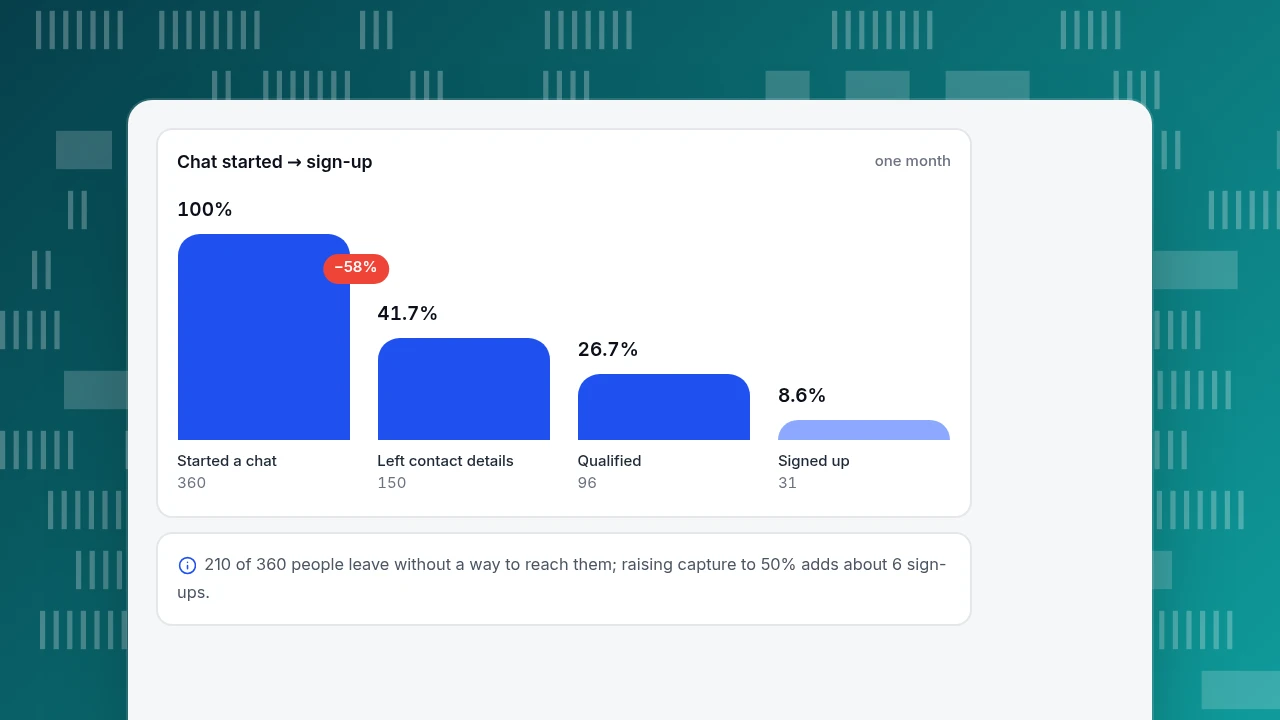
Sample data: one month on a software site. 12,000 visitors reached the site, 360 of them started a chat, and the rest never did.
| Step | People | Rate from previous step | Lost at this step |
|---|---|---|---|
| Visitors | 12,000 | n/a | n/a |
| Started a chat | 360 | 3.0% | 11,640 |
| Left contact details | 150 | 41.7% | 210 |
| Qualified | 96 | 64.0% | 54 |
| Signed up | 31 | 32.3% | 65 |
The calculations: 360 ÷ 12,000 = 3.0%; 150 ÷ 360 = 41.7%; 96 ÷ 150 = 64.0%; 31 ÷ 96 = 32.3%. From first message to sign-up, 31 ÷ 360 = 8.6%.
Two readings are worth making straight away:
- The largest loss inside the chat is at contact capture. 210 of 360 people, 58.3%, left without giving a way to reach them. Those are people who wanted something enough to type, and you cannot contact them.
- Qualification is working. Of the 150 who left contact details, 96 met the criteria. If that rate fell to 30%, the problem would be the questions you ask, not the follow-up.
Chat started → sign-up
one monthStarted a chat
360
Left contact details
150
Qualified
96
Signed up
31
Where the funnel leaks first
Sizing a fix in people is more useful than a feeling. Suppose a change raises contact capture from 41.7% to 50%, with the later steps unchanged:
- Contacts: 360 × 50% = 180, up from 150.
- Qualified: 180 × 64.0% = 115.2, up from 96.
- Sign-ups: 115.2 × 32.3% ≈ 37.2, up from 31.
The change is worth about 6 more sign-ups a month, from changing nothing except when and how the conversation asks for an email. Compare that with improving the last step, from 32.3% to 40%: 96 × 40% = 38.4 sign-ups, about 7 more. Both are worth doing, and the sample shows the first is cheaper because it needs only a change of wording.
A rule: fix the step where the most people leave, but check the step with the lowest rate. They are not always the same.
A three-question qualification flow
Qualify inside the conversation, in the order that helps the visitor first. Three questions are enough, and each one should be skippable if the visitor is just asking for help.
- "What are you trying to do?" Answers sort the chat into support, buying or exploring. Only buying and exploring continue to qualification.
- "Who is it for?" For a business product, team size or role. This is the fit question.
- "When do you need it?" The timeframe separates this month from someday.
Then the contact request: "I can send you the details and a setup guide. What email should I use?" The reason is stated, which is more likely to get an answer than a bare request, and it keeps the exchange honest.
Three practical rules:
- Answer first, ask second. If the visitor's question has an answer, give it before asking anything.
- Never block the chat on a form. A required form before the first message loses the people who only wanted a quick answer.
- Write down the criteria. A lead is "qualified" when all three answers meet thresholds you wrote in advance, not when an agent feels good about it.
| Question | What it sorts | Skip when |
|---|---|---|
| What are you trying to do? | Support, buying or exploring | Never skip; it comes first |
| Who is it for? | Fit: team size or role | Visitor only wants support |
| When do you need it? | This month or someday | Visitor is still exploring |
Then ask for contact with a stated reason. Qualified means all three answers meet thresholds written in advance.
How fast the follow-up needs to be
Speed decides whether a captured contact is still a lead. Harvard Business Review published a study in March 2011 by James Oldroyd, Kristina McElheran and David Elkington, "The Short Life of Online Sales Leads", whose finding is that most companies are not responding nearly fast enough. A CBS News report citing Oldroyd's research puts the window at about five minutes for the best chance of converting a lead, and says that after about 30 minutes the lead is almost completely dead. Treat these as a direction rather than a promise, since they come from a study of online leads in general, not chat specifically.
For chat, the practical target is simpler: answer while the visitor is still on the page. Set two internal targets and measure both:
- First response in the chat: seconds from the first message to the first human reply.
- Follow-up after an offline message: minutes from the form being submitted to the first reply.
If the visitor leaves an email because nobody was online, the follow-up clock starts when they submit.
What to say about consent and storage
When you collect an email in a chat you are collecting personal data, and that has obligations. Article 13 of the EU's General Data Protection Regulation requires the controller to give the person information, including who is collecting the data and why, at the time the data are obtained. In a chat, the practical version is:
- State the reason in the message that asks for the email, as in the example above.
- Show that the chat is recorded, and link your privacy notice.
- Collect only what you will use: an email, not a phone number, if email is all you will use.
- Decide how long chats are kept and delete on that schedule.
This is a summary, not legal advice. Check your own obligations where your visitors are.
How to read the chat versus no-chat comparison
Sample data, continued: of the 11,640 visitors who did not chat, 233 signed up, a rate of 2.0%. The 360 who chatted signed up at 31 ÷ 360 = 8.6%.
Relative lift is the chatted rate divided by the no-chat rate, minus 1: 8.6% ÷ 2.0% − 1 = 330%.
It is tempting to say chat quadrupled sign-ups. It did not necessarily, because people who start a chat are usually already more interested. This is selection, and the number includes it. What the comparison does tell you is how valuable a chatting visitor is, and where in the funnel the gap is largest. To read it fairly:
- Compare on the same pages where you can, such as the pricing page only.
- Do not act on a sample under 30 chatters; the result moves a lot with a few people.
- Track the change over time. A fall in the chatted rate when staffing changed says more than the absolute level.
Tracking chat leads in TapCub
The funnel above can be built from three places in TapCub. TapCub measures the chat and what visitors do.
- Turn on chat and mark the goal. Chat is on under Live chat › Chat settings › Appearance. Define the sign-up as a goal in Web analytics › Goals, because the chat conversion report counts goals configured in analytics.
- Capture and see the contact. Visitors who write while an agent is away fill the form under Live chat › Chat settings › Offline messages, with statuses New, Replied and Closed. In the live inbox, Live chat › Inbox, the side panel shows the visitor's source, current page and the last two days of browsing, and links to their analytics profile, so the first reply can start from what they were reading.
- Know who the lead is once they log in. If your site calls
tapcub.loginafter sign-in, the person appears under All-platform analytics › Users › People with a daily timeline of what they did, and the chat side recognizes the same visitor. - Watch the speed. Live chat › Reports shows conversations, resolution rate and average first response. First response counts the first human reply only, not an AI reply, and offline messages are counted separately.
- Compare chat and no chat. Live chat › Reports › Conversion attribution shows visitors that day, chatted and reached a goal, the two rates and relative lift, and lists the pages where chats started. With fewer than 30 chatters it warns that the sample is too small. The report works by day, so check the note in the documentation about when a goal on another day is not joined.
TapCub does not do lead scoring or CRM, so keep the follow-up in your own sales tools.
FAQ
What are chat leads?
Chat leads are people who started a chat and gave a way to follow up, such as an email, and whose answers show they fit what you sell. Count conversations, contacts captured and qualified leads separately, because each measures a different part of the process and has a different fix.
How do you qualify a lead in live chat?
Ask three questions in order: what they are trying to do, who it is for, and when they need it. Answer their question first and never block the chat with a required form. Mark the lead qualified only when the answers meet criteria you wrote in advance.
How fast should you respond to a chat lead?
While the visitor is still on the page for live chat. For leads captured after hours, the Harvard Business Review study of 2011 found most companies respond too slowly, and a CBS News report citing the author's research put the window at about five minutes. Measure first response and follow-up time separately.
Are chat leads lower quality than form leads?
Not by default, and the answer depends on your own data. Compare qualified rate and sign-up rate for each source on the same funnel steps. A chat lead who reached you in the middle of a pricing question often has stronger intent than a form lead, but test it rather than assume it.
How do you track chat leads?
Define the sign-up or demo request as a goal in your analytics, capture a contact inside the chat or an offline form, and compare goal conversion between visitors who chatted and those who did not. Read the lift with care: chatters are usually more interested to begin with.
Sources
- Oldroyd, McElheran and Elkington, The Short Life of Online Sales Leads, Harvard Business Review 89(3), March 2011 (most companies are not responding nearly fast enough). Checked 2026-11-22.
- CBS News, Online sales leads: how long are they hot? (about five minutes; about 30 minutes, almost completely dead; citing Oldroyd). Checked 2026-11-22.
- European Union, Regulation (EU) 2016/679 (GDPR), Article 13 (information to be provided when personal data are collected from the data subject). Checked 2026-11-22.
Was this article helpful?
We use your answers to fix and expand this page.
Couldn’t send. Please try again in a minute.
Thanks for the feedback. We’ll use it to improve this page.You’ve already sent feedback on this page. Thanks.

Product Experience Specialist
Writes about product experience, practical workflows, and growth, turning complex processes into clear steps for everyday decisions.