Try it on your own data
Every report in this article is in the free plan. One snippet for web and apps, up to 10 sites.
Start freeAnalytics for agencies is mostly structure, not charts: a separate project per client so data cannot mix, one metric dictionary so reports compare, a delivery rhythm so reporting is not rebuilt by hand, and roles so only the right people see each client. Below: the five needs, a worked time calculation for 12 clients, a permissions table and a TapCub setup.
What you will learn
- Give each client brand its own project so data, time zone, members and retention never mix
- Write a six-to-eight metric dictionary and map each client's goals to it, so reports compare and reporting time stops growing with the client list
- Give each person the lowest role that works, keep a member list per client and offboard on a checklist
What do agencies actually need from analytics?
A freelancer with one client needs charts. An agency with ten or twenty clients needs a system: the same questions answered the same way for every client, delivered on a schedule, seen by the right people only. Most analytics trouble at agencies is not about a missing chart. It is one of five problems that appear as the client list grows.
| Need | What goes wrong without it | The decision you must make |
|---|---|---|
| Keep clients' data apart | A client's contact sees another client's numbers; one wrong filter mixes two sites | What is one container: a client, a brand or a domain? |
| Use the same definitions | "Lead" means a form fill for one client and a phone call for another, so no comparison holds | A short metric dictionary, with each client's goals mapped to it |
| Deliver on a rhythm | Reports are built by hand each month, late, and different every time | What goes out daily, weekly, monthly and quarterly, and who reads it |
| Control who sees what | Interns can delete goals; ex-employees and ex-contractors keep access | Roles per person per client, and an offboarding checklist |
| Handle client data properly | Nobody can say who has access or what happens when the contract ends | Written instructions from each client and a deletion routine |
The rest of this guide takes them in that order, with a worked time calculation and a permissions table. It does not compare reporting products. For the reporting side on its own, see automated reports and digital marketing reporting; this article is about the structure that makes those reports easy to produce for many clients.
How should you separate one client's data from another's?
Use one project per client brand. A project is the container that has its own data, time zone, privacy settings, members and retention. Keeping a client in its own container solves most of the first problem at once: a member of Client A's project cannot see Client B, and a filter mistake cannot mix them because the data is in different places.
Rules of thumb for deciding what a container is:
- One brand, one container. If a client has two brands with separate audiences and separate teams, treat them as two projects.
- One brand, several domains, one container. A client's main site, blog subdomain and checkout domain usually belong together, because a visitor crosses between them. Register each hostname as a source in the same project.
- Do not make a "shared agency project" for everyone. It is convenient for you and a leak risk for them.
- Name containers the same way every time. For example
client-short-name | brand. When you have forty, search depends on naming.
Time zone is the quiet one. Every project has its own time zone, and "today" in reports uses it, so a client in Sydney and one in Chicago will disagree on yesterday if you set them to your office's time. Set it per client at onboarding and write it in the client record.
How do you keep definitions the same across clients?
Comparison across clients, and your own sanity, needs a small metric dictionary: a shared name, a plain definition and the unit for every number you report. Keep it short. Six to eight metrics are enough for most clients.
| Standard name | Definition | Client A maps to | Client B maps to |
|---|---|---|---|
| Visitors | Distinct visitors in the period | Same | Same |
| Qualified lead | A visitor who completes the client's chosen lead action | Demo request form | Quote request form |
| Lead rate | Qualified leads ÷ visitors | 1.2% | 0.8% |
| Purchase | A completed order | Order confirmation page | Order confirmation page |
| Revenue per visitor | Revenue ÷ visitors | $1.40 | $0.95 |
| Top source share | Visitors from the largest single source ÷ all visitors | 41% | 63% |
Sample data: the figures show what two clients' monthly rows might look like once they use the same dictionary. The dictionary does not force clients to count the same event; it forces them to give it the same name and the same formula. That is what lets you say "Client B depends on one source for 63% of visitors" and mean the same thing as in Client A's report.
Write three more things in the dictionary: the default period (for example, the previous calendar month), how you treat bot traffic (excluded or reported separately), and which time zone applies. Without those, two reports with the same label can disagree. If your agency has formal rules for who defines and changes metrics, see data governance.
What should you deliver, and how often?
Clients rarely want more charts; they want fewer surprises. A rhythm with four layers covers most retainers.
| Rhythm | What goes out | Who reads it | Length |
|---|---|---|---|
| Alerts, as they happen | A metric breaks its rule: traffic drop, error spike, tracking gap | The account lead, then the client if it is real | One line, with a link |
| Weekly note | Three numbers, one sentence on what changed, one action | The client's day-to-day contact | Under 100 words |
| Monthly report | The standard metric set, month over month, with a short reading and next month's plan | The client's decision-maker | One page |
| Quarterly review | Trends, experiments run, budget implications | Client leadership | A meeting plus the pack |
Whatever the layer, every report should say what changed, why you think so, and what happens next. A report with only numbers invites the client to ask questions the report should have answered.
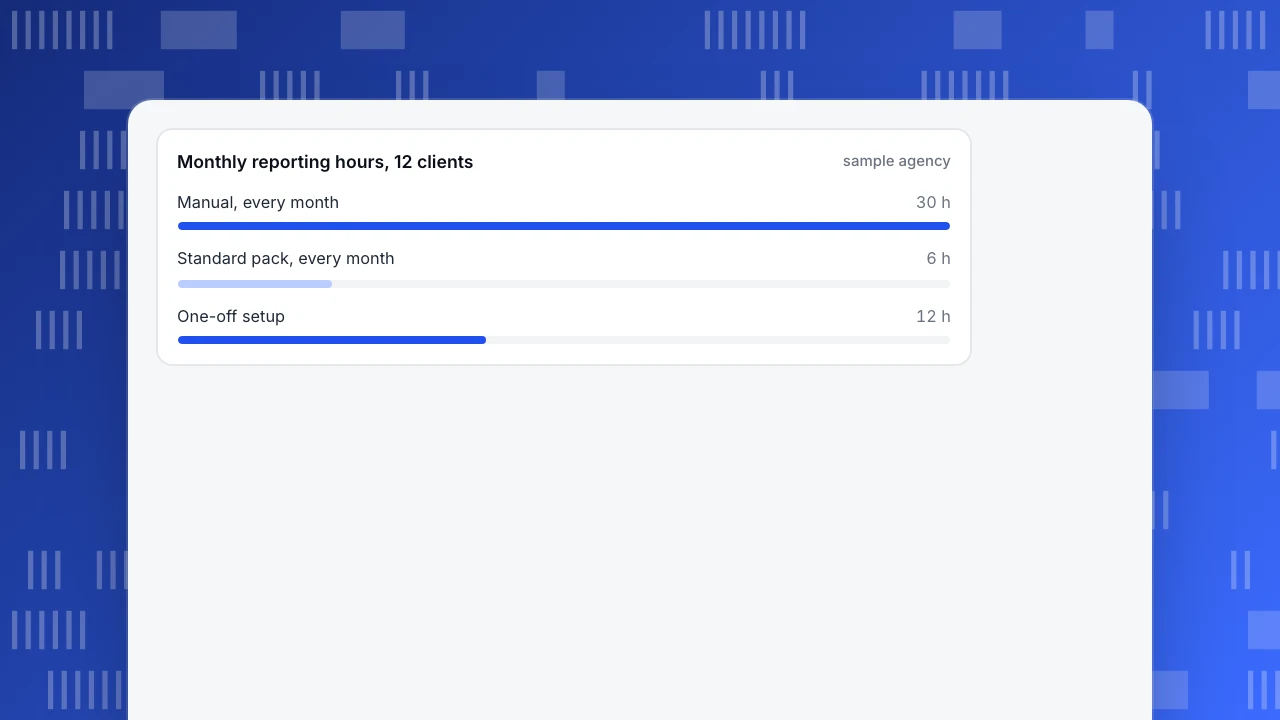
Sample data: the time saved by building the monthly pack once and reusing it. An agency has 12 clients.
- Manual, each month: 12 clients × 2.5 hours = 30 hours.
- Standard pack, each month: 12 clients × 0.5 hours of review and commentary = 6 hours.
- Saving: 30 − 6 = 24 hours a month.
- One-off setup: 12 hours to build the dictionary, templates and delivery schedule.
- Payback: 12 ÷ 24 = 0.5 months. At a blended $60 an hour, the saving is 24 × $60 = $1,440 a month.
These hours are assumptions for illustration; measure your own for two months before you plan around them. The point is the shape: the setup is paid once and every extra client costs half an hour instead of two and a half.
How should permissions work for staff and clients?
Give each person the lowest role that lets them do their job; this is the principle of least privilege, which NIST describes as limiting users to the minimum necessary to accomplish assigned tasks. Four groups of people need decisions.
| Person | Needs to | Suggested access | Revisit when |
|---|---|---|---|
| Account lead | Configure goals, annotate, set alerts | Admin or Analyst on that client's project | The lead changes |
| Analyst | Build analyses and dashboards | Analyst on assigned projects only | Assignment changes |
| Client marketing contact | Read reports, filter, export | Viewer | They leave the client |
| Client executive | See a one-page view | Read-only shared link, with a password | The link is shared further |
| Freelancer or contractor | Do one job | Viewer or Analyst for a fixed period | The job ends |
Four habits keep this safe:
- Name the owner. For each client, decide whether the agency or the client holds the Owner role. If the client should keep their data when the contract ends, give them Owner or Admin on their own project from day one.
- Offboard on a checklist. When a person leaves your agency or a contractor finishes, remove them from every project in one pass. A list of members per client makes this a five-minute job.
- Separate configuration from reading. Fewer people should be able to change goals, exclusion rules and filters than can read the reports.
- Check member limits. The number of members per project depends on the plan, so budget it in the client's setup.
What changes when you hold clients' data?
Handling a client's visitor data usually makes the agency a processor for that client. Under the EU's GDPR, Article 28 says a processor processes the personal data only on documented instructions from the controller, and that the arrangement is set out in a contract or other legal act. This is not legal advice; ask your own counsel what applies to you. The practical consequences are simple and worth doing anyway:
- Get the client's instruction in writing. What you will collect, why, for how long, and who at your agency may see it.
- Keep a list of everyone with access. It is the same list as the offboarding checklist.
- Set retention per client. If a client wants data deleted after twelve months, that is a setting in their own project, not a promise in an email.
- Know what happens at the end. Decide how the client gets an export and when the data is removed.
Do not put analytics data from one client into another client's project, and do not use a client's data to benchmark another client unless the contracts allow it.
Common mistakes in agency analytics
- One shared project for every client. It saves ten minutes at onboarding and costs a client's trust the day a filter is wrong.
- Letting each client define metrics in their own words. The reports cannot be compared and your reporting time does not shrink as the list grows.
- Building every report by hand. The report becomes the job; the thinking becomes the afterthought.
- Reports with numbers and no reading. Add what changed, why, and what you will do.
- Giving everyone full access "just in case". It is the cause of most accidental deletions.
- Forgetting to offboard. Former staff and contractors remain on the access list for years.
- Mixing time zones. Yesterday differs between two regions, and so do week boundaries.
How to set this up in TapCub
Here is client number 13 joining the agency, using the structure above. TapCub is a measurement tool; it does not run your ads, manage your clients or build a proposal. It supplies the containers, roles, dashboards and delivery.
- Create the container. Create a new project for the client and set its time zone. Add each hostname the client owns as a source in that project. Website, app and server data in one project share one event table and one identity space, so one brand stays in one place.
- Apply your dictionary. Define the client's goals in Web analytics › Goals and name them with your standard names. In All-platform analytics › Behavior › Metrics & SQL save the shared metrics, such as lead rate, once per project.
- Set the people. Add members in Configuration › Settings with the roles you chose. TapCub has Owner, Admin, Analyst, Viewer and Agent-only roles; saving analyses needs Analyst or above, and turning sharing on needs Admin or Owner. Treat the member list as your offboarding checklist.
- Build and schedule the pack. In All-platform analytics › Overview › My dashboards, make the client's dashboard from saved analyses and a text card for your reading. In Configuration › Settings › Notifications, turn on weekly or monthly scheduled reports, if the plan includes them. They contain visitors, pageviews, sessions, bounce rate, average duration, the fastest-rising pages and sources, and goal conversions, with a short reading. For the report's content, see web analytics report.
- Give the client a view. For a read-only look, Configuration › Settings › Public sharing creates a link with an optional password, lets you choose which modules to open (overview, pages, sources, audience, bots) and cap how many days the viewer sees. Visitor lists and sessions cannot be shared. Or invite their contact as a Viewer.
- Set alerts. In All-platform analytics › Operations › Monitors, add rules for traffic drops and tracking gaps, with a dry run first. Alerts go to the notification channels configured on that project (webhook, WeCom, DingTalk, Feishu or email).
Each project is its own data and its own members; the docs describe no roll-up across clients, so build any agency-wide table from each project's export (All-platform analytics › Data › Data export) or its scheduled report. For dashboard layout across clients, see analytics dashboard.
FAQ
What is analytics for agencies?
It is the way an agency measures and reports for many clients at once: separate data per client, shared metric definitions, a regular delivery rhythm and controlled access. The tools matter less than the structure, because the structure decides how long reporting takes and whether one client's data can leak into another's.
Should each client have its own analytics project?
Yes, one per client brand. A separate project gives each client its own data, time zone, privacy settings, members and retention, which prevents cross-client leaks and filter mistakes. Several domains of the same brand can sit in one project as separate sources.
How often should an agency report to clients?
Layer it: alerts as they happen, a short weekly note, a one-page monthly report and a quarterly review. Weekly keeps the client calm, monthly is where decisions are made, and quarterly reviews trends and budget. Fewer layers leave gaps, and more create noise.
Who should own the analytics account?
Decide per client in writing. If the client should keep its data when the contract ends, give the client Owner or Admin on its own project from the start, and give the agency a role that lets it do the work. Owning the data at the agency's end tends to cause friction at exit.
Does an agency need a data processing agreement?
Often yes, because handling a client's visitor data makes the agency a processor under GDPR Article 28, which expects processing on documented instructions in a contract. This article is not legal advice, so confirm with counsel which rules apply to you and each client.
Sources
Was this article helpful?
We use your answers to fix and expand this page.
Couldn’t send. Please try again in a minute.
Thanks for the feedback. We’ll use it to improve this page.You’ve already sent feedback on this page. Thanks.

Product Experience Specialist
Writes about product experience, practical workflows, and growth, turning complex processes into clear steps for everyday decisions.