Try it on your own data
Every report in this article is in the free plan. One snippet for web and apps, up to 10 sites.
Start freeThe AI chatbot features that matter for support are the ones that rescue unresolved conversations: knowledge coverage with exact-match answers, a visible route to a person, answers drawn only from your material, translation, and context for the agent. In a sample month, those lifted resolution from 36.0% to 78.7%, and coverage plus handoff delivered 25.8 of the 42.7 points. Cosmetic options scored zero.
What you will learn
- Grade every feature by conversations rescued: coverage (+13.8 points) and handoff (+12.0) beat everything else in the sample
- A handoff only counts if the customer can ask, the bot hands off by itself, the reason is recorded and the agent sees who the visitor is
- Handing off when unsure lowers what the bot resolves alone but raises resolution, because a person finishes the job
What should an AI chatbot's features be judged on?
Judge every feature by one question: does it get more customer problems resolved? Resolution rate is the number of conversations marked resolved divided by all conversations in the period, whether the bot or a person resolved them. It is the right yardstick because the usual failures of support chatbots are failures to resolve: the bot has no answer, gives a wrong one, or leaves the customer stuck.
Regulators and researchers describe the same pattern. The US Consumer Financial Protection Bureau's 2023 review of bank chatbots says customers can get trapped in repetitive loops of unhelpful responses, which it calls "doom loops", and that some chatbots leave people "without an offramp to a human customer service representative". It cites a survey in which 80% of consumers who used a chatbot felt more frustrated and 78% needed to reach a human afterward (CFPB, 2023). A usability study of chatbots from Nielsen Norman Group reported that users reacted well when a bot admitted failure and offered an escape hatch, and that repeated answers annoyed them. That study had only 8 participants, so treat it as directional (NN/g).
So the grading below ranks features by how many unresolved conversations each one rescues. Cosmetic features score zero on this scale, and that is a legitimate finding.
Which conversations fail, and which feature rescues each kind?
Start from why conversations fail, because each failure has a different cure. Here is a sample month for a bot that has an answer source and nothing else (sample data, 1,000 conversations):
| Outcome | Conversations | Share |
|---|---|---|
| Resolved | 360 | 36.0% |
| Failed: the knowledge base had no answer | 230 | 23.0% |
| Failed: the customer was stuck with no way to reach a person | 150 | 15.0% |
| Failed: the bot gave a wrong or irrelevant answer | 120 | 12.0% |
| Failed: the customer wrote in a language the bot did not handle | 60 | 6.0% |
| Failed: the request needed an agent who did not know the visitor | 60 | 6.0% |
| Failed: the customer wrote when nobody was online | 20 | 2.0% |
| Total | 1,000 | 100% |
Baseline resolution rate: 360 ÷ 1,000 = 36.0%. The sample splits the 640 failures into six causes. Now match features to causes, and be explicit about how many of each failure a feature would rescue. These rescue rates are assumptions for the example, not measurements; replace them with numbers from your own conversations.
| Failure | Conversations | Share |
|---|---|---|
| Resolved | 360 | 36.0% |
| No answer in the knowledge base | 230 | 23.0% |
| Customer stuck, no route to a person | 150 | 15.0% |
| Wrong or irrelevant answer | 120 | 12.0% |
| Language not handled | 60 | 6.0% |
| Agent did not know the visitor | 60 | 6.0% |
| Nobody online | 20 | 2.0% |
Sample data: 1,000 conversations for a bot with an answer source and no other features. Baseline resolution rate 36.0%.
Which features matter most? The graded checklist
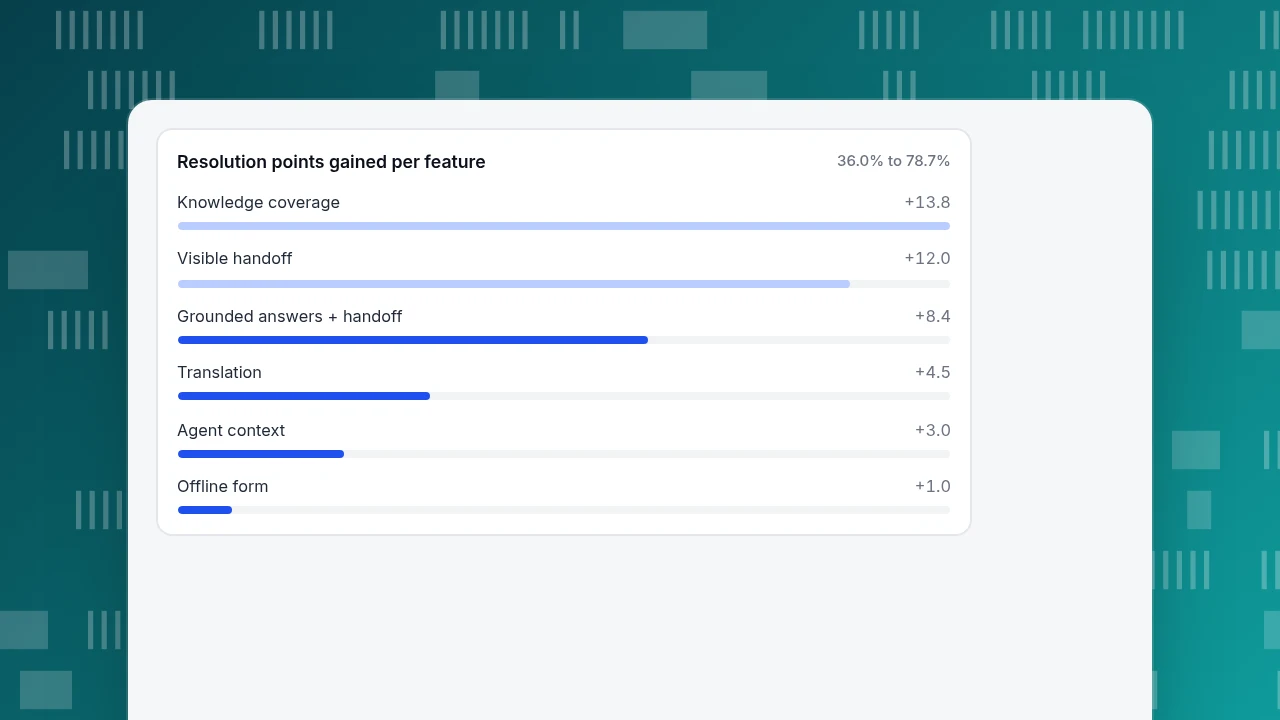
For each feature: chats rescued = failures of that kind × assumed rescue rate; points = rescued chats ÷ 1,000.
| Rank | Feature | Failure it targets | Failures | Assumed rescue rate | Chats rescued | Points of resolution rate |
|---|---|---|---|---|---|---|
| 1 | Knowledge coverage with exact-match answers for frequent questions | No answer in the knowledge base | 230 | 60% | 138 | +13.8 |
| 2 | A visible way to reach a person, plus a turn limit | Customer stuck | 150 | 80% | 120 | +12.0 |
| 3 | Answers drawn only from your material, handing off when unsure | Wrong or irrelevant answer | 120 | 70% | 84 | +8.4 |
| 4 | Two-way translation | Language mismatch | 60 | 75% | 45 | +4.5 |
| 5 | Visitor context shown to the agent on handoff | Agent did not know the visitor | 60 | 50% | 30 | +3.0 |
| 6 | Offline message form | Nobody online | 20 | 50% | 10 | +1.0 |
Add them up: 138 + 120 + 84 + 45 + 30 + 10 = 427 extra resolved conversations. The resolution rate goes from 360 ÷ 1,000 = 36.0% to (360 + 427) ÷ 1,000 = 78.7%.
Three lessons come out of the ranking.
- The two biggest wins are not "AI" at all. Coverage and handoff together are +25.8 of the 42.7 points. A team that spends a month tuning the model and ignores the knowledge gaps and the stuck customers is working on the wrong end.
- Feature 3 can lower your containment and still raise your resolution. Handing off when unsure means the bot answers fewer questions itself. Resolution goes up because a person finishes the job.
- Order matters in practice. Adding handoff first (+12.0) protects customers while you fill the knowledge gaps (+13.8) over the following weeks.
Features that did not make the table score nothing here: a bot name and avatar, a friendly tone setting, emoji, typing animations. They may affect how the chat feels; they do not rescue any of the six failure types above. Do not buy on them.
Resolution points gained per feature
36.0% to 78.7%What does "handoff" have to include to count as a feature?
"Human handoff" appears on every vendor's list, so check the details, because a handoff that does not work is the doom loop in the CFPB's report. A working handoff has five properties:
- The customer can ask for it at any time, in plain words, and it is honoured on the first request.
- The bot hands off by itself after a set number of unproductive turns, so a customer is never trapped.
- The reason is recorded (no match, model could not answer, the customer asked, turn limit), so you can tell which of the failure causes in the table you are seeing.
- A message explains what happens next, including what happens when nobody is online (a form for leaving an email and the question).
- The agent sees the conversation and who the visitor is without asking again.
The test is simple: open your own chat, ask something the bot cannot answer, and count how many messages pass before you reach a person or a message form. As a rule of thumb, more than four or five is a loop in the making.
What about accuracy and honesty features?
Language models can write fluent answers that are wrong. The CFPB's review warns that such chatbots are "not well-positioned to distinguish between factually correct and incorrect data" and that errors can lead to real harm. Accuracy features reduce that risk:
- Answer from approved material only. An answer retrieved from your own pages can be checked; an answer from the model's general knowledge cannot.
- Prefer exact matches for high-stakes questions. A refund policy or a delivery deadline should be sent exactly as you wrote it, not paraphrased.
- A way to correct a wrong answer once. When an agent fixes an answer, the fix should be stored so the same question gets the corrected answer next time.
- Label that it is an AI. In the EU, the AI Act's Article 50(1) requires providers of AI systems that interact directly with people to design them so people are informed they are interacting with an AI system, unless that is obvious (AI Act, Art. 50). Article 113 sets when it applies, so check the date for your market.
Also be honest about what the bot cannot do. Users in the NN/g study often could not tell what a bot could do in advance; stating its scope in the opening line avoids false expectations.
How do you measure whether a feature helped?
Measure resolution rate before and after, over whole weeks, and read the change with the same care as any other test.
- Record the baseline for 2–4 weeks: conversations, resolution rate, handoff reasons, share of questions answered from the knowledge base.
- Change one thing at a time. If you add translation and rewrite your answers in the same week, you will not know which moved the number.
- Compare like with like. A promotion, a product outage or a new support hour changes the mix of conversations. Note it.
- Check the failure mix, not only the total. If the rate rose but handoffs for "customer asked" doubled, you may have made the bot harder to use.
- Be wary of a big jump. If resolution jumps from 36% to 80% overnight, check that "resolved" is not being set automatically by an inactivity timer.
For how to size a before-and-after comparison, see A and B testing; for what a support agent should and should not do, see AI support agent, and for the families of chatbot, types of chatbots.
How do these features map to TapCub?
Using the failure table above, here is where each feature lives in TapCub's live chat.
- Coverage and exact matches. In Live chat › Knowledge base, a Q&A entry whose question equals the visitor's line, or whose keywords the message contains, is sent as written and uses no AI call. Documents are split into passages of about 600 characters, and when no Q&A matches, the model drafts from the highest-scoring passages. On Draft inbox, Generate from conversations turns the last 30 days of resolved conversations into Q&A drafts; nothing goes live until you approve it.
- Handoff. In Live chat › Chat settings › AI assistant, pick one of three modes: off, only when all agents are offline, or AI answers first. The AI stops when an agent takes the chat, replies, or the visitor asks for a person. Max AI turns per conversation runs from 1 to 20 (default 6); past it, the chat hands off, and if nobody is online the window becomes the message form.
- Know why it handed off. The inbox labels the reason: no knowledge match, the model could not answer, the visitor asked, the turn limit, or an agent took over. Use these labels as the failure table above.
- Fix wrong answers once. In the inbox, Fix & save stores a corrected answer as a Q&A entry, so the same question next time is sent without asking the model.
- Translation and context. Greeting & translation shows visitors and agents their own languages. The inbox side panel shows the visitor's source, their last 2 days of browsing and past conversations, with one click to the analytics profile.
- Measure. Live chat › Reports shows conversations, resolution rate (resolved divided by conversations), first response (human replies only; an AI reply does not count), satisfaction, and knowledge base hit rate. Offline messages are counted separately and are not part of resolved. See set up AI chat replies.
Two boundaries to state plainly. TapCub's AI only drafts replies from your knowledge base: it does not change an order, issue a refund, send email or call another system. And before its first reply the visitor is told they are talking to an AI; that notice cannot be turned off.
FAQ
What features should an AI chatbot have?
Rank by resolved conversations: knowledge coverage with exact-match answers, a visible route to a person, answers drawn only from your material, translation, and context passed to the agent. Cosmetic options rescue no failures.
What is the most important feature of an AI chatbot for support?
In the sample, knowledge coverage (+13.8 points) and a working handoff (+12.0) together delivered about 60% of the improvement. Without them, a stronger model mostly produces fluent answers to the wrong questions.
How do you measure a chatbot's resolution rate?
Resolved conversations divided by all conversations in the period, regardless of who resolved them. Track it with handoff reasons, since a rate that rises while customers ask for a person more often can mean the bot is harder to use.
Should an AI chatbot hand off to a human?
Yes, at the customer's request and after a set number of unproductive turns. The CFPB's review describes doom loops and missing offramps as the main harms, so make handoff automatic as well as available.
Can an AI chatbot take actions like refunds?
It can only if it is built to connect to those systems, which adds risk and integration work. TapCub's AI does not: it drafts replies from your knowledge base and leaves actions to agents.
Sources
- Consumer Financial Protection Bureau (2023). Chatbots in consumer finance. Issue spotlight, 6 June 2023.
- Nielsen Norman Group. The User Experience of Chatbots. Small qualitative study, 8 participants. Read 2026-11-20.
- European Union. Artificial Intelligence Act, Article 50: Transparency obligations. Read 2026-11-20.
Was this article helpful?
We use your answers to fix and expand this page.
Couldn’t send. Please try again in a minute.
Thanks for the feedback. We’ll use it to improve this page.You’ve already sent feedback on this page. Thanks.

Product Experience Specialist
Writes about product experience, practical workflows, and growth, turning complex processes into clear steps for everyday decisions.