Try it on your own data
Every report in this article is in the free plan. One snippet for web and apps, up to 10 sites.
Start freeIn GA4's default channel report, Unassigned is the bucket for sessions that GA4 could not place in any channel. It is not a source of traffic; it is a sign that the source information did not match the rules. Most of the time the cause is campaign tagging. This guide explains the usual causes, how to find yours and a naming standard that keeps the bucket small.
What you will learn
- Unassigned means the session had source data that matched no channel rule
- The most common cause is non-standard utm_medium values
- Fix with a naming standard; past data stays as it was, so annotate the change date
What Unassigned means
GA4 sorts each session into a channel, such as Organic Search, Paid Social or Email, by matching its source, medium and campaign against a set of rules. When a session has source information but nothing matches, it lands in Unassigned.
It is different from Direct, which means there was no source information at all, and from (not set), which means a specific field was empty. See (not set) in Google Analytics.
Common causes
- Non-standard
utm_mediumvalues. This is the usual one. A medium likenewsletterorpaiddoes not match the patterns the email or paid channels expect. The table lists common examples and what to use instead. - A source without a medium. Links tagged with
utm_sourceonly. - Server-side or imported events without session source details.
- Ad traffic whose details did not come through, for example an ad account that is not linked.
| Medium you used | Why it may not match | Use instead |
|---|---|---|
| newsletter, mailchimp | Not recognised as email | |
| paid, ads, ppc-google | Not a recognised paid search value | cpc |
| facebook, insta | Platform names belong in source | social, or paid_social for ads |
| qr-code, print | No matching channel by default | qr, in a custom channel if your tool allows |
| (empty) with a source set | Source without a medium | Always set both source and medium |
Exact matching rules depend on the tool and can change; check your tool's channel definitions.
How to find your cause
- In the traffic acquisition report, filter to the Unassigned channel.
- Change the dimension to session source / medium.
- Sort by sessions. A handful of medium values usually explains most of it.
- For each, find where the links come from: an email tool, an agency, an ad platform, printed codes.
A worked example
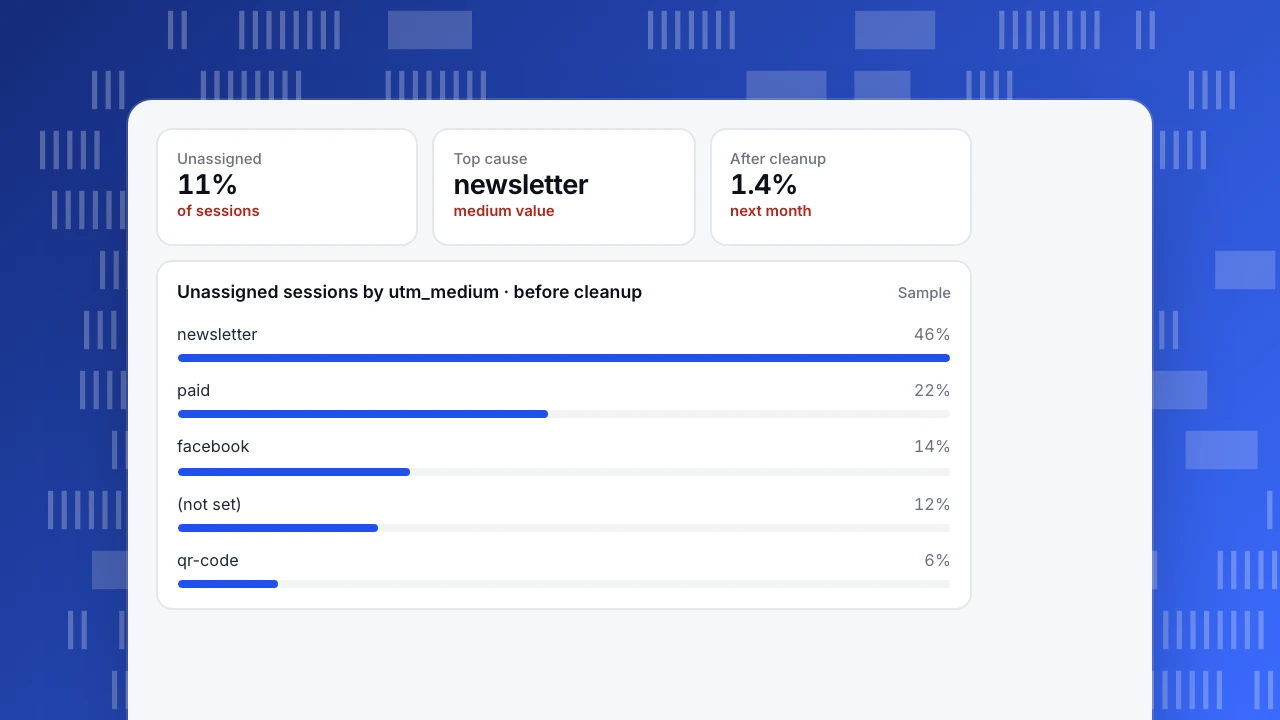
A store sees 11% of sessions as Unassigned. Breaking them down by medium shows five values. newsletter alone is 46%: the email tool had been set to use the list name as the medium. paid (22%) comes from an agency's ads; facebook (14%) from posts tagged with the platform as the medium.
The team changes the email tool to utm_medium=email, sends the agency a naming sheet, and tags QR codes with a single agreed value. A month later, Unassigned is 1.4%.
Past sessions keep their old channel. Add an annotation on the date of the change so trends are read correctly.
Unassigned
11%
of sessions
Top cause
newsletter
medium value
After cleanup
1.4%
next month
Unassigned sessions by utm_medium · before cleanup
SamplePrevent it with a naming standard
- Medium is the type, source is the place.
utm_medium=email&utm_source=newsletter,utm_medium=cpc&utm_source=google. - Use a short list of mediums:
email,cpc,social,paid_social,display,affiliate,referral,qr. - Lowercase everything.
- Share one link builder with everyone who creates campaign links. The free UTM link builder normalises values.
How other tools handle it
Every analytics tool needs rules for sorting traffic. TapCub checks UTM parameters first, then ad click IDs, then the referring host, then whether the hop came from your own site, and counts visits with nothing as direct. Rules you add are checked before the defaults, and you can recompute history after changing them. A clean naming standard pays off whichever tool you use.
FAQ
What is Unassigned traffic in GA4?
Sessions with source information that does not match any of GA4's default channel rules.
Is Unassigned the same as Direct?
No. Direct means there was no source at all. Unassigned means there was a source, but it did not fit a channel.
Can I fix past Unassigned data?
Fixing tags affects new data. Past sessions keep the channel they were given, so note the change date.
Was this article helpful?
We use your answers to fix and expand this page.
Couldn’t send. Please try again in a minute.
Thanks for the feedback. We’ll use it to improve this page.You’ve already sent feedback on this page. Thanks.

Product Experience Specialist
Explores usability, user journeys, and feature adoption through practical examples of onboarding and everyday product use.