Try it on your own data
Every report in this article is in the free plan. One snippet for web and apps, up to 10 sites.
Start free(not set) is the placeholder Google Analytics uses when it has no value for a dimension. It is not an error by itself: some rows will always be missing a value. But a large or growing share usually points to a tagging or configuration problem. This guide shows where it appears, the usual cause in each report and how to reduce it.
What you will learn
- (not set) means a dimension had no value for those rows, not that data was lost
- Each report has its own usual cause; fix them one report at a time
- A few percent is normal; a sudden rise usually follows a tagging or setup change
What (not set) means
When Google Analytics has no value for a dimension, it shows (not set) instead of leaving the row blank. It means "we received data for these rows, but this one field was empty". The sessions, events or revenue still count in the totals.
Some (not set) is normal. A share that is large, or that jumped after a change, is worth fixing because it hides which pages, campaigns or products did the work.
Causes by report
Each report has its own usual reason. The table lists the common ones and what to do about each. The exact cause depends on your setup, so confirm with your own data before changing tags.
| Where it appears | Usual cause | What to do |
|---|---|---|
| Landing page | Session had events but no page view, e.g. it restarted after a timeout or came from a server-side hit | Make sure page views fire first; send session details with server events |
| Source / medium | Events arrived without session source information | Check consent settings and server-side hits carry session context |
| Campaign | Ad clicks without campaign details, or links missing utm_campaign | Link ad accounts, keep auto-tagging on, tag every campaign link |
| Country / city | Location could not be worked out from the IP | Usually small; check for proxies or internal traffic |
| Item name or other custom dimension | Parameter not sent or misspelled | Compare event parameters with your tracking plan |
Exact causes vary by setup. Check your own configuration before changing tags.
How much is normal
There is no official threshold. As a working rule:
- Under a few percent of rows in a report: usually not worth chasing.
- Five to ten percent: look at which pages, devices or dates carry it.
- A sudden rise: almost always follows a change, such as a new consent banner, a tag manager update or server-side events added without session details.
A worked example
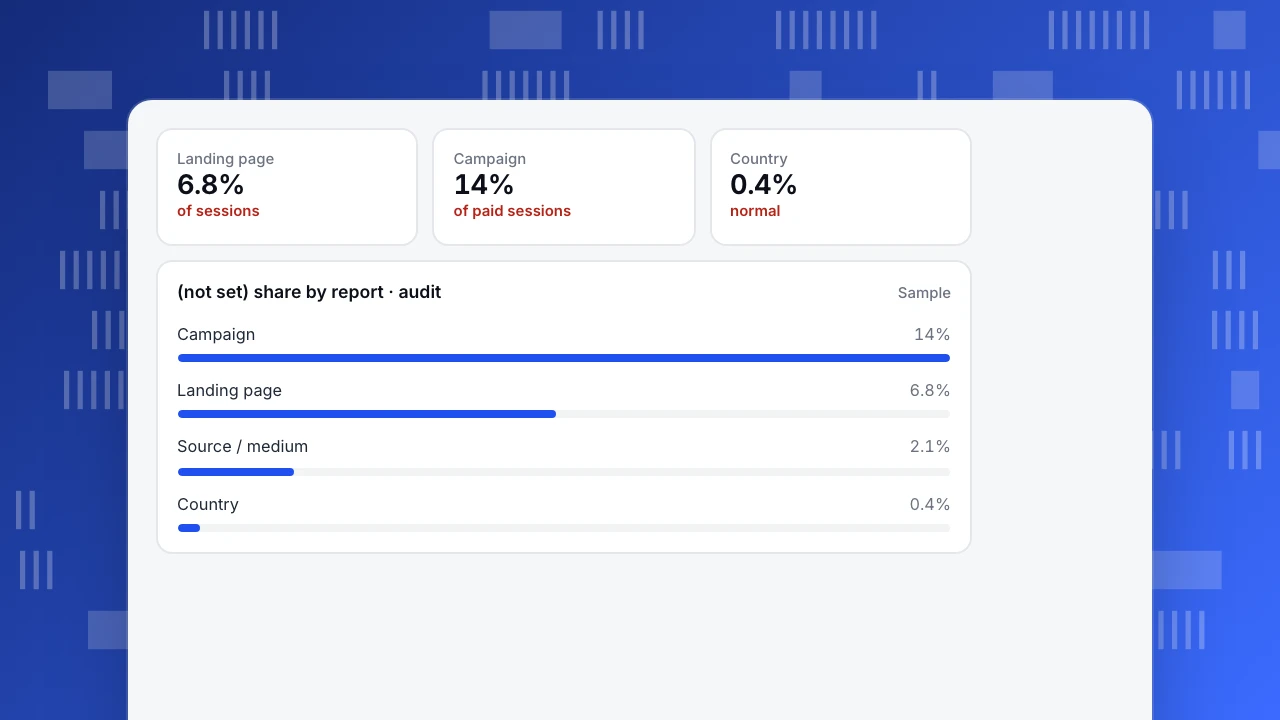
An ecommerce team audits four reports. Country is 0.4% (not set), which is fine. Landing page is 6.8%, mostly sessions that restarted after a long idle period on the checkout page without a fresh page view. Campaign is 14% of paid sessions: some ad links did not carry campaign details because a new ad account had not been linked.
They link the ad account first, since it affects the most revenue, then make sure a page view fires on checkout steps. A month later, campaign (not set) is under 2%.
Landing page
6.8%
of sessions
Campaign
14%
of paid sessions
Country
0.4%
normal
(not set) share by report · audit
SamplePrevent it
- Write a tracking plan with every event and parameter, and check new tags against it. See data quality.
- Tag every campaign link with source, medium and campaign.
- Send page views before other events on each page.
- Include session context with server-side events where your setup supports it.
- Re-check after each release. A short web analytics audit every quarter catches most of it.
How other tools label missing values
Every analytics tool needs a label for missing values. In TapCub, a visit with no referrer, no UTM tags and no click ID is counted as direct, and you can add your own channel rules that take priority over the defaults and recompute history after changing them. Whatever tool you use, the fix is the same: send complete data at the source. See direct traffic for what "no source" usually hides.
FAQ
Does (not set) mean data is lost?
No. The rows are counted in totals; only the value for that dimension is missing.
Why is landing page (not set) in GA4?
Usually a session that has events but no page view, for example one that restarted after a timeout, or events sent from a server without page context.
How do I remove (not set) from reports?
You can filter it out of a view, but that hides the problem. Fix the cause in tagging so future data has the value.
Was this article helpful?
We use your answers to fix and expand this page.
Couldn’t send. Please try again in a minute.
Thanks for the feedback. We’ll use it to improve this page.You’ve already sent feedback on this page. Thanks.

Product Experience Specialist
Explores usability, user journeys, and feature adoption through practical examples of onboarding and everyday product use.