Try it on your own data
Every report in this article is in the free plan. One snippet for web and apps, up to 10 sites.
Start freeOdd referrers with names you have never seen usually mean referral spam. This guide separates its three kinds (ghost hits, crawler visits and scripted browser visits), shows the report signals for each, and the fix that belongs at each layer, from collection allowlists to report filters.
What you will learn
- Ghost spam never touches your site; only a collection allowlist stops it
- Spam referrers bounce, last zero seconds and often land on pages that do not exist
- Collection rules fix new data; use report filters for past periods
What referral spam is
Referral spam (also called referrer spam) is fake traffic that shows a website as its referrer, so the site's name appears in your analytics reports. The goal is usually to make you curious enough to visit it (Wikipedia). It distorts traffic, bounce rate and channel reports, and some of it is not traffic at all.
Three kinds of referral spam
The fix depends on which kind you have:
- Ghost spam: fake hits sent straight to an analytics collection endpoint using your site's tracking id. The spammer never loads your pages, so nothing on your server can block it.
- Crawler spam: a bot requests your pages with a fake referrer header. It shows up in server logs, and in analytics only if the bot runs your script.
- Scripted browser visits: headless browsers that load pages and run scripts, so they look like real visitors with a referrer.
The table lists each kind with its signal and the layer where it can be stopped.
| Kind | How it works | Signal | Where to stop it |
|---|---|---|---|
| Ghost spam | Fake hits sent to the analytics endpoint | Wrong hostname; pages that do not exist | Collection allowlist of your domains |
| Crawler spam | Bot requests pages with a fake referrer | Server logs; bot reports | Bot detection; server blocks |
| Scripted browser visits | Headless browser runs your script | 100% bounce, 0 s, odd user agents | Bot detection; exclusion rules |
| Any kind, past data | Already stored | Spikes from unknown domains | Report filters |
Blocking on the server cannot stop ghost spam.
Spot it in your reports
Spam referrers share a pattern that real referrers rarely do:
- Every session bounces, with zero or near-zero duration.
- Landing pages that do not exist, or the hostname is not yours (ghost hits).
- Referring domains you have never heard of, often with words like "traffic", "seo" or "buttons", sometimes with a different top-level domain each week.
- Spikes on specific days, then silence.
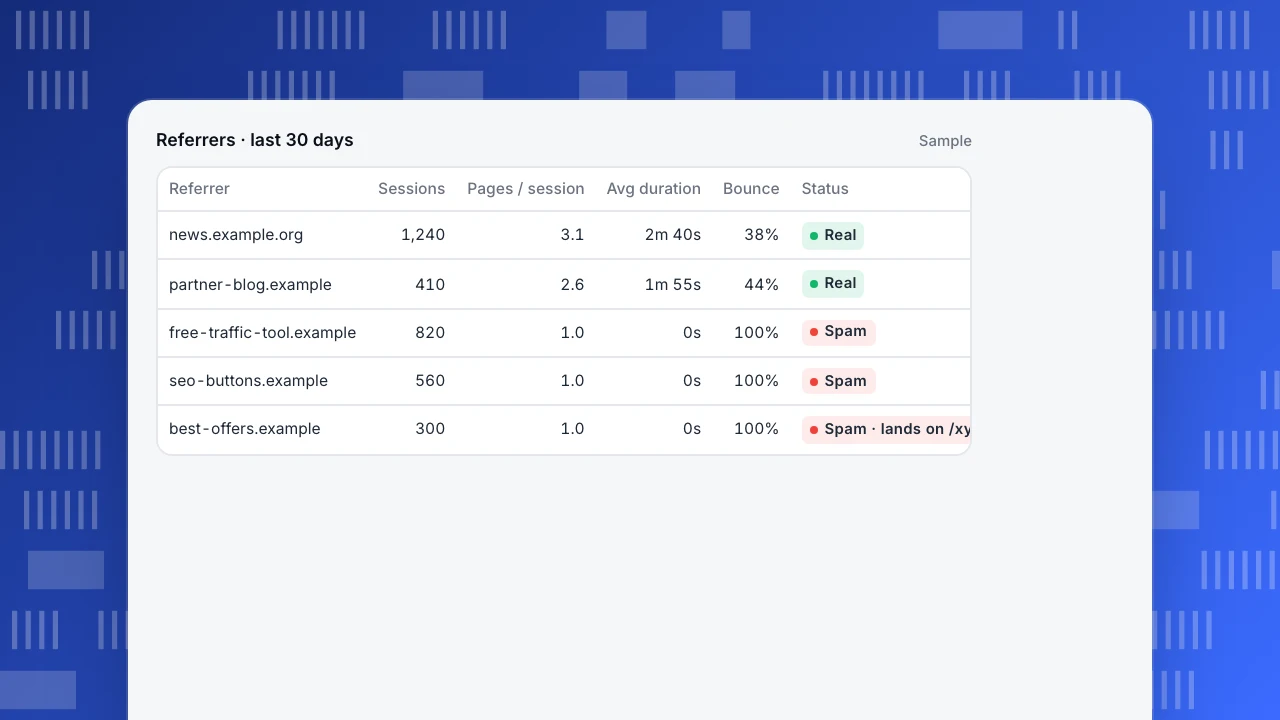
In the example, the first two referrers are real: sessions last minutes and reach several pages. The last three are spam: one page per session, zero seconds, and one lands on a path the site does not have.
Referrers · last 30 days
Sample| Referrer | Sessions | Pages / session | Avg duration | Bounce | Status |
|---|---|---|---|---|---|
| news.example.org | 1,240 | 3.1 | 2m 40s | 38% | Real |
| partner-blog.example | 410 | 2.6 | 1m 55s | 44% | Real |
| free-traffic-tool.example | 820 | 1.0 | 0s | 100% | Spam |
| seo-buttons.example | 560 | 1.0 | 0s | 100% | Spam |
| best-offers.example | 300 | 1.0 | 0s | 100% | Spam · lands on /xyz-promo |
Fix it at the right layer
- At collection: accept hits only from your own domains. Ghost hits come from elsewhere and are rejected before storage. This is the single most effective control.
- Bot detection: separate recognised bots from human reports, so crawler spam does not inflate visitors.
- Exclusion rules: drop hits by hostname, user agent, IP or path when a pattern is clear.
- Report filters: hide a referrer from a report view while you investigate, without deleting data.
- On the server: blocking a crawler's IP or user agent stops server load, but cannot stop ghost spam, which never reaches you.
Avoid one common mistake: do not visit spam domains to "check" them.
Clean the reports you share
Rules that act at collection only affect new data. For past periods, use a saved filter that excludes the spam referrers, and note the date range in anything you share. Compare totals before and after: if spam was a large share, channel percentages and bounce rate shift noticeably. Related: direct traffic, where some spam lands when the referrer is missing, and website visitor tracking.
Referral spam in TapCub
TapCub checks every hit against the project's allowed domains: if the request's origin host (and the page URL host) is not on the list, the event is dropped. The collector still answers 202, so a spammer cannot tell whether the hit was stored (project settings). That stops ghost spam that sends hits with your site key from other origins.
Recognised bots go to the separate Bots report by default, not into human visitors, sessions and pageviews (bots). Exclusion rules drop events by address, path, hostname or user agent, and filters let you narrow any report while you investigate (filters & sharing). To exclude your own team's visits as well, see exclude internal traffic. More on bots and channels.
FAQ
What is referral spam?
Fake traffic that shows a spammer's website as the referrer, so it appears in your analytics reports.
What is ghost spam?
Fake analytics hits sent directly to a collection endpoint with your tracking id, without ever visiting your site.
How do I block referral spam?
Accept hits only from your own domains, separate bots from human reports, and add exclusion rules for clear patterns. Server blocks only help with crawler spam.
Is referral spam harmful?
Mostly to your data: it inflates traffic and bounce rate and pollutes channel reports. Do not visit the referring sites.
Can I remove referral spam from past data?
Collection rules apply to new data. For past periods, exclude the spam referrers with a report filter.
Was this article helpful?
We use your answers to fix and expand this page.
Couldn’t send. Please try again in a minute.
Thanks for the feedback. We’ll use it to improve this page.You’ve already sent feedback on this page. Thanks.

Customer Experience Consultant
Writes about live chat, visitor conversations, and self-service, sharing practical ways to make customer communication clearer and more effective.