Try it on your own data
Every report in this article is in the free plan. One snippet for web and apps, up to 10 sites.
Start freeA product feature is something a product has or does that a customer can notice and use, such as two-way calendar sync. It describes the product; a benefit describes what changes for the customer. Good feature copy starts from the benefit and names the feature as the reason it is true. This guide covers the definition, five types, a one-line formula, and a sample survey that orders a feature list by what customers say made them choose.
What you will learn
- A feature is what the product does; a benefit is what changes for the customer; a requirement is what the team must build — keep the three apart
- Write each feature as [who] can [do what] so that [result], about 20 words, with one verifiable detail instead of an adjective
- Order the list by what customers say made them choose: in the sample, two of five features account for 69.0% of reasons
What is a product feature?
A product feature is something a product has or does that a customer can notice and use: a capability ("syncs with your calendar"), a quality ("loads in under a second") or a design choice ("works one-handed"). It describes the product. A benefit describes what changes for the customer, and an outcome is the result they were after in the first place. Keep the four terms apart, because most weak feature copy is a requirement or a specification wearing a feature's name:
| Term | Describes | Written from | Example (sample scheduling app for small restaurants) |
|---|---|---|---|
| Requirement | What the team must build | The team's view | "Sync must complete within 60 seconds of a calendar change" |
| Feature | What the product does | The product's view | "Two-way calendar sync" |
| Benefit | What changes for the customer | The customer's view | "Shifts you schedule show up in your own calendar, no copying" |
| Outcome | The result they wanted | The customer's goal | "I stop double-booking staff" |
The test: a feature should be something a customer could point at in the product. If you cannot point at it, it is a benefit or an outcome; if only engineers care about it, it is a requirement.
| Term | Describes | Written from | Example |
|---|---|---|---|
| Requirement | What the team must build | Team | Sync completes within 60 seconds |
| Feature | What the product does | Product | Two-way calendar sync |
| Benefit | What changes for the customer | Customer | Shifts show in your own calendar |
| Outcome | The result they wanted | Customer goal | I stop double-booking staff |
Sample product: a made-up scheduling app for small restaurants.
What types of product features exist?
Sorting a list into types shows what you have too much of. Five kinds cover most products:
- Core function — the thing the product is bought for. Scheduling shifts.
- Supporting function — work that makes the core usable. Shift swaps, reminders, report export.
- Quality — how well it performs. Speed, uptime, accuracy, battery life.
- Experience and design — how it feels to use. One-handed use, clear layout, dark mode.
- Service — what surrounds the product. Onboarding help, support hours, a warranty.
The same list can be read as an inventory: a product with twelve supporting functions and no stated quality or service feature is usually described in the language of the team's roadmap, not the customer's decision. Customers decide on a mix. Start the page with the core function and the one quality or service point that reduces risk.
How is a feature different from a benefit?
A feature is what the product does; a benefit is what that means for the person using it. Clayton Christensen and colleagues describe the reason in their jobs-to-be-done framing: customers "hire" a product to help them do a job, and they judge it by how well it does that job, not by its parts list.
Use the "so what?" ladder to move from one to the other. Ask it up to three times:
- Feature: "Two-way calendar sync."
- So what? "Scheduled shifts appear in each person's own calendar."
- So what? "Staff stop asking what time they work."
- So what? "The manager spends less time answering the same question and fewer shifts are missed."
Stop where the answer becomes something the customer would say about their own day. Write the benefit line first and name the feature as the reason it is true. Do not stop at the first rung: "syncs with calendars" is accurate and tells a reader nothing about whether they should care.
How do you write a feature description?
Use one sentence in this shape: [Who] can [do what] so that [result], in about 20 words, with one proof if you have it. The proof can be a number you can verify, a screenshot or a link to the help page, not an adjective.
| Weak (feature as label) | Stronger (benefit first, proof second) |
|---|---|
| Shift swap workflow | Staff swap shifts in two taps and the manager approves from a phone, so a gap is covered the same day. |
| SMS reminders | Everyone gets a text the evening before a shift, which cuts no-shows without a manager chasing. |
| Reports export | Export hours per person to CSV in one click, ready for payroll. |
| Dark mode | Read the rota in a dim kitchen without glare. |
Why short? People read little of what you put on a page. Jakob Nielsen's analysis of browsing data found users read at most about 28% of the words on an average page and more realistically about 20%. A feature line that needs a paragraph is a line most readers skip.
Three rules keep descriptions honest. Name the capability in the customer's words, not internal codenames. Say what it does not do when the limit would change a purchase decision. And do not describe something as a feature if it does not work yet; put it on a roadmap page instead.
In what order should you list features?
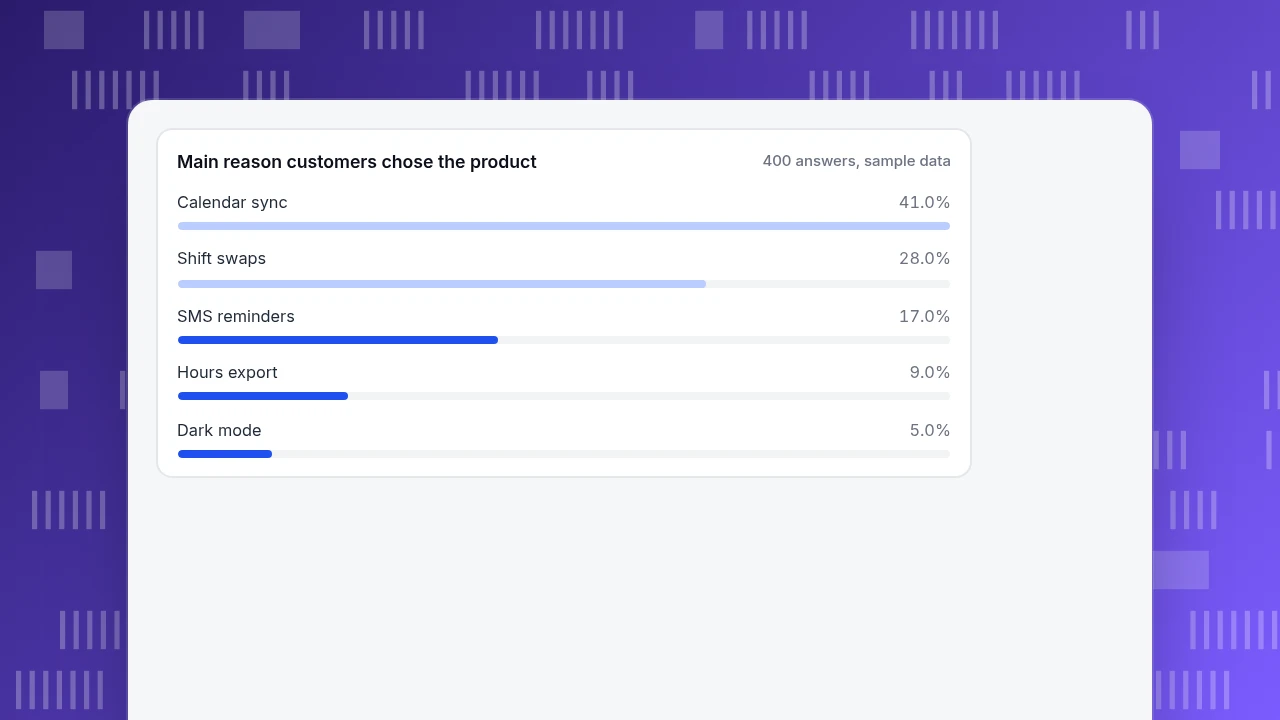
Order by what makes customers choose, not by build order or by how long a feature took. You can measure that with one question at purchase or signup: "What was the main reason you chose us?", single choice.
Sample data: 400 new customers of the sample scheduling app answered:
| Reason chosen | Customers | Share |
|---|---|---|
| Calendar sync | 164 | 41.0% |
| Shift swaps | 112 | 28.0% |
| SMS reminders | 68 | 17.0% |
| Hours export for payroll | 36 | 9.0% |
| Dark mode | 20 | 5.0% |
| Total | 400 |
The first two reasons account for 276 of 400 answers, or 69.0%. So the page leads with calendar sync and shift swaps, gives SMS reminders third billing, and moves export and dark mode to a "more" list. Without that data the likely order would have been the build order, which put dark mode, a recent launch, near the top.
Two cautions. This measures what existing customers say convinced them, which is not the same as what would convince people who did not buy; run the same question on lost deals if you can. And a feature chosen by few people can still be essential to those few — a low share is a reason to demote it on the page, not to remove it.
Main reason customers chose the product
400 answers, sample dataWhat do good product feature examples look like?
Examples across product types show the same pattern: a capability, then the change it makes.
| Product type | Feature | Benefit line |
|---|---|---|
| Scheduling app | Shift swaps | Staff trade shifts themselves and the manager only approves |
| Accounting software | Bank feed matching | Transactions arrive pre-matched, so month-end starts from a clean list |
| Reusable water bottle | Double-wall insulation | Cold drinks stay cold through a workday |
| Mobile app | Offline mode | Field staff keep working without signal and sync later |
| Laptop | 10-hour battery (state the test condition) | A day away from a charger |
| Help desk | Saved replies | Agents answer common questions in seconds with the same wording |
Notice that physical and software features share the structure, and that the claims you can verify (hours of battery, seconds to reply) sit next to a named test condition. A claim with no condition ("long battery life") belongs in the category of adjective.
How are features different from requirements and user stories?
They are the same work seen from different seats. A requirement states what must be true (a testable condition). A user story states who needs what and why ("As a manager I want to approve swaps from my phone so that gaps are covered"). A feature is the shipped capability that satisfies them, named for the customer. If you are writing a roadmap, your list is mostly requirements and stories; if you are writing a page, your list should be features and benefits. Mixing the two is how a marketing page ends up saying "Supports WebSocket reconnection."
For measuring what happens after launch, see feature adoption and product feature analysis; for deciding what to build next, product strategy framework. This article is about the description, which is the part customers read.
Where should the feature descriptions live?
Different pages need different depth:
- Homepage: three features at most, in benefit form, ordered by the table above.
- Pricing page: features only where plans differ; a long identical list is noise.
- Feature page: the benefit line, how it works in three steps, a screenshot, and the limits.
- Changelog or release notes: what changed and who it affects; this is where requirement-style detail belongs.
- Help article: the steps, not the pitch.
A rule of thumb for any list: if every row is a feature and none states a benefit, rewrite the first three rows and test whether the page still reads as a list.
Which mistakes weaken feature copy?
- Listing everything. Twelve equal bullets tell the reader nothing about priority.
- Naming a benefit with no feature. "Save time" is not something a customer can find in the product.
- Adjectives instead of proof. "Powerful," "advanced," "seamless" do not change a decision; a number and a condition do.
- Internal names. If customers never say the term, they cannot search for it.
- Describing the roadmap as the product. Mark unreleased items clearly.
- Never checking use. A feature described well but used by almost nobody is a signal to check whether the description or the feature is wrong.
How to check feature descriptions with TapCub
Take the sample scheduling app: you rewrote the feature lines and want to know whether customers use what the page promises.
- Send a usage event per feature. Define custom events such as
shift_swap_requestedandcalendar_synced, and send them from the app or server. In All-platform analytics › Behavior › Event analysis count the distinct people who did each in a period; divide by active people to get reach per feature. - Read how people reach the feature page. In Web analytics › Pages and Web analytics › Sources see which channels land on the feature page and how many go on to the signup goal in Web analytics › Goals.
- See what visitors click. If autocapture is on (it requires the Pro plan or higher), the Elements tab of All-platform analytics › Behavior › Heatmaps lists the most clicked controls on a page. A feature card that gets clicks and a feature card that gets none are both information about the description.
- Read the questions. If visitors ask in live chat "what does X do?", that is a feature line that failed. Live chat › Reports shows the knowledge-base hit rate, so repeat questions can become a clearer description.
TapCub measures; it does not A/B test the copy for you. Compare periods before and after a rewrite, annotate the change date, and keep the changes small enough to attribute.
FAQ
What is the definition of a product feature?
A product feature is a capability, quality or design choice that a product has and that a customer can notice and use, such as "two-way calendar sync." It describes the product. A benefit describes what changes for the customer, and an outcome is the result they wanted.
What is the difference between a feature and a benefit?
A feature is what the product does; a benefit is what that means for the person using it. Write the benefit first and name the feature as the reason it is true: "Shifts appear in your own calendar" (benefit) because of two-way calendar sync (feature).
What are some examples of product features?
For a scheduling app: shift swaps, calendar sync, SMS reminders. For a bottle: double-wall insulation. For a mobile app: offline mode. Each works best with a benefit line and, where possible, a verifiable detail such as a test condition or a number.
How many features should I list?
On a homepage, three, ordered by what makes customers choose. On a pricing page, only the ones that differ between plans. A complete list belongs on a feature or help page. In the sample, two features accounted for 69.0% of the reasons customers gave.
How do I know which feature to lead with?
Ask new customers one question — "What was the main reason you chose us?" — and count the answers. Lead with the top reasons, and compare with lost deals if you can, since buyers and non-buyers can differ.
Sources
- Christensen, C., Hall, T., Dillon, K. & Duncan, D. Know Your Customers' "Jobs to Be Done". Harvard Business Review, September 2016 — customers "hire" a product to do a job. Read 2026-11-19.
- Nielsen, J. How Little Do Users Read?. Nielsen Norman Group — users read at most 28% and more realistically about 20% of the words on an average page. Read 2026-11-19.
Was this article helpful?
We use your answers to fix and expand this page.
Couldn’t send. Please try again in a minute.
Thanks for the feedback. We’ll use it to improve this page.You’ve already sent feedback on this page. Thanks.

Product Analyst
Focuses on event analysis, conversion funnels, and retention, using clear metric definitions and structured analysis to explain product performance.