Try it on your own data
Every report in this article is in the free plan. One snippet for web and apps, up to 10 sites.
Start freeA premium upsell is an offer to move a user to a higher paid tier at a moment when the extra value is visible, and the trigger decides the conversion: a prompt at a usage limit converted 7.0% of the users who saw it in the sample below, a banner for everyone else 0.5%. Measure each trigger with its own funnel, use a holdout to see how much the prompt really added, and watch 30-day cancellations as a guardrail.
What you will learn
- Prompt on proven intent first (usage limit, locked feature), and use a general banner last
- Report raw and incremental upgrades: in the sample, 126 raw upgrades were only 45 incremental against a holdout
- Track a 30-day cancellation guardrail per prompt, and show price, billing period and cancellation route on the upgrade screen
What is a premium upsell in SaaS?
A premium upsell is an offer to move a user to a higher paid tier at a moment when the extra value is visible to them. In SaaS it usually means one of two moves: a free user upgrading to a paid plan (the freemium case, covered in freemium model), or a paying customer moving to a bigger plan. This guide covers both with one idea: the trigger decides the conversion. An upgrade prompt shown the moment someone hits a limit they care about converts better than a banner shown to everyone, and you can measure the difference.
The reference point is ChartMogul's SaaS Conversion Report (published 4 February 2026, survey run in January 2026), which found a median free-to-paid conversion of 8% across 200 software products, counting leads or free signups who become paying within six months. For standard freemium it calls 3 to 5% good and 8 to 12% great; for ungated freemium, 7 to 9% good. These come from a vendor-run survey, so use them as a rough range, not a target. Users who show buying signals through product behaviour are what a product-qualified lead describes.
Which triggers should prompt an upgrade?
Prompt on behaviour that proves value or friction, not on a calendar. The table lists six triggers with the event that detects each, what the message should say and the one metric to watch.
| Trigger | Signal to detect | What the message says | Metric to watch | Guardrail |
|---|---|---|---|---|
| Usage limit reached | Event when the user hits the free cap | What they just hit and what the next tier removes | Upgrade rate of those who saw the prompt | Dismiss rate; support tickets |
| Locked feature attempted | Event when a free user clicks a premium feature | What the feature does, with a trial or preview | Click-to-paid rate | Users who leave after the click |
| Value moment reached | Event for the "aha" action (for example, third report created) | Next outcome the paid plan enables | Exposure-to-paid rate | Prompt shown too early in the first session |
| Team growth | Invites sent or seats beyond the plan | What shared features or admin controls add | Seats upgraded per account | Accounts that downgrade after upgrade |
| Renewal or anniversary | Date plus recent usage | Usage summary and what a higher tier would add | Upgrade rate at renewal | Cancellation rate at renewal |
| Trial about to end | Trial day and depth of use | What they would lose and what they used | Trial-to-paid rate | Refunds in the first 30 days |
Rule for choosing: start with the trigger where a real event proves intent (limit and locked feature), because the user is already asking for the value. Use a general banner last, for users who hit no trigger; it has the lowest intent.
| Trigger | Signal to detect | Metric to watch |
|---|---|---|
| Usage limit reached | Event when the user hits the free cap | Upgrade rate of those who saw the prompt |
| Locked feature attempted | Event when a free user clicks a premium feature | Click-to-paid rate |
| Value moment reached | Event for the aha action | Exposure-to-paid rate |
| Team growth | Invites sent or seats beyond the plan | Seats upgraded per account |
| Renewal or anniversary | Date plus recent usage | Upgrade rate at renewal |
| Trial about to end | Trial day and depth of use | Trial-to-paid rate |
Each trigger also needs a guardrail, such as dismiss rate, refunds or cancellation rate.
What does trigger-by-trigger conversion look like?
Sample data: a product with 10,000 free monthly active users, a $29 per month paid plan and four prompts. Each free user sees only the first prompt they qualify for, so the four groups do not overlap.
| Trigger | Users shown | Clicked upgrade | Paid | Click rate | Paid rate (of shown) | Paid rate (of clicks) | New MRR |
|---|---|---|---|---|---|---|---|
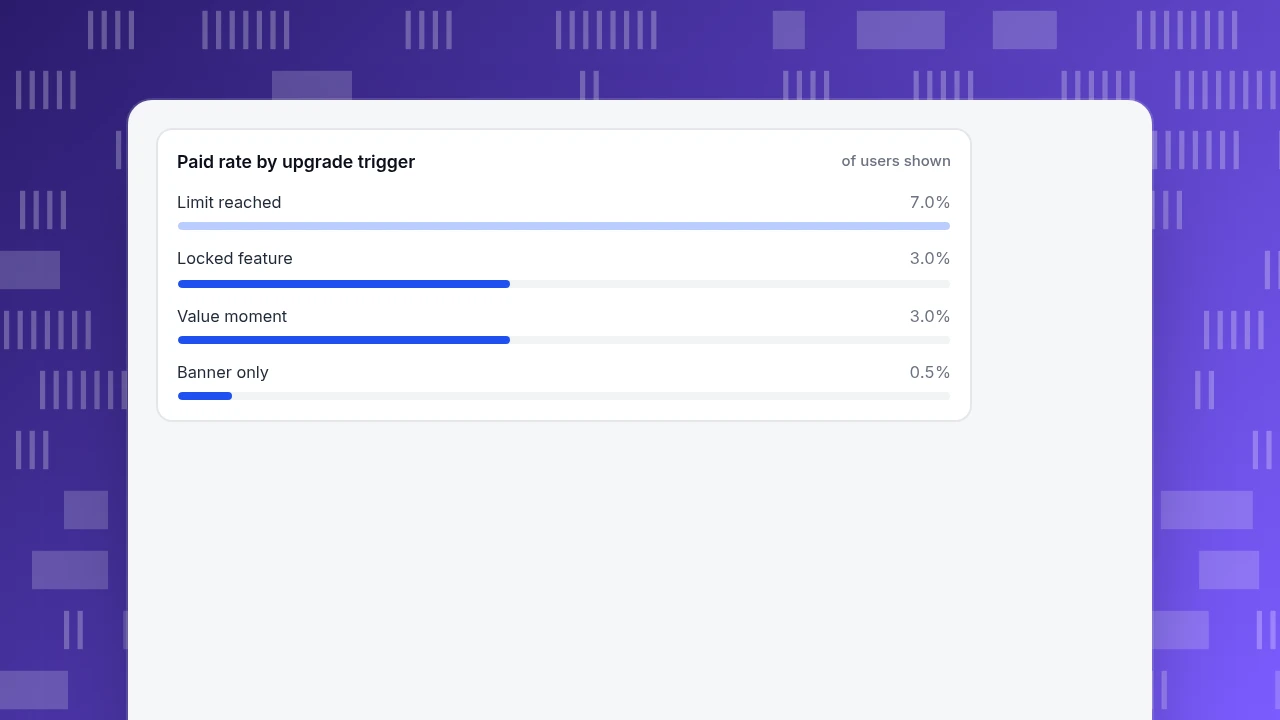
| Limit reached | 1,800 | 306 | 126 | 17.0% | 7.0% | 41.2% | $3,654 |
| Locked feature | 2,400 | 192 | 72 | 8.0% | 3.0% | 37.5% | $2,088 |
| Value moment | 3,000 | 240 | 90 | 8.0% | 3.0% | 37.5% | $2,610 |
| Banner only (hit no trigger) | 2,800 | 56 | 14 | 2.0% | 0.5% | 25.0% | $406 |
| Total | 10,000 | 794 | 302 | 3.02% of 10,000 | $8,758 |
Recompute: 126 ÷ 1,800 = 7.0%; 306 ÷ 1,800 = 17.0%; 126 ÷ 306 = 41.2%; 126 × $29 = $3,654; 1,800 + 2,400 + 3,000 + 2,800 = 10,000 users; 126 + 72 + 90 + 14 = 302 paid, and 302 ÷ 10,000 = 3.02%; 302 × $29 = $8,758. In real data users qualify for several triggers, so assign each to the first one they hit before you add the rows.
Two things stand out. The limit prompt reaches only 18% of free users but produces 42% of paid upgrades (126 of 302). The banner reaches 28% of users (2,800) and produces 5% (14 of 302). The total, 3.02%, sits at the bottom of ChartMogul's 3 to 5% "good" range for freemium, which tells you the programme is reasonable, not that it is finished.
Paid rate by upgrade trigger
of users shownHow much of that did the prompt actually add?
Some users would have upgraded anyway. A holdout group separates the prompt's effect from the user's own intent: keep a small share of eligible users from seeing the prompt.
Sample data for the limit trigger: of 2,000 free users who hit the limit, 200 were held out. Of the 1,800 prompted, 126 paid (7.0%); of the 200 held out, 9 paid (4.5%).
Recompute: incremental rate = 7.0% − 4.5% = 2.5 percentage points; incremental upgrades = 1,800 × 0.025 = 45. So of the 126 paid upgrades, 45 (35.7%) were caused by the prompt, and 81 would have upgraded anyway. Incremental MRR is 45 × $29 = $1,305, not the $3,654 shown in the trigger table. Report both, and decide on the incremental number.
A holdout needs a way to split users. If your prompt tool cannot, split by a stable user attribute, and compare outcomes in your analytics. Without a holdout, treat the raw paid rate as an upper bound.
When and how often should the prompt appear?
Three working rules, to be tested in your own data:
- After value, not before. Show the first prompt after the user has completed the activation action, not in the first session. If the paid rate for users prompted in session one is lower than for those prompted after activation, move it.
- Cap the frequency. Count dismissals per user. A common cap is to stop a given prompt after the user dismisses it a few times, then try another trigger. Pick your cap and check that opt-out and support tickets stay flat.
- One prompt at a time. If two triggers fire together, show the one with the higher paid rate in your trigger table.
Sample data for rule 1: 2,000 users prompted in their first session, 42 paid (2.1%); 2,000 users prompted after the activation action, 68 paid (3.4%). The gap is 3.4% − 2.1% = 1.3 points, or 26 more paying users per 2,000 prompted (68 − 42). If your own comparison looks like that, move the prompt; if the two rates are equal, the timing is not your lever and you should test the message instead.
Copy that fits each trigger, with blanks to fill:
- Limit: "You've used {limit} of {limit}. {Next tier} raises it to {new limit}. Upgrade for {price}."
- Locked feature: "{Feature} is on {tier}. Try it free for {days} days."
- Value moment: "You've built {n} {things}. Teams that do this usually add {paid capability}."
- Team growth: "Your team is at {n} of {seat limit} seats. {Tier} adds {seats and admin controls}."
What are the guardrails against bad upsells?
A higher upgrade rate is not good if it brings cancellations. Track one guardrail metric per prompt, measured over 30 days after the upgrade.
Sample data: 126 users upgraded after the limit prompt; 14 cancelled within 30 days (11.1%). Net retained upgrades = 126 − 14 = 112, and the retained new MRR is 112 × $29 = $3,248. A trigger with a high paid rate and high 30-day cancellation is worth less than its paid rate suggests.
Mind the rules for selling subscriptions in the United States: under the Restore Online Shoppers' Confidence Act, 15 U.S.C. § 8403 bars charging for goods or services sold online through a negative option feature unless the seller clearly discloses the material terms before getting billing information, obtains the consumer's express informed consent before charging, and provides a simple way to stop recurring charges. Put the price, billing period and cancellation route on the upgrade screen. This is not legal advice.
How do you measure this in TapCub?
TapCub measures what users do around the prompt; it does not display the prompt, split users into test and holdout groups or bill anyone. Using the sample above, set it up like this.
- Define the events. In All-platform analytics › Data › Tracking plan, plan the events: for example
limit_reached,upgrade_prompt_view,upgrade_click, with atriggerproperty, plussubscription_started(propertiesplanandmrr) sent from the server. The B2B / SaaS industry pack in All-platform analytics › Business › Industry packs already definessubscription_started,subscription_upgraded,subscription_cancelledandinvite_sent. - Build one funnel per trigger. In All-platform analytics › Behavior › Behavior analysis, make a funnel from the trigger event to prompt view, click and subscription, and filter by the
triggerproperty. This reproduces the trigger table with your own numbers. - Find ready buyers. In All-platform analytics › Users › Segments & tags, create a rule segment of people who did
limit_reachedbut notsubscription_started. Rule segments refresh daily; anonymous visitors have no profile and never enter a segment, so calltapcub.loginafter sign-in. - Watch accounts. For team growth,
tapcub.group('company', 'acme', {...})rolls people up so All-platform analytics › Users › Accounts shows members and 30-day activity per account. - Check retention after the upgrade. Use
subscription_cancelledin the same funnel tool to read the 30-day guardrail, and keep the holdout in whatever tool shows the prompt: TapCub does not split traffic or run experiments.
FAQ
What is a premium upsell?
It is an offer to move a user to a higher paid tier at a moment when the extra value is visible, such as after hitting a usage limit or trying a locked feature. It covers free users upgrading and paying customers moving to a bigger plan.
When should you show an upgrade prompt?
After the user has experienced value or hit friction: at a usage limit, when attempting a locked feature or after the activation action. Avoid the first session and avoid prompting everyone at once; test paid rate by timing.
What is a good free-to-paid conversion rate?
ChartMogul's 2026 report finds a median of 8% across 200 products within six months of signup, with 3 to 5% good and 8 to 12% great for standard freemium. It is a vendor survey, so treat it as a range and compare with your own history.
How do you measure whether an upsell prompt works?
Compare paid rate for users who saw it with a holdout who did not. In the sample, 7.0% against 4.5% means 2.5 points were caused by the prompt, so only 45 of 126 upgrades were incremental. Also check 30-day cancellations.
Are upsells legal?
Selling is legal, but online subscription sales in the US must follow rules on disclosing terms, getting express informed consent before charging and easy cancellation. Check which rules apply to you with counsel.
Sources
- ChartMogul. The SaaS Conversion Report — 200 products, 8% median free-to-paid within six months, freemium ranges; published 4 February 2026. Verified 2026-11-20.
- Legal Information Institute (Cornell Law School). 15 U.S.C. § 8403, Restore Online Shoppers' Confidence Act — disclosure, express informed consent and simple cancellation for negative option sales. Verified 2026-11-20.
Was this article helpful?
We use your answers to fix and expand this page.
Couldn’t send. Please try again in a minute.
Thanks for the feedback. We’ll use it to improve this page.You’ve already sent feedback on this page. Thanks.

Product Analyst
Focuses on event analysis, conversion funnels, and retention, using clear metric definitions and structured analysis to explain product performance.