Try it on your own data
Every report in this article is in the free plan. One snippet for web and apps, up to 10 sites.
Start freeAn onboarding questionnaire is a short set of questions after sign-up that routes each new user to a matching first experience. Keep a question only if its answers lead to different screens and predict activation: in the sample below the goal question separates 50.0% from 15.0% activation, while the team-size question separates only 38.0% from 39.7%, so it goes.
What you will learn
- Test every question with: if the answer is A the user sees X, if B they see Y
- Keep a question when best and worst answers differ by at least 10 activation points with at least 100 users each
- Net the gain against the completion cost: in the sample, +90 activations against 15.5 lost is +74.5
What an onboarding questionnaire is for
An onboarding questionnaire is a short set of questions shown to a new user (or a new client) right after sign-up, so that the first minutes of the product can be shaped around who they are and what they came to do. This article is about the product and SaaS version: questions that segment users and route onboarding. (Client intake forms for agencies and HR new-hire surveys are different documents with different goals.)
The test for every question is one sentence: "If the answer is A the user sees X; if it is B the user sees Y." If you cannot finish that sentence, you are collecting data nobody will use, and every extra question costs completions. For the wider onboarding process see the onboarding flow and user onboarding; this guide covers only the questionnaire inside it.
How many questions to ask: what the evidence says
Each question has a price. Two public data points give the scale:
- The Baymard Institute's 2024 benchmark of checkout flows found an average of 11.3 form fields, while most sites need only about 8. A questionnaire is a form, so every extra question is another chance to lose the user.
- A SurveyMonkey analysis of 100,000 surveys (2,000 for each length from 1 to 50 questions) found that the sharpest increase in drop-off comes with each extra question up to 15 questions, and the rate rises more slowly after that.
Neither study is about product onboarding, so treat them as a direction, not a forecast: the first few questions cost the most per question, and the cheapest question is the one you do not ask. A workable default is one to three questions, each one answerable by tap or click, with the option to skip.
| Question type | Effort for the user | Use for |
|---|---|---|
| Single choice with 3–5 options | Low | Goal, role, experience |
| Multiple choice | Medium | Data sources, tools in use |
| Free text | High | Almost never at sign-up; move it to a later moment |
Which questions to ask: from question to route
Start from the routes you can actually build, then ask only what chooses between them. A route is a different first screen, checklist, template or message.
| Question | Answers | Route you show | What to record |
|---|---|---|---|
| What do you want to do first? | Track website traffic / Add live chat / Analyse product usage / Not sure | A matching first-run checklist | goal |
| What is your role? | Marketer / Developer / Founder / Other | Marketer: reports first; developer: install steps first | role |
| How much have you done this before? | New to it / Some experience / Expert | Guided tour or a short version | experience |
| Where will you use it? | Website / App / Both | Web snippet or SDK instructions | platform |
| Who else needs access? | Just me / My team | Invite step shown early or later | team_size_band |
Rules that keep the list short:
- One question per route decision. If two questions lead to the same screen, drop one.
- Prefer questions about intent over identity. What the user wants to do first predicts the next step better than who they are.
- Always offer "Not sure". It sends the user to a default route and tells you how many people arrive without a goal.
- Never collect what you can infer. Country, device and browser come from the visit itself.
- Do not ask for personal data you will not use. Free-text answers can contain personal data; keep them out of analytics events.
Does the question actually segment? A worked example
A question earns its place only if the answers predict something you care about, such as activation (the user completing the first meaningful action). Sample data: 2,000 sign-ups in a month, two questions, activation within 7 days.
Question 1, goal
| Answer | Sign-ups | Activated | Activation rate |
|---|---|---|---|
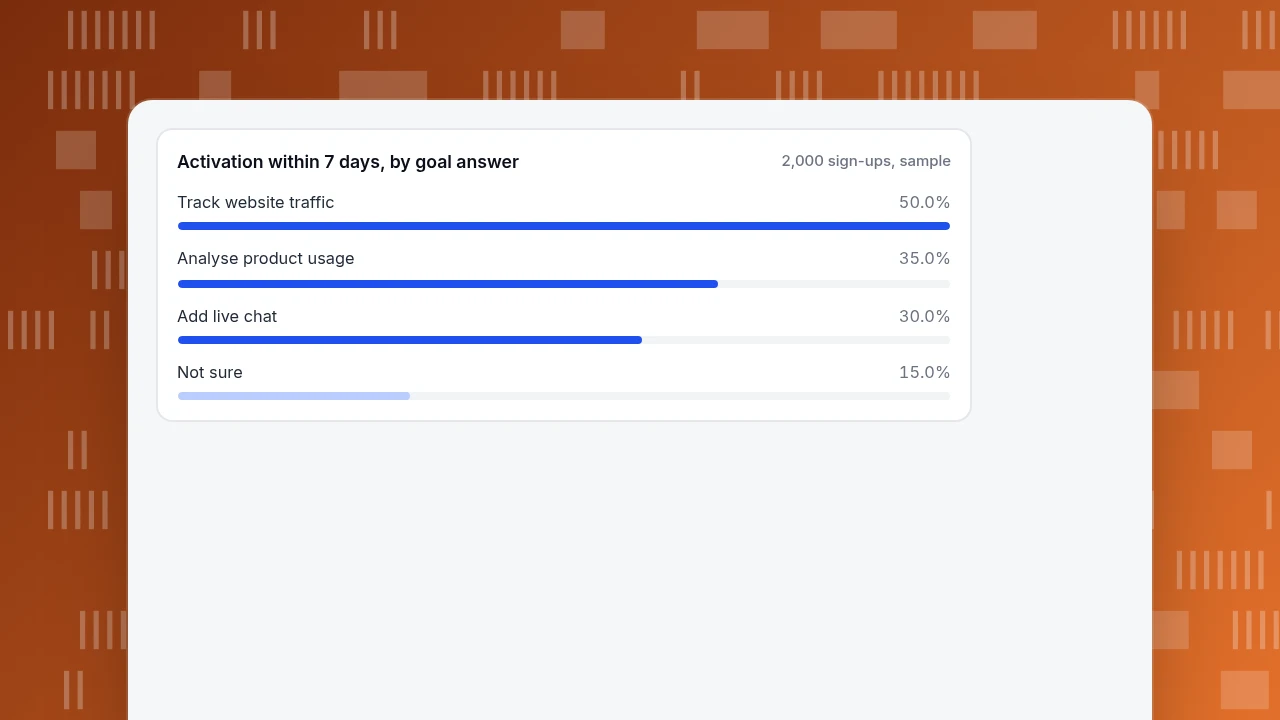
| Track website traffic | 900 | 450 | 50.0% |
| Add live chat | 400 | 120 | 30.0% |
| Analyse product usage | 500 | 175 | 35.0% |
| Not sure | 200 | 30 | 15.0% |
| All | 2,000 | 775 | 38.75% |
Question 2, team size
| Answer | Sign-ups | Activated | Activation rate |
|---|---|---|---|
| Just me | 1,100 | 418 | 38.0% |
| My team | 900 | 357 | 39.7% |
| All | 2,000 | 775 | 38.75% |
The goal question separates 50.0% from 15.0%, a gap of 35 points, and the two-proportion test (z = 9.0) says that is not noise. The team-size question separates 38.0% from 39.7%, a gap of 1.7 points (z = −0.76), which is within what chance produces at these sizes. Keep question 1 and drop question 2: it routes nobody to a different experience and still costs completions. (The test used is the two-proportion z-test described in the NIST/SEMATECH e-Handbook.)
A rule that works in practice: keep a question if the best and worst answers differ by at least 10 points of activation and each answer group has at least 100 users.
Activation within 7 days, by goal answer
2,000 sign-ups, sampleIs the question worth its completion cost?
Even a segmenting question has to pay for itself. Continue the sample, with two assumptions you should replace with your own:
- Showing the goal question makes 2% of sign-ups leave onboarding without answering: 0.02 × 2,000 = 40 users. Those users activate at the overall rate, 38.75%, so the cost is 40 × 38.75% = 15.5 activations.
- Routing helps: the 1,800 users who gave a concrete goal activate 5 points more often when they see a matching checklist: 1,800 × 5% = 90 activations.
Net gain: 90 − 15.5 = 74.5 activations, or 74.5 ÷ 2,000 = 3.7 points of activation. If routing helped by only 1 point, the gain would be 18 − 15.5 = 2.5, close to zero; at 0.5 points it turns negative. Measure the uplift with a before-and-after period or a holdout before you decide a second question is worth it.
| Check | Keep the question if | Sample result |
|---|---|---|
| Route exists | Each answer leads to a different screen or message | Goal: yes; team size: no |
| Activation gap | Best and worst answers differ by 10+ points | Goal 35 points; team size 1.7 |
| Group size | Each answer has 100+ users | Smallest group 200 |
| Net gain | Gain exceeds lost completions | +74.5 activations |
Rules of thumb to adjust to your own volumes; confirm uplift with a holdout or before-and-after period.
Write the question and its answers
Wording decides whether people answer and whether the answer is usable.
| Weak version | Better version | Why |
|---|---|---|
| "Tell us about your goals" (free text) | "What do you want to do first?" with four buttons | Concrete and answerable in one tap |
| A role list with ten options | Four roles plus "Other" | Three to five options keep the choice fast |
| "How experienced are you?" (1 to 5) | "Have you used a web analytics tool before?" Yes or No | A factual question beats a self-rating |
| "What is your company size?" with no route attached | Skip it, or ask it later when pricing or invites need it | Without a route the answer is unused |
Timing matters as much as wording. Ask before the first screen only when the answer chooses that screen. If the answer only affects a later step, ask when the user reaches it, so the questionnaire feels like part of the work rather than a gate in front of it.
Common mistakes in onboarding questionnaires
- Questions with no route. Asking company size and then showing everyone the same screen.
- No "Not sure" or "Skip". Forced answers produce false data and angry users.
- Free-text fields at sign-up. Low completion and often personal data you did not need.
- Too many questions on one screen. Show one at a time on mobile.
- Changing answer options without versioning. If "Marketer" becomes "Marketing" in March, April's segment is not March's. Keep stable answer codes (
marketer) and change only the label. - Treating answers as facts. Stated goals are intent. Compare them with what users then do.
- Not reading the results. If nobody checks activation by answer after a month, delete the questionnaire.
Measure the questionnaire in TapCub
TapCub does not run questionnaires or surveys; it measures what happens around yours. Take the sample above and follow these steps.
- Plan the event. In All-platform analytics › Data › Tracking plan, add an event such as
onboarding_answeredwith propertiesquestionandanswer. Event names are snake_case; one browser event keeps at most 20 properties and cuts string values at 200 characters, so send stable answer codes, not free text. - Send it from your own form. When the user answers, call
tapcub.track('onboarding_answered', {question: 'goal', answer: 'traffic'}). After login,tapcub.loginties the answers to the person, so they appear in All-platform analytics › Users › People with a timeline. - Check it arrives. Open the tracking plan's real-time validation (last 24 hours) to see arrivals and required-property completeness for each answer.
- Make a segment per answer. In All-platform analytics › Users › Segments & tags, create a rule segment for people who did
onboarding_answeredwithanswerequal totraffic, and one for each other answer. Anonymous visitors have no profile and are not in segments, so identify users first. - Compare activation. In All-platform analytics › Behavior › Behavior analysis, run a funnel from sign-up to your activation event and bring each segment in as a group. The rates should match your own table: 50.0%, 30.0%, 35.0% and 15.0% in the sample.
TapCub shows which answers lead to activation; the routing itself (showing a different screen) lives in your product.
FAQ
What should an onboarding questionnaire ask?
Ask only questions whose answers change what the user sees next, most often their goal, role, experience and platform. Test each with "if the answer is A the user sees X". If you cannot finish that sentence, the question collects data nobody will use.
How many questions should an onboarding questionnaire have?
One to three is a safe default. Benchmarks suggest costs per question are highest early: Baymard finds the average checkout form has 11.3 fields when about 8 are enough, and SurveyMonkey's data shows drop-off climbing fastest up to about 15 questions. Make each question answerable in one tap and skippable.
How do I know if a question segments users?
Split sign-ups by answer and compare activation. In the sample the goal question separated 50.0% from 15.0% (z = 9.0), while team size separated 38.0% from 39.7% (z = −0.76). Keep questions whose best and worst answers differ by at least 10 points with at least 100 users per answer.
Should the onboarding questionnaire be skippable?
Yes. A skip button and a "Not sure" option prevent false answers and show you how many users arrive without a goal. Send those users to a sensible default route and check their activation separately; in the sample it was 15.0%.
Can I use free-text answers?
Rarely at sign-up. Free text has low completion, is hard to segment and can contain personal data. Ask it later, once the user has seen value, and keep answers out of analytics events; send a code for the choice instead.
Sources
- Baymard Institute. Checkout Flow: Average Form Fields — 11.3 average fields in 2024, most sites need about 8. Checked 2026-11-22.
- SurveyMonkey. Survey questions and completion rates — 2,000 surveys for each length from 1 to 50 questions; sharpest drop-off up to 15 questions. Checked 2026-11-22.
- NIST/SEMATECH e-Handbook of Statistical Methods. 7.3.3 How can we determine whether two processes produce the same proportion of defectives? — the two-proportion test used in the example.
- TapCub documentation: Tracking plan, Events and properties, People, Segments. Checked 2026-11-22.
Was this article helpful?
We use your answers to fix and expand this page.
Couldn’t send. Please try again in a minute.
Thanks for the feedback. We’ll use it to improve this page.You’ve already sent feedback on this page. Thanks.

Technical Engineer
Focuses on tracking code, SDKs, and API integrations, with practical guidance on implementation checks and troubleshooting.