Try it on your own data
Every report in this article is in the free plan. One snippet for web and apps, up to 10 sites.
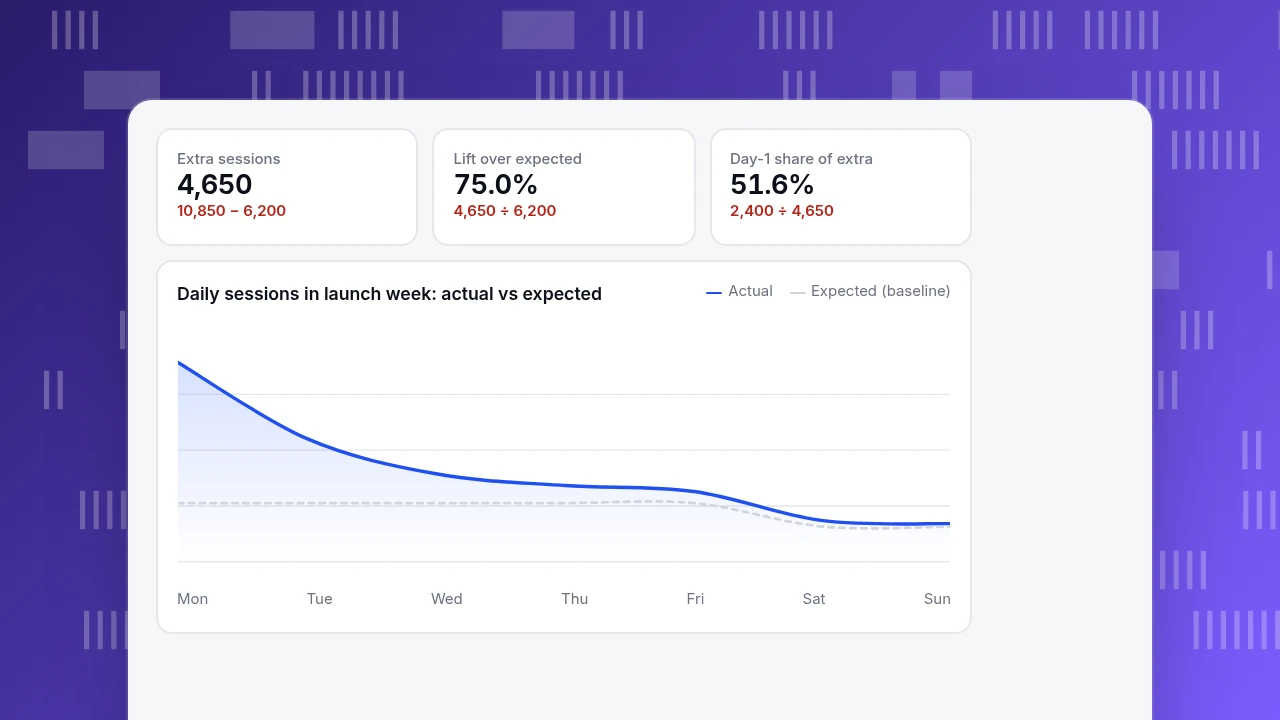
Start freeA new product announcement tells a defined audience what you launched, who it is for, why it matters now and what to do next, in five parts and one call to action. Write it once as a skeleton and adapt it for email, changelog, social, in-app and blog. Then measure it: tag every link with one campaign name, compute an expected baseline and compare. In the sample below the launch week brought 75.0% more sessions than expected.
What you will learn
- Five parts: what it is, who it is for, why now, how to try it, one call to action
- Tag every link with one utm_campaign before publishing, or email and social both land in direct
- Judge the whole week against a baseline: the first day was 51.6% of the extra traffic in the sample
What is a new product announcement?
A new product announcement is a short, specific message that tells a defined audience what you launched, who it is for, why it matters now and what to do next. It is not one document: the same launch usually becomes a blog post, a customer email, a changelog entry, a social post and an in-app message, each written for a different reader with a different amount of attention.
A reliable skeleton for every version has five parts:
- What it is, in one plain sentence without internal code names.
- Who it is for, so the wrong readers can stop reading.
- Why now, the problem it removes or the change it makes.
- How to try it, a link or a step, not "learn more".
- One call to action. Two compete.
Most advice stops at the writing. This guide adds the other half: setting up measurement before you publish, so a week later you can say how much traffic and how many sign-ups the announcement produced instead of guessing. For the planning side, see product launch plan; for the email in particular, see product launch email.
Templates by channel
Replace the square brackets. Each one fits the reader's attention: a changelog entry is a line, an email is a short note, a blog post is the full story.
Customer email (subject and body)
Subject: [PRODUCT] now does [BENEFIT] Hi [NAME], we've added [FEATURE], so you can [WHAT THE USER CAN NOW DO] without [OLD PAIN]. It's available on [PLANS] today. [One-sentence example.] Try it here: [LINK]. [SIGN-OFF]
Changelog entry
[DATE] — New: [FEATURE]. [One sentence on what changed and who it affects.] [Link to help page.]
Social post
New: [FEATURE] lets you [BENEFIT]. [One concrete detail or number.] [LINK]
In-app message
[FEATURE] is here. [Five words on the benefit.] [Button: Try it]
Blog post outline
- Headline with the benefit, not the feature name.
- The problem, in the reader's words (two sentences).
- What is new, with one screenshot or short clip.
- How it works in three steps.
- Who gets it and when.
- What is next, if you have a date you will keep.
Rules that apply to all five: say what changed in the first line, use one verb the reader can act on ("try", "turn on", "read"), and never announce something that is not yet available without a date.
For the changelog format in more depth, see release notes examples.
If the announcement is an email: the legal minimum
A promotional announcement email to customers is commercial email in the US, and the FTC's CAN-SPAM guide lists eight requirements: accurate header information, honest subject lines, a clear disclosure that the message is an advertisement, a valid physical postal address, an explanation of how to opt out, honouring opt-outs, and responsibility for what a third party sends for you (FTC, CAN-SPAM Act: A Compliance Guide for Business). Two numbers matter operationally: opt-outs must be honoured within 10 business days, and the opt-out mechanism must work for at least 30 days after you send. Each separate email in violation can bring penalties of up to $53,088.
Purely transactional messages (an invoice, a password reset) are treated differently, but a product announcement is marketing, so include the address and an opt-out link even to existing customers. Other countries have their own rules, so check where your readers are.
Set up measurement before you publish
You can only measure an announcement's impact if you can tell its traffic apart. Tag every link you control.
Google Analytics documents nine UTM parameters and says that whenever you add parameters you should always use utm_source, utm_medium and utm_campaign; missing ones produce "(not set)" values in reports, and values are case sensitive, so utm_source=google is different from utm_source=Google, which is why lowercase is recommended (Google Analytics Help, Collect campaign data with custom URLs). A naming table you can copy:
| Where the link lives | utm_source | utm_medium | utm_campaign |
|---|---|---|---|
| Customer email | newsletter | 2026-11-launch | |
| Social post | social | 2026-11-launch | |
| In-app banner | app | in-app | 2026-11-launch |
| Partner or press post | partner-name | referral | 2026-11-launch |
| Changelog | changelog | owned | 2026-11-launch |
Keep one utm_campaign for the whole launch so the channels add up, and use the source and medium to split them. A tagged link looks like https://example.com/new?utm_source=newsletter&utm_medium=email&utm_campaign=2026-11-launch. The background is in UTM glossary and name UTM parameters.
Also decide the goal before launch: sign-up, trial start, demo request, or reading the help page. One sentence, written down, and the event or page that counts as it.
| Where the link lives | utm_source | utm_medium | utm_campaign |
|---|---|---|---|
| Customer email | newsletter | 2026-11-launch | |
| Social post | social | 2026-11-launch | |
| In-app banner | app | in-app | 2026-11-launch |
| Partner or press post | partner-name | referral | 2026-11-launch |
Use lowercase: values are case sensitive and missing ones show as (not set).
Work out the baseline before the announcement
Impact is the difference between what happened and what would have happened without the launch, so you need an estimate of the second. A simple baseline:
- Take the 14 days before launch, excluding any day that had another campaign or outage.
- Calculate the average for each type of day: weekdays and weekends, because most sites have a weekly pattern.
- For each day after launch, the expected value is the average of the same type of day.
- Impact on a day = actual − expected. Add up the days in your window.
Mark the launch on your charts so a later reader can see why a line moved, and note other things that happened the same week.
A worked example: one launch week
Sample data: a site normally gets 1,000 sessions on a weekday and 600 on a weekend day, and launches on a Monday. Sessions for the launch week:
| Day | Actual | Expected | Extra |
|---|---|---|---|
| Mon | 3,400 | 1,000 | 2,400 |
| Tue | 2,100 | 1,000 | 1,100 |
| Wed | 1,500 | 1,000 | 500 |
| Thu | 1,300 | 1,000 | 300 |
| Fri | 1,200 | 1,000 | 200 |
| Sat | 700 | 600 | 100 |
| Sun | 650 | 600 | 50 |
| Total | 10,850 | 6,200 | 4,650 |
Expected = 5 × 1,000 + 2 × 600 = 6,200. Lift = 4,650 ÷ 6,200 = 75.0% over expected. The first day accounts for 2,400 ÷ 4,650 = 51.6% of the extra traffic, and Tuesday's extra is 1,100 ÷ 2,400 = 45.8% of Monday's, so the effect fades fast. Judge an announcement over the whole week, not on launch day alone.
By channel, using the campaign tag:
| Channel | Extra sessions | Share of extra |
|---|---|---|
| Email (tagged) | 2,000 | 43.0% |
| Social (tagged) | 1,100 | 23.7% |
| Partner and press | 650 | 14.0% |
| Direct | 700 | 15.1% |
| Other | 200 | 4.3% |
| Total | 4,650 | 100.0% |
Email and social give two thirds of the lift (3,100 of 4,650, 66.7%), and 700 extra direct sessions probably include people who saw a post and typed the address. Tags make that attribution possible; without them, the whole lift would look like "direct".
Now the result that matters. At the 2.0% baseline sign-up rate, 6,200 expected sessions would have produced 6,200 × 2.0% = 124 sign-ups. The week produced 232 sign-ups (232 ÷ 10,850 = 2.14% overall). The incremental sign-ups are 232 − 124 = 108, from 4,650 extra sessions, an incremental rate of 108 ÷ 4,650 = 2.3%. The announcement brought traffic that converted slightly better than usual, which is worth knowing and worth checking for another launch.
Extra sessions
4,650
10,850 − 6,200
Lift over expected
75.0%
4,650 ÷ 6,200
Day-1 share of extra
51.6%
2,400 ÷ 4,650
Daily sessions in launch week: actual vs expected
ActualExpected (baseline)Read decay and quality, not just the spike
- Decay: if the extra falls by half or more each day, plan follow-up posts at day 3 and day 7 to catch late readers; if it holds, the channel is working.
- Quality by channel: compare engaged-session rate and sign-up rate for each tagged source. A channel with plenty of sessions and no sign-ups is entertainment, not a launch channel.
- New vs existing users: an announcement to your own customers mostly drives existing users to try the feature; count feature use, not only visits.
- Bots: launch days attract crawlers and link previews. Make sure the human count is what you are comparing.
Common mistakes
- Counting launch-day sessions as the impact without subtracting the baseline. A Monday spike over a quiet Sunday exaggerates the lift.
- Untagged links, so email and social both land in "direct".
- Changing the campaign name per channel, so the totals never add up.
- Measuring only visits. Visits without a goal are vanity.
- Announcing before the feature is available, which wastes the spike.
- Forgetting an opt-out and a physical address in the announcement email.
- Ignoring other events in the same week, such as a holiday or another campaign.
Measure the announcement in TapCub
Take the launch week above. TapCub does not write or send the announcement; it measures what happened after the click.
- Before launch, put UTM tags on every link you control, then open Web analytics › Sources to see the campaign broken down by source and medium, with sessions and conversions for each.
- Define the goal in Web analytics › Goals (an event or a page counts as a conversion). It is the same data as All-platform analytics › Business › Goals.
- On launch day, watch Web analytics › Realtime. Recognised bots are counted separately in Web analytics › Bots, so link-preview crawlers do not inflate the human numbers.
- Add a marker in Configuration › Annotations for the launch, and for any other campaign that week, so a later reader sees why the line moved.
- After a week, compare the daily sessions with your expected values and check each source's conversion. To brief stakeholders, share a read-only link from Configuration › Settings › Public sharing, with an optional password and limits on how many days are visible.
TapCub does not do the baseline arithmetic for you in one click: compute expected values from the 14 days before as shown above, then compare. Keep the campaign tag the same across all channels, so the totals tie.
FAQ
What should a new product announcement include?
What it is, who it is for, why it matters now, how to try it and one call to action. Make the first line say what changed, and give a link or a step instead of "learn more".
How do you write a product announcement email?
A short subject with the benefit, two or three sentences on what the user can now do, one example and one link. Include your physical address and an opt-out link, since a promotional announcement email is covered by the FTC's CAN-SPAM rules in the US.
How do you measure the impact of a product announcement?
Tag every link with the same utm_campaign, estimate expected traffic from the 14 days before using the same day types, and compare actual with expected over the whole week. Then compare each channel's conversion to your goal.
How long does a product announcement keep driving traffic?
It depends on the channel; in the sample, the extra traffic fell from 2,400 sessions on Monday to 50 on Sunday, with the first day producing 51.6% of the week's extra. Measure your own decay and plan follow-ups accordingly.
Where should you announce a new product?
Where your audience already reads: your email list, your blog or changelog, social accounts, and in-app messages for existing users. Tag each so you can compare them afterwards.
Sources
Was this article helpful?
We use your answers to fix and expand this page.
Couldn’t send. Please try again in a minute.
Thanks for the feedback. We’ll use it to improve this page.You’ve already sent feedback on this page. Thanks.

Product Experience Specialist
Explores usability, user journeys, and feature adoption through practical examples of onboarding and everyday product use.