Try it on your own data
Every report in this article is in the free plan. One snippet for web and apps, up to 10 sites.
Start freeGood release notes say what changed for the reader in the first line, group items by type, show the date and version and put breaking changes in their own entry. Bad ones are either empty ("bug fixes and improvements") or a commit log. In the sample, a benefit-first format got a 3.1% click rate against 1.2% for the vague one.
What you will learn
- Write the first line for the reader: what they can do now or no longer suffer
- Group by type (Added, Changed, Deprecated, Removed, Fixed, Security) and show an ISO 8601 date
- Test formats: in the sample, benefit-first notes got 3.1% clicks, 2.6 times the vague notes at 1.2%
What release notes are for
Release notes tell a user three things in order: what changed, whether it affects them and where to get details. A good example does all three in the first two lines. A bad one is either empty ("bug fixes and improvements") or a dump of everything the team did, leaving the reader to guess which line is theirs.
The format matters more than the volume. Nielsen Norman Group found that 79% of test users always scanned new web pages and only 16% read word by word, so release notes are skimmed. Apple's App Store Connect requires a "What's New in This Version" text for every version after the first, up to 4,000 characters, but the limit is a ceiling, not a target. This article shows annotated bad and good examples, a format comparison on sample data and a checklist. For the launch email that often accompanies a release, see product launch email; for how version numbers signal change, app versioning.
The anatomy of release notes that people read
The Keep a Changelog convention, written for open-source projects but useful anywhere, gives a short rule set. Changelogs are for people, not machines. Every version gets an entry. Similar changes are grouped. Versions and sections are linkable. The latest version comes first and each shows its release date, in ISO 8601 (year-month-day, such as 2026-11-21) to avoid confusion with regional formats. It also names six types of change.
| Type | Use it for | Reader question it answers |
|---|---|---|
| Added | New features | What can I do now? |
| Changed | Changes to existing behaviour | What works differently? |
| Deprecated | Features that will go away soon | What should I stop using? |
| Removed | Features that are gone | What broke for me? |
| Fixed | Bug fixes | Was my problem solved? |
| Security | Vulnerabilities | Do I need to update now? |
Use those six as headings when a release has more than a few items. For a consumer app, you may fold them into "New" and "Fixed", but keep the grouping.
| Type | Use it for | Reader question |
|---|---|---|
| Added | New features | What can I do now? |
| Changed | Changes to existing behaviour | What works differently? |
| Deprecated | Features that will go away soon | What should I stop using? |
| Removed | Features that are gone | What broke for me? |
| Fixed | Bug fixes | Was my problem solved? |
| Security | Vulnerabilities | Do I need to update now? |
The six change types from Keep a Changelog 1.1.0.
Bad example 1: the empty promise
"Bug fixes and performance improvements."
What is wrong. It says nothing a reader can use. It does not tell them whether the bug they hit is gone, so it gives no reason to update and no reason to trust the next set of notes. Every release looks the same.
Fix. Name at least the most visible fix and its effect: "Fixed: photos no longer rotate when you upload from an iPhone." If a release has only invisible changes, say so in one honest line: "No visible changes: under-the-hood stability work."
Bad example 2: the commit log
"Refactor auth middleware. Bump deps. Merge PR #412 (fix-null-check). Update CI config. Rename config key
timeouttotimeout_ms."
What is wrong. It is written for the team, not the reader. Most lines are noise, and the one line that matters, the renamed config key, will break installs and is buried. Keep a Changelog states the case directly: using commit log diffs as changelogs is a bad idea because they are full of noise, and entries should describe the noteworthy differences for end users.
Fix. Keep what a reader must act on and say what to do: "Changed: the timeout setting is now timeout_ms and is measured in milliseconds. Update your config before upgrading."
Good example 1: benefit first, grouped by type
Version 4.2, 2026-11-21 Added - Export any report to CSV from the report menu, so you can share numbers with people outside the app. - Dark mode follows your phone's setting. Fixed - Photos no longer rotate when you upload from an iPhone. - Search finds items with accents in the name.
Why it works. Each line starts with what the reader can do or no longer suffers, in plain words. Items are grouped, so a reader skims "Fixed" for their own bug. The date and version let people tell it apart from older notes. There are four items, not forty: it lists what users noticed, and links the rest.
Good example 2: a breaking change
Heads-up: the v1 API turns off on 2027-03-01. Who is affected: anyone calling
/v1/events. What to do: switch to/v2/events; the response fields are the same excepttsis nowtimestamp. How: [migration guide]. v2 has been available since 2026-09-01.
Why it works. It states the date, who is affected, what to do and where the guide is, in that order, and it uses a bold lead line a skimmer cannot miss. Breaking and deprecating changes deserve their own entry rather than a line in a list, and an advance notice, ideally for at least one full release cycle.
Wording rules that keep notes readable
- Start with a verb or the thing the user sees. "Export any report to CSV" beats "We are excited to announce an export capability".
- Use the names users see. Call it "Reports" if the menu says Reports, not by the internal project name.
- One change per line. A line with "and" usually hides two changes and one of them gets missed.
- Name the symptom for fixes. "Search finds items with accents" tells the person who hit the bug that it is theirs.
- Skip hype and apology. Words like "amazing" and "we are sorry for any inconvenience" add length and no information.
- Say what is not changing when it matters. "Your existing exports still work" prevents a support ticket.
Match the format to the channel
| Channel | Length | Tone | Include |
|---|---|---|---|
| App store text | 3 to 6 short lines (the field allows 4,000 characters, but few read past the first lines) | Friendly, plain | Top 2 changes, top fix |
| In-app prompt | 1 to 3 lines | Direct | One feature, one button |
| Changelog page | Complete, grouped by type | Precise | Date, version, all six types, links |
| Release email | Subject line plus 3 bullets | Benefit-led | Main benefit, link to full notes |
Write the changelog page first, because it is the complete record, then cut the shorter versions from it. Never write the short versions first and let the page lag behind.
Do formats change engagement? A comparison on sample data
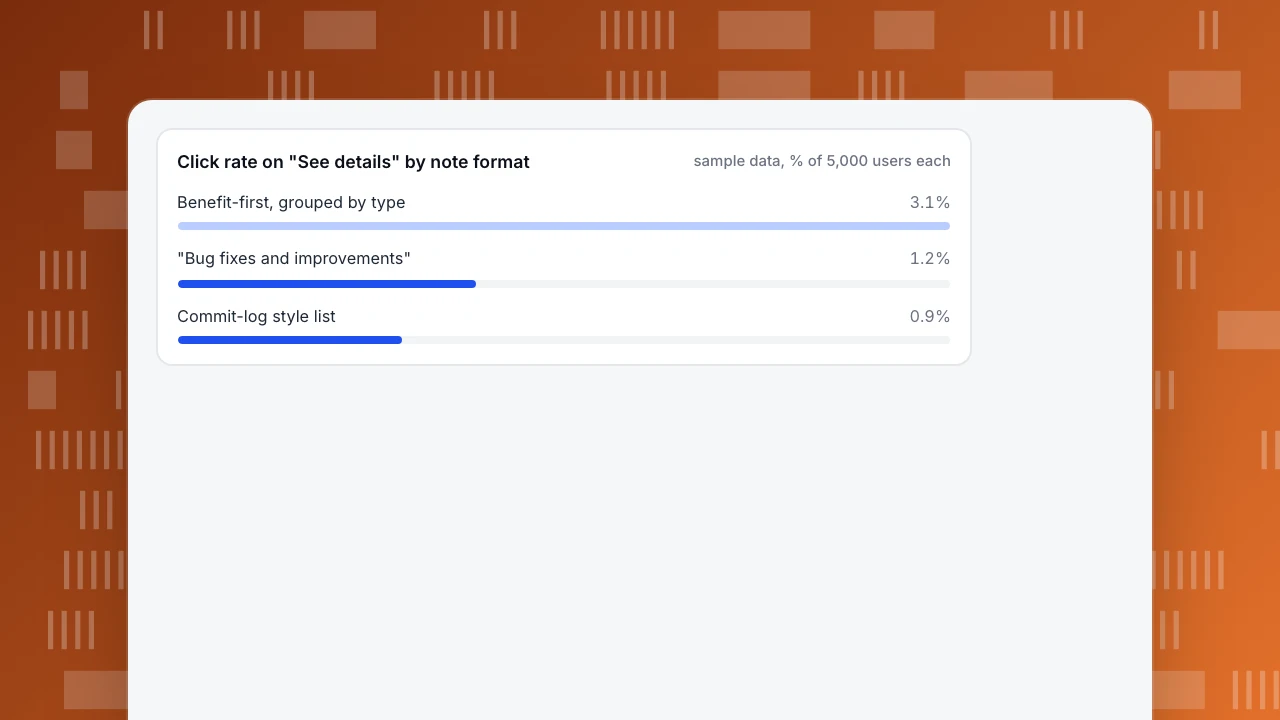
Sample data: three note formats sent to equal groups of 5,000 users each, measuring clicks on "See details".
| Format | Clicks | Click rate |
|---|---|---|
| "Bug fixes and improvements" | 60 | 1.2% |
| Commit-log style list | 45 | 0.9% |
| Benefit-first, grouped by type | 155 | 3.1% |
The benefit-first version has 3.1 ÷ 1.2 = 2.6 times the click rate of the vague one. A two-proportion z-test between them (155 of 5,000 against 60 of 5,000) gives pooled rate 2.15%, standard error 0.00290 and z = 6.5, which is far past 1.96. The gap is real.
Between the vague and the commit-log versions (60 against 45), z = 1.5 and p = 0.14: not significant. The sample cannot tell the two bad formats apart, and it does not need to. The lesson is not that one bad format beats another; it is that structure and benefit lead are worth testing against what you do now.
Do not stop at the click. Count what the reader does next: opens the feature, updates the app, or stops contacting support about the old bug.
Click rate on "See details" by note format
sample data, % of 5,000 users eachA checklist before you publish
- Does the first line say what changed for the reader, not for the team?
- Are items grouped, and is the version and date visible (ISO 8601)?
- Is every item a change users can notice? Remove refactors and dependency bumps.
- Is any breaking change in its own entry, with a date, who is affected and what to do?
- Does each Fixed line name the symptom people saw?
- Does the short version link to the complete notes?
Measure what a release did in TapCub
Take version 4.2 from the example and follow the effect.
- Mark the release. Add an annotation on the release date in Configuration › Annotations, so every chart shows the line where behaviour changes.
- Tag the links. Put
utm_campaign=release-4-2on the links in the email and in-app prompt. Web analytics › Sources then shows sessions and conversions for that campaign. - See whether the new feature is used. In All-platform analytics › Behavior › Event analysis, chart the events for the new export before and after the date, by day. Compare the weeks on both sides of the annotation.
- Watch for regressions. A monitor on
error_ratein All-platform analytics › Operations › Monitors notifies you if errors rise after the release, and Monitoring › Errors shows which pages and sessions are affected. For apps, App analytics › Quality & attribution › Stability covers crashes. - Compare note formats. Send variants with different
utm_contentvalues and compare clicks and goals per variant, as in the table above.
TapCub does not write or send release notes or emails; use your email tool and store listing for that. It measures what happens afterwards.
FAQ
What are release notes?
Release notes are a short description of what changed in a version of a product, written for users. They say what is new, what works differently, what was fixed and what to do if anything breaks, ideally with the date and version.
What is a good example of release notes?
A good example is grouped by type (Added, Changed, Fixed), opens each line with what the reader can do now, shows the date and version and links to details for the rest. "Fixed: photos no longer rotate when you upload from an iPhone" beats "bug fixes and improvements".
How long should release notes be?
As short as the audience needs: three to six lines in an app store, one to three in an in-app prompt, complete on a changelog page. Apple allows up to 4,000 characters, but the limit is a ceiling. Put the most important change first.
What should release notes include?
The version and release date, new features, changes to existing behaviour, bug fixes with the symptom named, deprecations with a date and any security fix. Add who is affected and what to do for anything that breaks.
How do you measure whether release notes work?
Tag the links in the notes, then count clicks and what the reader does next: feature use, updates and support contacts about the old problem. In the sample, the benefit-first format got 3.1% clicks against 1.2% for a vague one.
Sources
- Keep a Changelog, Keep a Changelog 1.1.0: guiding principles, the six types of change, ISO 8601 dates and why commit logs are not changelogs. Checked 2026-11-21.
- Apple, Platform version information (App Store Connect Help): What's New in This Version is required after the first version, up to 4,000 characters. Checked 2026-11-21.
- Nielsen Norman Group, How Users Read on the Web: 79% of test users always scanned, 16% read word by word. Checked 2026-11-21.
Was this article helpful?
We use your answers to fix and expand this page.
Couldn’t send. Please try again in a minute.
Thanks for the feedback. We’ll use it to improve this page.You’ve already sent feedback on this page. Thanks.

Technical Engineer
Focuses on tracking code, SDKs, and API integrations, with practical guidance on implementation checks and troubleshooting.