Try it on your own data
Every report in this article is in the free plan. One snippet for web and apps, up to 10 sites.
Start freeA product launch email needs three sends: a teaser about a week before, a launch email on launch day, and a last call two to four days later to people who did not click. Each carries one button. Mailchimp's averages, 35.63% opens and 2.62% clicks, are the planning baseline, but opens are unreliable.
What you will learn
- Send three emails with one job and one button each: teaser, launch, and a last call only to people who did not click
- Plan with clicks and conversions, not opens: Apple Mail Privacy Protection can inflate open rates, and Mailchimp's averages are 35.63% opens and 2.62% clicks
- In the sample, 10,000 subscribers gave about 852 clicks and 43 conversions at a 5% landing rate, with 65 unsubscribes
What is a product launch email, and why send three?
A product launch email tells your list that something new exists and gives them one clear next step: read, sign up, try or buy. One message on launch day is rarely enough, because most subscribers do not open any single email. A sequence of three gives each person a reason to act at a different moment:
- The teaser (about a week before): the problem you solve and what is coming, with a single low-commitment action such as joining a waitlist.
- The launch email (launch day): what it is, who it is for, the proof, and one button.
- The last-call email (two to four days later): sent only to people who did not click the launch email, with a deadline or a new angle.
This is the email layer of a wider product launch plan. The rest of this guide gives the structure of each message, subject lines you can adapt, the benchmark rates to plan against, a worked example that turns a list of 10,000 into expected clicks and conversions, and the compliance rules that apply before you hit send.
What should each of the three emails contain?
Each message has one job and one call to action. If a section does not serve the job, cut it.
| Timing | Job | Must contain | Sent to | |
|---|---|---|---|---|
| Teaser | 5–7 days before | Create interest, collect a signal | The problem in one sentence, one preview, one low-commitment link | Whole list |
| Launch | Launch day | Drive the main action | What it is, who it is for, one proof point, one button | Whole list |
| Last call | 2–4 days after | Convert the undecided | Deadline or new reason, the same button, a short FAQ line | Non-clickers of the launch email |
Structure of the launch email. Use a short block order that works on a phone:
- Subject and preview line that say what is new, not that it is "exciting."
- One sentence naming the reader's problem and what changed.
- One image or short demo of the product in use, with real text, not an image-only layout.
- Three bullets of what the reader can now do (benefits, not features).
- One proof point you can substantiate: a measured result, a customer sentence you have permission to use, or a number from your own testing.
- One button. If two actions compete, clicks split and you cannot tell which message worked.
Subject line patterns to adapt. Say what it is plainly (for example "Introducing [product]: [what it does]"), name the benefit ("[Task] in half the clicks"), or give the date ("Launching Tuesday: [product]"). Keep the line accurate: under the US CAN-SPAM rules the subject must reflect the message's content, and misleading subjects are a violation in their own right.
| Timing | Sent to | |
|---|---|---|
| Teaser | 5–7 days before | Whole list |
| Launch | Launch day | Whole list |
| Last call | 2–4 days after | Non-clickers of the launch email |
One job and one button per email.
What open and click rates should you plan around?
Mailchimp publishes average rates from its customers' campaigns. The page was last updated in December 2023, and the figures are across all industries unless noted.
| Metric | All industries | Ecommerce |
|---|---|---|
| Average open rate | 35.63% | 29.81% |
| Average click rate | 2.62% | 1.74% |
| Unsubscribe rate | 0.22% | 0.19% |
Three cautions apply before you plan around them. First, open rates are unreliable: Mailchimp notes that Apple's Mail Privacy Protection can affect the accuracy of open rates, because opens can be recorded without a person opening the message, so use clicks and landing-page conversions as the real signal. Second, these are averages of general campaigns, not launch campaigns, and a launch to an engaged waitlist often outperforms them, while a stale list underperforms. Third, the page lists no software category, so treat the all-industries row as a baseline and replace it with your own last three sends as soon as you have them.
For deliverability, note two numbers from Google's requirements for senders of 5,000 or more messages a day to Gmail accounts: keep the spam rate in Postmaster Tools below 0.30% (Google advises staying below 0.10%), and support one-click unsubscribe. On a list of 10,000 that is 30 complaints at the hard limit and 10 at the advised level, a margin a hard sell to a cold list can use up in a single send.
What does the sequence deliver? A worked example
Sample data: a list of 10,000 subscribers. Rates for the teaser use Mailchimp's all-industries averages (35.63% opens, 2.62% clicks, 0.22% unsubscribes). Rates for the launch and last-call emails are our assumptions: a 4.0% click rate on the launch email (higher than the average because it carries the main offer) and 2.0% on the last call. Assume 5% of clickers convert on the landing page.
| Teaser | Launch | Last call | |
|---|---|---|---|
| Delivered | 10,000 | 9,978 | 9,557 (non-clickers only) |
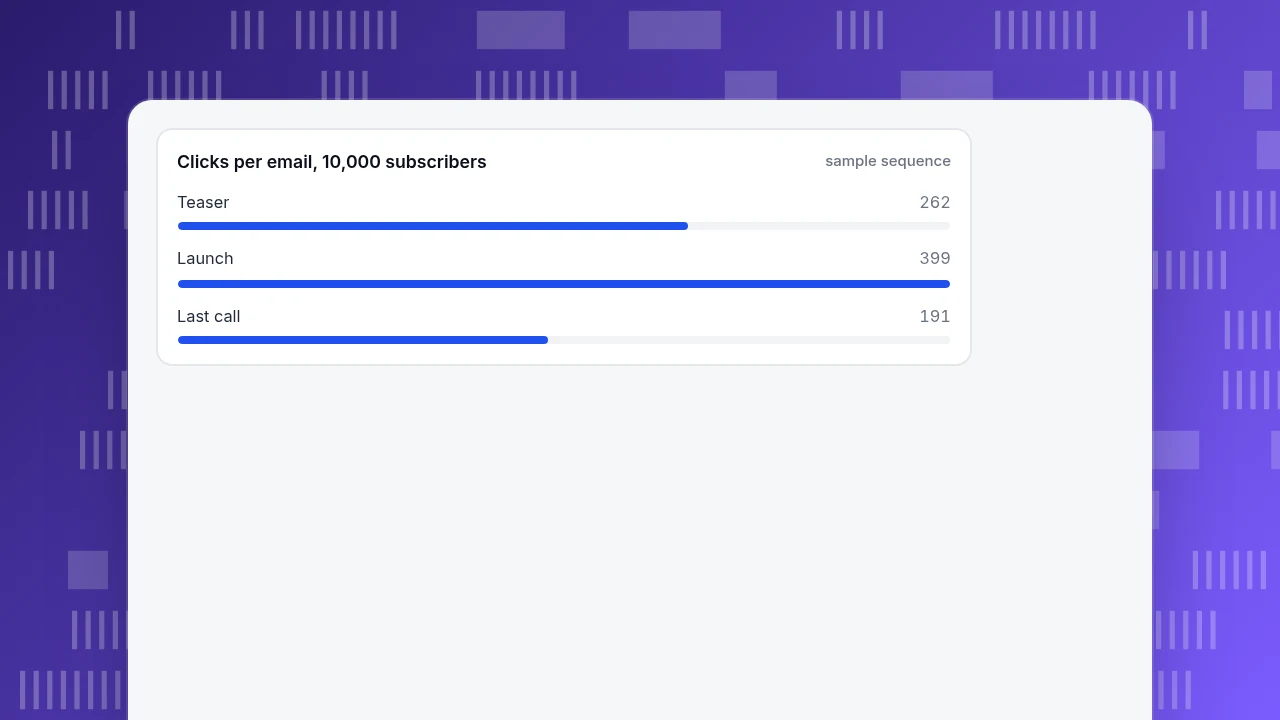
| Clicks | 262 (2.62%) | 399 (4.0%) | 191 (2.0%) |
| Unsubscribes (0.22%) | 22 | 22 | 21 |
Computation:
- Launch audience: 10,000 − 22 unsubscribes = 9,978; clicks 9,978 × 4.0% = 399.
- Last-call audience: 9,978 − 22 unsubscribes = 9,956, minus the 399 who clicked = 9,557; clicks 9,557 × 2.0% = 191.
- Total clicks 262 + 399 + 191 = 852. At 5% landing-page conversion that is about 43 conversions.
- Unsubscribes 22 + 22 + 21 = 65, or 0.65% of the original list.
Reading it: the last-call email adds 191 clicks, 22% of the total, for 21 unsubscribes, so it pays for itself when a click is worth more than a handful of lost subscribers. If your launch email sits at 2.0% instead of 4.0%, the total clicks drop to 262 + 200 + 195 = 657, which is why you plan with your own last three sends, not the average. The decision rule: send the last call only to non-clickers, and stop if unsubscribes exceed the benchmark 0.22% by more than a factor of two.
Clicks per email, 10,000 subscribers
sample sequenceHow do you write subject lines and calls to action?
Use the benchmarks above to decide what to test, and test one thing at a time.
- Test the subject line on the teaser, not on the launch. The teaser has less riding on it. Pick two plain versions and send each to a random half. Because opens are unreliable, judge by clicks to the waitlist.
- Keep the button text specific. "Start the free trial" or "See what's new" beats "Click here"; say what happens next.
- Put the button in the first screen. Many readers act without scrolling; repeat it once at the end.
- Write for the preview line. The first 40 to 90 characters appear next to the subject in many inboxes; use them for the benefit, not "View in browser."
- Match the landing page. The words on the button should be the first words on the page. A mismatch is the most common reason a good click rate produces a poor conversion rate.
If part of your list has gone quiet, a re-engagement campaign before launch protects your sender reputation and gives you a cleaner baseline.
Which compliance rules apply before you send?
The US FTC's CAN-SPAM guide lists eight requirements, and a launch email is a marketing message, so each applies:
- Accurate header information (from, to, reply-to).
- A subject line that reflects the content.
- A clear disclosure that the message is an advertisement.
- A valid physical postal address.
- A clear way to opt out of future marketing email.
- Honouring opt-outs within 10 business days.
- Opt-outs stay opt-outs (subscribers keep the right).
- Responsibility for email sent on your behalf, even if an agency sends it.
Each separate email in violation can be subject to penalties of up to $53,088 per the FTC's guide. Gmail's bulk-sender rules add authentication (SPF, DKIM and DMARC records for your domain), a visible unsubscribe link in the body, and the one-click unsubscribe header. Other regions have their own laws; this section covers the United States and Gmail only.
How to measure a launch email sequence in TapCub
Here is how the team in the example would see what each email delivered. TapCub does not send email; it measures what happens once people land on your site.
- Tag every link. Add UTM parameters to each button, with one value per email in the content field (for example
utm_source=email&utm_medium=email&utm_campaign=launch&utm_content=teaser, thenlaunch, thenlastcall). - Read the sources. In Web analytics › Sources, open the UTM tab, which splits source, medium, campaign, term and content. Each row shows visitors, sessions, pageviews, bounce and duration, so you can compare the three emails by landing sessions.
- Set the conversion as a goal. In Web analytics › Goals, mark the signup or purchase as the goal, so each source row shows conversions and you can check the 5% assumption. Recognised bots are counted separately, so they do not inflate your visitor numbers or conversion rates.
- Compare clicks to sessions. Email platforms count clicks, TapCub counts people who actually reached the page; the gap between the two is the number to watch.
- Add the send dates as annotations. Mark each send in Configuration › Annotations so spikes in Web analytics › Overview can be matched to an email.
FAQ
What should a product launch email include?
A subject line that says what is new, one sentence on the reader's problem, a short demo or image, three benefits, one proof point you can substantiate, and one button. Add the legal elements: accurate sender details, a clear unsubscribe and your postal address.
How many emails should a product launch sequence have?
Three is a practical minimum: a teaser about a week before, a launch email on launch day, and a last-call email two to four days later to people who did not click. Add a post-launch email only if you have news, such as results or a user story.
What is a good open rate for a product launch email?
Mailchimp's average across industries is 35.63% (29.81% for ecommerce), but Apple's Mail Privacy Protection can inflate opens, so rely on clicks and conversions instead. Compare with your own last three sends rather than a general average.
What is a good click rate for a launch email?
Mailchimp's all-industries average click rate is 2.62%, and 1.74% for ecommerce. A launch to an engaged list often exceeds the average, while a stale list falls short. Track clicks per email and the conversions they produce.
When is the best time to send a launch email?
There is no reliable universal answer, and we did not find an original source that proves one. Test two send times on the teaser by sending each to a random half of your list, and use whichever produces more landing sessions per 1,000 delivered.
Sources
- Mailchimp. Email Marketing Benchmarks and Statistics. Data last updated December 2023 — open, click and unsubscribe rates; Apple Mail Privacy Protection caveat.
- US Federal Trade Commission. CAN-SPAM Act: A Compliance Guide for Business — eight requirements and the $53,088 per-email penalty. Checked 2026-11-20.
- Google. Email sender guidelines — authentication, 0.30% spam-rate limit and one-click unsubscribe for bulk senders. Checked 2026-11-20.
Was this article helpful?
We use your answers to fix and expand this page.
Couldn’t send. Please try again in a minute.
Thanks for the feedback. We’ll use it to improve this page.You’ve already sent feedback on this page. Thanks.

Product Experience Specialist
Explores usability, user journeys, and feature adoption through practical examples of onboarding and everyday product use.