Try it on your own data
Every report in this article is in the free plan. One snippet for web and apps, up to 10 sites.
Start freeOTT and CTV are not synonyms: OTT (over-the-top) is how video is delivered, over the internet to any screen, while CTV (connected TV) is the television screen it plays on. All CTV viewing is OTT delivery, but phone and laptop streaming is OTT without being CTV. The difference matters because the two are measured differently, and CTV arrivals mostly reach your site untagged.
What you will learn
- OTT answers how the video arrived; CTV answers what screen it played on. CTV is usually a subset of OTT, so classify with two questions and write your rule down
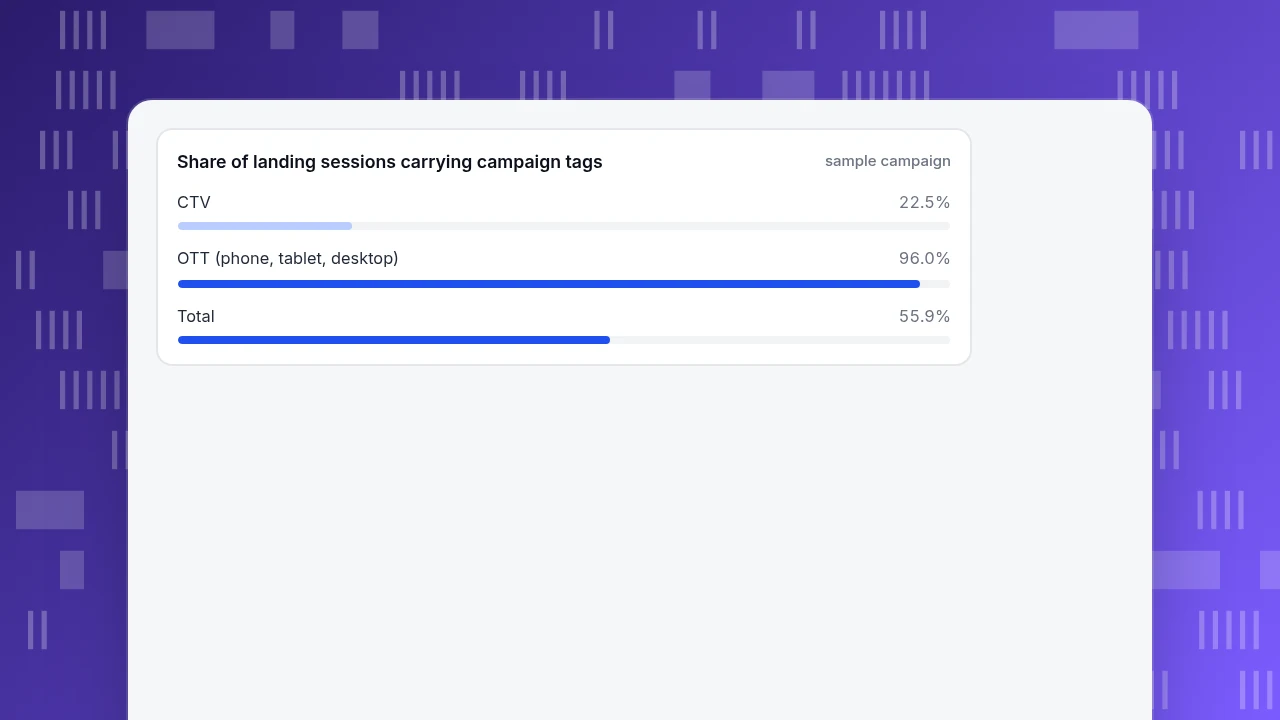
- OTT viewers can click to a landing page; CTV viewers rarely can, so in the sample only 22.5% of CTV sessions carried campaign tags against 96.0% for OTT
- Tag CTV and OTT with separate medium values and a dedicated landing address for TV, and report tagged and untagged arrivals side by side
What do OTT and CTV each mean?
OTT (over-the-top) describes how video reaches the viewer: it travels over the internet instead of through a cable or satellite operator's own channel lineup. CTV (connected TV) describes where the video is watched: on a television screen that is connected to the internet, whether through a smart TV, a streaming stick, a game console or a set-top box. Nielsen's own explainer draws the same line, defining OTT as streaming "over the top" of the internet across any device and CTV as streaming on a television screen.
So the two words answer different questions:
| Word | Question it answers | What it describes | Typical screens |
|---|---|---|---|
| OTT | How did the video arrive? | A delivery method (internet streaming) | Phone, tablet, laptop, desktop, TV |
| CTV | What did the viewer watch it on? | A device category (an internet-connected TV) | Smart TV, streaming stick, console, set-top box |
Because a TV is one of the screens an OTT service can play on, CTV is usually treated as a subset of OTT: all CTV streaming is OTT delivery, but not all OTT viewing happens on a CTV. The rest of this guide uses that framing, notes where sources differ, and spends most of its time on the part that matters to anyone running a campaign: the two terms are measured differently.
Which viewing situations count as OTT, CTV or both?
A quick test settles most cases. Ask two questions: did the video arrive over the internet through an app or service (not a scheduled broadcast or cable channel)? And is the screen a television? Two yeses mean the viewing is both OTT and CTV.
| Viewing situation | Over the internet? | On a TV screen? | Label |
|---|---|---|---|
| A streaming app on a smart TV | Yes | Yes | OTT and CTV |
| A streaming stick plugged into a TV | Yes | Yes | OTT and CTV |
| A free ad-supported channel on a TV streaming app | Yes | Yes | OTT and CTV |
| The same streaming app on a phone | Yes | No | OTT, not CTV |
| A streaming service in a laptop browser | Yes | No | OTT, not CTV |
| A cable channel watched through the TV's cable input | No | Yes | Neither (linear TV) |
| A satellite broadcast on a TV with no internet app | No | Yes | Neither (linear TV) |
Two edge cases cause most of the arguments. First, a smart TV is a connected device even when it is only showing a cable input, but the content is not OTT delivery, so the viewing is linear TV on a connected screen. Second, sources disagree on whether game consoles belong in the CTV device list. Pick one rule, write it into your report definitions, and apply it to every campaign. Nielsen also separates other streaming categories that sit inside OTT: subscription on-demand, ad-supported on-demand, pay-per-title, free ad-supported scheduled channels and bundles of live channels delivered over the internet. None of them changes the delivery-versus-device distinction above.
| Viewing situation | Over the internet? | On a TV screen? | Label |
|---|---|---|---|
| Streaming app on a smart TV | Yes | Yes | OTT and CTV |
| Streaming app on a phone | Yes | No | OTT, not CTV |
| Streaming service in a laptop browser | Yes | No | OTT, not CTV |
| Cable channel through the TV's cable input | No | Yes | Neither (linear TV) |
Two yeses mean both OTT and CTV; sources differ on whether game consoles count as CTV devices.
Why does the difference matter for advertising?
Nielsen's comparison of the two ad experiences gives the practical consequences. On OTT devices such as phones and desktops, viewers can be sent straight to a brand's website or app with a click or swipe, and detailed user data supports finer targeting. On CTV, most ads are unskippable and ad breaks are generally shorter than linear TV's, but individual user tracking is uncommon, so buying and measurement lean on household data and contextual signals. The same article lists three problems both share: advertisers often cannot see what content surrounds their ads, every platform has its own datasets and methods, and the lack of consistent standards and user or device IDs leaves room for fraud.
Scale explains why this is no longer a niche concern. Nielsen's Gauge reported streaming at 48.6% of total U.S. TV usage in May 2026, with broadcast at 19.2% and cable at 20.4% (the Gauge counts all TV viewing, ad-supported or not, and is separate from the ratings currency used to sell ads). When almost half of television time is streamed, a plan that treats "OTT" and "CTV" as synonyms will mix two kinds of audience with different identifiers and different ways to take action.
Keep the buying side out of the definition debate. TapCub does not buy, serve or bid on any of this inventory; what matters here is how each type of viewing shows up when someone arrives at your site.
How is each one measured?
Measurement differs on four points, and each is where reports quietly disagree.
| Measurement question | OTT on phone, tablet, desktop | CTV on a TV screen |
|---|---|---|
| Who is counted | Often a device or logged-in user | Usually a household; co-viewing is hard to see |
| How a viewer acts on an ad | Click, tap or swipe to a landing page | Rarely direct; viewer picks up a phone, scans a code or searches later |
| Viewability | Ad must meet the pixel and time rule | Full-screen ads; viewability is often inferred from progress events |
| Typical data gaps | Cookie and device-ID limits | No JavaScript tags, limited pixels, player or SDK integration needed |
The standards behind that table are specific. The Media Rating Council's viewable-impression guideline (June 2014) counts a video ad as viewable when at least 50% of its pixels are in view on an in-focus browser tab for 2 continuous seconds. The IAB's 2024 guide states that the same impression and viewability requirements apply on CTV but are measured through different signals, because CTV environments involve large screens, independently powered devices and limited tracking tags. It adds a data point on the cost of that gap: in 2022 DoubleVerify found that 1 in 4 of the top CTV environments and apps kept playing ads after the television was turned off. And because CTV is generally a logged-in environment but not an individually identified one, audience composition can only be inferred at household level.
Read that as a rule of thumb for report writers: an OTT number tells you about a device, a CTV number tells you about a screen in a home. Adding the two together without saying so produces a "reach" figure no one can reproduce.
What does a landing-page view of OTT and CTV look like?
The last step of the journey, the arrival on your site, is where the two diverge most visibly. The example below uses made-up numbers to show the pattern. Sample data: one campaign ran 1,000,000 impressions, 600,000 on CTV and 400,000 on OTT devices other than TVs. Landing-page sessions credited to the campaign came in as follows.
| Channel | Impressions | Sessions | Sessions per 1,000 impressions | Sessions carrying campaign tags | Tagged share |
|---|---|---|---|---|---|
| CTV | 600,000 | 2,400 | 4.0 | 540 | 22.5% |
| OTT (phone, tablet, desktop) | 400,000 | 2,000 | 5.0 | 1,920 | 96.0% |
| Total | 1,000,000 | 4,400 | 4.4 | 2,460 | 55.9% |
The arithmetic: 2,400 ÷ 600,000 × 1,000 = 4.0; 2,000 ÷ 400,000 × 1,000 = 5.0; 540 ÷ 2,400 = 22.5%; 1,920 ÷ 2,000 = 96.0%; (540 + 1,920) ÷ 4,400 = 55.9%. The CTV row shows the characteristic gap: 1,860 of 2,400 sessions (77.5%) arrive without campaign tags, because the viewer saw the ad on a TV and later typed the address, searched the brand, or scanned a code that was not tagged. Those sessions land in "direct" or "organic search", so a report that only counts tagged sessions says CTV delivered 540 sessions when the truth is nearer to 2,400.
This is why the rule for CTV is different from the rule for OTT. For OTT clicks, tag every ad URL and trust the tags. For CTV, give each placement its own landing address or code, tag that, and read the untagged "direct" and "search" lift during flight dates as a second signal, with the caveat that it cannot be proven to be caused by the ad.
Share of landing sessions carrying campaign tags
sample campaignHow should you tag CTV and OTT so landing-page data separates them?
Use one consistent naming scheme in the campaign tags so the two can be filtered separately:
- Medium by delivery, not by vendor. Use one medium value for CTV placements and another for non-TV OTT placements, for example
ctvandott. Keep spellings lowercase and fixed. - Source by inventory type. Put the placement family (for instance a streaming app category) in the source so you can compare placements inside each medium.
- Campaign and content by creative. Use campaign for the flight and content for the creative version, so you can see which message drove arrivals.
- A separate destination for TV-only viewers. A short address or QR code shown only in CTV creative gives you a tagged path where a click is impossible.
- Record flight dates. Write down start and end so you can separate lift in untagged traffic from the baseline.
Never reuse the CTV tags on a phone placement for convenience; the moment the two mix, the table above stops being possible.
How do you report OTT and CTV results honestly?
Four rules keep the report defensible:
- State your definition. One sentence: "CTV means viewing on a television screen; OTT means all internet-delivered viewing, including CTV." Without it two readers will count different things.
- Report households and devices separately. Do not add a CTV household count to an OTT device count.
- Show tagged and untagged arrivals side by side. Present the tagged share (22.5% versus 96.0% in the example) so readers can see how much of a channel is invisible to click-based tracking.
- Label lift as lift. Untagged growth during a flight is a signal, not a proven result. Compare against a similar stretch outside the flight and say so.
If the question is "which delivers more," the example gives a fair answer to a narrower question: per 1,000 impressions, OTT produced 5.0 sessions and CTV 4.0, but 77.5% of CTV sessions were unattributed, so the true gap is unknown until you control for untagged arrivals.
How do you see OTT and CTV arrivals in TapCub?
Take the example above and picture the same campaign landing on your site. TapCub does not buy ads, serve them or measure what happens on the TV; it only reports what happens after someone reaches your pages, so the tagging discipline above decides what you can see.
- Tag the links. Put the
ctvandottmedium values from the previous section into the campaign URLs. In Web analytics › Sources, open the UTM tab and split medium, source and campaign; each row shows visitors, sessions, pageviews, bounce and duration. - Look at what is not tagged. On the Channels tab, direct and organic search rows are the home of the untagged CTV arrivals. Compare their daily trend with the flight dates; you can mark the start and end under Configuration › Annotations so the chart carries the dates.
- Check conversions. In Web analytics › Goals, see the conversion rate of each medium. The channel table also has a conversions column.
- Bring in spend. In All-platform analytics › Business › Channel ROI, import spend by day, channel, source and campaign (CSV or one entry at a time) to get cost per session and return on ad spend. TapCub does not track TV impressions or reach; those numbers come from your buying platform.
- Keep bots out. Real people and recognised bots are counted separately, so automated traffic does not distort the visitor counts you compare.
TapCub does not decide whether an arrival was caused by a TV ad. It gives you tagged and untagged arrivals, conversions and spend in one place so the comparison above can be calculated from your own data.
FAQ
Is CTV a subset of OTT?
Usually yes. OTT is a delivery method that works on any internet-connected screen, and CTV is the television screen. Every CTV stream is delivered over the internet, so it is OTT, but phone and laptop streaming is OTT without being CTV. Sources differ on the device list, so state your own rule.
Can something be OTT but not CTV?
Yes. Streaming on a phone, tablet, laptop or desktop is OTT delivery, but not CTV because the screen is not a television. That is why OTT inventory offers clicks and detailed user data that CTV usually does not.
Is cable video on demand OTT?
Not under the definitions above. OTT means video delivered over the internet instead of through an operator's own cable or satellite lineup. Video on demand carried inside a cable operator's network is a different path. If you need a definite answer for a report, write the rule down once.
Which is easier to measure, OTT or CTV?
OTT on phones and desktops is usually easier, because users can click and devices can be tagged. CTV measurement depends on household data, player or SDK integrations and landing addresses you create, and viewability is often inferred. In the example, only 22.5% of CTV sessions carried campaign tags.
Does CTV advertising have a click-through rate?
Not in the usual sense, because a TV screen has no mouse or touch input. Viewers respond later, on another device, by searching, typing an address or scanning a code. Measure those arrivals through dedicated landing addresses and read untagged lift as a signal.
Sources
- Nielsen. What's the difference between OTT and CTV? (2024), definitions, ad experience differences and shared measurement obstacles. Checked 2026-11-22.
- Nielsen. Streaming embarks on annual summer ascent in Nielsen's May 2026 Gauge reports (July 28, 2026), streaming 48.6%, broadcast 19.2%, cable 20.4%. Checked 2026-11-22.
- IAB. The Anatomy of a Video Impression (December 2024), CTV measurement, household-level audience inference, DoubleVerify 2022 TV-off finding. Checked 2026-11-22.
- Media Rating Council. Viewable Ad Impression Measurement Guidelines (June 30, 2014), 50% of pixels for 2 continuous seconds for video. Checked 2026-11-22.
Was this article helpful?
We use your answers to fix and expand this page.
Couldn’t send. Please try again in a minute.
Thanks for the feedback. We’ll use it to improve this page.You’ve already sent feedback on this page. Thanks.

Product Experience Specialist
Explores usability, user journeys, and feature adoption through practical examples of onboarding and everyday product use.