Try it on your own data
Every report in this article is in the free plan. One snippet for web and apps, up to 10 sites.
Start freeLive chat for real estate works when it starts the conversation a listing visitor was about to have with an agent: invite on listing and valuation pages after a short delay, greet with one specific offer of help, handle after-hours chats with a promised reply time, and keep wording within fair housing rules. Measure chats that become inquiries, not chat counts.
What you will learn
- Invite on listing, valuation and form pages after 15–40 seconds; keep search results passive
- Describe the property, not who it suits: fair housing rules cover statements, notices and advertisements
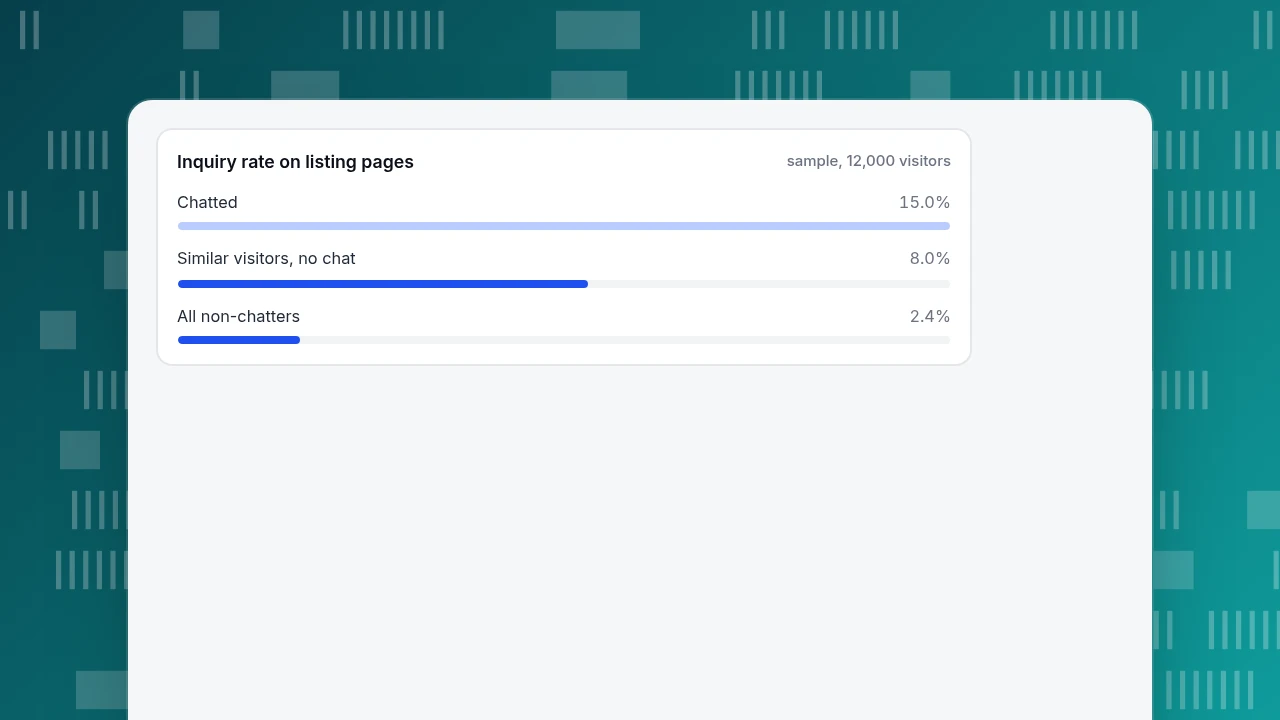
- In the sample, chatters convert at 15.0% against 2.4% for non-chatters, but a matched baseline gives an 87.5% lift, not 515.8%
Why use live chat on a real estate website?
Live chat on a real estate site works when it starts the conversation a visitor was already about to have with an agent. The National Association of Realtors' 2025 Profile of Home Buyers and Sellers reports that 88% of home buyers used a real estate agent or broker and 91% of sellers did. People browsing listings are not trying to avoid an agent; they are trying to reach one without filling in a form and waiting for a callback.
Chat helps in three places:
- On a listing page, where a visitor has a specific question (is it still available, can I see it Saturday, what are the HOA fees) that the listing text does not answer.
- Outside office hours, since many people browse listings in the evening and at weekends when the office is closed.
- On the page that asks for personal details (valuation request, viewing form), where a visitor hesitates and a short answer removes the doubt.
This guide covers where to invite, greeting scripts you can adapt, the fair housing limits on what an agent or script may say, how to handle after-hours chats, and how to measure chat-to-inquiry honestly. For the general setup steps, see add live chat to a website; for tool selection, best live chat software. A sibling guide for another high-consideration purchase is live chat for car dealerships.
Where should you invite visitors to chat?
Invite on pages where people have a reason to ask, and stay quiet where they are still browsing. A rule is "page plus seconds on page", for example a listing page after 20 seconds.
| Page | Trigger (sample) | Invitation | Goal |
|---|---|---|---|
| Listing detail | 20 seconds on page | "Questions about this home? I can check availability or set up a viewing." | Viewing request |
| Search results | None, or 45 seconds | Leave the bubble passive | Do not interrupt browsing |
| Open house or event page | 15 seconds | "Planning to come Saturday? I can send directions and parking." | Registration or visit |
| Valuation or "sell your home" page | 25 seconds | "Want a quick idea of your home's value range? Ask me what we need." | Valuation request |
| Contact or viewing form | 30 seconds | "Stuck on the form? Tell me what you need and I'll help." | Form completion |
| Neighborhood guide | 40 seconds | "Looking in this area? I can share what is available." | Search brief |
Keep to one invitation per visitor by default, and write them as offers of help rather than "Chat now!" Aim to retire an invitation that nobody answers; a rule list that records impressions and replies lets you do that.
What should the first message say?
A good greeting names the page, offers one specific kind of help and asks for nothing yet. Sample greetings you can adapt (replace the brackets):
| Situation | Sample message |
|---|---|
| Listing page | "Hi, I'm [Name] at [Agency]. Anything about [Street] you'd like me to check, like availability, fees or viewing times?" |
| Listing page, price drop | "This one was reduced recently. Want me to send details or check viewing slots?" |
| Valuation page | "I can give a rough range if you tell me the area and number of bedrooms. Shall we start with the address?" |
| Open house | "Are you planning to attend? I can confirm the time and send directions." |
| After hours | "We're away now. Leave your question and an email, and [Name] will reply first thing at 9 a.m." |
| Returning visitor | "Welcome back. Still looking in [Area]? Tell me what changed and I'll update the list." |
Two habits make scripts work. Ask for contact details only when you need them to help ("What is the best email to send the floor plan to?"), not as a gate. And answer the actual question first: availability, fee or time, then the next step.
| Metric | How to calculate | Why it matters |
|---|---|---|
| Chat starts per 100 visitors | Chats started ÷ visitors on the page × 100 | Shows which pages prompt questions |
| First response time | Time to first human reply, split by hours | After-hours replies decide lost leads |
| Chat-to-inquiry rate | Chats that end in an inquiry ÷ chats started | The measure of business, not activity |
| Offline messages answered | Replied in promised window ÷ messages received | Tests your after-hours plan |
| Chatted vs not chatted | Conversion of each group | Upper bound only; compare with matched visitors |
Define an inquiry once (viewing request, valuation request or contact form) and keep it fixed.
What can you not say? Fair housing limits
Chat messages are statements about housing, and the U.S. Fair Housing Act prohibits making, printing or publishing any notice, statement or advertisement about a dwelling that expresses a preference, limitation or discrimination based on a protected class (42 U.S.C. § 3604(c)). The statute names race, color, religion, sex, familial status and national origin in its core provisions, and handicap in related provisions. In a chat, that has practical consequences:
- Describe the property, not the people. "Three bedrooms, fenced yard, 8 minutes to the primary school" is fine. "Perfect for young families" or "a quiet adult community" signals who is preferred.
- Do not steer. If a visitor asks "Is this a good neighborhood for people like me?", answer with facts they can verify (distance to services, public data) and suggest they review them, rather than characterising residents.
- Use the same script for every visitor. Do not change what you offer based on how a name or accent sounds.
- Keep records. Transcripts help you review whether replies were consistent.
This is general information, not legal advice; check your brokerage's compliance guidance and state rules, which can be stricter.
How do you handle after-hours chats?
After hours is where chat earns its keep or loses leads. Set expectations in the first line, collect only what you need for a reply, and follow up within a stated window.
- Say when you will reply. "We reply within one business day, usually by 9 a.m." beats "Leave a message".
- Ask for one contact and one question. An email and a listing address are enough.
- Answer the easy questions automatically. If your knowledge base has availability policy, open house hours and how viewings work, a bot can answer those at midnight and leave the personal ones for the morning.
- Follow up in the morning in the visitor's own words. Refer to the listing they asked about.
Sample data: if 40 of 300 chats a month arrive after hours and you reply to them before 10 a.m. next day, track how many of those 40 become an inquiry; compare with those you reply to later.
How do you measure chat-to-inquiry?
Count what turns a chat into business, not how many chats happen. Metrics for chat-started pages and conversations:
- Chats started per 100 listing-page visitors, by page.
- First response time (human reply), split into office hours and after hours.
- Chats that produce an inquiry (viewing request, valuation request, contact form) ÷ chats started.
- Offline messages received and how many got a reply within your promised window.
- Chatted vs not chatted conversion, with the selection-bias warning below.
Worked example, all sample data: a site has 12,000 visitors to listing pages in a month. 300 start a chat (2.5%). Inquiries total 330: 45 came from chatters and 285 from the 11,700 non-chatters.
- Chatters: 45 ÷ 300 = 15.0%
- Non-chatters: 285 ÷ 11,700 = 2.4%
- Raw ratio: 15.0 ÷ 2.44 = 6.2, a relative lift of 515.8%
That is the upper bound, not the effect of chat. People who open a chat are usually already interested: they asked a question. A fairer comparison looks at similar visitors who did not chat; suppose visitors who viewed three or more listings and did not chat convert at 8.0%. Then the lift is 15.0 ÷ 8.0 − 1 = 87.5%. Report both and say which is which. For a sceptical look at the idea, see does live chat increase conversions.
Inquiry rate on listing pages
sample, 12,000 visitorsWhat are the common mistakes?
- Inviting on search results, where people are still browsing.
- Asking for phone and email in the first message, so the visitor leaves.
- Describing neighborhoods by who lives there instead of facts.
- No after-hours plan, so the conversation dies on the first night.
- Reporting raw chatted-vs-not conversion as the effect of chat.
- A script that sounds automated, so visitors do not reply. Short, personal and specific wins.
How do you set this up in TapCub?
Using the example above, the setup in TapCub takes four steps:
- Turn chat on. If the TapCub script is already on your site, switch on live chat under Live chat › Chat settings › Appearance; the bubble shows without changing site code. Hide it on pages where you do not want it (see hide chat on pages).
- Add page-based invitations. Under Live chat › Chat settings › Proactive invites, create a rule for your listing path (path prefix, 20 seconds) with a message of up to 300 characters. Each visitor is invited once by default, and the list shows impressions, open rate and reply rate. The number of rules depends on your plan.
- Set hours and offline messages. Office hours sets the working times by time zone; outside them the offline greeting shows and visitors can leave an email and question under Offline messages, which have statuses New, Replied and Closed. Add common answers to Live chat › Canned replies and insert them with
/. - Read the report. In the inbox, the visitor's source and the pages from the last 2 days sit beside the conversation, so you know which listing they viewed. Live chat › Reports › Conversion attribution compares visitors who chatted with those who did not and lists which pages conversations started on; below 30 chatters it warns that the sample is small.
TapCub's chat widget has no pre-chat form, so ask for the email inside the conversation. TapCub does not book showings, sync with listing feeds or push leads to a CRM; the AI reply feature only drafts answers. It reports conversion by goal, so set a goal for your inquiry form or viewing page before you start.
FAQ
Does live chat work for real estate websites?
It works when it answers the questions visitors cannot get from the listing and gives a faster route to an agent than a form. Judge it by chats that become inquiries, not by chat counts.
What should a real estate chat greeting say?
Name the page or listing, offer one concrete kind of help (availability, fees, viewing times) and ask for nothing yet. Ask for an email only when you need it to send something.
How do I handle chats outside business hours?
Say when you will reply, collect an email and the listing the person asked about, answer standard questions from a knowledge base, and follow up first thing in the morning referring to that listing.
Are there legal limits on what agents can say in chat?
Yes. The U.S. Fair Housing Act prohibits statements about housing that express preferences or limits based on protected classes. Describe properties and facts, not who is welcome, and check your brokerage's guidance.
How do I measure whether chat generates inquiries?
Track chats started per 100 visitors, first response time, chats that become inquiries and offline messages answered. When you compare chatters with non-chatters, remember that chatters were already interested.
Sources
- National Association of Realtors. Top 10 takeaways from NAR's 2025 Profile of Home Buyers and Sellers. 88% of buyers and 91% of sellers used an agent or broker. Checked 2026-11-23.
- U.S. Code. 42 U.S.C. § 3604, Discrimination in the sale or rental of housing, Legal Information Institute. Subsection (c) on statements, notices and advertisements. Checked 2026-11-23.
Was this article helpful?
We use your answers to fix and expand this page.
Couldn’t send. Please try again in a minute.
Thanks for the feedback. We’ll use it to improve this page.You’ve already sent feedback on this page. Thanks.

Product Experience Specialist
Writes about product experience, practical workflows, and growth, turning complex processes into clear steps for everyday decisions.