Try it on your own data
Every report in this article is in the free plan. One snippet for web and apps, up to 10 sites.
Start freeLive chat on mobile lets a visitor on a phone reach a person without leaving the page or app. You can offer it as a chat widget on the mobile site, a standalone chat page link, in-app chat or a messaging app link. Whichever you choose, judge it by mobile start rate, abandonment before the first reply, resolution and goal rate, compared with desktop.
What you will learn
- Start with the mobile web widget and a standalone link; check tap targets (24 CSS px minimum, 44 ideal) and keep the bubble off primary buttons
- Compare mobile with desktop on start rate, abandonment before first reply, resolution and goal rate; in the sample mobile started half as many chats
- Wait for enough chats (about 30 per group) before acting, and change one thing at a time
What are your options for live chat on mobile?
Live chat on mobile means a visitor on a phone can reach a person without leaving the page or app they are in. There are four ways to provide it, and they differ in setup, in what happens when the visitor switches away and in how much of the visitor's context reaches the agent.
| Option | How it works | Strong when | Weak when |
|---|---|---|---|
| Chat widget on the mobile site | The same bubble as on desktop, responsive on a phone browser | You already have a website and most phone traffic arrives there | The bubble covers buttons; the keyboard takes half the screen |
| Standalone chat page link | A full-screen chat page opened from a link, QR code or email signature | Messages sent from email, social profiles or printed material | Visitors are no longer on your site, so page context is lost |
| In-app chat | A chat screen built into your own iOS or Android app | People are logged in to an app and expect notifications | Needs app development, release cycles and push permission |
| Messaging apps | A link that opens a third-party messaging app | Customers already live in that app | History and routing sit outside your support tool |
Most teams start with the first option and add a standalone link for messages that start outside the site. In-app chat is a different project, covered in in-app live chat; this guide concentrates on the mobile web widget and on measuring whether mobile chat is working.
Why it matters: the Pew Research Center's mobile fact sheet (survey fielded January 30 to June 18, 2026) reports that 91% of US adults own a smartphone and 16% are smartphone-only internet users, meaning they have a smartphone but no home broadband subscription. For that 16%, a phone is the only way they will ever reach you.
| Option | Strong when | Weak when |
|---|---|---|
| Chat widget on the mobile site | Most phone traffic arrives on your website | The bubble covers buttons; the keyboard takes much of the screen |
| Standalone chat page link | Messages start from email, social profiles or print | Visitors are off your site, so page context is lost |
| In-app chat | Users are logged in to your app and expect notifications | Needs app development, releases and push permission |
| Messaging apps | Customers already live in that app | History and routing sit outside your support tool |
Most teams start with the first option and add a standalone link.
What makes a chat widget work on a phone?
Phone screens turn small details into blockers. Check these before you look at any metric:
- Tap target size. The Web Content Accessibility Guidelines 2.2 (success criterion 2.5.8) require targets of at least 24 by 24 CSS pixels, and the stricter criterion 2.5.5 uses 44 by 44. A chat bubble and its send and close buttons should meet at least the first and ideally the second.
- Do not cover the main action. A bubble that sits on top of an "Add to cart" or "Submit" button costs more than chat earns. Move it to the other corner, or hide it on those pages.
- Plan for the keyboard. When it opens, the keyboard takes a large part of the screen, so the message list needs to stay visible above it.
- Keep the first message short. One line and one question fits a small screen; a paragraph does not.
- Decide on proactive prompts. A prompt that pops over content on a small screen is more intrusive than on desktop. Trigger it by page and time on page, and test it on mobile separately.
- Handle the switch-away. Mobile visitors leave the browser to check a message or an app. Make sure an unanswered message turns into something you can answer later, such as an offline message with an email.
Which metrics show mobile chat is working?
Compare mobile with desktop on four numbers, using the same period and the same definitions:
- Chat start rate = chats started ÷ sessions
- Abandoned before first reply = chats where the visitor left before any reply ÷ chats started
- Resolution rate = resolved chats ÷ chats started
- Goal rate after chatting = chatters who reached a goal ÷ chatters
Sample data for one month. All rates were recomputed in Python.
| Metric | Desktop | Mobile |
|---|---|---|
| Sessions | 12,000 | 18,000 |
| Chats started | 360 | 270 |
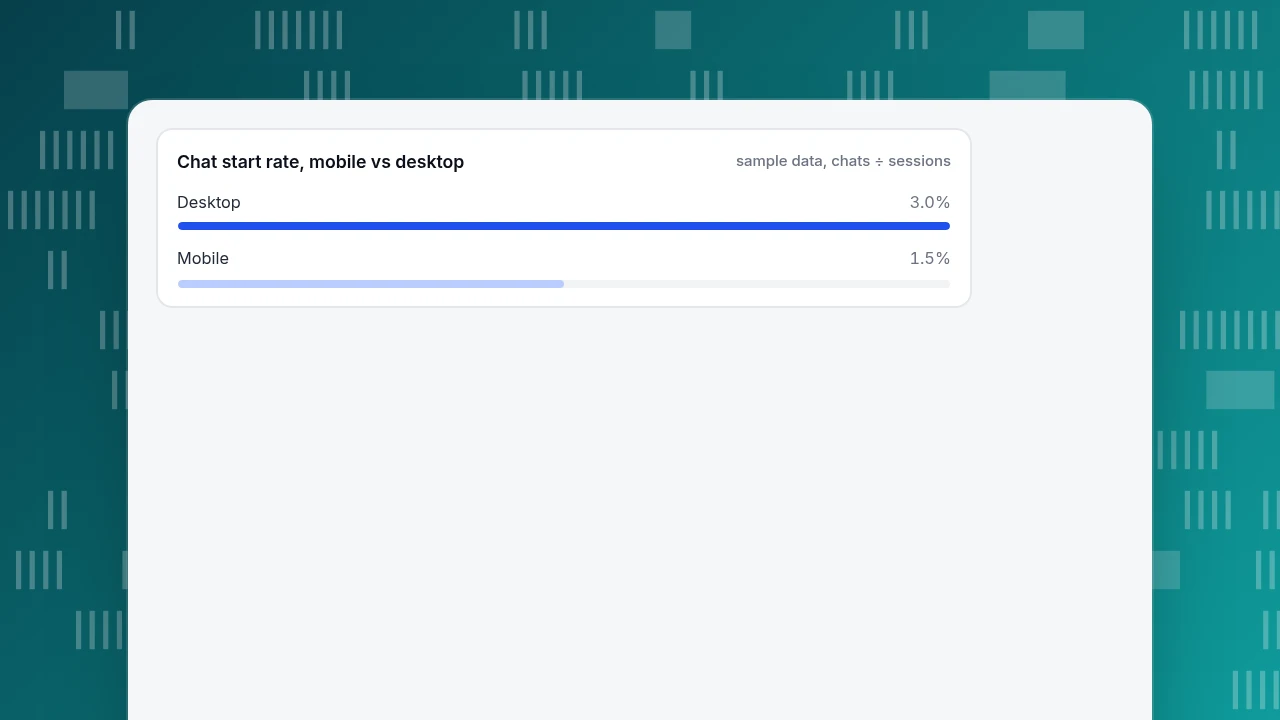
| Chat start rate | 3.0% | 1.5% |
| Abandoned before first reply | 36 (10.0%) | 54 (20.0%) |
| Resolved | 288 (80.0%) | 189 (70.0%) |
| Chatters who reached a goal | 108 (30.0%) | 54 (20.0%) |
Read it in three steps. First, mobile is 60% of sessions (18,000 ÷ 30,000) but only 42.9% of chats (270 ÷ 630), and its start rate is half of desktop's. Second, mobile visitors abandon twice as often before anyone replies (20.0% against 10.0%), so some of the gap is slow or missing first replies, not lack of interest. Third, the chatters who do get through convert less (20.0% against 30.0%); remember that chatters are not a random sample, so the gap is a pointer, not an effect.
Decision rules:
- If the start rate is low but resolution is fine, the bubble is hard to find or in the way; change its position or hide it on conversion pages.
- If abandonment before first reply is high, check staffing at the hours mobile traffic peaks. Check the hourly pattern of your own mobile traffic; it may peak outside desk hours.
- If goal rate after chatting is low only on mobile, look at what happens after the reply: links to pages that load slowly on a phone, forms that are hard to fill on a small screen.
Wait for enough chats before acting. Below roughly 30 chatters per group the rates swing too much to compare; a month with 54 mobile goal completions supports a conclusion, one week with 12 does not. More metrics for a chat programme are in live chat analytics.
Chat start rate, mobile vs desktop
sample data, chats ÷ sessionsHow do you test a change for mobile chat?
Change one thing and compare periods that are similar. A simple test: move the bubble to the other corner on the checkout and cart pages for two weeks, then compare mobile start rate and abandonment with the previous two weeks, excluding any promotion. If the start rate rises from 1.5% to 2.0% on 18,000 sessions, that is 90 extra chats a month (18,000 × 0.5%), enough to see the effect. If you hide the bubble on mobile as a test, make it a deliberate comparison and look at conversion rate on mobile, not only chat volume.
How should agents reply to a phone visitor?
Replies on a phone need to fit a small screen and a thumb. Keep a short set of canned replies for the questions mobile visitors ask most, and edit each before sending:
| Visitor asks | Short reply |
|---|---|
| "Is this in stock?" | "Yes, in all sizes. Want me to send the link to your size?" |
| "Where is my order?" | "Can I have the order number? I will check now and reply here." |
| "Can't pay" | "Which step shows the error? A screenshot helps if you can." |
| "How do I reach you later?" | "Leave your email here and we will reply within the hour." |
Three habits help: put the answer in the first line, keep each message under about two sentences, and send links rather than long instructions. If the visitor goes quiet, leave the conversation open and reply once more after a few minutes; phone visitors often switch to another app and come back.
Which mistakes hurt mobile chat?
- Copying the desktop layout. A bubble that looks right at 1,440 pixels can cover half a phone screen.
- Measuring only the blend. A healthy overall chat rate can hide a weak mobile rate when desktop is strong, as the sample shows.
- Ignoring the hours when phone traffic peaks. If it peaks outside your office hours, first replies will be slow exactly when mobile visitors arrive.
- Long first replies. Typing long paragraphs on a phone keyboard slows the visitor; short messages and canned replies help.
- Treating the standalone link as the widget. A visitor who arrives from a link has no page context, so ask what they need first.
How to set this up in TapCub
TapCub's live chat is a widget on your website plus a standalone chat page; it does not provide a native in-app chat screen. To run the mobile test above:
- Turn chat on and check the bubble. In Live chat › Chat settings › Appearance, enable live chat, set the brand colour and bubble position. Open your site on a phone and confirm the bubble does not cover primary buttons.
- Choose whether to show it on phones. Hide bubble on mobile hides it when the window is narrower than 640 pixels or the browser is a phone. Use it only as a deliberate test.
- Add the standalone link where messages start outside the site. The chat page address is
https://chat.askcub.com/<site key>; it can go in email signatures, QR codes and social profiles. Offline messages (Live chat › Chat settings › Offline messages) collect an email when nobody is online, which helps with visitors who switch away. - Cover the hours. Set Live chat › Chat settings › Office hours by time zone, and look at the heatmap in Live chat › Reports, which counts chat starts by weekday and hour, to see when staffing matters.
- Compare mobile and desktop. Chat reports do not split by device, so use Web analytics › Sessions: filter by device, and under More filters use Chatted to keep visitors who had a chat conversation. Divide chatters by sessions for each device to get the start rate. Open a conversation in Live chat › Inbox to see the visitor's device in the side panel.
Proactive invites by page and time on page are in Live chat › Chat settings › Proactive invites.
FAQ
How do you do live chat on mobile?
Show a responsive chat widget on your mobile site, add a standalone chat page link for messages that start outside the site, or build chat into your app. Check tap-target size, keep the bubble off primary buttons and make sure unanswered messages become offline messages.
Is live chat on mobile different from live chat on desktop?
The conversation is the same, but the screen, keyboard and visit pattern differ. Phone visitors abandon more often before the first reply and switch away more, so first-reply speed, tap-target size and evening staffing matter more.
What is a good chat start rate on mobile?
There is no universal number, because it depends on your site and offer. Compare your mobile start rate with your desktop rate and your own trend. In the sample, mobile at 1.5% against desktop at 3.0% was the signal to investigate.
How big should a chat button be on a phone?
At least 24 by 24 CSS pixels to meet WCAG 2.2 success criterion 2.5.8, and 44 by 44 for the stricter 2.5.5. A larger target also reduces accidental taps next to a close button.
Sources
- Mobile Fact Sheet, Pew Research Center, 91% smartphone ownership and 16% smartphone-only internet users, survey of January 30 to June 18, 2026.
- Understanding Success Criterion 2.5.8: Target Size (Minimum), W3C WCAG 2.2, the 24 by 24 CSS pixel minimum and the 44 by 44 criterion.
Was this article helpful?
We use your answers to fix and expand this page.
Couldn’t send. Please try again in a minute.
Thanks for the feedback. We’ll use it to improve this page.You’ve already sent feedback on this page. Thanks.

Product Analyst
Focuses on event analysis, conversion funnels, and retention, using clear metric definitions and structured analysis to explain product performance.