Try it on your own data
Every report in this article is in the free plan. One snippet for web and apps, up to 10 sites.
Start freeAutomotive live chat lets a shopper ask about a vehicle and book a visit while still browsing, and 83% of recent car buyers in Cox Automotive's 2019 study wanted at least one purchase step online. Build it around four flows (test drive, trade-in, financing, service) and judge it by the chain from chat to appointment to sale.
What you will learn
- Four flows, one question at a time, each ending in a concrete next step and a time
- Never ask for credit details in chat, and quote the listing price with the fees that apply
- Track the chain: in the sample, 600 chats gave 54 appointments (9.0%) and 14 sales (2.3% of chats)
Why car buyers use chat before they visit
Automotive live chat is a chat window on a dealership website that lets a shopper ask a question and book a visit while they are still browsing a vehicle. It fits how people buy cars. Cox Automotive's 2019 Car Buyer Journey study, a survey of 3,086 recent vehicle buyers, found that 83% wanted to do one or more purchase steps online, and seven in ten said they were more likely to buy from a dealership that let them start the process online.
Time is the other pressure. The same study reports that buyers spent nearly three hours at the dealership to complete a purchase, and that satisfaction begins to fall after 90 minutes. Shoppers visit few lots: new-car buyers about 2.5 dealerships and used-car buyers about 2.2, with 41% visiting only one. A dealership that answers a question in a minute, and turns it into a booked visit, is spending its scarce first impression well.
Chat does not sell the car. Its job is smaller and measurable: answer the question that blocks the visit, and capture a way to continue. The rest of this article gives four flows built around that job, three scripts, the limits on what to ask and the numbers to track. General chat copy is covered in live chat scripts and lead capture in live chat lead generation.
Four chat flows built for a dealership
| Flow | Starts on | First question | Capture before handoff | Ends with |
|---|---|---|---|---|
| Test drive booking | A vehicle detail page | "Want to see it in person? What day suits you?" | Name, phone or email, preferred day and time | A confirmed slot, or a call-back time |
| Trade-in | Trade-in or sell page | "What are you driving now: year, make, model?" | Vehicle, mileage band, contact | An appraisal appointment |
| Financing questions | Finance page | "Are you looking to finance or pay in full?" | Budget range, preferred contact | A call with the finance team |
| Service and parts | Service page | "Which vehicle, and what does it need?" | Vehicle, issue, preferred day | A service slot |
Two design rules apply to all four. Ask one question at a time; each extra question in the first message lowers the chance of a reply. And end every flow with a concrete next step and a time, not "someone will be in touch".
| Flow | Starts on | Ends with |
|---|---|---|
| Test drive booking | Vehicle detail page | A confirmed slot or call-back time |
| Trade-in | Trade-in or sell page | An appraisal appointment |
| Financing questions | Finance page | A call with the finance team |
| Service and parts | Service page | A service slot |
Ask one question at a time and always close with a next step and a time.
Sample scripts for the three busiest flows
Vehicle page greeting (test drive). "Hi, I see you are looking at the 2023 crossover in grey. It is on the lot today. Would you like to see it? I can have it ready at a time that suits you."
Trade-in. "I can get you a rough range. What are you driving now: year, make and model? And roughly how many miles? An appraiser will confirm in person, and it takes about 20 minutes."
Financing. "Happy to help. I cannot take credit details in chat. Are you thinking of financing or paying in full? I will have someone from finance call you, and you can choose the time."
Keep the vehicle, the time and the next step in the same message. Replace the example vehicle with the real listing the shopper is viewing, and do not promise a price in the script (see the next section).
What not to ask for or promise in chat
Three boundaries keep chat safe and useful:
- No sensitive identifiers. Never ask for a Social Security number, a full card number or a credit application in the chat window. Send a link to your secure form.
- Quote the listing, not a new number. If a shopper asks for the price, give the advertised price and name the fees that are added. Regulation here is unsettled: the FTC's CARS Rule, which would have required dealers to disclose the offering price and mandatory fees up front, was vacated by the Fifth Circuit on 27 January 2025 on procedural grounds. Dealers remain subject to existing rules against unfair or deceptive practices, so check your chat scripts with counsel.
- Say when a person is needed. A bot or a canned reply should not promise trade-in values or approval. Hand off to a person for any number you will be held to.
Route each chat to the right person
A chat that lands with the wrong department loses the minute it was meant to save. Route by the page the shopper started on: vehicle and trade-in chats to sales, finance chats to the finance desk, service and parts chats to the service advisors. Write a handoff rule for each flow that says what the person who receives it can see, so nobody asks the shopper to repeat themselves: the vehicle, the page, the answers already given and the contact captured.
Set two escalation limits. If a chat has no human reply after the one-minute target, alert a second person. If the shopper asks twice for a price or a trade-in value, hand it to someone authorised to give one. Then count transfers per flow: a high rate of transfers from the sales queue to finance suggests the vehicle-page script should ask about financing earlier.
The numbers to track
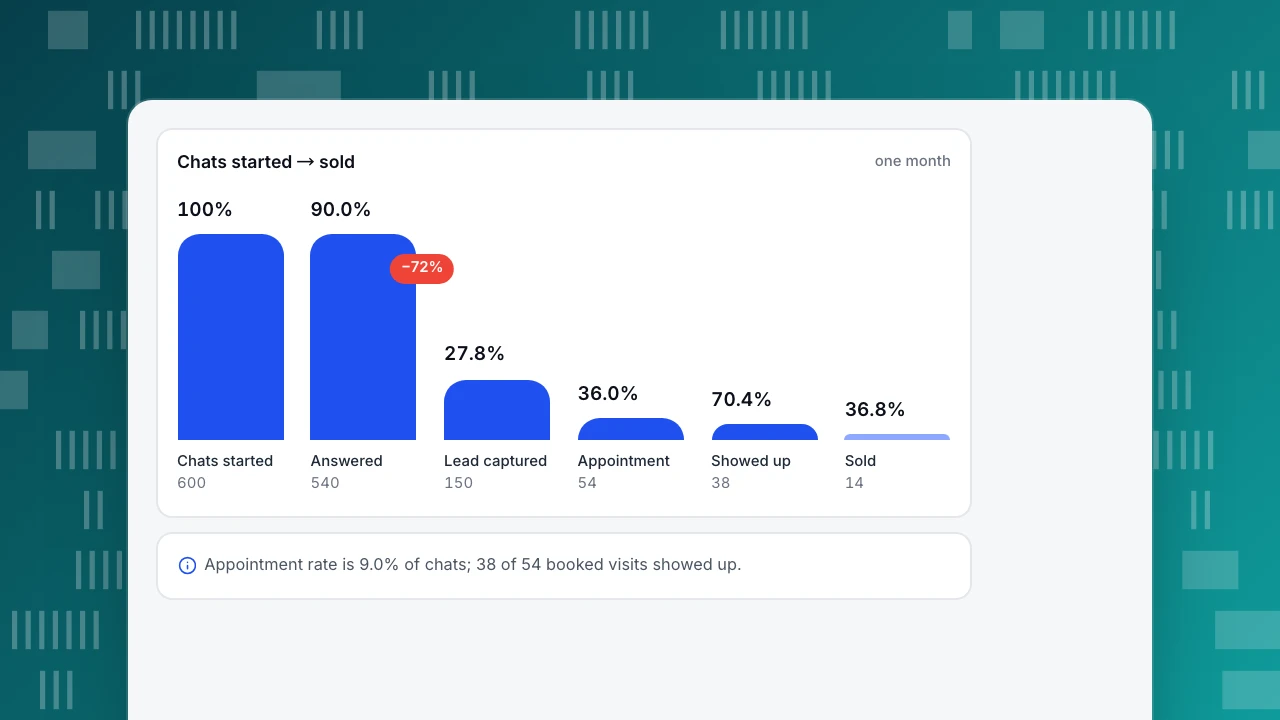
Chat produces a chain of conversions, and each link has a rate. Sample data: one month on a dealership site.
| Step | Count | Rate |
|---|---|---|
| Chats started | 600 | — |
| Answered by a person or the knowledge base | 540 | 90.0% of chats |
| Contact captured (lead) | 150 | 25.0% of chats |
| Appointments booked | 54 | 9.0% of chats |
| Showed up | 38 | 70.4% of appointments |
| Sold | 14 | 36.8% of shows |
Chat-to-appointment is 54 ÷ 600 = 9.0%, and chat-to-sale is 14 ÷ 600 = 2.3%. Define each carefully: first response time should measure the first human reply (not the automatic greeting), and a "lead" should mean a reachable contact, not any visitor who typed. Then read the chain from the bottom: if shows are low, fix reminders; if leads are low, fix the questions.
Chats started → sold
one monthChats started
600
Answered
540
Lead captured
150
Appointment
54
Showed up
38
Sold
14
Does faster response book more appointments?
Sample data: the same 600 chats grouped by how fast the first reply came.
| First reply | Chats | Appointments | Rate |
|---|---|---|---|
| Within 1 minute | 380 | 40 | 10.5% |
| 1 to 5 minutes | 120 | 9 | 7.5% |
| Over 5 minutes | 40 | 2 | 5.0% |
| Not answered live (offline message) | 60 | 3 | 5.0% |
The rate falls as response time rises. But compare "within 1 minute" (40 of 380) against everyone else (14 of 220, or 6.4%): a two-proportion z-test gives z = 1.7, p ≈ 0.09. That is suggestive, not proven, and busy hours may account for some of it. The decision rule: treat the pattern as a reason to set a one-minute target, and re-run the comparison after another month of chats before staffing around it.
Match staffing to the hours chats arrive
In the sample, 60 of 600 chats (10.0%) were not answered live, and they booked 3 appointments (5.0%) against 51 of 540 (9.4%) for the rest. To cut that gap, look at when chats start. If, say, a quarter of chats arrive after the showroom closes, cover them with two things: a knowledge base that answers the repeating questions (opening hours, test-drive policy, documents to bring), and an offline-message form that promises a first reply by a stated time the next morning. Measure the share of chats answered live each week and the time to first reply on the next morning.
Run this in TapCub
Take the vehicle-page flow from the scripts and set it up.
- Turn chat on. If the site already has the TapCub script, switch on the live chat in Live chat › Chat settings › Appearance; no code change is needed. The agent sees where the shopper came from, the page they are on and their last two days of browsing, and can open the visitor profile from the inbox.
- Invite on vehicle pages. In Live chat › Chat settings › Proactive invites, trigger a message by page and seconds on page, for example the vehicle page after 30 seconds. Write the vehicle-page greeting from above.
- Load the scripts. Save the three scripts in Live chat › Canned replies (type
/in the inbox, edit before sending). - Answer the repeating questions. Add opening hours, the test-drive policy and documents to bring as question-and-answer entries in Live chat › Knowledge base. A matching question is answered word for word without an AI call. Set Live chat › Chat settings › Office hours and offline messages for evenings.
- Read the result. Live chat › Reports shows conversations, resolution rate and first response (human replies only). Define the booking confirmation page as a goal; Live chat › Reports › Conversion attribution then compares chatters and non-chatters, and warns when fewer than 30 chatted.
TapCub is not a CRM or a dealer management system and does not book appointments or score leads. It runs the chat and measures what happens on the site afterwards. For shoppers who write in another language, translation shows each side their own language.
FAQ
What is automotive live chat?
Automotive live chat is a chat window on a dealership website that lets shoppers ask about a vehicle, book a test drive, start a trade-in appraisal or schedule service in real time. Its value is answering the question that blocks a visit and capturing a contact.
Does live chat work for car dealerships?
It fits how people shop: Cox Automotive found 83% of recent buyers wanted at least one purchase step online. Whether it works for your store depends on your own chain: chats, leads, appointments, shows and sales. Measure each rate rather than relying on industry claims.
What should a dealership chat bot say?
It should answer factual questions such as hours, documents to bring and test-drive policy, ask one question at a time, never request credit details or sensitive identifiers and hand off to a person for prices, trade-in values or approval.
What is a good first response time for dealership chat?
Aim for under one minute during open hours. In the sample, chats answered within a minute booked 10.5% appointments against 7.5% for 1 to 5 minutes. That gap was not statistically conclusive, so check it against your own data.
How do I measure chat leads at a dealership?
Track chats started, contact captured, appointments, shows and sales, each as a rate of the step before. Count a lead only when you have a reachable contact. Compare appointment rates by response time and by page.
Sources
- Cox Automotive, 2019 Car Buyer Journey Study: 3,086 recent buyers; 83% want to do at least one step online; time at the dealership; dealerships visited. Checked 2026-11-21.
- Cox Automotive, Online and in-store, car buyers looking for change (2018 study release): share of shopping time spent online and time at the dealership. Checked 2026-11-21.
- Holland & Knight, Fifth Circuit strikes down FTC's auto retail scam rule (February 2025): vacatur of the CARS Rule. Checked 2026-11-21.
Was this article helpful?
We use your answers to fix and expand this page.
Couldn’t send. Please try again in a minute.
Thanks for the feedback. We’ll use it to improve this page.You’ve already sent feedback on this page. Thanks.

Product Analyst
Focuses on event analysis, conversion funnels, and retention, using clear metric definitions and structured analysis to explain product performance.