Try it on your own data
Every report in this article is in the free plan. One snippet for web and apps, up to 10 sites.
Start freeLive chat helps sales when a visitor is near a decision and has one unanswered question, so prompt only high-intent pages and reply within a minute. In the sample, the signup page produced 30.0 leads per 1,000 sessions and the blog 0.2, and chats answered within a minute became leads 38.0% of the time against 5.0% after fifteen minutes.
What you will learn
- Rank pages by leads per 1,000 sessions, not by traffic
- Prompt on pricing and signup; stay quiet on the blog
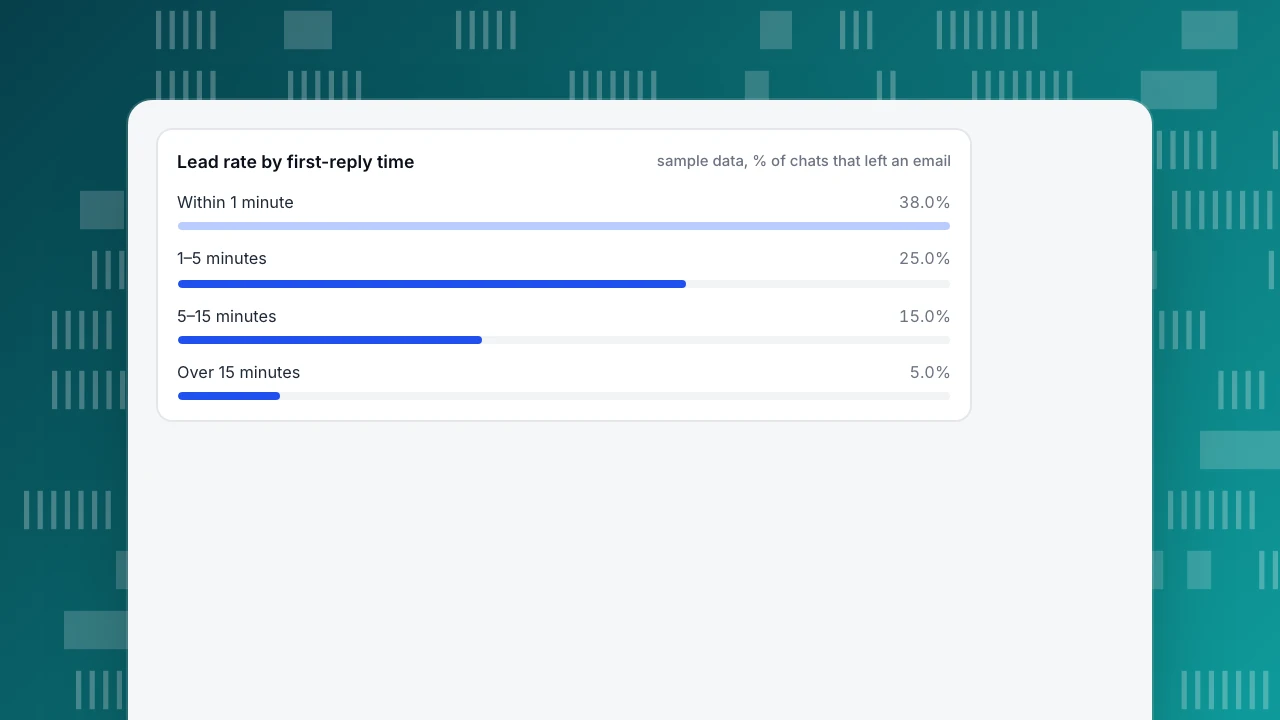
- Sample lead rate fell from 38.0% to 5.0% as first reply slowed from under 1 minute to over 15
Where live chat earns its place in a sales process
Live chat helps sales in one specific spot: when a visitor is close to a decision and has one unanswered question. It does not replace the sales call, and it does not help on pages where nobody is deciding. A chat that appears on every page after five seconds mostly talks to people who are reading a blog post. The job is to put a conversation in front of the right visitors at the right moment, answer fast, and leave with a way to continue (usually an email address). The ecommerce version of this is in live chat for ecommerce; the definition is on the live chat page.
Which pages deserve a chat prompt
Sample data: a B2B software site with 50,000 sessions in a month. For each page type, count the sessions, the chats started, and the chats that ended with the visitor leaving an email address (a lead).
| Page type | Sessions | Chats | Chat rate | Leads | Leads per chat | Leads per 1,000 sessions |
|---|---|---|---|---|---|---|
| Pricing | 6,000 | 270 | 4.5% | 90 | 33.3% | 15.0 |
| Features | 12,000 | 240 | 2.0% | 48 | 20.0% | 4.0 |
| Blog | 30,000 | 150 | 0.5% | 6 | 4.0% | 0.2 |
| Signup | 2,000 | 120 | 6.0% | 60 | 50.0% | 30.0 |
| All | 50,000 | 780 | 1.6% | 204 | 26.2% | 4.1 |
The blog gets 60% of the sessions and 3% of the leads (6 of 204). The signup page gets 4% of the sessions and 29% of the leads (60 of 204). The last column is the one to rank pages by: leads per 1,000 sessions tells you how much a page's traffic is worth to chat, regardless of how big the page is.
Rule: start with the pages at the top of that column. Prompt on pricing and signup, stay quiet on the blog, and test features later.
A caution on staffing: if a prompt on the pricing page lifts chat volume from 270 to 400 a month, check that the team can still answer within a minute. A prompt that fills the queue and pushes replies past fifteen minutes turns a 33% lead rate into 5%, so scale prompts to the number of people who can reply.
| Page type | Chat rate | Leads per 1,000 sessions |
|---|---|---|
| Pricing | 4.5% | 15.0 |
| Features | 2.0% | 4.0 |
| Blog | 0.5% | 0.2 |
| Signup | 6.0% | 30.0 |
Sample data: 50,000 sessions, 780 chats, 204 leads in one month.
What to say, and when
A proactive message has three parts: a trigger (page and time on page), an opening line that fits the page, and an easy way to reply. Examples with sample timings:
| Page | Trigger | Opening line |
|---|---|---|
| Pricing | 30 seconds on the page | "Comparing plans? Tell me your team size and I'll point you to the right one." |
| Signup | 20 seconds without submitting | "Stuck on a field? I can help right here." |
| Features | 60 seconds on one feature page | "Looking for something specific? Ask me and I'll check." |
| Blog | No prompt | Leave the bubble available, no pop-up |
Choose the seconds from your own data: look at the median time on the page for visitors who convert, and trigger a little after it. A prompt at 5 seconds interrupts reading; a prompt at three times the median misses the people who already left. Check the result after two weeks and drop any prompt whose chat rate is under 1%.
Response time decides how many chats become leads
Jakob Nielsen's classic limits say that about one second keeps a user's flow of thought unbroken and ten seconds is about the limit for keeping attention on a task; after that people switch to something else. Chat is the same, only with a person typing. Sample data from the same site: the 780 chats grouped by how long the first human reply took.
| First reply within | Chats | Leads | Lead rate |
|---|---|---|---|
| 1 minute | 300 | 114 | 38.0% |
| 1–5 minutes | 260 | 65 | 25.0% |
| 5–15 minutes | 140 | 21 | 15.0% |
| Over 15 minutes | 80 | 4 | 5.0% |
If the 80 slowest chats had been answered at the blended rate of the two fastest groups, (114 + 65) ÷ (300 + 260) = 32.0%, they would have produced about 25.6 leads instead of 4, roughly 21 more per month. Treat that as an upper bound: people who wait are also often less interested, so part of the difference is who they are, not how long they waited. The direction is still clear, and a 2011 Harvard Business Review study of how companies answer web inquiries concluded that most companies are not responding nearly fast enough.
Rules: set a target (for example, first reply under one minute during office hours), measure it weekly, and when no one is online switch to an offline message form so the visitor can still leave an email.
Lead rate by first-reply time
sample data, % of chats that left an emailHow to get an email address without a form
Chat does not need a pre-chat form, and forcing one before the first message reduces conversations. Ask after you have been useful:
- Answer the question in one or two messages.
- Offer something concrete: "I can send you the pricing breakdown for 10 seats. What email should I use?"
- If they hesitate, offer the next step without the email: a link to the booking page.
- Record the lead where your sales team already works. A chat tool is not a CRM; copy the email and the page the chat started on into your own system the same day.
Sample result: of 780 chats, 204 gave an email, 26.2%. A value over 40% on pricing chats usually means the opening line is doing its job; a value under 10% usually means agents ask for the email in the first message.
What to do with a chat after it ends
A chat that ends with an email address is the start of the sales process, not the end of the chat job. Handle each lead in the same working day:
- Copy three things into your sales system: the email, the page the chat started on, and one sentence on what the visitor asked. "Asked about 10 seats on pricing" is a better first line for the sales call than "chat lead".
- Tag the intent in your own system. Three buckets are enough: ready to buy (asked about price or start date), evaluating (asked about features), and support (existing customer). Only the first needs a same-day call.
- Send the follow-up from a person. A short note that repeats what you promised in chat ("here is the pricing breakdown for 10 seats") gets the second conversation started.
- Close the loop after a week. Count how many of the 204 sample leads became sales conversations, and write the rate next to the page they came from. If pricing leads convert to conversations at twice the rate of features leads, move the prompt budget there.
The number that matters at the end is not chats or even leads but conversations or deals per 1,000 sessions by page. Chat tools stop at the lead; the rest is measured in your sales system.
How to tell if chat is actually helping
Count leads per 1,000 sessions by page, as above, and then run a second comparison: of the visitors who reached a goal such as signup, what share chatted before, and how does the goal rate of people who chatted compare with people who only browsed? Sample data: on a day with 1,000 visitors, 40 chatted and 6 of them signed up (15.0%); of the 960 who did not chat, 29 signed up (3.0%). Relative lift is 15.0% ÷ 3.0% − 1 = 400%.
Be careful reading this: people who start a chat are already more interested, so the comparison overstates what chat caused. Use it for two things only, which pages produce chats that end in goals, and whether the number moves after you change prompts. With fewer than 30 chatters in the sample, the rate is too noisy to act on.
How to do it in TapCub
Take the pricing-page example and set it up in TapCub:
- Turn chat on. If the site script is already installed, switch on the chat bubble in Live chat › Chat settings › Appearance; no code change is needed. Brand name, colour and position are set there.
- Add the invite. In Live chat › Chat settings › Proactive invites, trigger on a page plus a number of seconds, for example pricing page and 30 seconds, and write the opening line.
- Reply with context. In Live chat › Inbox, each conversation shows the visitor's source, current page and the last two days of browsing, with one click to the analytics profile, so you can ask a better question than "how can I help?". Keep replies fast with canned replies typed with
/. - Catch the visitors who arrive off-hours. Set Office hours and Offline messages so a visitor can leave an email and question when nobody is online.
- Check the result. Live chat › Reports › Conversion attribution compares people who chatted with people who only browsed, shows which pages chats started on, and warns when fewer than 30 people chatted.
TapCub does not score leads or send follow-up email. The email you collect goes into your own CRM or inbox; TapCub only measures what happened around the chat.
FAQ
How do you use live chat for sales?
Show a proactive message only on high-intent pages such as pricing and signup, answer within a minute, and ask for an email after you have helped. In the sample, pricing and signup produced 15.0 and 30.0 leads per 1,000 sessions.
Which pages should have live chat?
Pricing, signup, demo or contact and checkout pages. Skip prompts on blogs: in the sample, the blog had 60% of sessions and 3% of leads. Rank pages by leads per 1,000 sessions.
How fast should you reply to a live chat?
Aim for under one minute during office hours. In the sample, lead rate fell from 38.0% for replies within a minute to 5.0% for replies over 15 minutes.
Does live chat increase sales?
It can, but the comparison of chatters and non-chatters overstates the effect because chatters are more interested. Judge it by leads per page and by changes after you adjust prompts.
Should I require an email before chat starts?
No. Ask for the email after you have answered the first question, and use an offline form only when nobody is online.
Sources
- Jakob Nielsen, Response Time Limits: Article by Jakob Nielsen, Nielsen Norman Group (0.1 s, 1 s and 10 s limits).
- Oldroyd, McElheran and Elkington, The Short Life of Online Sales Leads, Harvard Business Review, March 2011.
- Baymard Institute, Cart Abandonment Rate Statistics (70.22% average documented rate, 50 studies).
Was this article helpful?
We use your answers to fix and expand this page.
Couldn’t send. Please try again in a minute.
Thanks for the feedback. We’ll use it to improve this page.You’ve already sent feedback on this page. Thanks.

Product Analyst
Focuses on event analysis, conversion funnels, and retention, using clear metric definitions and structured analysis to explain product performance.