Try it on your own data
Every report in this article is in the free plan. One snippet for web and apps, up to 10 sites.
Start freeLive chat companies fall into six categories: standalone widgets, helpdesk suites, CRM suites, analytics-bundled chat, AI-first agents and self-hosted tools. Pick the category that matches your main need, then score two finalists on eight testable criteria with weights set in advance. In the sample below the winner changes from a tie to a clear leader when the weights shift, which shows why priorities come first.
What you will learn
- Choose the category first: it predicts strengths, pricing logic and weak spots better than a feature list
- Test eight criteria in an afternoon, including page speed, accessibility and the data processing agreement
- Set scorecard weights before demos; if the winner flips when a weight moves, the real decision is priorities
How do live chat companies differ?
Live chat companies fall into six categories, and the category tells you more about fit than any single feature list. Companies in the same category tend to share the same strengths, the same pricing logic and the same weak spots. Choosing the category first shrinks a field of dozens to a short list you can actually test. This guide names no vendors on purpose: products change names, plans and owners every year, while the categories and the criteria below stay useful. For a step-by-step buying process see how to choose live chat services, and for feature definitions see live chat support software.
| Category | What it is built around | Strong at | Typical weak spot | Usually priced by |
|---|---|---|---|---|
| Standalone chat widget | A chat window and inbox, nothing else | Fast setup, simple for small teams | Few reports, thin integrations | Seat or flat plan |
| Helpdesk suite with chat | Tickets, with chat as one channel | Long conversations, knowledge base, handoff to tickets | Heavier widget, more setup | Seat |
| CRM or sales suite with chat | The customer database, chat as a lead capture | Lead routing, contact history | Support features thinner; chat often tied to the suite | Seat inside a bundle |
| Analytics-bundled chat | Website or app analytics, chat as an extension | Visitor context in every conversation, one script | Fewer ticketing and CRM functions | Analytics plan |
| AI-first agent | A bot that answers from your content, humans as backup | Volume of repetitive questions | Wrong-answer risk, per-resolution cost | Per conversation or resolution |
| Self-hosted or open source | Software you run yourself | Data control, customisation | Your team maintains it, scaling and security are yours | Infrastructure and staff time |
Most real products straddle two categories. Use the table to ask where a product started, because that decides which parts are polished and which were added later.
| Category | Strong at | Typical weak spot |
|---|---|---|
| Standalone widget | Fast setup | Few reports |
| Helpdesk suite | Long conversations, tickets | Heavier widget |
| CRM or sales suite | Lead routing | Thinner support features |
| Analytics-bundled | Visitor context, one script | Fewer ticketing and CRM functions |
| AI-first agent | Repetitive questions | Wrong-answer risk |
| Self-hosted | Data control | You maintain it |
Most products straddle two categories; ask where a product started.
What criteria should decide the choice?
Eight criteria decide most outcomes. Each can be tested in an afternoon, not argued about.
- Speed tools for agents. Canned replies, routing, notifications, mobile apps. Test: how many clicks from a new message to a sent answer.
- Visitor context. Does the agent see the page, source and recent browsing without asking? Test: open a conversation and count what you learn before typing.
- Page performance impact. The widget loads on every page. Google's Core Web Vitals "good" thresholds are Largest Contentful Paint within 2.5 seconds, Interaction to Next Paint of 200 milliseconds or less and Cumulative Layout Shift of 0.1 or less, each measured at the 75th percentile of page loads (web.dev, checked 2026-11-21). Test: measure a key page with the widget on and off, on mobile.
- Accessibility. The launcher and window should meet WCAG 2.2: pointer targets at least 24 by 24 CSS pixels (success criterion 2.5.8) and text contrast of at least 4.5:1 for normal text (success criterion 1.4.3) (W3C, checked 2026-11-21). Test: tab through it with the keyboard and run a contrast checker on the launcher.
- Data protection. Under the GDPR a controller may use only processors offering sufficient guarantees, under a binding contract covering things such as acting on documented instructions and deleting or returning data when the service ends (Article 28, checked 2026-11-21). Test: ask for the data processing agreement, the hosting regions and the sub-processor list.
- AI with a human exit. If it answers automatically, can it hand over to a person with the transcript, and can it say it does not know? Test: ask it something outside its content.
- Reporting. Response time, resolution, volume by page, and ideally conversion of chatters. Test: can you answer "did chat change sales" without exporting.
- Cost at your volume. Pricing model matters more than the headline price, as the next sections show.
How do pricing models change the bill?
Three models cover most plans, and each scales differently with your volume.
Sample data, illustrative prices (not any vendor's): a team of 5 agents. Per-seat plan at $20 per agent per month, per-conversation plan at $0.50 per conversation, flat plan at $79 per month.
| Conversations per month | Per seat (5 × $20) | Per conversation ($0.50) | Flat ($79) |
|---|---|---|---|
| 200 | $100 | $100 | $79 |
| 1,200 | $100 | $600 | $79 |
| 5,000 | $100 | $2,500 | $79 |
How to recompute: per-seat is 5 × $20 = $100 regardless of volume; per-conversation is conversations × $0.50 (1,200 × 0.50 = $600; 5,000 × 0.50 = $2,500); flat stays $79. The per-conversation plan equals the per-seat plan at $100 ÷ $0.50 = 200 conversations a month, and exceeds it above that.
Read your own numbers into this. A seasonal shop with 200 chats in January and 5,000 in November sees a per-conversation bill move twenty-five-fold; a per-seat bill does not move at all but gets expensive as the team grows. Whatever the model, ask for the price at three volumes: today, double today and your peak month. Also ask what is billed separately: AI usage, extra seats for supervisors, transcripts export, history retention and extra sites.
How do you score the candidates without fooling yourself?
A weighted scorecard forces you to decide what matters before you see a demo. Give each criterion a weight that adds to 100, score each candidate 1 to 5 from your afternoon tests, and compute the total as the sum of weight × score ÷ 5.
Sample data: three candidates, one from each of three categories, scored by an online shop.
| Criterion | Weight | Standalone (A) | Helpdesk suite (B) | Analytics-bundled (C) |
|---|---|---|---|---|
| Agent speed tools | 15 | 4 | 4 | 3 |
| Visitor context | 15 | 2 | 3 | 5 |
| Page performance | 15 | 4 | 2 | 4 |
| Data protection | 15 | 3 | 4 | 3 |
| AI with human exit | 10 | 3 | 4 | 3 |
| Reporting | 10 | 3 | 4 | 3 |
| Cost at volume | 10 | 4 | 2 | 4 |
| Integrations | 10 | 3 | 5 | 2 |
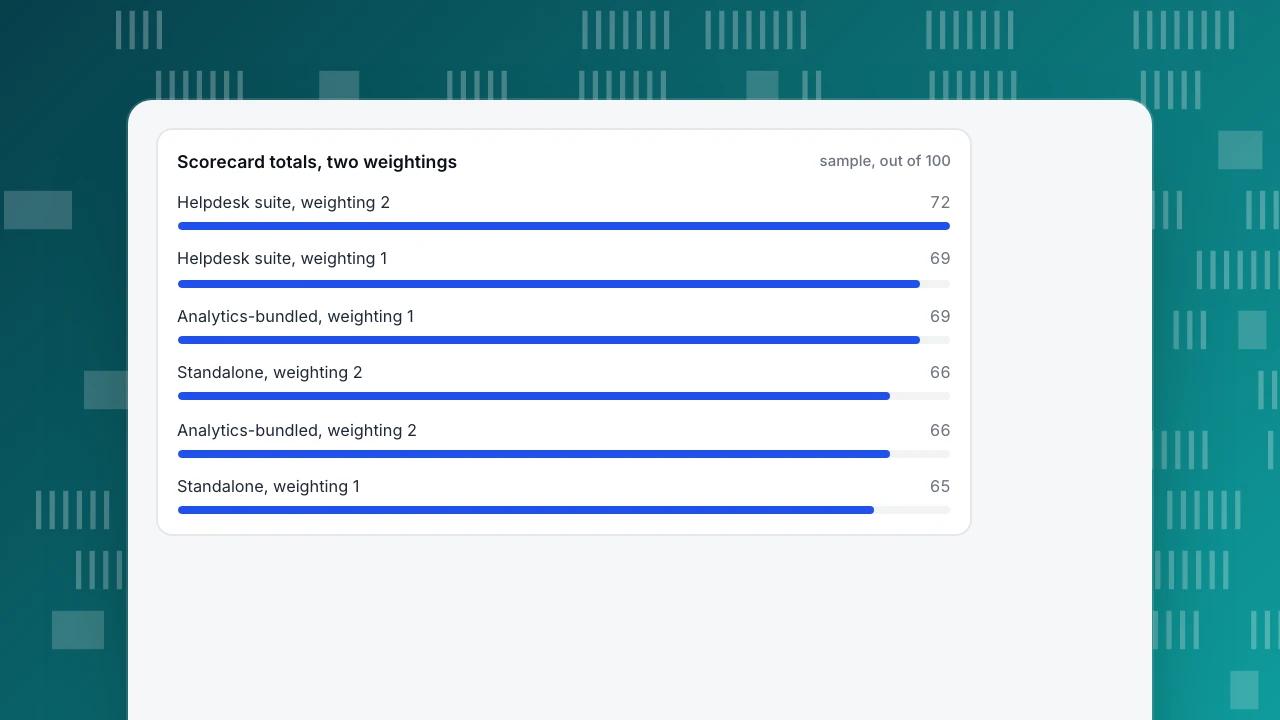
| Total (out of 100) | 100 | 65 | 69 | 69 |
Recompute A: 15×4 + 15×2 + 15×4 + 15×3 + 10×3 + 10×3 + 10×4 + 10×3 = 325, and 325 ÷ 5 = 65.
Now the important test. A support-heavy team that wants speed and reporting changes the weights to 20, 10, 10, 15, 10, 15, 10, 10. The totals become A 66, B 72 and C 66, so B wins clearly. The ranking depends on the weights, which is the point: if the winner flips when you move a weight, the decision is really about priorities, and you should debate those first. If the same candidate wins under every reasonable weighting, it is a safe choice.
Rules that keep a scorecard honest: set weights before the demos, score from tests rather than slides, and have two people score separately and compare.
Scorecard totals, two weightings
sample, out of 100How do you run a two-week trial?
Demos show the best day of the product. A trial shows yours.
- Pick two finalists, not four. Each trial costs staff time.
- Install on real traffic for at least one full week, including a weekend, and put the widget on the pages that matter, not a test page.
- Use real questions. Take twenty actual questions from your inbox and run them through each tool, noting time to answer and any dead ends.
- Measure the page. Compare key page speed with and without the widget, on mobile, against the thresholds above.
- Test the exit. Ask for the data, cancel the trial and check what is deleted. How a vendor treats your data at the end is the best preview of how it treats it throughout.
- Decide with the scorecard, not with the last conversation.
Where does TapCub fit among these categories?
TapCub's chat belongs in the analytics-bundled category: the live chat uses the same script and the same visitor ID as website and app analytics. If that is the category you are considering, this is what it means in practice, using the scorecard above.
- Visitor context. Open Live chat › Inbox and a conversation arrives with the visitor's source, current page and recent browsing from the last 2 days, with a one-click link to the visitor profile in analytics.
- Setup. If the analytics script is already installed, turn on the live chat in Live chat › Chat settings › Appearance; no site code change. Otherwise get the code from Live chat › Chat settings › Install.
- Agent speed. Canned replies insert with
/and can be edited before sending (Live chat › Canned replies); routing and statuses are in Live chat › Agents. - AI with a human exit. Live chat › Chat settings › AI assistant has three modes: off, only when all agents are offline, and AI first. The AI only writes replies; it does not change orders, send emails or call other systems, and when the knowledge base does not have enough it hands to a person (Live chat › Knowledge base).
- Reporting. Live chat › Reports covers conversations, resolution rate, first response, satisfaction and workload, and Conversion attribution compares goal conversion for visitors who chatted and those who did not.
Be clear about what is not there: the chat widget has no pre-chat form (to get an email, ask in the conversation or use offline messages), and TapCub does not do CRM or email marketing. That is the trade-off of the category: strong visitor context and one script, thinner in ticketing and CRM functions.
What mistakes do buyers make?
- Comparing feature lists instead of testing. Every tool has a long list; the questions are how many clicks and how fast.
- Ignoring page speed. A heavy widget can pass Core Web Vitals on a test page and fail on your real pages with all scripts loaded.
- Buying on the headline price. Price at three volumes.
- Treating AI as the whole product. An AI that cannot hand over cleanly turns a good question into a bad experience.
- No exit plan. Know how to export conversations and what happens to data when you stop paying.
FAQ
What are the main types of live chat companies?
There are six: standalone chat widgets, helpdesk suites with chat, CRM or sales suites with chat, analytics-bundled chat, AI-first agents, and self-hosted or open-source tools. The category shows where a product started and therefore where it is strong and where it is thin.
How do I choose a live chat company?
Pick the category that matches your main need, shortlist two products, score them on eight criteria with weights set in advance, and run a trial on real traffic and real questions. Check page speed, accessibility, data protection terms and the price at three conversation volumes.
How much does live chat software cost?
It depends on the model. Per-seat plans stay flat as chat volume grows but rise with team size. Per-conversation plans follow volume, so a busy month costs far more. Flat plans are predictable. Ask for the price at today's volume, double it and your peak month.
Does live chat slow down my website?
It can, because the widget loads on every page. Measure a key page with and without it on mobile and compare against the Core Web Vitals thresholds: LCP within 2.5 seconds, INP of 200 milliseconds or less and CLS of 0.1 or less at the 75th percentile.
What should I ask a live chat company about data protection?
Ask for the data processing agreement, where data is hosted, the list of sub-processors, retention periods, how deletion requests are handled and what happens to your data when you cancel. Under the GDPR a controller needs a binding contract with its processor.
Sources
- web.dev: Web Vitals, checked 2026-11-21
- W3C: WCAG 2.2, Target Size (Minimum) and Contrast (Minimum), checked 2026-11-21
- GDPR Article 28: Processor, checked 2026-11-21
Was this article helpful?
We use your answers to fix and expand this page.
Couldn’t send. Please try again in a minute.
Thanks for the feedback. We’ll use it to improve this page.You’ve already sent feedback on this page. Thanks.

Product Analyst
Focuses on event analysis, conversion funnels, and retention, using clear metric definitions and structured analysis to explain product performance.