Try it on your own data
Every report in this article is in the free plan. One snippet for web and apps, up to 10 sites.
Start freeAn instant messaging SDK is a client library, usually paired with a backend, that adds real-time messaging to an app: persistent connection, send and acknowledge, history, presence and push. Before you embed one, test delivery, ordering, offline behaviour and push design, and compare build and buy over three years. On the sample assumptions here buying wins below about 291,667 monthly active users.
What you will learn
- Split any offer into transport, messaging core, presence, push, media, UI kit and admin layers, and ask what you get, what you still own and what happens on failure
- Push is a doorbell, not a mailbox: with a 4,096-byte payload limit, send an identifier and fetch the message over the live connection
- On the sample model, buying is cheaper below about 291,667 monthly active users and building above it; run a six-test proof of concept before committing
What is an instant messaging SDK, and what does it actually include?
An instant messaging SDK is a client library, usually paired with a hosted or self-run backend, that lets an app send and receive real-time messages without you writing the plumbing yourself. The library on the device keeps a connection open, sends messages, confirms delivery and stores a local copy. The service behind it routes messages, keeps history, tracks who is online and triggers push notifications.
When you evaluate one, split the offer into layers, because vendors price and support them differently:
| Layer | What it does | You still own |
|---|---|---|
| Transport | Persistent connection, reconnect, fallback | Network policy, firewall exceptions |
| Messaging core | Send, acknowledge, order, retry, history sync | Message schema, retention rules |
| Presence and signals | Online status, typing, read receipts | Privacy choices on what to show |
| Push | Wake the app when it is closed | Platform push credentials, payload design |
| Media | Image, file and voice upload and storage | Size limits, scanning, moderation |
| UI kit | Ready-made chat screens | Branding, accessibility, localisation |
| Admin | Users, channels, bans, export, delete | Who may use the admin tools |
A good evaluation question for every layer is the same: what do I get, what do I still own, and what happens when it fails?
Which protocols sit underneath, and why does it matter?
Most SDKs hide the protocol, but its limits show through in battery, firewalls and message size. Three building blocks cover almost everything:
| Building block | What it is | Concrete limit or default | Why you care |
|---|---|---|---|
| WebSocket | One open two-way channel over TCP, replacing repeated polling | Ports 80, or 443 over TLS, by default (RFC 6455, December 2011) | Works through most corporate firewalls and proxies |
| XMPP | An open messaging protocol over XML streams, with messaging, presence and request-response | Default ports 5222 for clients and 5269 between servers (RFC 6120, March 2011) | Federation and presence are built in; check that the port is open on the networks your users are on |
| Mobile push | The platform's channel to wake a closed app | Payload of 4,096 bytes for both notification and data messages in Firebase Cloud Messaging | A push can announce a message but cannot carry a long one |
The last row drives a design rule worth testing in any SDK: push is a doorbell, not a mailbox. Take a small envelope as an example (sample data): a JSON object with a type, conversation id, message id, sender id, timestamp and an empty preview field is 137 bytes. That leaves 3,959 bytes in a 4,096-byte payload, which is about 3,959 English characters but only about 1,319 Chinese characters at 3 bytes each in UTF-8. A long message, an attachment or a message in a language that needs more bytes per character will not fit, so a sound SDK sends the identifier in the push and fetches the content over the live connection once the app opens. If a vendor puts the full body in the push, ask what happens to long messages.
What should a requirements checklist include?
Write the answers down before you talk to vendors or start a build. Each line is something you can test.
| Requirement | Question to ask | How to test it |
|---|---|---|
| Delivery | Is delivery at-most-once, at-least-once or exactly-once, and is there a message id for de-duplication? | Send 100 messages over a flaky connection; count duplicates and losses |
| Ordering | Are messages ordered within a conversation? | Send 20 messages in a burst from two devices; check order on a third |
| Offline | What happens when the recipient is offline for a day? | Airplane mode for 24 hours; reopen and check history and unread counts |
| History | How does a new device sync old messages? | Sign in on a second phone; time the first screen |
| Reconnect | How does the client back off after a network drop? | Toggle the network every 5 seconds for a minute; watch connection counts |
| Push | What is in the push, and how is the app woken on each platform? | Kill the app; send a message; check the latency and content |
| Media | Size limits, scanning, expiry of links? | Upload a file at the stated limit and one just above it |
| Moderation | Can you block, mute, report and delete? | Run a block, then check what the blocked user still sees |
| Data | Where are messages stored, for how long, and can you export and delete per user? | Request an export and a deletion for a test user |
| Platforms | Native iOS and Android, web, cross-platform frameworks? | Check each package and its minimum OS version |
| Size and cost | App size added, price per active user, free tier limits? | Build a release with and without it; compare the size |
The platform question deserves a second look for teams with several clients. The web, iOS, Android and cross-platform packages usually have different release schedules and feature gaps, so check that every client you need supports the features you rely on.
| Building block | Concrete limit or default | Why you care |
|---|---|---|
| WebSocket (RFC 6455) | Ports 80, or 443 over TLS | Passes most corporate firewalls and proxies |
| XMPP (RFC 6120) | Ports 5222 (client) and 5269 (server) | Federation and presence built in; check the port is open |
| Mobile push (FCM) | 4,096-byte payload for both message types | A push can announce a message but not carry a long one |
Design rule: send an identifier in the push and fetch the content when the app opens.
What does build versus buy cost?
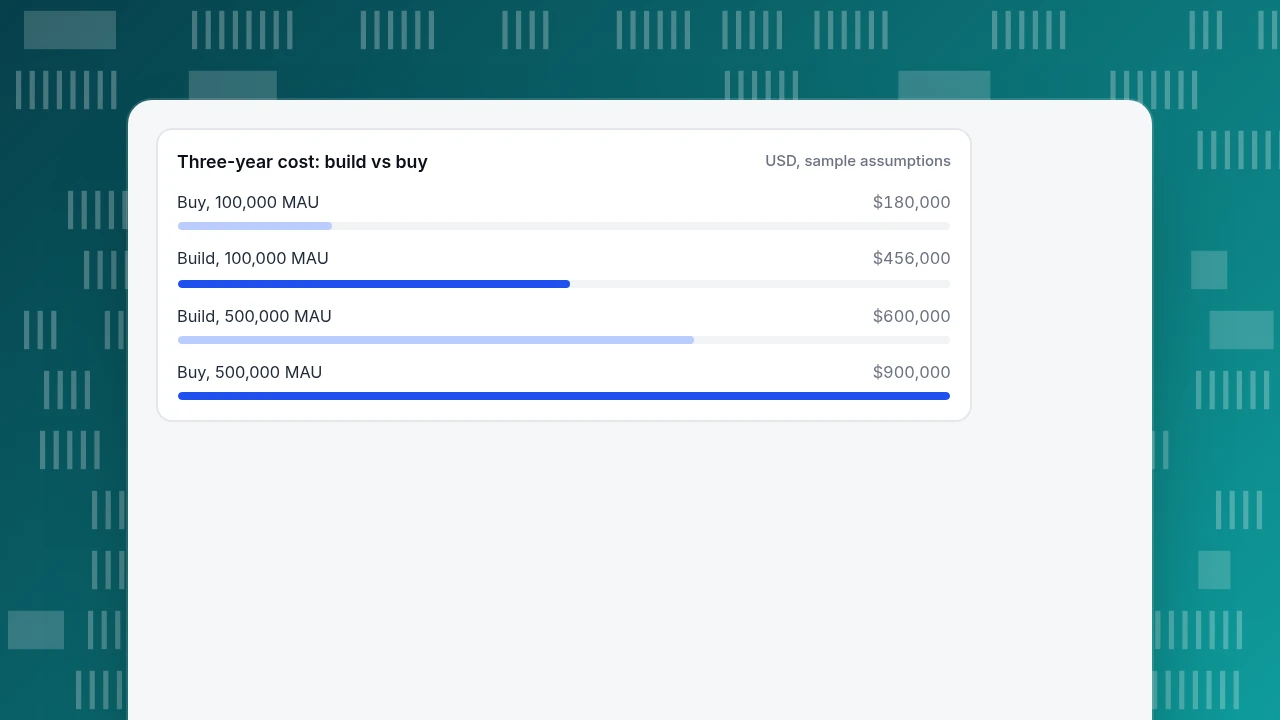
A build is a fixed project plus ongoing upkeep; a buy is a per-user subscription. Compare them over three years at several audience sizes. Sample data with assumptions you can replace: building takes 2 engineers for 5 months at $15,000 per engineer-month, so $150,000 once. Upkeep (on-call, security fixes, platform changes) is $90,000 a year. Servers and storage cost $0.01 per monthly active user (MAU) per month. A hosted service costs $0.05 per MAU per month.
Three-year cost = fixed + 3 × upkeep + 36 × infrastructure rate × MAU for a build, and 36 × service rate × MAU for a buy.
| Monthly active users | Build, 3 years | Buy, 3 years | Cheaper |
|---|---|---|---|
| 10,000 | $423,600 | $18,000 | Buy |
| 100,000 | $456,000 | $180,000 | Buy |
| 500,000 | $600,000 | $900,000 | Build |
Break-even: the fixed costs ($150,000 + 3 × $90,000 = $420,000) divided by the 3-year per-user saving (36 × ($0.05 − $0.01) = $1.44) gives about 291,667 MAU. Below that, buying is cheaper on these assumptions; above it, building is.
Three caveats stop the number from being a verdict. First, the assumptions are yours to challenge: halve the service rate to $0.025 and the break-even rises to about 777,778 MAU (420,000 ÷ (36 × 0.015)). Second, the build side usually omits compliance work, abuse handling and the opportunity cost of two engineers who are not working on your core product. Third, the buy side omits the cost of leaving: ask how you would export history and how long a migration would take, since switching later is a project of its own.
Three-year cost: build vs buy
USD, sample assumptionsHow do you test reliability before you commit?
A one-week proof of concept with a short script is worth more than any feature page. Run these six tests with at least three real devices:
- Burst and order. Send 50 messages in 10 seconds from two devices into one conversation. Count lost, duplicated and out-of-order messages on a third device.
- Network flapping. Switch between Wi-Fi and mobile data every 10 seconds for 5 minutes. Check that messages are neither lost nor duplicated, and that reconnection does not drain the battery.
- Cold start. Kill the app, send a message, and measure the time until the notification arrives and the time until the conversation shows the message after tapping it.
- Long offline. Keep one device offline for 24 hours with 200 messages waiting. Time the sync after reconnect and check unread counts.
- Large content. Send a message at the documented size limit and one above it, plus a file near the upload cap. Check the error messages the user sees.
- Deletion. Delete a message, a conversation and a test user. Check what remains on other devices and in the export.
Write the results into the checklist table. A vendor that cannot explain a failing test has told you something important.
How do you decide?
Use three rules. Buy when messaging is a supporting feature and your audience is below the break-even from the cost table. Build when messaging is the product, when you need behaviour no vendor offers, or when your audience is well above break-even and you can staff on-call. Do not choose either yet when the real need is customer support on a website: a support chat widget does a different job from an in-app messaging SDK, and chat SDK versus widget explains the difference. For the broader category, in-app live chat covers when chat inside an app earns its place, and SDK versus API covers how the two ways of integrating differ.
Where does TapCub fit when you evaluate an instant messaging SDK?
Start with what TapCub is not. TapCub's live chat is a customer support chat for websites, drawn by a script on your page; it is not an instant messaging SDK you embed in an app for user-to-user chat, and TapCub does not provide one. Its mobile SDKs (iOS, Android, Flutter, React Native, HarmonyOS) are analytics SDKs. What TapCub can do is measure whether the messaging feature you chose is working, using the app SDK to send your own events.
- Define the events. Record the events you will send, such as opening the chat screen and sending a first message, in All-platform analytics › Data › Tracking plan, with an owner and status.
- Build the funnel. In All-platform analytics › Behavior › Behavior analysis, use the funnel to see how many people who open the chat send a message, and where the rest stop.
- Compare retention. In the same builder, compare retention of people who sent a message with those who did not. It is an observational comparison, since engaged people chat more, so read it as a signal and not a proof.
- Watch stability by version. After you add an SDK, open App analytics › Users › Versions and App analytics › Quality & attribution › Stability to see whether the release that shipped it changed crash behaviour.
- If you also need support chat on a website, the web widget is a different tool: it is switched on from Live chat › Chat settings › Install, shares the visitor ID with the analytics script and needs only a script tag, not an app SDK.
TapCub measures usage and stability around your messaging choice. The messaging itself, including delivery, history and push, comes from the SDK or backend you pick.
FAQ
What is an instant messaging SDK?
A client library, normally paired with a backend service, that adds real-time messaging to an app. It handles the persistent connection, sending and acknowledging messages, history, presence and push notifications, so you build the interface and rules rather than the transport.
Should you build or buy chat for an app?
Compare three-year cost with your audience size. On the sample assumptions here, buying is cheaper below about 291,667 monthly active users and building is cheaper above it. Add compliance, abuse handling and the cost of switching later before you decide.
What protocols do chat SDKs use?
Most use a persistent WebSocket connection, which defaults to ports 80 and 443, and some are built on XMPP, with default ports 5222 and 5269. For closed apps they rely on platform push, which has small payloads: Firebase Cloud Messaging allows 4,096 bytes.
How do you test message delivery reliability?
Run a short proof of concept on real devices: bursts with two senders, network flapping, a killed app, a long offline period, and a deletion. Count lost, duplicated and out-of-order messages and time the sync. Write the results into your checklist.
Is a support chat widget the same as an instant messaging SDK?
No. A widget puts a support conversation on a website between a visitor and your team. A messaging SDK adds chat features inside an app, often between users. They solve different problems and can coexist in one product.
Sources
- I. Fette and A. Melnikov. RFC 6455: The WebSocket Protocol. IETF, December 2011: one open channel for browser-based code, default ports 80 and 443. Checked 2026-11-22.
- P. Saint-Andre. RFC 6120: Extensible Messaging and Presence Protocol (XMPP): Core. IETF, March 2011: default client and server ports 5222 and 5269. Checked 2026-11-22.
- Firebase. Notification messages and data messages: maximum payload of 4,096 bytes for both message types. Checked 2026-11-22.
Was this article helpful?
We use your answers to fix and expand this page.
Couldn’t send. Please try again in a minute.
Thanks for the feedback. We’ll use it to improve this page.You’ve already sent feedback on this page. Thanks.

Product Experience Specialist
Writes about product experience, practical workflows, and growth, turning complex processes into clear steps for everyday decisions.