Try it on your own data
Every report in this article is in the free plan. One snippet for web and apps, up to 10 sites.
Start freeTo write SDK documentation developers use, put a quickstart first that ends in a result the reader can verify, then add task guides, an exhaustive reference, a concepts page and a changelog with migration notes. Test every code sample, put the version on every page and measure the quickstart as a funnel. In the sample below 55.0% finish in a median of 6.0 minutes, and the slowest step loses the most people.
What you will learn
- Quickstart first: prerequisites, numbered steps with exact code, a verify step and the pitfalls where they occur
- Use SemVer in the docs: breaking changes get a major version, a deprecation needs a minor release before removal
- Measure install to first event as a funnel and fix the step that is both slowest and loses the most readers
What does good SDK documentation contain?
Good SDK documentation gets a developer from "I found this" to "my first call works" in minutes, and then stays useful for the next hundred questions. It does that with four kinds of page, because developers arrive with four different needs. The Diátaxis framework names them: tutorials, how-to guides, technical reference and explanation (Diátaxis). For an SDK they map to:
- Quickstart (tutorial): a guided path from nothing to a first working call.
- How-to guides: task recipes such as "identify a user" or "send events from a server".
- Reference: every class, method, parameter, default and error, exhaustively and predictably.
- Explanation: why the SDK queues events, retries, or batches, and what that means for the developer.
The common failure is a docs set that is only reference, generated from code comments and complete but unreadable to a newcomer, or only tutorials that go stale at the first release. The rest of this guide puts the quickstart first, then examples, then versioning, with numbers you can recompute. Background on what an SDK is and how it differs from an API is in SDK vs API, and the writing basics for any user-facing documentation are in how to write a user guide.
Quickstart first: the structure that works
A quickstart has a fixed shape and a single goal: the reader sees a result they can verify.
- Prerequisites. Language and platform versions, accounts, keys. State them before step one, not when step four fails.
- Numbered steps, each with one action and the exact command or code, copy-pasteable with real values filled in wherever you can (for example a snippet generated with the reader's own key).
- A verify step. Show what success looks like: the output, the screen or the event that should appear. "It works" without a way to check is not an ending.
- Known pitfalls, placed at the step where they occur. A common one: tracking disabled on a local development host.
- Next steps, three links at most, to the how-to guides readers most often need.
Rules that keep it short:
- One path. If there are three install methods, the quickstart shows the most common and links the others.
- No concepts that are not needed yet. A paragraph about batching belongs in explanation, not before step one.
- Target a time and test it: five minutes for a client SDK is a reasonable goal if you stand behind it, which the worked example below shows how to measure.
A page map for an SDK doc set
| Page | Diátaxis type | Question it answers | Must contain |
|---|---|---|---|
| Overview and support matrix | Reference | Does it support my platform and version? | Platform, package, install method, version, minimum requirements |
| Quickstart | Tutorial | How do I get a first result? | Prerequisites, numbered steps, verify, pitfalls |
| Authentication and configuration | How-to and reference | How do I set the key and options? | Every option, its default and an example |
| Core tasks (per task) | How-to | How do I do X? | One goal, minimal code, expected result |
| API reference | Reference | What exactly does this call do? | Signature, parameters, return value, errors |
| Concepts | Explanation | Why does it behave like this? | Queueing, retries, identity, limits |
| Errors and troubleshooting | How-to | Why did it fail? | Message, cause, fix |
| Changelog and migration | Reference and how-to | What changed and what must I do? | Version, date, change type, migration steps |
A support matrix as the first thing under the overview pays for itself: it answers the most common question before anyone reads further. For example, TapCub's own SDK overview lists, per platform, the package, distribution channel, version, minimum requirement and what is captured automatically, in one table.
| Page | Type | Must contain |
|---|---|---|
| Overview | Reference | Platform, package, version, minimum requirements |
| Quickstart | Tutorial | Prerequisites, numbered steps, verify, pitfalls |
| Task guides | How-to | One goal, minimal code, expected result |
| API reference | Reference | Signature, parameters, return value, errors |
| Concepts | Explanation | Queueing, retries, identity, limits |
| Changelog and migration | Reference | Version, date, change type, migration steps |
Types follow the Diataxis framework.
Code examples that people can run
Examples carry most of the weight in SDK documentation, and the Google developer documentation style guide has concrete rules for them (Google developer documentation style guide, code samples):
- Wrap code at 80 characters, or fewer if readers may use narrow windows or print the page.
- Follow the indentation rules of the language's style guide.
- Mark omitted code with a comment in the sample's own language, not with three dots or an ellipsis character, so the sample stays valid to copy.
- Introduce most samples with a sentence; end it with a colon when it comes right before the sample.
Add four rules of your own:
- Every sample must run. Put the samples in a test suite or run them in CI against the released package; a sample that fails is a bug in the docs.
- Show the result next to the code: the output, or the screen where the effect appears.
- Use obvious placeholders (
YOUR_SITE_KEY) and say where the real value comes from. - One example per task, minimal. Put the full-featured example further down the page.
Versioning and deprecation
Developers pin versions, so the docs must say which version each page describes. Semantic Versioning 2.0.0 gives a shared vocabulary: increment MAJOR for backward-incompatible changes to the public API, MINOR for new backward-compatible functionality (and when a feature is deprecated), PATCH for backward-compatible bug fixes; versions 0.y.z mean anything may change at any time (Semantic Versioning 2.0.0). The same specification says to deprecate by updating the documentation, releasing a minor version that includes the deprecation, and keeping at least one minor release with the deprecation before removing the feature in a new major release.
A worked example. Sample data: the current version is 2.4.1 and the next release contains these changes:
| Change | Type | Why |
|---|---|---|
| Fix a retry bug that sent events twice | PATCH | Backward-compatible bug fix |
| Speed up internal serialisation | PATCH | Internal, behaviour unchanged |
Add a flush() method | MINOR | New compatible functionality |
Add an optional timeout parameter | MINOR | New compatible functionality |
Deprecate track(name, props) in favour of capture | MINOR | Deprecation is a minor change |
Rename option siteId to siteKey and drop the old name | MAJOR | Backward-incompatible |
There are 2 patch, 3 minor and 1 major change. The highest type wins, and lower numbers reset: with the rename, the next version is 3.0.0. If you defer the rename, the highest is minor and the next version is 2.5.0. Either way the deprecated track(name, props) cannot be removed until a later major release, and only after at least one minor release has carried the deprecation, so the migration guide should say which version removes it.
In the docs: put the version on every page, show deprecated items with the replacement and the removal version, and keep a migration guide for each major release.
A worked example: install to first event
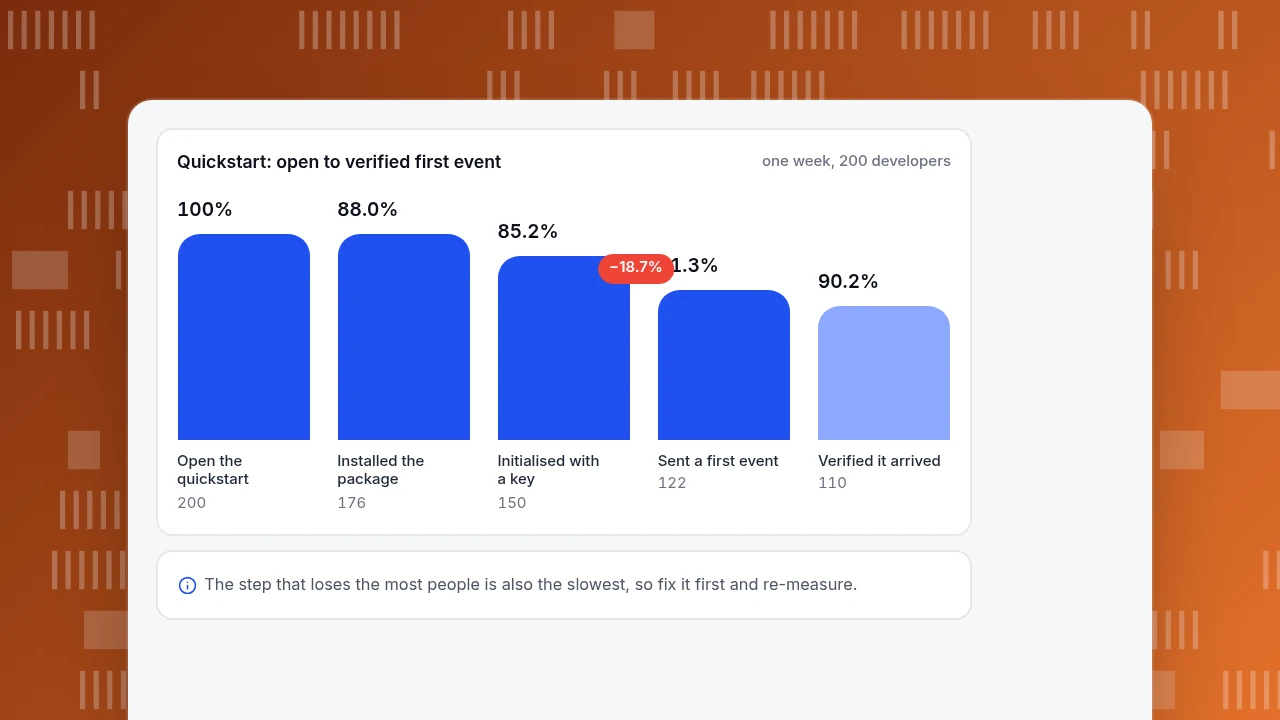
An SDK quickstart is a funnel. Measure it. Sample data: 200 developers open the quickstart in a week, and an event log from the product records how far each got.
| Step | Developers reaching it | Share of previous step | Loss from previous | Median time |
|---|---|---|---|---|
| Open the quickstart | 200 | n/a | n/a | n/a |
| Installed the package | 176 | 88.0% | 12.0% | 1.0 min |
| Initialised with a key | 150 | 85.2% | 14.8% | 1.5 min |
| Sent a first event | 122 | 81.3% | 18.7% | 3.0 min |
| Verified it arrived | 110 | 90.2% | 9.8% | 0.5 min |
Overall, 110 ÷ 200 = 55.0% finish. The median times add to 1.0 + 1.5 + 3.0 + 0.5 = 6.0 minutes. The step that loses the most people, 28 of 150 (18.7%), is also the slowest at 3.0 minutes: sending the first event. That is where the documentation work pays off first: show the exact call with real values filled in, show the output to expect and list the one or two reasons it silently fails. Fix the biggest loss that is also the slowest step, then re-measure; a quickstart is done when most readers finish in the time you promised.
Note the limits: median times from a sample of 200 are rough, the developers who open the quickstart are not a random sample, and the funnel does not tell you why someone left. Use it to decide where to watch a real person try the page.
Quickstart: open to verified first event
one week, 200 developersOpen the quickstart
200
Installed the package
176
Initialised with a key
150
Sent a first event
122
Verified it arrived
110
A review checklist
- Does the first screen say what the SDK does, which platforms it supports and which version the page describes?
- Can a newcomer reach a verified first result in the time you promise?
- Does every step have one action, exact code and a visible result?
- Do prerequisites come before step one?
- Is every code sample run in CI against the released package?
- Does the reference cover every public method, parameter, default and error?
- Is there a concepts page for behaviour that surprises (queues, retries, identity)?
- Does every deprecation name the replacement and the removal version?
- Is there a migration guide per major release and a dated changelog?
- Do you read support questions monthly and fix the page that caused them?
Common mistakes
- Reference only, generated from comments, with no quickstart.
- Tutorial only, with no reference once the reader needs the exact signature.
- Stale samples. The most damaging mistake; developers copy the first sample they see.
- No version on the page, so readers cannot tell if it applies to their install.
- Hiding breaking changes in a changelog line. Give breaking changes a heading and a migration path.
- Concepts before the first result. Readers want the result first and the theory when it surprises them.
Measure your quickstart in TapCub
Take the funnel above. TapCub does not host documentation or generate reference docs; it measures what readers of your docs and your product do.
- Add the TapCub script to your documentation site so the pages become measurable in Web analytics › Pages, with entry pages, exits and time on page per quickstart step.
- Send a server-side event from your product when a first event arrives (for example
first_event_received), using the server HTTP interface or a server SDK, and record planned names in All-platform analytics › Data › Tracking plan. - In All-platform analytics › Behavior › Behavior analysis, build a funnel from the quickstart page through the install and verify pages to
first_event_received, to see where readers drop. - Use Web analytics › Realtime to confirm the script is firing when you check a change, and mark each docs release in Configuration › Annotations so a later improvement can be compared with the weeks before.
- For the step that loses most readers, open All-platform analytics › Behavior › Session replay (off by default) on the page to see where people stall, then edit the page and compare the same funnel afterwards.
TapCub shows where readers leave and which pages they read. Why they leave still needs a person trying the page, as noted above.
FAQ
How do you write SDK documentation?
Start with a quickstart that ends in a verifiable result, then add how-to guides for common tasks, an exhaustive reference, a concepts page and a changelog with migration notes. Test every code sample and put the version on every page.
What should SDK documentation include?
An overview with a support matrix, a quickstart, configuration, task guides, API reference, concepts, troubleshooting, and a changelog and migration guide. Diátaxis groups these into tutorials, how-to guides, reference and explanation.
How do you document versions and breaking changes?
Use Semantic Versioning: MAJOR for backward-incompatible changes, MINOR for compatible features and deprecations, PATCH for fixes. Deprecate with at least one minor release before removing in a major release, and publish a migration guide for each major release.
How long should an SDK quickstart take?
Pick a target you can verify, and measure it. A client SDK quickstart that gets to a first verified event in around five minutes is a common goal; in the sample here the median was 6.0 minutes with 55.0% finishing.
How do I keep code samples from going stale?
Run them in CI against the released package, so a failing sample fails the build. Re-run them on every release.
Sources
Was this article helpful?
We use your answers to fix and expand this page.
Couldn’t send. Please try again in a minute.
Thanks for the feedback. We’ll use it to improve this page.You’ve already sent feedback on this page. Thanks.

Technical Engineer
Focuses on tracking code, SDKs, and API integrations, with practical guidance on implementation checks and troubleshooting.