Try it on your own data
Every report in this article is in the free plan. One snippet for web and apps, up to 10 sites.
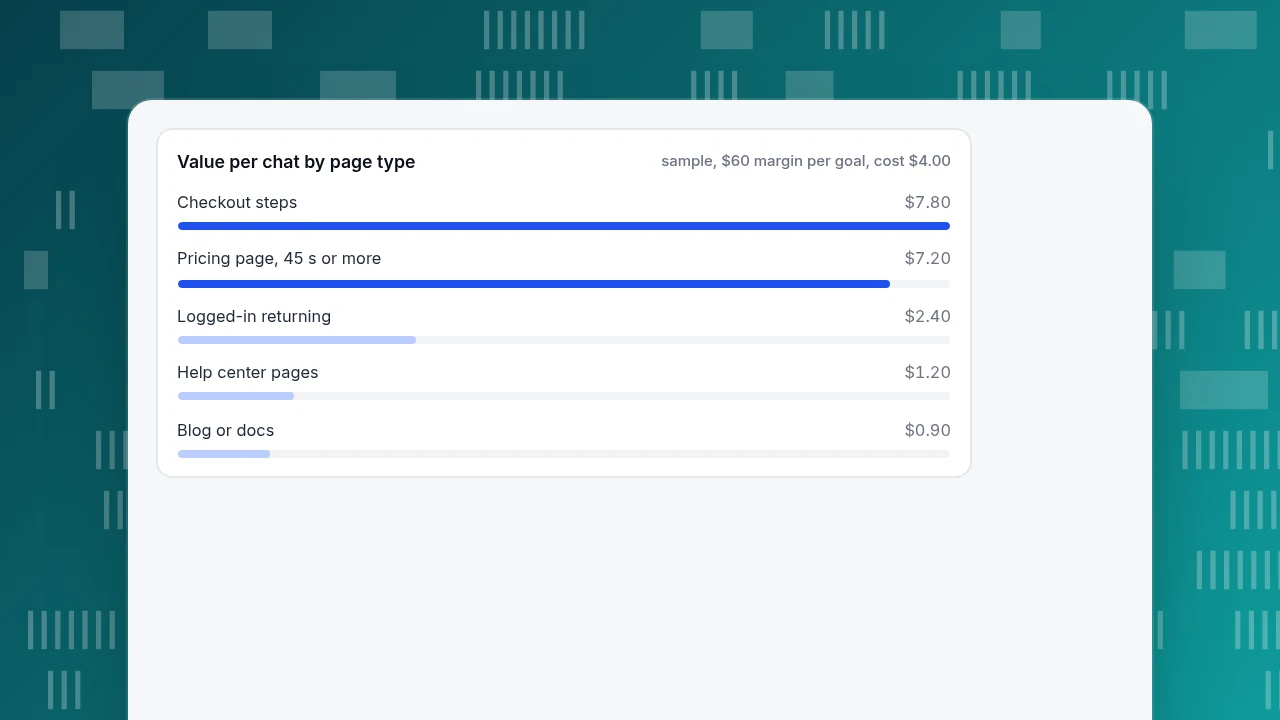
Start freeHigh-touch means a person joins the conversation; low-touch means the visitor serves themselves. Put humans where the value per chat is above the cost per chat. In the sample, a chat on the pricing page was worth $7.20 and one at checkout $7.80 against a $4.00 cost, while chats on blog and help pages were worth $0.90 to $1.20, so those get a knowledge base first and chat on request.
What you will learn
- Decide by page and behaviour: value per chat against cost per chat, not by lift alone
- Keep an easy route to a person everywhere: self-service fully resolves only 14% of issues overall
- Treat the chatted-versus-not-chatted gap as an upper bound, because chatters were already keen
What do high-touch and low-touch mean for a website?
High-touch means a person is involved: an agent invites a visitor into a chat, answers live, or follows up. Low-touch means the visitor serves themselves: a knowledge base, a pinned FAQ, a help article, perhaps an automated answer. Most sites need both. The question is not which model is better but where each one belongs, and the cheapest honest answer comes from what visitors do on the site.
The tension is cost against value. A human conversation costs agent time; a self-service answer costs almost nothing but works only when the question is simple. Customer-success teams make this decision for accounts (see customer success strategy); this guide makes it for pages and visitor behaviour, using signals you can read from analytics. For the proactive side, see proactive chat examples.
Why can't you give everyone a human?
Because the arithmetic does not close. Sample data: a site with 60,000 visitors a month and 1,760 chat conversations. At an assumed fully loaded cost of $4.00 per human-handled conversation (an agent at $28 an hour handling 7 an hour), those chats cost 1,760 × $4.00 = $7,040 a month. Offering a human to far more visitors multiplies that cost, and most of those extra conversations would be questions that a good page or FAQ answers.
Low-touch has a ceiling too. A Gartner survey of 5,728 customers (December 2023, published 19 August 2024) found that only 14% of customer service issues are fully resolved in self-service overall, and only 36% even for issues customers call "very simple". So self-service is the right default for simple questions and the wrong one for anything involved, high-value or emotional. The practical answer is a split by signal: human where the stakes are high, self-service where the question is simple, and an easy path to a person from everywhere.
Which visitor signals say a human is worth it?
Use signals you can observe without asking:
| Signal | What it suggests | Touch level |
|---|---|---|
| On pricing or plan pages for 45 seconds or more | Evaluating, likely has a question | High: proactive invite |
| In checkout steps | Close to buying, a small obstacle can stop them | High: chat available and visible |
| Several pages deep, returning visitor | Serious interest | Medium: invite if on a key page |
| Reading a blog post or documentation page | Learning, not buying yet | Low: knowledge base, chat on request |
| On help-center pages | Has a problem | Low first; human if "not solved" |
| Logged in, existing customer | Different needs: support, not sales | Medium: depends on account value |
Two guard-rails: do not invite anyone who has just arrived (a few seconds is not a signal), and never block the route to a person for high-touch pages.
| Signal | What it suggests | Touch level |
|---|---|---|
| 45 seconds or more on pricing | Evaluating, likely has a question | High: proactive invite |
| In checkout steps | Close to buying | High: chat visible |
| Reading a blog or docs page | Learning | Low: knowledge base, chat on request |
| On help-center pages | Has a problem | Low first, human if not solved |
| Logged-in customer | Support, not sales | Medium |
Signals you can read from analytics without asking visitors.
Worked example: what is a chat worth on each type of page?
Sample data, one month, 60,000 visitors in five groups. "Goal rate" is the share of visitors who completed a goal that day; the no-chat rate is among those who browsed and did not chat.
| Segment | Visitors | Chats | Chat rate | Goal rate (chatted) | Goal rate (no chat) | Relative lift |
|---|---|---|---|---|---|---|
| Pricing page, 45 s or more | 5,000 | 400 | 8.0% | 22.0% | 10.0% | +120% |
| Checkout steps | 2,400 | 240 | 10.0% | 38.0% | 25.0% | +52% |
| Blog or docs, 1 to 2 pages | 36,000 | 360 | 1.0% | 3.0% | 1.5% | +100% |
| Help center pages | 9,600 | 480 | 5.0% | 6.0% | 4.0% | +50% |
| Logged-in returning customers | 7,000 | 280 | 4.0% | 18.0% | 14.0% | +29% |
| Total | 60,000 | 1,760 | 2.9% |
Relative lift = chatted rate ÷ no-chat rate − 1; for pricing, 22.0 ÷ 10.0 − 1 = 120%. Lift alone misleads: blogs show +100% on tiny rates. What matters is extra goals per chat: chats × (chatted rate − no-chat rate) ÷ chats, which is just the difference in rates.
| Segment | Extra goals from chats | Per chat | Value per chat at $60 margin |
|---|---|---|---|
| Pricing page, 45 s or more | 400 × 12.0 points = 48.0 | 0.12 | $7.20 |
| Checkout steps | 240 × 13.0 points = 31.2 | 0.13 | $7.80 |
| Blog or docs | 360 × 1.5 points = 5.4 | 0.015 | $0.90 |
| Help center pages | 480 × 2.0 points = 9.6 | 0.02 | $1.20 |
| Logged-in returning | 280 × 4.0 points = 11.2 | 0.04 | $2.40 |
Value per chat by page type
sample, $60 margin per goal, cost $4.00What is the rule for where to put high touch?
Put humans where the value per chat is above the cost per chat. With a $4.00 cost, only pricing ($7.20) and checkout ($7.80) pass; the other three do not. So:
- High-touch: proactive invites and human answers on pricing and checkout.
- Low-touch first: knowledge base and pinned FAQ on blog, docs and help pages, with chat still on request.
- Medium: returning customers get chat available, with no invite, because their value per chat ($2.40) is below cost but not negligible.
Two cautions. The margin ($60) and the cost ($4.00) are assumptions to replace with yours. And the table's differences are an upper bound: people who choose to chat were already more likely to act, so some of the lift is not caused by the chat. Treat a segment that clears the bar only narrowly as a test, not a decision. See selection bias and chatbot ROI for the correction.
How do you keep the low-touch side honest?
- Answer the common questions first. Take the top questions agents answer on those pages and write them as short answers.
- Keep a visible way to a person. A visitor who failed the FAQ and cannot reach anyone leaves, or files an angrier ticket.
- Count "not solved". The share of people who opened an FAQ answer and then asked for a human tells you which answers fail.
- Review wrong answers. Self-service that answers incorrectly costs more than none.
Human help can also be made cheaper without removing it. In a study of 5,179 customer support agents, access to a generative AI assistant raised issues resolved per hour by about 14% on average and about 34% for novice and low-skilled workers (Brynjolfsson, Li and Raymond, NBER working paper 31161). That makes high-touch conversations cheaper, which can move a segment above the line.
How do you invite without annoying people?
- Pick the pages from the rule above, not every page.
- Choose a dwell time that signals thought, not arrival: for a pricing page, start around 45 seconds and adjust from results.
- Invite once per visitor by default, and write one line that offers help with something specific ("Questions about which plan fits?").
- Review the open and reply rates and retire invites nobody answers.
What mistakes make a touch strategy fail?
- Inviting every visitor on every page. It trains people to close the widget.
- Judging a segment by lift alone. A +100% lift on a 1.5% base is worth little per chat.
- Taking the raw gap as the effect. It overstates the value, because chatters were already keen.
- Burying the human option on high-value pages. The highest-value visitors are the ones who most need an easy path.
- Using one rule for logged-in customers and prospects. Their questions and values differ.
How do you run this analysis in TapCub?
Use the example as a guide.
- Find where chats start. Live chat › Reports lists the top 10 hot pages: the page where each chat started, without the query string. It also has a heatmap of chat starts by weekday and hour to compare with office hours.
- Compare chatted and not chatted. Live chat › Reports › Conversion attribution shows, for each day, visitors, those who chatted and those who reached a goal after chatting, with the chatted rate, the no-chat rate and the relative lift (chatted rate ÷ no-chat rate − 1). When fewer than 30 visitors chatted it warns that the sample is too small. Because it is per day and for the whole site, you work out segment tables like the one above yourself, filtering visitors by the pages and signals in analytics. It is the upper bound described above, not a controlled test.
- Set the invites. Live chat › Chat settings › Proactive invites matches every page, path contains, path prefix or a regular expression, with a dwell time from 3 to 600 seconds and text up to 300 characters. When several rules match one page, the highest priority fires, and by default each visitor is invited once. The rule list shows impressions, open rate and reply rate.
- Keep the low-touch side. In Live chat › Knowledge base, pinned Q&A entries appear in the visitor's FAQ; opening an answer does not create a conversation, and only Not solved or a request for a person opens one.
- Know what TapCub does not do. It does not run A/B tests or random holdouts, so the strongest check of lift needs another tool; it measures what happens after the invite.
FAQ
What is the difference between high-touch and low-touch customer experience?
High-touch involves a person, such as a proactive chat invite or a live agent. Low-touch is self-service: a knowledge base, FAQ or help page. Most sites need both, with humans placed where the value per conversation exceeds the cost.
When should you use high-touch customer service?
On high-intent, high-value moments: pricing pages after a pause, checkout steps, complex setup, or important accounts. In the sample, a chat on the pricing page was worth about $7.20 against a $4.00 cost, while a chat on a blog page was worth about $0.90.
Can self-service replace human support?
Not entirely. Gartner found only 14% of customer service issues were fully resolved in self-service (36% for very simple ones). Use it as the default for simple questions and keep an easy route to a person for the rest.
How do I decide which pages should have a proactive chat invite?
Rank pages by extra goals per chat times the value of a goal, and invite only where it exceeds the cost of a conversation. Treat the chatted-versus-not-chatted gap as an upper bound and confirm with a test where you can.
How do I stop proactive chat from annoying visitors?
Invite on a few key pages, wait for a dwell time that shows interest (for example 45 seconds on pricing), invite each visitor once and retire invites with low reply rates.
Sources
- Gartner. Gartner Survey Finds Only 14% of Customer Service Issues Are Fully Resolved in Self-Service — 5,728 customers surveyed in December 2023; 14% overall and 36% for very simple issues; press release 19 August 2024. Checked 2026-11-22.
- Erik Brynjolfsson, Danielle Li and Lindsey R. Raymond. Generative AI at Work. NBER Working Paper 31161 — 5,179 support agents; about 14% average and 34% novice gains in issues resolved per hour. Checked 2026-11-22.
Was this article helpful?
We use your answers to fix and expand this page.
Couldn’t send. Please try again in a minute.
Thanks for the feedback. We’ll use it to improve this page.You’ve already sent feedback on this page. Thanks.

Product Experience Specialist
Writes about product experience, practical workflows, and growth, turning complex processes into clear steps for everyday decisions.