Try it on your own data
Every report in this article is in the free plan. One snippet for web and apps, up to 10 sites.
Start freeA live chat works in six stages: a script draws the chat bubble, the visitor's message travels over a real-time connection, routing queues it for an agent or lets a knowledge base answer, the agent replies from a workbench that shows the visitor's page and history, rules decide when a bot hands off, and the conversation is resolved.
What you will learn
- Messages travel over a persistent two-way connection (WebSocket), so replies appear without polling
- Routing has three outcomes: an exact stored answer, an AI draft from your documents, or a person; set a turn limit so the bot hands off cleanly
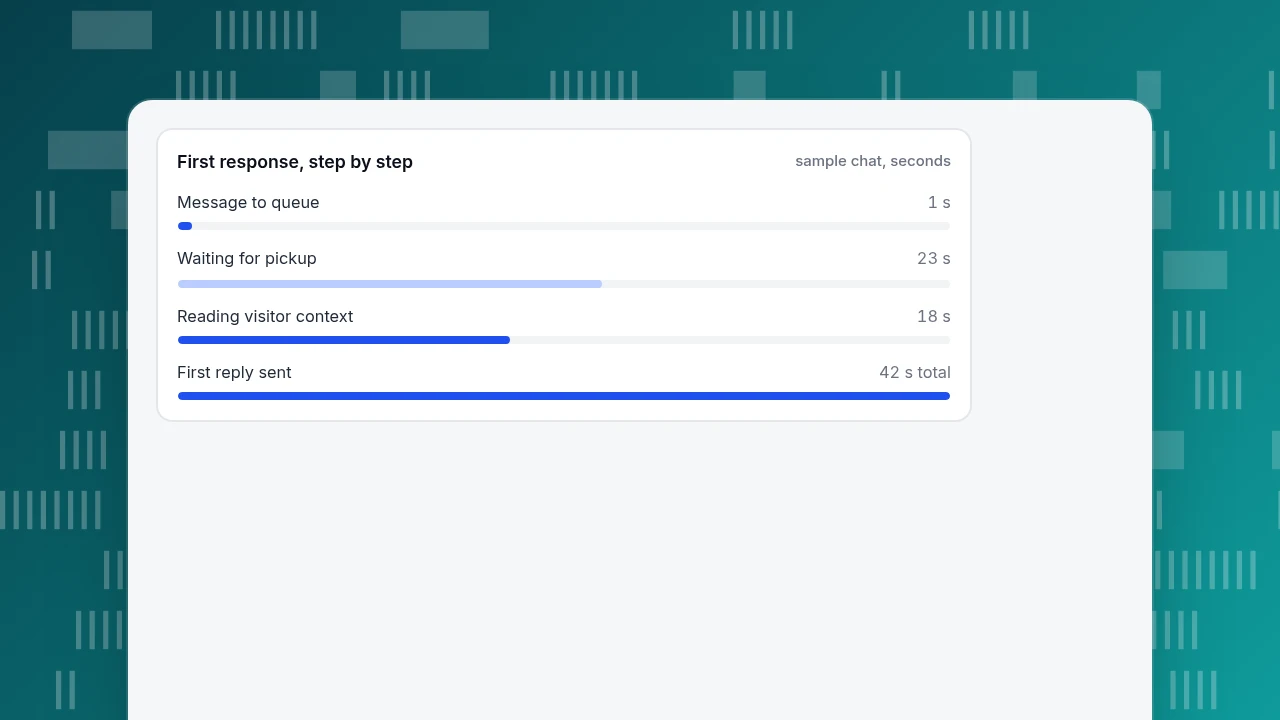
- In the sample, a 42-second first response is 1 s queue, 23 s waiting for pickup and 18 s reading context
How does a live chat work from click to reply?
A live chat is a small piece of script on your page, a real-time connection to a server, and a workbench where your team answers. The visitor opens the bubble and types; the server holds the message in a queue, picks an agent or an automatic answer, and pushes the reply back to the page. Context about the visitor travels with the message, so the agent does not have to ask where they are.
Six stages cover every live chat product:
| Stage | What the visitor sees | What happens behind it |
|---|---|---|
| 1. Widget loads | A chat bubble in the corner | Your page loads a script that draws the bubble, if the page is on an allowed domain |
| 2. Visitor opens and sends | A window and a typed message | A connection opens to the chat server and the message is stored |
| 3. Routing | "We will reply shortly" or an automatic answer | The conversation enters a queue and is assigned, or the knowledge base answers |
| 4. Agent picks up | Typing and then a reply | The agent sees the message, the visitor's page and past conversations |
| 5. Handoff | A person takes over from the bot, or a message form | Rules decide when automation stops |
| 6. Resolve | An optional rating | The conversation closes, and reopens if the visitor writes again |
Each stage has a failure that visitors notice: no bubble, a slow first answer, an agent who asks questions the system already knows, or a bot that cannot let go. The sections below walk through them in order and show where TapCub does each one.
How does the chat widget appear and connect?
The bubble is drawn by JavaScript on your page. Two conditions have to be true: the script is loaded, and the page's origin is allowed. In TapCub the chat reads the project's allowed domain list; if the origin is not on it, the bubble does not appear.
Showing the bubble is cheap and private: TapCub's documentation says it writes nothing to browser storage, and a session token is stored only after the visitor opens the chat.
Once the visitor sends a message, the page needs a way to receive the reply without reloading. Old systems polled: the page asked the server "anything new?" every few seconds, which wastes requests and adds delay. Modern chat uses a WebSocket, which MDN describes as a way to open a two-way interactive communication session between the browser and a server, so the server can push a message the moment it exists without the page polling for a reply. WebSockets have been widely available across browsers since July 2015, and the protocol is specified in RFC 6455. The chat gateway behind TapCub is a WebSocket service.
One caveat from MDN worth knowing: an open WebSocket can keep a page out of the browser's back/forward cache, so MDN advises closing the connection when the user is finished with the page.
How is a message routed to the right place?
When the message arrives, three outcomes are possible, in the order the system checks them.
| Route | Trigger | What the visitor gets | Uses an AI call? |
|---|---|---|---|
| Exact answer | The knowledge-base question matches the visitor's line, or the line contains every keyword | The stored answer, sent as written | No |
| Drafted answer | No exact match, a document passage scores well enough | An AI-labelled reply drafted from your documents | Yes |
| Person | No match, the model cannot answer, the visitor asks for a human, the turn limit is reached, or an agent takes over | A handoff line, or a message form if nobody is online | No |
Whether automation runs at all depends on the AI mode: off, only when all agents are offline, or AI answers first. Before the first AI reply, the visitor is told they are talking to an AI, and that notice cannot be turned off. The AI only writes a reply; it cannot place an order, edit an account or operate your site.
For messages that reach people, an auto-assignment setting decides who gets them. With "least load", the open conversations divided by each agent's maximum concurrent chats are compared and the smallest ratio wins; with round robin, agents are taken in turn. Away and offline agents receive nothing. When everyone is at the cap, the conversation waits in the queue, and in TapCub the wait time turns red after 120 seconds. If an owner goes offline and the visitor still has unread messages, a "reclaim" setting can return the conversation to the queue.
When nobody is online or it is outside office hours, an offline message form collects an email address and a question instead.
| Route | Trigger | Visitor gets | AI call? |
|---|---|---|---|
| Exact answer | Stored question or all keywords match | The stored answer as written | No |
| Drafted answer | No exact match, a document passage scores well | An AI-labelled reply | Yes |
| Person | No match, model cannot answer, visitor asks, turn limit or agent takes over | A handoff line or an offline message form | No |
Order checked: exact Q&A first, then document drafting, then a person.
What context does the agent see?
The best answer to "where is this person and what were they looking at?" is to not ask. A good handoff puts the answer next to the message.
TapCub's visitor drawer shows the current page, the landing page, the referrer, region, device, language and time on site; the pages viewed during this conversation; the analytics trail from the last two days grouped into sessions; and past conversations with the same visitor. A button opens the visitor's profile in analytics. This works because chat and analytics compute the same visitor ID with the same algorithm, so the 32-character ID in analytics is the one in chat.
Two limits: members with the Agent-only role can have the visitor-context permission turned off, which hides the trail and referrer; and on the strict privacy preset the ID rotates every day, so the two-day trail breaks at midnight. The drawer does not show a raw IP address.
Context is also the reason chat and analytics belong together. A question asked on the pricing page by someone who arrived from a comparison article is a different conversation from the same question asked after three days of reading documentation.
What does a real conversation look like, step by step?
Sample data: a visitor on /pricing asks whether the Pro plan includes API access. Two agents are online, Mia with one open chat and Leo with two, and auto-assignment is on with the "least load" strategy.
| Time | Event | Elapsed |
|---|---|---|
| 14:02:10 | Visitor sends the message | 0 s |
| 14:02:11 | Message appears in the queue and goes to Mia (1 open chat, the lowest load) | 1 s |
| 14:02:34 | Mia opens it | 24 s |
| 14:02:34–14:02:52 | Mia reads the context drawer: pricing page, arrived from a comparison article, two earlier visits | 42 s |
| 14:02:52 | First reply sent | 42 s |
| 14:08:20 | Conversation resolved after six more messages | 6 min 10 s |
| next day | Visitor rates 5 out of 5 | within 24 h |
The first response is 42 seconds, of which 23 seconds is waiting for a person to open the chat and 18 seconds is reading context before writing. Compare that with the response-time limits in Nielsen Norman Group's research: 0.1 seconds feels instant, 1 second keeps a user's flow of thought, and 10 seconds is the limit for keeping attention on the task, after which users need feedback that something is happening. A 42-second human reply is normal for chat, but it shows why visible signals matter in the first 10 seconds: an acknowledgement, a typing indicator or an automatic answer to the common question.
TapCub counts the first response as the first human reply only, so an instant automatic answer does not make the number look better than it is.
First response, step by step
sample chat, secondsWhen does the bot stop and a person take over?
Automation is only trustworthy if it stops cleanly. The rules in TapCub's AI mode are explicit:
- In "AI answers first" mode, every visitor line goes through the knowledge base until an agent takes the chat, an agent replies in person, or the visitor asks for a person.
- Each conversation has a maximum number of AI turns, from 1 to 20, and the default is 6. Past it, the chat hands off.
- If the knowledge base has no enabled entries, the AI does not answer.
- If the quota is used up or the model call fails, the visitor sees no error: the chat hands off, or shows the message form when nobody is online.
- The inbox labels why: no knowledge match, the model could not answer, the visitor asked, the turn limit, or an agent took over.
Treat the handoff reason as data. A pile of "no knowledge match" labels is a list of questions to write answers for, and the draft inbox can generate Q&A drafts from the last 30 days of resolved conversations.
Does live chat work, and how do you know?
"Does it work" has two meanings: does the system deliver messages, and does it help the business. The first is testable in two minutes: send a message from a private window and confirm it arrives in the inbox and the reply arrives back. The second needs measurement.
Two reports answer it. The support overview shows conversations, resolution rate, first response, satisfaction and agent workload. The chat versus no-chat conversion report compares goal conversion between visitors who chatted and visitors who did not. Be careful reading the second: people who start a chat were often closer to buying anyway, so the raw gap overstates the effect. The article on chatbot ROI shows how to correct for that.
If you are choosing between a live chat and a bot, chatbot vs live chat covers the trade-offs, and add live chat to your website covers installation.
How to see the whole flow in TapCub
Here is how to run the timeline above on your own site, in about fifteen minutes.
- On a site that already loads the TapCub script, open Live chat › Chat settings › Appearance and switch on live chat. The bubble appears without changing your site code. Set office hours under Live chat › Chat settings › Office hours.
- Open Live chat › Agents and set yourself online; in the chat settings turn on auto-assignment and choose least load or round robin.
- From a private window, send a message from the page. In Live chat › Inbox it appears under Waiting, or goes straight to Mine if auto-assignment is on and you are online.
- Click Take, then open the visitor drawer on the right to see the page, referrer and two-day trail; click View in analytics for the profile.
- Reply, then click Resolve. Open Live chat › Reports to see the first response and resolution numbers, and Reports › Conversion attribution for chatted versus not.
- Optional: under Live chat › Knowledge base add a Q&A, then set the mode in Live chat › Chat settings › AI assistant and test the answer in the Playground, which spends no quota.
TapCub's chat is a website widget and a standalone chat page; it has no native in-app chat.
FAQ
How does live chat work on a website?
A script on the page draws a chat bubble. When a visitor sends a message, it travels over a real-time connection to a chat server, which queues it, assigns an agent or lets a knowledge base answer, and pushes the reply back to the page. The agent works in a separate inbox that also shows the visitor's page and history.
What technology does live chat use?
Most systems use a WebSocket, a persistent two-way connection between the browser and a server, so messages arrive the moment they are sent without polling. WebSockets have been available across browsers since July 2015 and are defined by RFC 6455.
Does live chat work for small businesses?
It works when someone can answer within a minute or two during the hours you advertise. For small teams, set realistic office hours, collect offline messages and use a knowledge base for the questions you answer every day. One agent can handle several chats, but a visible limit on concurrent chats keeps quality up.
What happens to a chat when no agent is online?
Outside office hours or with nobody online, the visitor sees an offline message form for an email and a question. If AI replies are on, the knowledge base answers first and the form appears only when it cannot answer.
Does the agent know which page the visitor is on?
Yes, in TapCub the inbox drawer shows the current page, landing page and referrer, the pages viewed during the chat and the analytics trail from the last two days, unless that permission is turned off for an Agent-only member.
Sources
- MDN Web Docs. The WebSocket API (WebSockets) — two-way sessions without polling, availability since July 2015, no backpressure, bfcache note, RFC 6455. Read 2026-11-23.
- Nielsen Norman Group. Response Times: The 3 Important Limits — 0.1 s, 1 s and 10 s limits. Read 2026-11-23.
Was this article helpful?
We use your answers to fix and expand this page.
Couldn’t send. Please try again in a minute.
Thanks for the feedback. We’ll use it to improve this page.You’ve already sent feedback on this page. Thanks.

Product Analyst
Focuses on event analysis, conversion funnels, and retention, using clear metric definitions and structured analysis to explain product performance.