Try it on your own data
Every report in this article is in the free plan. One snippet for web and apps, up to 10 sites.
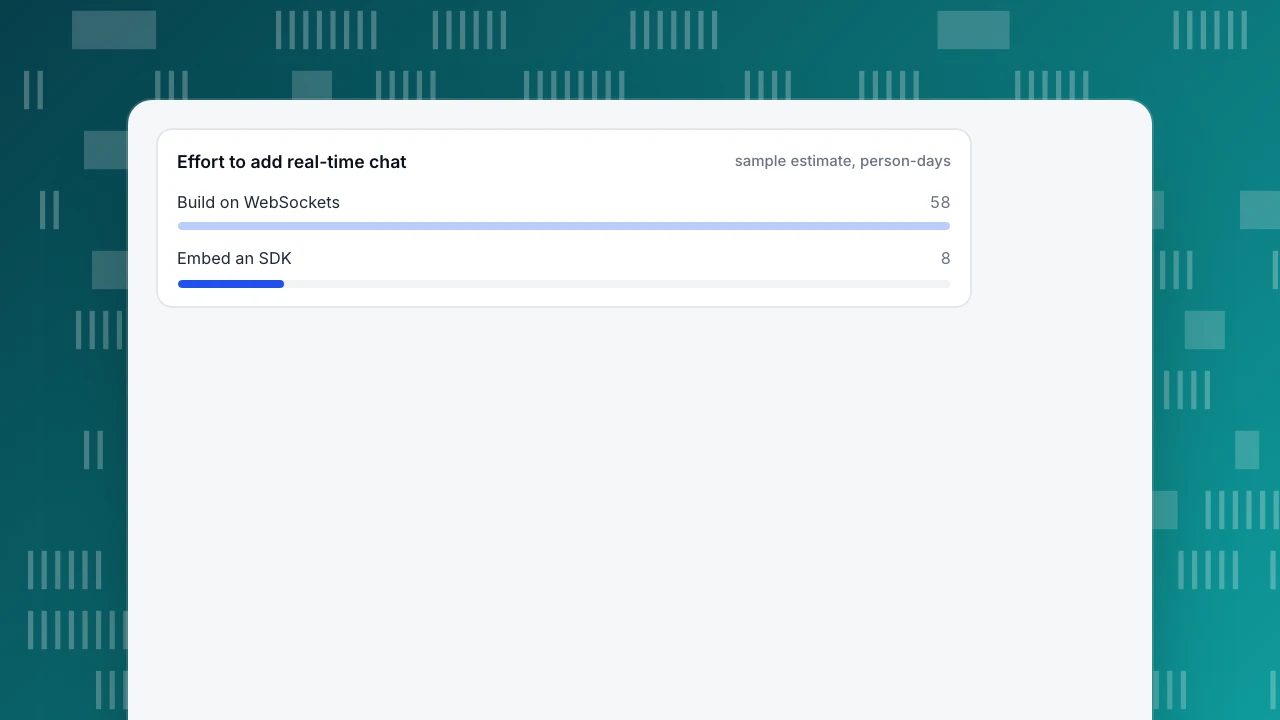
Start freeTo add real-time chat to a Flutter app you either build on WebSockets or embed a chat SDK. Flutter's own recipe is about fifteen lines but has no reconnect, push or offline queue. Under the stated assumptions, building took 58 person-days against 8 for embedding and needed about 14.7 years to pay back, so build only if chat is your product.
What you will learn
- The cookbook WebSocket recipe opens the channel once and has no reconnect logic
- Android Doze suspends network access, so push (FCM) covers messages when the app is idle
- Sample estimate: 58 person-days to build vs 8 to embed; payback about 14.7 years
Two ways to add real-time chat to a Flutter app
Real-time chat in Flutter means a message typed on one device appears on another within a second or two. You can get there two ways. Build: run your own WebSocket server and write the Flutter client, storage, reconnect and notification code. Embed: use a chat SDK or hosted component that already does those things, and spend your time on how it looks inside the app. A third path, a web chat page opened from a button, is covered in in-app live chat; the wider SDK-versus-widget choice is in chat SDK vs widget. This article helps you decide between the first two, with numbers, and says plainly what TapCub does and does not do in a Flutter app.
What Flutter's WebSocket recipe gives you, and what it leaves out
Flutter's documentation shows chat's basic loop with the web_socket_channel package: connect with WebSocketChannel.connect(Uri.parse('wss://…')), read messages from channel.stream (the cookbook uses a StreamBuilder to rebuild on every event), send with channel.sink.add(...) and close with channel.sink.close() in dispose(). That is about fifteen lines and it works on a good connection.
What the recipe does not cover, by its own example: it opens the channel once, has no retry, and no handling for a dropped connection. Everything below is the code you add to turn that demo into chat.
The parts you have to build yourself
| Part | What it has to do | Where it goes wrong |
|---|---|---|
| Authentication | Prove who is connecting before accepting messages | Token expires mid-conversation |
| Reconnect | Re-open the socket after drops with backoff | All clients reconnect at the same second |
| Message IDs and ordering | Give every message a unique ID so retries do not duplicate | Duplicate or out-of-order messages |
| Offline queue | Keep unsent messages and send them on reconnect | Messages lost when the app is killed |
| Local storage | Show history instantly on open | Slow open, stale history |
| Push notifications | Tell the user about messages when the app is closed | Messages arrive only when the app is open |
| Delivery and read state | Mark sent, delivered, read | Wrong state after reconnect |
| Agent side | An inbox where staff reply, assign and search | Often bigger than the app work |
| Attachments, moderation | Upload files, block abuse | Security and storage costs |
The first seven are client and server plumbing. The eighth, the agent inbox, is the part teams forget to budget.
Why a Flutter app cannot just keep the socket open
On Android, Google's documentation says that when a device sits unplugged and still with the screen off, Doze mode suspends apps' network access and defers jobs, syncs and standard alarms; the system opens short maintenance windows that get less frequent over time. Google recommends Firebase Cloud Messaging for apps that need messages while the device is idle, because FCM shares one persistent connection and can wake the app with a RemoteNotification message. The same page lists chat apps among those that should use FCM instead of asking users to exempt them from battery optimisation, unless FCM cannot be used for a technical reason.
Practical consequence: your WebSocket is for the conversation while the app is open, and push delivery covers everything else. A chat build that skips push will look fine in testing and fail in real use, because phones sleep.
Reconnect logic, with numbers
Networks drop all the time on phones: elevators, tunnels, switching from Wi-Fi to mobile data. Use exponential backoff with jitter: wait base × 2^attempt seconds, capped, and pick a random time within that wait.
Sample data: base 1 s and cap 30 s give waits of 1, 2, 4, 8, 16, 30, 30 seconds for attempts 1 to 7; the first six add up to 61 seconds.
Why add jitter: suppose the server restarts and 10,000 connected apps lose the socket at once. Without jitter they all retry at the same instants, so 10,000 connections arrive in the same second on the first retry. With random delay spread across the 8-second wait of the fourth attempt, the average load is 10,000 ÷ 8 = 1,250 connections per second. That is the difference between a server recovering and a server falling over again.
Duration retryDelay(int attempt) {
  final capSeconds = 30;
  final waitSeconds = min(capSeconds, pow(2, attempt).toInt());
  return Duration(milliseconds: Random().nextInt(waitSeconds * 1000));
}
Also keep the connection alive: the WebSocket protocol (RFC 6455) defines ping and pong control frames (opcodes 0x9 and 0xA), and many servers and proxies drop idle connections, so send a ping on a timer and reconnect when no pong comes back.
Effort and cost: build vs embed
These are planning estimates with stated assumptions, not measurements. Sample data in person-days for a team adding chat to an existing app:
| Component | Build | Embed |
|---|---|---|
| Socket server and authentication | 10 | 1 |
| Client UI (list, input, scrolling, images) | 8 | 3 |
| Reconnect and offline queue | 6 | 0 |
| Push notification integration | 5 | 2 |
| Agent inbox and admin | 15 | 0 |
| Attachments, moderation, search | 8 | 0 |
| Testing across devices and networks | 6 | 2 |
| Total | 58 | 8 |
Assume 400 per person-day: build is 58 × 400 = 23,200 and embed is 8 × 400 = 3,200, a gap of 50 days or 20,000. Add running costs: maintenance of 20% of build effort per year is 58 × 0.2 = 11.6 days, about 4,640 a year, against an assumed subscription of 500 a month, 6,000 a year, for the embedded option. The build saves 6,000 − 4,640 = 1,360 a year, so the extra 20,000 pays back in 20,000 ÷ 1,360 ≈ 14.7 years, before counting server costs. Change the assumptions to match your team: the conclusion only flips when chat is a core feature you will keep extending, or when vendor pricing grows with volume.
Effort to add real-time chat
sample estimate, person-days| Component | Build (days) | Embed (days) |
|---|---|---|
| Socket server and auth | 10 | 1 |
| Client UI | 8 | 3 |
| Reconnect and offline queue | 6 | 0 |
| Push integration | 5 | 2 |
| Agent inbox and admin | 15 | 0 |
| Attachments, moderation, search | 8 | 0 |
| Testing | 6 | 2 |
| Total | 58 | 8 |
Planning estimates with stated assumptions, not measurements.
Test the chat before launch: a six-case checklist
Whichever option you choose, run these cases on a real Android phone and a real iPhone before launch. Each has a clear pass condition:
| Case | How to run it | Pass if |
|---|---|---|
| Airplane mode mid-message | Type a message, switch to airplane mode, send, switch back | The message sends once after reconnect, not twice, and not never |
| Kill the app | Send a message, swipe the app away, reopen | History is there; unsent messages are not lost |
| Background for 15 minutes | Leave the app with the screen off, reply from another device | A push notification arrives; opening it shows the message |
| Switch network | Move from Wi-Fi to mobile data while the chat is open | The socket reconnects within the backoff window |
| Double tap on send | Tap send twice quickly | One message, because of the message ID |
| Long history | Open a conversation with 500+ messages | Opens in under a second and scrolls smoothly |
On Android you can force the device into idle mode with the adb command adb shell dumpsys deviceidle force-idle from Google's documentation and observe whether your messages still arrive. If a case fails, fix the failure before adding any new feature. Record the result of each case in a short table with the app version and device model, so you can repeat the run after every release (and so a new teammate can see what was already covered) that touches networking, push or the chat screen. Rerunning the same six cases is cheaper than debugging a field report that you cannot reproduce.
How to decide
Use these rules:
- Chat is the product (a messaging or marketplace app where chat features are your edge): build, and budget the agent or moderation side from day one.
- Chat is a support or sales channel inside an app that does something else: embed, and spend the saved weeks on the product.
- You must keep data in your own region or database: build, or choose a vendor that stores data where you need it.
- Team has fewer than two mobile engineers: embed; the push and reconnect work alone can take a month.
- Unsure: embed first, measure how many users open chat, and revisit when the number justifies it.
How to do it in TapCub
TapCub does not ship a Flutter chat component, so it is not the "embed" option for in-app chat. What it does for a Flutter app is measurement:
- Add the plugin.
flutter pub add tapcub_flutter, thenTapCub.preInit(...)andTapCub.init()with your site key and app ID. Version 0.2.0 needs Flutter 3.44 and Dart 3.12 or newer. - Record screens and chat events. Attach
TapCub.navigatorObserveronMaterialApp(named routes only), and callTapCub.track('chat_opened')andTapCub.track('chat_message_sent')from your chat screen, whichever chat option you picked. - Compare the options with data. Build a funnel in All-platform analytics › Behavior › Behavior analysis from app open to chat opened to message sent, and watch the same chat events by app version in App analytics › Users › Versions.
- Identify users. Call
TapCub.login('USER_ID')so the same person is recognised across devices. - Website chat. If your website also needs support chat, TapCub's chat is a web widget loaded from the same script as analytics; see Live chat › Chat settings › Install.
TapCub measures what happens around chat; it does not run the chat transport inside your Flutter app.
FAQ
How do you build real-time chat in Flutter?
Use the web_socket_channel package to connect to a WebSocket server, read from channel.stream and send with channel.sink.add. Then add what the basic recipe omits: authentication, reconnect with backoff, message IDs, an offline queue and push notifications.
Does WebSocket chat work when the app is in the background?
Not reliably. On Android, Doze suspends network access when the device is idle, so Google recommends Firebase Cloud Messaging for messages delivered to idle devices.
Should I build chat or use an SDK in Flutter?
Build only if chat is core to your product. In the sample, building took 58 person-days against 8 for embedding, and payback took about 14.7 years under the stated assumptions.
How do you reconnect a WebSocket in Flutter?
Listen for the stream's error and done events, wait with exponential backoff plus random jitter, and create a new channel. The cookbook recipe does not include this.
Can I use TapCub chat inside a Flutter app?
TapCub's chat is a web widget. Its Flutter plugin measures screens, events and users; it does not provide an in-app chat component.
Sources
- Flutter documentation, Work with WebSockets.
- Android Developers, Optimize for Doze and App Standby.
- IETF, RFC 6455: The WebSocket Protocol, section 5.2 (ping and pong opcodes).
Was this article helpful?
We use your answers to fix and expand this page.
Couldn’t send. Please try again in a minute.
Thanks for the feedback. We’ll use it to improve this page.You’ve already sent feedback on this page. Thanks.

Product Analyst
Focuses on event analysis, conversion funnels, and retention, using clear metric definitions and structured analysis to explain product performance.