Try it on your own data
Every report in this article is in the free plan. One snippet for web and apps, up to 10 sites.
Start freeEmail promotion is sending a specific offer by email to people who opted in. It pays off only if you can trace revenue back to each send, and that takes a UTM tag on every link. Without tags, email clicks drift into direct traffic and you can count clicks but not return.
What you will learn
- Tag every link with utm_source, utm_medium and utm_campaign, in lowercase and from a fixed list
- Report clicks, tagged sessions, orders and revenue per delivered email; open rate is inflated by mail privacy features
- In the sample, 20,000 delivered emails produced $2,280, or $114 per 1,000 delivered
What email promotion is and what it should be judged on
Email promotion is using email to push a specific offer, such as a sale, a launch, a discount code or an event, to people who agreed to hear from you. A newsletter is judged on whether people read it; a promotion is judged on what happened next. That makes the question for every send simple: how much revenue or how many sign-ups came back from this email, and what did it cost?
Your email tool reports what happens inside the email: sent, delivered, clicked, unsubscribed. It stops at the click. Your analytics reports what happens after the click: the visit, the pages, the order. Joining the two takes one thing, a tag on every link in the email, and that tag is the UTM parameter set. Without it you can count clicks but you cannot count return.
| Stage | Where you see it | Metric |
|---|---|---|
| Reached the inbox | Email tool | Delivery rate = delivered ÷ sent |
| Chose to stay | Email tool | Unsubscribe rate = unsubscribes ÷ delivered |
| Clicked | Email tool | Click rate = clicks ÷ delivered |
| Arrived on your site | Analytics | Sessions from the tagged links |
| Did what the offer asked | Analytics | Conversion rate = orders ÷ sessions |
| Paid for itself | Analytics plus your send cost | Revenue per delivered email, revenue ÷ send cost |
Why untagged email clicks disappear into other channels
A click from an email does not carry a label that says "email". When a visitor arrives, analytics looks at the referring page and any UTM parameters. Mail opened in an app often has no referring page at all, and webmail may show the webmail address. Untagged email clicks are therefore often recorded as direct traffic or as a referral from a mail site, and the promotion looks like it did less than it did.
Tagging solves this by making the link itself carry the answer. Google's documentation lists the parameters and says that you should always use utm_source, utm_medium and utm_campaign. Missing parameters show as "(not set)" in reports. A second rule matters just as much: values are case sensitive, so utm_source=Email and utm_source=email are different sources, and lowercase is the recommended standard.
The reverse mistake also exists: putting UTM parameters on links inside your own site, for example from a banner to a product page. A tagged internal link can overwrite the real source of the visit. Use tags only on links that bring people from outside to your site.
| Stage | Metric |
|---|---|
| Reached the inbox | Delivery rate = delivered ÷ sent |
| Chose to stay | Unsubscribe rate = unsubscribes ÷ delivered |
| Clicked | Click rate = clicks ÷ delivered |
| Arrived on your site | Sessions from tagged links |
| Did what the offer asked | Conversion rate = orders ÷ sessions |
| Paid for itself | Revenue ÷ send cost |
The first three come from your email tool; the rest come from analytics, joined by UTM tags.
How to tag the links in a promotional email, step by step
- Fix the vocabulary once. Write down the allowed values and keep them in a shared sheet. Use lowercase, hyphens instead of spaces, and no personal data.
- Use the same medium for every email.
utm_medium=emailfor all of them, so the Email channel is one row. - Name the source for the list or sender, not the tool, for example
utm_source=newsletterorutm_source=customers. - Name the campaign with a date and the offer, for example
utm_campaign=2026-11-friday-sale. The date keeps repeat promotions apart. - Use
utm_contentto tell links apart inside one email:hero-button,product-grid,footer-link. It tells you which link earned the clicks. - Tag every link that leads to your site, including the logo, the footer and the unsubscribe-preference page if it is on your domain.
- Click the real links in a test send and confirm the parameters survive any link wrapping your email tool adds.
| Part | Good | Problem |
|---|---|---|
utm_medium | email | Email, e-mail, newsletter used as a medium |
utm_source | customers | list1, the name of a person, or an email address |
utm_campaign | 2026-11-friday-sale | sale, reused for every promotion |
utm_content | hero-button | left out, so all links look the same |
Set up the landing page and goal before the send
A tagged link only tells you who arrived. To count return you also need a defined goal on the other side: an order, a sign-up, a booking, a coupon redemption. Decide it before you send.
Point the link at the page that matches the promise in the email. If the subject line promises a discount on shoes, link to the shoes, not to the home page. Each extra step costs visitors.
Where the money arrives matters too. If the order is a purchase on your site, count the order event, with the amount. If a discount code is part of the promotion, record it on the order so you can see which sales used it, and remember that revenue after a discount is what the promotion actually produced.
Worked example: one promotional send, start to finish
Sample data: a store emails a 24-hour sale to its customer list.
- 20,400 emails sent, 400 bounced, so 20,000 delivered. Delivery rate: 20,000 ÷ 20,400 = 98.0%.
- 60 people unsubscribed. Unsubscribe rate: 60 ÷ 20,000 = 0.30%.
- The email tool reports 780 clicks. Click rate: 780 ÷ 20,000 = 3.9%.
- Analytics shows 640 sessions from
utm_medium=emailandutm_campaign=2026-11-friday-sale. That is 640 ÷ 780 = 82% of the reported clicks. The gap is normal: click counts can include repeat clicks, link scanners and visitors who left before the page loaded. - 38 orders from those sessions. Conversion rate: 38 ÷ 640 = 5.9%.
- Revenue was $2,280, which is $60 per order. Revenue per delivered email: $2,280 ÷ 20,000 = $0.114, or $114 for every 1,000 delivered.
- The send cost $80. Revenue per dollar of send cost: $2,280 ÷ 80 = 28.5.
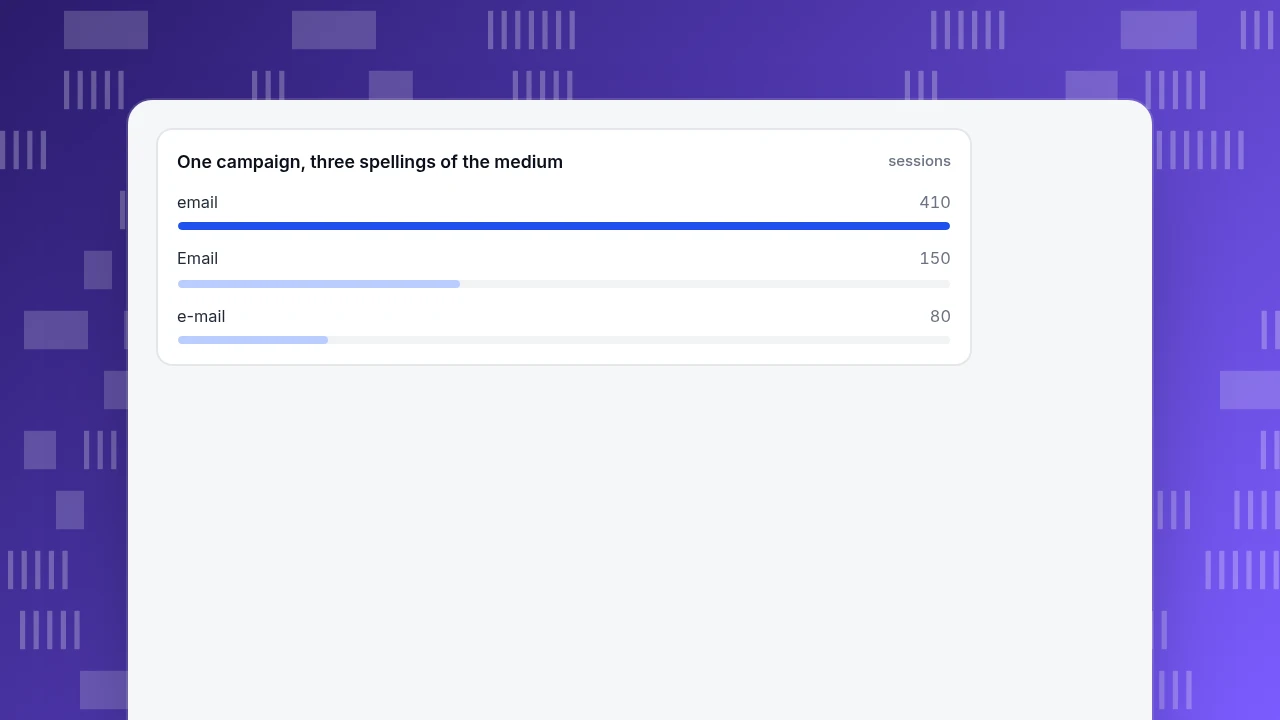
Now the case for consistent spelling. In the same campaign the sessions are recorded under three spellings of the medium:
| Medium as tagged | Sessions |
|---|---|
email | 410 |
Email | 150 |
e-mail | 80 |
| Total | 640 |
A report that lists each spelling separately shows three small rows and hides the real size of the channel. Merge them in the report if you must, but fix the template so the next send uses one spelling.
One caution about the $2,280. It is revenue from people who clicked, not revenue that exists only because of the email. Some of those 38 customers might have bought anyway. To find out how many, hold back a random share of the list from the promotion and compare; the method is in how to calculate incrementality.
One campaign, three spellings of the medium
sessionsWhy open rate is not the number to report
Open rate used to be the headline metric of email, but it is no longer a safe one. Apple's Mail Privacy Protection, when a person turns on Protect Mail Activity, hides the IP address and downloads remote content privately in the background when the message arrives, not when it is read. A tracking image can therefore load whether or not the person looked at the email, so opens are inflated for those readers.
Use opens, at most, as a rough signal for subject lines inside one send. For the results you report, use clicks, sessions from tagged links, conversions and revenue, which come from real visits.
A short compliance check before you send
This is not legal advice. For marketing email in the United States, the Federal Trade Commission's CAN-SPAM guide lists the basics: accurate header information, accurate subject lines, a clear indication that the message is an ad, your physical postal address, a working way to opt out, honouring opt-outs, and monitoring any third party sending on your behalf. Opt-out requests must be honoured within 10 business days. Other countries have different rules, so check the ones that apply to your list.
None of this changes how you measure, but it does decide who stays on the list you are measuring.
Common mistakes
- Tagging only the main button. Footer and logo clicks come through untagged and land in direct.
- Mixed spellings.
email,Emailande-mailbecome three channels. - Reusing one campaign name for every send. You cannot tell this month's promotion from last month's.
- Tagging links that stay inside your own site. This can replace the real source of the visit.
- Reporting open rate. Use clicks, sessions and orders.
- Counting all revenue as caused by the email. Compare with a holdout before you claim it.
- Judging a send by clicks. A high click rate with a weak landing page produces visits, not orders.
- Writing campaign names that contain personal data. UTM values end up in analytics, referrers and server logs.
In TapCub: read the email channel the same afternoon
Take the 640 sessions from the example. TapCub does not send email, and it does not connect to your email tool; it measures what arrives from the links you tagged.
- Tag the links as above. The tagged URL is all TapCub needs.
- Read the UTM tab. Open Web analytics › Sources and choose the UTM tab. It splits traffic into source, medium, campaign, term and content, with visitors, sessions, pageviews, bounce and duration for each row. Find
emailand your campaign name; a second row with different spelling is the tagging mistake from the table above. - Check the conversion. On Web analytics › Goals, an event or page goal counts the conversion, and with Track revenue on, the goal sums the amount from the property you name. For orders and money, All-platform analytics › Business › Commerce & revenue reads the purchase ledger.
- Compare the cost. In All-platform analytics › Business › Channel ROI, import the send cost as a CSV row with day, channel, source, campaign and cost, and the page shows cost per click, cost per acquisition and return on ad spend by channel and campaign. Cost per acquisition counts purchases on the order ledger.
- Decide on the next send. If one
utm_contentlink has most of the clicks and orders, move that offer higher in the next email.
For the wider workflow around campaign links, see email campaign tracking and the UTM definition. For lapsed customers who are not responding to promotions, read re-engagement campaigns.
FAQ
What is email promotion?
Email promotion is sending email to people who opted in, in order to push a particular offer such as a sale, a product launch or an event. Unlike a newsletter, which is judged on reading, a promotion is judged on what the reader does next: an order, a sign-up or a booking.
How do you track email promotions in Google Analytics or other analytics?
Add utm_source, utm_medium and utm_campaign to every link that leads to your site, using lowercase and a fixed list of values. Your analytics will then group the visits as one campaign, and you can attach a goal or order event to see conversions and revenue from that email.
Why does my email traffic show up as direct?
A click from an email app or a link without UTM parameters carries no label, so analytics cannot tell where it came from and often records it as direct. Tagging each link with a medium, source and campaign puts the visit under the right email channel.
Is open rate a reliable metric for email promotions?
Not on its own. Apple's Mail Privacy Protection can download remote content, including tracking images, in the background when the message arrives, so some opens happen without anyone reading. Use clicks, sessions from tagged links, conversions and revenue as your results.
How often should I send promotional emails?
There is no fixed number that suits every list. Watch unsubscribe rate and revenue per delivered email for each send. If unsubscribes rise while revenue per send falls, you are sending too often or sending the wrong offer to the wrong group, and splitting the list is the better fix.
Sources
- Google Analytics Help, Collect campaign data with custom URLs (UTM parameters; always use source, medium and campaign; values are case sensitive). Checked 2026-11-19.
- Apple, Mail Privacy Protection and privacy (remote content downloaded in the background through relays). Checked 2026-11-19.
- Federal Trade Commission, CAN-SPAM Act: A Compliance Guide for Business (requirements; opt-outs honoured within 10 business days). Checked 2026-11-19.
Was this article helpful?
We use your answers to fix and expand this page.
Couldn’t send. Please try again in a minute.
Thanks for the feedback. We’ll use it to improve this page.You’ve already sent feedback on this page. Thanks.

Product Analyst
Focuses on event analysis, conversion funnels, and retention, using clear metric definitions and structured analysis to explain product performance.