Try it on your own data
Every report in this article is in the free plan. One snippet for web and apps, up to 10 sites.
Start freeCustomer analytics software collects data on how people use and buy from you, joins it into one record per customer and lets you slice it. Three things decide whether it is any good: how it merges identities, how it builds segments and whether you can get back to one person's detail. This guide shows how to test each in a trial and a scoring example where the winner changes from C to B when the weights change.
What you will learn
- Judge it on three things — identity merge, segmentation, drill-down to one person — not on dashboard screenshots
- Agree scoring weights before you see scores: in the sample, the winner flipped from C (3.95) to B (4.05) when the weights changed
- Test with real data and real accounts: a two-device login test, a reusable segment, one person's timeline, one export and one deletion request
What is customer analytics software?
Customer analytics software collects data about how people use and buy from you, joins it into a record per customer, and lets you slice that record to answer questions: who comes back, who is about to leave, which group is worth more. It differs from page-level web analytics in one respect: its unit is the person, not the page view or session. The three things that decide whether a product is any good at that are the ones in this guide: how it merges identities, how it builds segments, and whether you can get back to one person's detail.
How it relates to neighbouring categories, in plain terms:
| Category | Its main unit | Typical question | Where it usually stops |
|---|---|---|---|
| Web and product analytics | Visitor, session, event | What did people do on the site or app? | Often anonymous or partly identified |
| Customer analytics | Person (and sometimes account) | Which customers behave how, and why? | Depends on identity quality |
| Customer data platform | Unified customer record | Make one record available to other systems | The CDP Institute describes it as packaged software that builds a persistent, unified customer database accessible to other systems |
| CRM | Contact or deal | Who owns this relationship? | Sales activity, not behaviour |
The categories overlap, and products blur them. Choose by the question you need answered, not by the label.
What are the three things to check?
- Identity merge. The same person on a phone, a laptop and in your support chat should be one record, as far as the data allows. Ask: what links them (login ID, email you pass in), what happens before login, and what does a person who never logs in look like?
- Segmentation. A group defined once and reused in every report. Ask: how often do segments update, can they be static lists, can they join in real time, can the same segment be used in a funnel or retention report?
- Drill to the person. Aggregates tell you something is wrong; the individual timeline tells you why. Ask: can you open one person, see what they did in order, and delete or export their data on request?
If a product is strong on a dashboard of charts but cannot do these three, it is a reporting tool for aggregates, which may be all you need. Know which you are buying.
| Check | Ask | Test in a trial |
|---|---|---|
| Identity merge | What links phone, laptop and chat? | Log in on two devices; is it one profile? |
| Segmentation | Update rate, static lists, real-time, reuse? | Build one segment and use it in two reports |
| Drill to the person | Can I open one person's timeline? | Open one person and check it against what you know |
| Privacy requests | Find, export, restrict, erase? | Run one export and one deletion end to end |
This is not legal advice; confirm requirements with your own counsel.
Worked example: scoring three options, and checking the weights
Sample data: you are comparing three anonymous options, A, B and C, and score each from 0 to 5 on five criteria after a trial. Weights say how much each criterion matters to you.
| Criterion | Weight | A | B | C |
|---|---|---|---|---|
| Identity merge | 30% | 4 | 3 | 5 |
| Segmentation | 25% | 3 | 5 | 4 |
| Person-level detail | 20% | 5 | 2 | 4 |
| Export and data ownership | 15% | 2 | 4 | 3 |
| Privacy controls | 10% | 3 | 5 | 2 |
| Weighted score | 3.55 | 3.65 | 3.95 |
Calculations: A = 0.30 × 4 + 0.25 × 3 + 0.20 × 5 + 0.15 × 2 + 0.10 × 3 = 1.20 + 0.75 + 1.00 + 0.30 + 0.30 = 3.55. B = 0.90 + 1.25 + 0.40 + 0.60 + 0.50 = 3.65. C = 1.50 + 1.00 + 0.80 + 0.45 + 0.20 = 3.95. C wins.
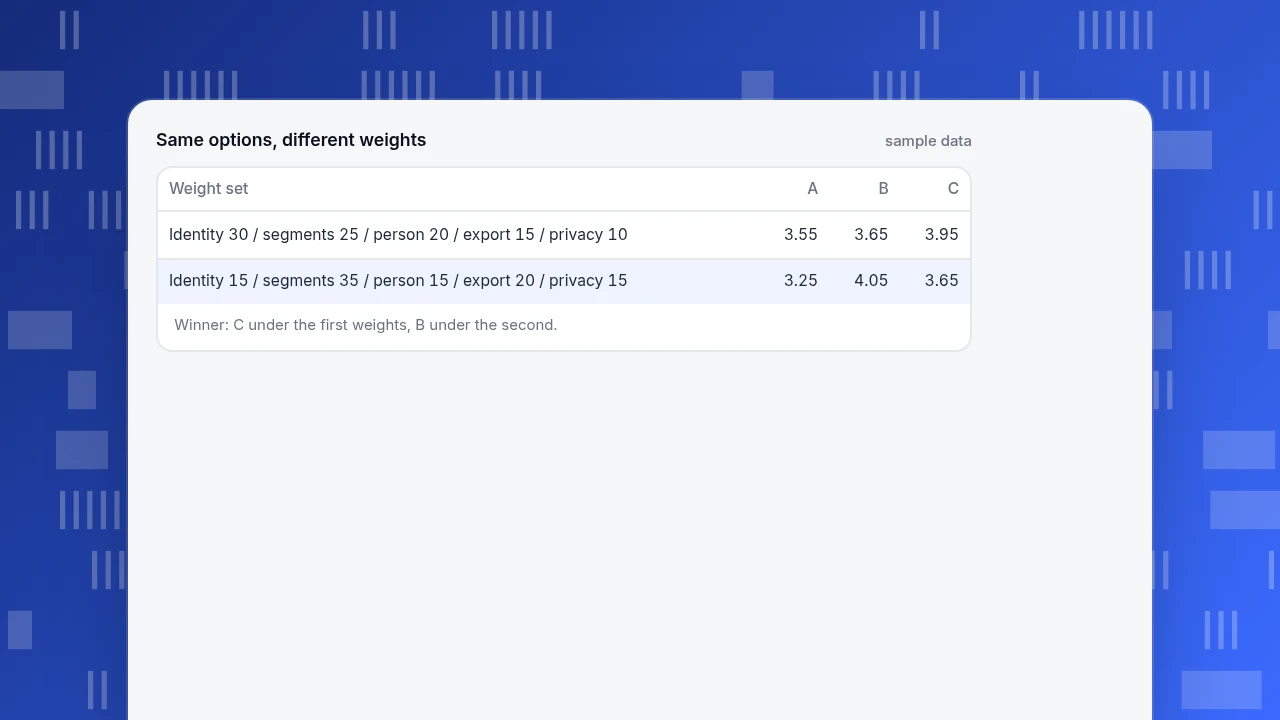
Now test how fragile that is: change the weights to identity 15%, segmentation 35%, person-level 15%, export 20%, privacy 15% (the weights still sum to 100%). A = 0.60 + 1.05 + 0.75 + 0.40 + 0.45 = 3.25. B = 0.45 + 1.75 + 0.30 + 0.80 + 0.75 = 4.05. C = 0.75 + 1.40 + 0.60 + 0.60 + 0.30 = 3.65. B wins, C drops to second and A to third.
The lesson: the winner depends on your weights more than on the products. Agree the weights before you see the scores, and if two sets of weights from two stakeholders give different winners, that disagreement is the real decision to resolve, not the scores.
Same options, different weights
sample data| Weight set | A | B | C |
|---|---|---|---|
| Identity 30 / segments 25 / person 20 / export 15 / privacy 10 | 3.55 | 3.65 | 3.95 |
| Identity 15 / segments 35 / person 15 / export 20 / privacy 15 | 3.25 | 4.05 | 3.65 |
Winner: C under the first weights, B under the second.
How do you test identity merge in a trial?
Run these checks with real accounts rather than relying on a feature list:
- Two-device test. Visit as an anonymous user on a phone, log in, then visit on a laptop and log in. Is there one profile with both devices, and is the earlier anonymous activity attached?
- Pre-login activity. Is what happened before login joined to the person after login, or lost?
- Never-logged-in people. How are they counted? A product that reports them as separate people inflates "customers".
- Wrong merge. If two people share a device, can you tell? An over-merged record is worse than a split one, because it mixes two customers' behaviour.
- Email handling. If the product matches on email, is it stored hashed, and can you search by the full address only?
Write down the result of each. A product that merges aggressively and cannot show you why is harder to trust than one that merges conservatively and says so.
What should segmentation let you do?
| Capability | Why it matters | Test |
|---|---|---|
| Rule-based segments | "Bought in the last 30 days and did not refund" defined once | Build it, check the count, save it |
| Static lists | A fixed list from a spreadsheet for a campaign | Import IDs or emails; are unmatched lines reported? |
| Real-time membership | Trigger something while the visitor is still on the site | How quickly does a person join after the event? |
| Reuse in analysis | The same segment in funnels and retention | Apply one segment to two reports |
| Size trend | Whether the audience is growing | Does it store a history of size? |
| Value tiers | Recency, frequency, monetary groups | Are tiers computed for you, and how often? |
A practical consistency test: a "recent buyers" segment defined as purchased in the last 30 days and did not refund should show the same count in the segment builder, in a funnel that applies it and in a retention view that applies it. If the three numbers differ, find out why before you trust any of them; the usual causes are different identity settings (visitor against person) and different time windows.
For the method behind groups, see customer segmentation analysis; for a broader view of customer data work, customer data analytics and customer analysis.
What about the individual's data and privacy?
The ability to open one person is also the ability to be asked about them. Under laws such as the UK GDPR, people have a right of access to the personal data an organisation holds about them; the Information Commissioner's Office publishes guidance on the right of access. In practice a customer analytics product should let you do four things for one person: find them (by email, login ID or another identifier), export what you hold, restrict processing, and erase. Ask also about retention: how long are event rows, profiles and consent records kept, and can you change that? This is not legal advice; confirm what applies to you with your own counsel.
What does a good trial checklist look like?
- Real data, not demo data, for at least two weeks.
- The identity tests above, with written results.
- One segment you actually need, built and reused in two reports.
- One person opened, with their timeline checked against what you know happened.
- One export and one deletion request, end to end.
- A note of what the product does not do that you assumed it would.
Which mistakes appear most often when choosing?
- Choosing by dashboard screenshots. Test identity, segments and drill-down instead.
- Agreeing weights after seeing scores. The example shows the winner flips.
- Treating anonymous traffic as customers. They have no profile.
- Assuming over-merging is safe. Two people merged into one corrupt both.
- Forgetting retention and deletion. Ask before you collect.
- Expecting analytics to act. Most analytics products measure; messaging and CRM actions need other tools.
How TapCub handles the three things
TapCub is web, app and mini-program analytics plus live chat in one project; it is not a CRM and not a CDP, and it does no lead scoring. Against the three checks:
- Identity. Call
tapcub.login()when someone logs in, with a name if you have one; that person appears in All-platform analytics › Users › People, where one login ID is one person across web, app and mini program. Anonymous visitors have no profile, and identified mode must be switched on (the console has no switch yet; contact support). - Segments. All-platform analytics › Users › Segments & tags supports rule segments (refreshed daily or manually), static segments (pasted IDs or emails), RFM segments with 10 buckets, and live segments that join at collection time; each keeps a 30-day size trend, and a segment can be applied as a cohort in funnels and retention.
- Drill to the person. A profile shows identity links, segments, tags, accounts and a day-by-day timeline that can link to the session replay if one exists. In Live chat › Inbox, the agent sees the same visitor ID with source and the last two days of browsing, and can open the profile.
- Requests. Configuration › Privacy center has data subject requests for access, export, restrict and erasure, found by email, login ID, device ID or person ID, and separate retention periods for events, autocapture, profiles and consent receipts (the privacy center menu is for owners and admins).
- B2B.
tapcub.group('company', ...)rolls people up into accounts in All-platform analytics › Users › Accounts; account views are organisation views and do not open individual detail.
FAQ
What is customer analytics software?
Software that collects data about how people use and buy from you, joins it into a record per customer and lets you segment and analyse that record. Its unit is the person, not the page view. Three things matter most: identity merge, segmentation and drill-down to one person.
What features should customer analytics software have?
Identity merge across devices and login, reusable segments (rule, static, real-time), drill-down to one person's timeline, data export and deletion, and clear retention settings. Dashboards are secondary.
How do I choose customer analytics software?
Score options against weighted criteria after a trial on real data, and agree the weights first. In the sample, the winner changed from C (3.95) to B (4.05) when the weights changed, so the weights decide as much as the products.
What is the difference between customer analytics and web analytics?
Web analytics counts visitors, sessions and events; customer analytics follows people and groups of people over time and across devices. They overlap when a product merges anonymous visits into known customers after login.
Is customer analytics software the same as a customer data platform?
No, though they overlap. The CDP Institute describes a CDP as packaged software that builds a persistent, unified customer database accessible to other systems; customer analytics software focuses on analysing that behaviour. Some products do both.
Sources
- CDP Institute. What is a CDP? — a customer data platform is packaged software that builds a persistent, unified customer database accessible to other systems. Read 2026-11-19.
- Information Commissioner's Office. Right of access — UK GDPR guidance on individuals' right of access to their personal data. Read 2026-11-19.
Was this article helpful?
We use your answers to fix and expand this page.
Couldn’t send. Please try again in a minute.
Thanks for the feedback. We’ll use it to improve this page.You’ve already sent feedback on this page. Thanks.

Data Engineer
Writes about event design, data quality, and collection workflows, with verifiable implementation methods for reliable analytics.