Try it on your own data
Every report in this article is in the free plan. One snippet for web and apps, up to 10 sites.
Start freeA chatbot builder lets you create a website bot without writing all its logic, as scripted flows, knowledge-base answers or a language model. Choose one by the metrics you will hold it to: resolution without handoff, wrong-answer rate, handoff rate and quality, and reporting depth. Run about 200 of your own questions through each candidate; in the sample, 126 correct, 9 wrong and 65 handed off gave 63.0% resolved, with a margin of error near 6.7 points.
What you will learn
- Define resolution, wrong-answer and handoff rates exactly before any pilot; vendors define them differently
- Score candidates with weights that reflect your risk; the highest resolution rate lost once wrong-answer control counted
- 200 questions give about a 7-point margin of error, so decide close calls on handoff quality and reporting
What does a chatbot builder do, and which kind do you need?
A chatbot builder is software that lets you create a bot for your website without writing the bot's logic from scratch. Under the same label sit three different designs, and the choice between them matters more than the brand:
| Design | How it answers | Strength | Weakness |
|---|---|---|---|
| Scripted flow | Follows branches you draw (buttons, menus, if-then) | Predictable; easy to audit | Breaks when the visitor types something unexpected |
| Knowledge-base answers | Matches the question to stored answers or document passages | Good for FAQs; answers are traceable to a source | Only as good as the material you load |
| Generative (LLM) | A model writes the reply, usually from your material | Handles phrasing you did not anticipate | Can state wrong things confidently; needs guardrails |
Most products mix two of these. The thesis of this guide is that you should choose a builder by the chat metrics you will hold it to, not by its feature list. If a bot cannot show you its resolution rate, how often it handed off and how often it answered wrongly, you cannot tell whether it is working. For the taxonomy of bot types, see types of chatbots; for the tools-and-templates view, see no-code chatbot builder and how to choose a chatbot provider. This page adds what those do not: a metric-weighted scorecard and a 200-question pilot you can run before you commit.
Which metrics should decide the choice?
Five measurements cover most of what goes wrong with website bots. Define each exactly before the pilot, because vendors define them differently.
| Metric | Formula | What a weak result means |
|---|---|---|
| Resolution rate (no handoff) | Questions answered correctly without a human ÷ questions asked | The bot is deflecting, not helping |
| Wrong-answer rate | Wrong answers given ÷ questions asked | Risk: customers act on bad information |
| Handoff rate | Questions passed to a person ÷ questions asked | Too high: little value; too low: bot may be bluffing |
| Handoff quality | Share of handoffs where the agent sees the question and reason | Customers repeat themselves |
| Reporting depth | Can you see each question, the answer and why it handed off? | You cannot improve what you cannot read |
Wrong-answer rate is the one most buyers do not measure and the one with legal and financial consequences. The Consumer Financial Protection Bureau's 2023 report on chatbots in consumer finance found that about 37% of the U.S. population (over 98 million people) interacted with a bank's chatbot in 2022, and warned that chatbots can fail to recognise a dispute unless the customer uses specific words, and that the information they give "may not be accurate". In 2024 a British Columbia tribunal held an airline responsible for incorrect information its website chatbot gave a customer (Moffatt v. Air Canada, 2024 BCCRT 149), awarding CAD 812.02. The lesson is not to avoid bots; it is to measure wrong answers and to treat the bot's statements as the company's statements.
| Metric | Formula | What a weak result means |
|---|---|---|
| Resolution rate | Correct without a human ÷ questions asked | The bot deflects instead of helping |
| Wrong-answer rate | Wrong answers ÷ questions asked | Customers act on bad information |
| Handoff rate | Passed to a person ÷ questions asked | Too high: little value; too low: bluffing |
| Handoff quality | Handoffs where the agent sees question and reason | Customers repeat themselves |
| Reporting depth | Can you read each question, answer and reason? | You cannot improve what you cannot read |
Write these definitions down before the pilot.
What do rules and regulations require?
Two requirements are worth building into the checklist even if you are not in a regulated sector.
- Say it is a bot. Article 50(1) of the EU AI Act requires providers to design AI systems that interact directly with people so that those people are informed they are dealing with an AI, unless that is evident to a reasonably observant person. If you serve EU visitors, ask the builder whether the disclosure is built in and whether you can turn it off. A disclosure you cannot remove is a feature, not a limit.
- Keep a path to a human. Every consumer-facing bot needs a way out. The CFPB's findings on unrecognised disputes are an argument for a visible handoff, not for a bot that tries harder.
Ask also where conversation data is stored and which model provider processes it; that belongs in your privacy notice.
How do you build a scorecard from these metrics?
Give each criterion a weight that adds to 100, score each candidate from 1 (poor) to 5 (strong), and compute the weighted average. Sample data for three anonymous candidates:
| Criterion | Weight | Candidate A | Candidate B | Candidate C |
|---|---|---|---|---|
| Resolution rate in pilot | 30 | 4 | 3 | 5 |
| Handoff quality | 20 | 2 | 5 | 3 |
| Wrong-answer control (can fix and reuse a corrected answer) | 20 | 3 | 4 | 2 |
| Disclosure and compliance | 10 | 5 | 4 | 3 |
| Reporting depth | 20 | 2 | 4 | 3 |
| Weighted score (out of 5) | 100 | 3.1 | 3.9 | 3.4 |
Candidate A: (30×4 + 20×2 + 20×3 + 10×5 + 20×2) ÷ 100 = 310 ÷ 100 = 3.1. Candidate B: 390 ÷ 100 = 3.9. Candidate C: 340 ÷ 100 = 3.4. Candidate C has the highest resolution rate but loses on wrong-answer control: a bot that resolves more by sometimes answering wrongly is not better. The weights express your risk, so change them if your questions are about pricing or refunds, where a wrong answer costs more.
How do you run a 200-question pilot?
Do not rely on a demo with the vendor's questions. Run your own.
- Collect 200 real questions. Take them from your inbox, email or search logs. Include 20% awkward ones: typos, two questions in one, questions your content does not cover.
- Write the correct answer for each, or "should hand off". You need the key before you test.
- Run all 200 through each candidate and label every response: correct without handoff, wrong, or handed off.
- Compute the five metrics and compare the intervals, not only the point values.
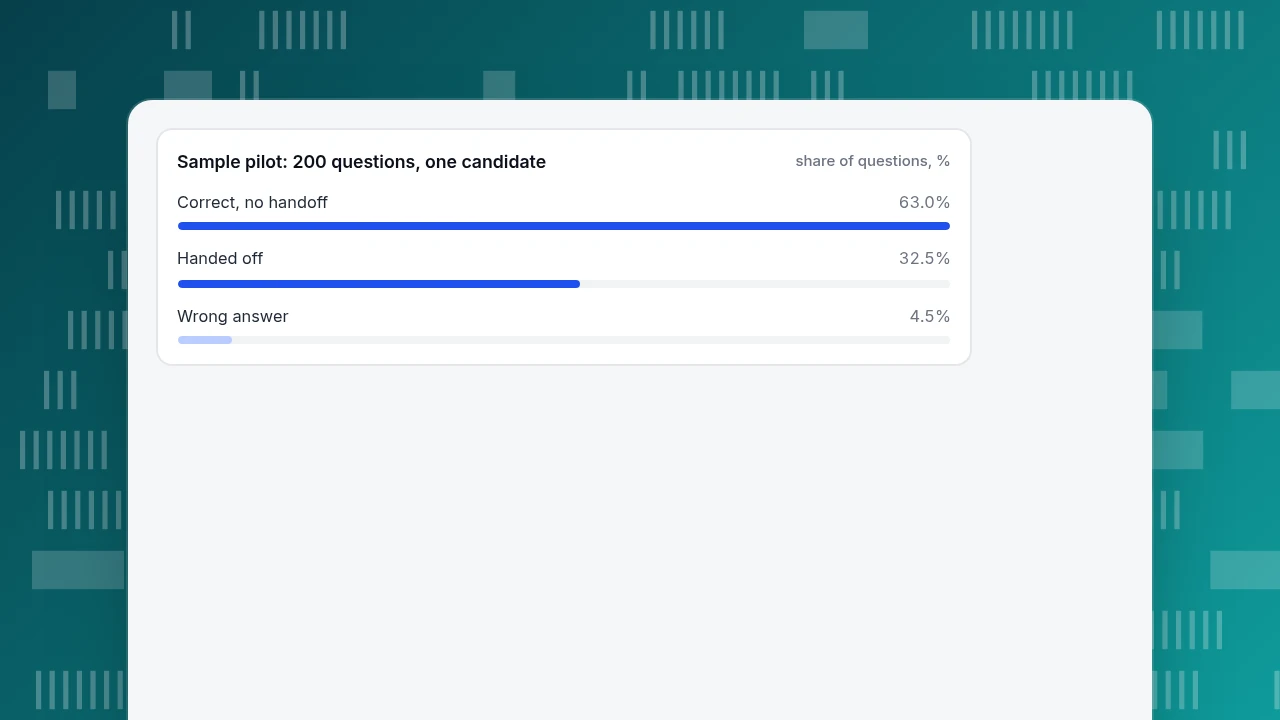
Sample results for one candidate: 126 correct without handoff, 9 wrong, 65 handed off. Resolution rate = 126 ÷ 200 = 63.0%; wrong-answer rate = 9 ÷ 200 = 4.5%; handoff rate = 65 ÷ 200 = 32.5%. With 200 questions the 95% margin of error on the resolution rate is about 1.96 × √(0.63 × 0.37 ÷ 200) = 6.7 percentage points, so the true figure is plausibly 56% to 70%. A difference of two or three points between two candidates is noise at this sample size.
Write the decision rule before you look at results: for example, wrong-answer rate must be below 3% on questions that involve money, and resolution rate must reach 55% with a lower bound above 50%. In the sample, 4.5% fails the first rule, so this candidate needs either a better knowledge source or a tighter handoff setting before launch.
Sample pilot: 200 questions, one candidate
share of questions, %No-code or custom: which should you pick?
Choose no-code if your questions are mostly FAQs, policies and product facts that can be written down, and nobody on the team will maintain code. Choose a developer-built bot if the bot must read or change data in other systems (look up an order, change an address), because that needs authentication, error handling and an audit trail that a content-only tool does not provide. Be wary of any builder that offers both without showing how actions are permissioned: a bot that can issue refunds also needs rules about when it may. Whichever you pick, budget time for upkeep; how to train a chatbot covers how often to review answers, and chatbot ROI shows how to put the costs next to the savings.
How does this map to TapCub's chat assistant?
TapCub's live chat includes an AI assistant, and the pilot above maps onto it as follows. It is not a visual flow designer: you give it questions and answers plus documents, choose when it replies, and it hands off when its material is not enough. It only generates replies; it does not change an order, send email or call other systems.
- Load the material. In Live chat › Knowledge base, Q&A entries are sent exactly as written when the question matches, without an AI call; document entries are split into passages of about 600 characters and the model drafts from the best matches. Search is a database full-text index, not a vector store. Playground runs the same path, uses no quota and creates no conversation, so you can run your 200 questions there.
- Pick the mode. In Live chat › Chat settings › AI assistant: off, only when all agents are offline, or AI answers first. Max AI turns per conversation (1 to 20, default 6) caps how long a bot keeps trying before handoff.
- Check the disclosure. The visitor is told they are talking to an AI before the first reply, and that notice cannot be turned off; AI messages carry an AI label.
- Read the handoffs. The inbox labels the reason: no knowledge match, model cannot answer, visitor asked, turn limit or agent took over. Fix & save turns a wrong answer into a Q&A entry so the next identical question gets the corrected answer without a model call.
- Read the reports. Live chat › Reports shows resolution rate (resolved ÷ conversations), knowledge base hit rate, first response and satisfaction. Note that resolution rate counts all resolved conversations, human or AI, so use the handoff labels and your pilot for the bot-only share; first response excludes AI replies.
TapCub does not replace the pilot: you still label the 200 answers yourself.
FAQ
What is a chatbot builder?
A chatbot builder is a tool for creating a website chatbot without coding all of its logic. It may let you draw scripted flows, load a knowledge base for answers, or connect a language model, and often combines two of these. The right choice depends on your questions and risk.
How do I choose a chatbot builder?
Choose by the metrics you will hold it to: resolution rate without handoff, wrong-answer rate, handoff rate and quality, and reporting depth. Weight them, score each candidate and run a pilot of about 200 of your own questions. In the sample, a 200-question pilot gave a 6.7-point margin of error.
Is a no-code chatbot builder enough?
For FAQs, policies and product facts, yes. If the bot must read or change data in other systems, such as order lookups or address changes, you need developer work for authentication and an audit trail. Check how any builder permissions actions before enabling them.
How many test questions do I need for a chatbot pilot?
About 200 real questions gives a margin of error near 7 points at a 63% resolution rate, enough to reject clearly weak candidates but not to separate two close ones. If two are within 3 points, decide on handoff quality, wrong-answer control and reporting.
Do chatbots have to say they are bots?
In the EU, Article 50(1) of the AI Act requires that people are informed they are interacting with an AI system unless that is obvious. Elsewhere rules vary, but disclosing is a sound default and builders that let you turn it off deserve questions.
Sources
- Consumer Financial Protection Bureau, Chatbots in consumer finance, 2023 — about 37% of the U.S. population (over 98 million users) interacted with a bank chatbot in 2022; risks of unrecognised disputes and inaccurate information.
- Civil Resolution Tribunal of British Columbia, Moffatt v. Air Canada, 2024 BCCRT 149 — responsibility for chatbot information; CAD 812.02 order.
- European Union, Regulation (EU) 2024/1689 (AI Act), Article 50(1) — duty to inform people that they are interacting with an AI system.
Was this article helpful?
We use your answers to fix and expand this page.
Couldn’t send. Please try again in a minute.
Thanks for the feedback. We’ll use it to improve this page.You’ve already sent feedback on this page. Thanks.

Product Analyst
Focuses on event analysis, conversion funnels, and retention, using clear metric definitions and structured analysis to explain product performance.