Try it on your own data
Every report in this article is in the free plan. One snippet for web and apps, up to 10 sites.
Start freeA no-code chatbot builder lets non-programmers set up a bot through forms, a visual editor or uploaded content. A small team should pick the design by the upkeep it can afford: flow-based, knowledge-based or hybrid. Estimate hours saved first, score the builder on answer source, handoff and AI disclosure, and test it on 30 real questions before launch.
What you will learn
- Choose the design by upkeep, not features: flow-based, knowledge-based or hybrid
- In the sample, 400 chats at 35% resolved save 14 hours a month, against about $200 of monthly cost, so the bot pays only above roughly 20%
- Test on 30 real questions with a pass bar of 90% correct and no wrong answer on money or policy before launch
What is a no-code chatbot builder, and which types exist?
A no-code chatbot builder lets someone who does not program set up a chatbot through forms, a visual editor or a document upload instead of code. For a small team the useful question is not which brand to pick but which of three designs fits your questions, because the design decides how much setup you do, how the bot can fail and who has to maintain it.
| Type | How it works | Setup effort | How it fails | Fits |
|---|---|---|---|---|
| Flow-based | You draw a decision tree: buttons and branches lead to fixed replies | High per topic; every branch is hand-built | Dead ends when the visitor types something you did not draw | A few predictable tasks, such as booking or order status |
| Knowledge-based (AI answers from your content) | You add articles and Q&A pairs; the bot finds the relevant ones and answers from them | Medium up front, then steady upkeep of the content | A wrong or invented answer when content is missing or stale | Many varied questions with documented answers |
| Hybrid | A knowledge base for open questions, with fixed paths for key tasks and a handoff to a person | Highest | More moving parts to keep consistent | Teams with both open questions and a few critical tasks |
This guide is written for teams of one to ten people, where nobody owns the bot full time. The claim is that a small team should choose the design by how much upkeep it can afford, then check the bot against its own questions before launch. The setup is rarely what fails; the upkeep is. For the wider map of bot types, see types of chatbots.
Does a small team need a chatbot at all?
Estimate the time a bot could save before you compare tools. The formula is short:
Hours saved per month = conversations × share the bot resolves alone × minutes per conversation ÷ 60
Sample data: 400 conversations a month, 6 minutes of agent time per conversation. The share the bot resolves alone is the number you do not yet know, so try three values.
| Share resolved by the bot | Conversations | Hours saved a month | Value at $25 an hour |
|---|---|---|---|
| 20% | 80 | 8.0 | $200 |
| 35% | 140 | 14.0 | $350 |
| 50% | 200 | 20.0 | $500 |
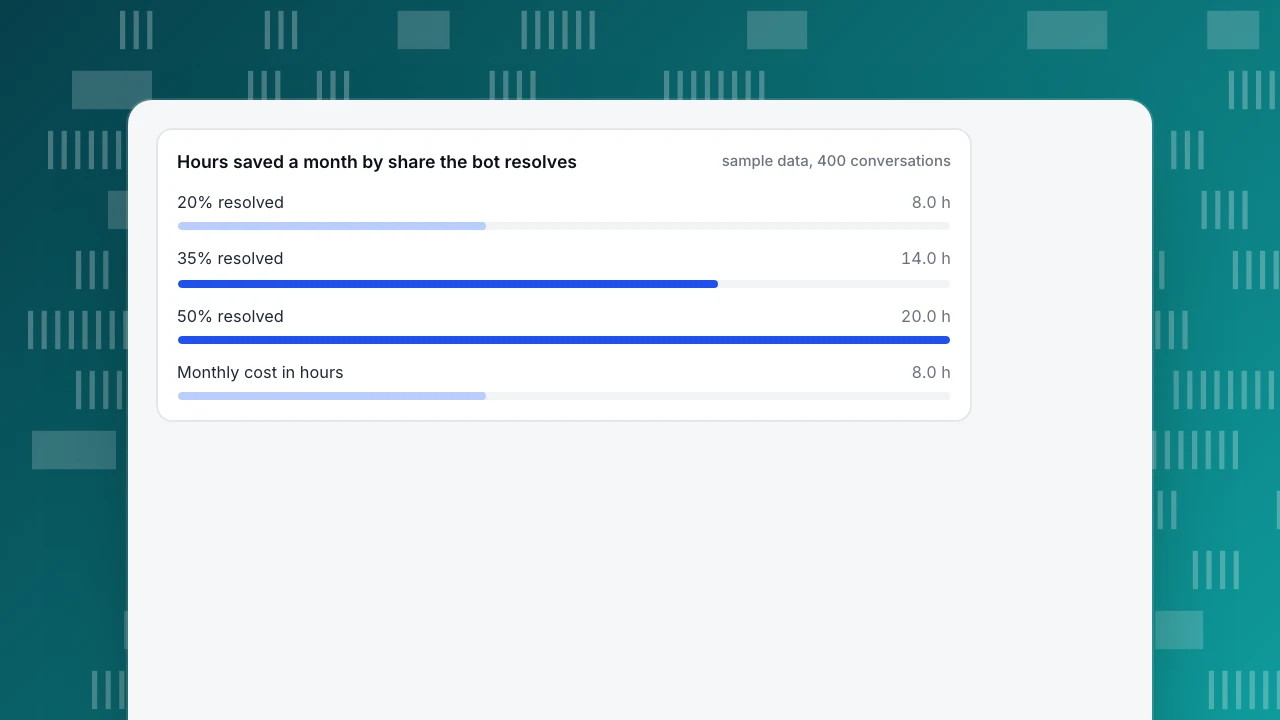
At 35%, 400 × 0.35 × 6 ÷ 60 = 14 hours a month. Compare that with what the bot costs you in money and in upkeep: if a plan costs $100 a month and the weekly review takes 1 hour (about 4 hours a month, $100 at the same rate), the cost is about $200 a month. The bot pays for itself only in the 35% and 50% rows, and at 20% it roughly breaks even. Two lessons follow. First, with fewer than about 100 conversations a month the saving is too small to justify setup; a good help page and a canned reply list may do more. Second, the resolve share is the number to measure in a trial, not assume. The cost side is covered in how much chatbots cost.
Hours saved a month by share the bot resolves
sample data, 400 conversationsWhich criteria should you use to choose a builder?
Rate each candidate on these eight criteria, scoring 0 to 2. They are ordered by how often they decide the outcome for a small team.
| Criterion | Question to ask | Score 2 when… |
|---|---|---|
| Answer source | Does it answer from my own content, and only from it? | It uses my articles and says so when it cannot find an answer |
| Human handoff | Can a person take over, with the transcript? | Handoff rules are configurable and agents see the history |
| AI disclosure | Does it tell visitors they are talking to AI? | The label is on by default and not easy to remove by accident |
| Upkeep effort | How do I find and fix a wrong answer? | I can test questions and see which source answered |
| Offline behaviour | What happens when nobody is online? | Visitors can leave an email and a message |
| Languages | Does it handle my visitors' languages? | It translates both ways or answers in the visitor's language |
| Measurement | Can I see what it resolved and what it handed off? | There are resolution and handoff numbers per period |
| Cost model | What am I charged for, and can I predict it? | A clear unit, such as calls or conversations, with a limit I can read |
Add the scores. A tool that scores 2 on answer source, handoff and disclosure but 0 on everything else is still a better choice than a tool with every feature and no way to test. Skip any criterion your business does not need, but do not skip the first three.
| Criterion | Question to ask | Score 2 when |
|---|---|---|
| Answer source | Does it answer only from my own content? | It uses my articles and says so when it cannot answer |
| Human handoff | Can a person take over with the transcript? | Handoff rules are configurable |
| AI disclosure | Does it tell visitors it is AI? | The label is on by default |
| Upkeep effort | How do I find and fix a wrong answer? | I can test questions and see the source |
| Measurement | Can I see resolved and handed-off counts? | Per-period numbers exist |
Score each of the eight criteria 0 to 2; the first three matter most for a small team.
Do you have to tell visitors it is a bot?
Increasingly, yes. In the EU, Article 50(1) of the AI Act requires providers to design AI systems that interact directly with people so that the people concerned are informed they are dealing with an AI system, unless that is obvious to a reasonably alert person. In California, the bot disclosure law (Business and Professions Code section 17941) makes it unlawful to use a bot to mislead someone about its artificial identity in order to incentivize a purchase or sale or influence a vote, and a clear and conspicuous disclosure that it is a bot is the way to stay on the right side of it. This is general information, not legal advice; check the rules for the places your visitors live.
The practical rule is simple. Label the bot as AI in the first message, keep the label on, and make it easy to reach a person. Choose a builder where the label is on by default, so that it takes a deliberate act, not a missed setting, to remove it.
How do you set one up without a technical person?
Work in this order, because each step produces the input for the next.
- Collect the real questions. Export or read the last 100 conversations or emails and tally the questions. Sample data: 100 conversations give 62 about shipping, returns and accounts, 23 about price and plans, 9 about setup problems and 6 others. The 62 are the first job for the bot.
- Write 10 to 20 answers. Cover the top questions with a complete answer each: who, what, how long, what to do next. A thin knowledge base is the most common cause of poor bots.
- Set the handoff rule. Decide when a person takes over: the visitor asks, the bot cannot find an answer, or the topic is a refund, a complaint or a legal question. Write these down before launch.
- Test with 30 questions. Take 30 real questions, including five phrased differently from your articles and five the bot should not answer. Record each result as correct, partly right or wrong.
- Check the threshold. Sample data: of 30 tests, 25 correct, 3 partly right and 2 wrong, so 83.3% correct and 6.7% wrong. A reasonable bar before launch is 90% correct and no wrong answer on money or policy topics, so this bot is not ready: fix the content for the 5 misses and test again.
- Launch narrow, then widen. Start with the bot answering only when nobody is online, or only on the pages that generate the questions, and widen after two weeks of clean transcripts.
How do you know it is working after launch?
Track four numbers each week, each with its denominator.
| Metric | Formula | Sample month |
|---|---|---|
| Resolved by the bot | Conversations closed with no human reply ÷ all conversations | 140 ÷ 400 = 35.0% |
| Handoff rate | Conversations passed to a person ÷ all conversations | 180 ÷ 400 = 45.0% |
| Left without an answer | Conversations ended with no result ÷ all conversations | 80 ÷ 400 = 20.0% |
| Wrong-answer rate | Wrong answers ÷ bot-resolved conversations reviewed | 2 ÷ 50 = 4.0% |
The last row needs a person: read 50 bot-resolved transcripts a month and mark the wrong ones. A resolution rate looks good even when the bot is confidently wrong, so the wrong-answer review is the number that protects customers. When the wrong-answer rate rises, fix the content first and tighten the handoff rule second.
How do you build one with a knowledge base in TapCub?
TapCub's chat answers from a knowledge base, not from a drag-and-drop flow canvas, so it fits the knowledge-based design above. It generates replies only; it does not change orders, send emails or call other systems. For the step-by-step guide, see set up AI replies from your knowledge base.
- Turn on chat. On a site that already has the TapCub script, switch on the live chat toggle under Live chat › Chat settings › Appearance; no code change is needed. Sites without the script get the code on the Install page.
- Build the knowledge base from your top questions. Under Live chat › Knowledge base, add Q&A entries for the exact questions and documents for longer pages. A Q&A is sent as written without an AI call when the question matches; a document is split into passages of about 600 characters and searched with full-text search, and the model drafts the answer. Pin your most common Q&As so they appear in the visitor's FAQ and open without starting a conversation.
- Test before launch. Use the knowledge base's Playground to run your 30 test questions; Playground tests do not use your AI quota.
- Choose the mode. Under Live chat › Chat settings › AI assistant, pick Off, Only when all agents are offline, or AI first. The assistant answers only from your knowledge base, labels itself as AI, and hands off to a person when it lacks material or the visitor asks. Start with the offline-only mode.
- Cover the gaps. Set office hours and offline messages under Live chat › Chat settings › Office hours and Offline messages, so visitors can leave an email and a question when nobody is available, and use two-way translation if your visitors write in other languages.
- Read the numbers. Live chat › Reports shows conversations, resolution rate, first response and the knowledge-base hit rate, the share of questions answered by a direct Q&A match or a retrieved answer. It does not measure wrong answers, so keep the weekly transcript review.
FAQ
What is a no-code chatbot builder?
A tool that lets non-programmers set up a chatbot through forms, a visual editor or by uploading content. The designs differ: flow-based bots follow a drawn decision tree, knowledge-based bots answer from your articles, and hybrids combine both with a handoff to a person.
How do you choose a no-code chatbot builder?
Score candidates on answer source, human handoff, AI disclosure, upkeep effort, offline behaviour, languages, measurement and cost model. Weight the first three most, and test each candidate on 30 real questions from your own inbox before deciding.
Can a small business use a chatbot without a developer?
Yes. Collect your top questions, write 10 to 20 complete answers, set a handoff rule, test with 30 questions and launch narrowly. The upkeep, not the setup, is the cost: plan about an hour a week to review transcripts and fix answers.
Do chatbots have to disclose that they are bots?
Often. The EU AI Act's Article 50(1) requires people to be informed they are interacting with an AI system unless that is obvious, and California's bot disclosure law makes misleading someone about a bot's identity to drive a sale unlawful. Label the bot in the first message. This is not legal advice.
Sources
- European Union, AI Act, Article 50: Transparency obligations — paragraph 1 on informing people that they interact with an AI system. Checked 2026-11-21.
- California, Business and Professions Code section 17941 — the bot disclosure law (SB 1001), effective July 1, 2019. Checked 2026-11-21.
Was this article helpful?
We use your answers to fix and expand this page.
Couldn’t send. Please try again in a minute.
Thanks for the feedback. We’ll use it to improve this page.You’ve already sent feedback on this page. Thanks.

Product Experience Specialist
Writes about product experience, practical workflows, and growth, turning complex processes into clear steps for everyday decisions.