Try it on your own data
Every report in this article is in the free plan. One snippet for web and apps, up to 10 sites.
Start freeAI live chat works when you decide the boundary first: which questions the AI may answer alone, which it answers partly and then hands over, and which go straight to a person. In the sample month, 55% of chats were safe to automate, yet the first version failed its 5% wrong-answer budget at 8.0%.
What you will learn
- Sort questions by volume, risk and whether your documents can answer them
- Set a wrong-answer limit per zone before launch; 92% correct still failed a 5% limit
- Design the handoff so the agent gets the conversation, the reason and the visitor context
What is AI live chat, and how is it different from a chatbot or a human-only chat?
AI live chat is a website chat in which an AI answers visitors first, or alongside your agents, and passes the conversation to a person when it should. The word "live" matters: a human stays in the loop, and the design question is where the line between the two sits.
It helps to separate three setups, because articles use the names loosely:
| Setup | Who answers | Strength | Risk |
|---|---|---|---|
| Human-only live chat | Agents | Judgement, empathy, can act | Cost and coverage at night |
| Rule-based chatbot | Scripted flows | Predictable | Breaks outside the script |
| AI live chat | AI first, people on handoff | Wide coverage of repeated questions | Confident wrong answers |
For the contrast with a scripted bot, see chatbot vs live chat; for the support-agent side of AI, see AI support agent; for what a customer-service bot is, see customer service chatbot. This article is about one design decision those pages leave open, and its claim is: before you switch AI on, decide which questions it may answer on its own and which must go to a person. Teams that write the boundary first get a bot they can defend; teams that switch it on first discover the boundary from complaints.
Step 1: how do you sort your questions by volume, risk and answerability?
Start from real conversations, not from what you hope the AI can do. Take a month of chats and put each into a category, then give each category three facts:
- Volume: the share of conversations.
- Answerable from your material: can a correct answer be written from documents you already have, without looking up a customer's record?
- Risk if wrong: low (a delay or a wasted click), medium (a wrong promise that costs money or time) or high (money, safety, legal or account consequences).
The second fact is the one teams skip. An order-status question is common and feels automatable, but the answer lives in a system the AI cannot read. If your chat AI only generates text from documents, "where is my order?" is not answerable by it, however easy it looks.
Step 2: which questions fall into the auto, assist and human zones?
Three zones turn the sorted list into rules:
| Zone | Rule | What happens |
|---|---|---|
| Auto | Answerable from your material and low risk | AI answers; the visitor can ask for a person at any time |
| Assist | Partly answerable, or medium risk | AI answers the factual part, then hands over; or an agent edits a draft |
| Human only | Needs a decision, a lookup or has high risk | Goes to an agent straight away |
Put money decisions, complaints, legal and safety topics, and anything needing a record lookup in the human-only zone. The moment a customer says "refund", "cancel", "lawyer" or "charged twice", the AI should stop answering and a person should take over. Put opening hours, policies and how-to questions in the auto zone.
| Zone | Rule | What happens |
|---|---|---|
| Auto | Answerable from your material and low risk | AI answers; visitor can ask for a person any time |
| Assist | Partly answerable or medium risk | AI answers the facts then hands over, or an agent edits a draft |
| Human only | Needs a decision, a lookup or is high risk | Goes to an agent straight away |
Money, complaints, legal, safety and record lookups sit in the human zone.
Worked example: what does the boundary do to a month of chats?
Sample data: 1,000 conversations in a month.
| Category | Conversations | Answerable from documents? | Risk if wrong | Zone |
|---|---|---|---|---|
| Hours, shipping and policy facts | 300 | Yes | Low | Auto |
| How-to product questions | 250 | Yes | Low | Auto |
| Order status | 200 | No, needs a lookup | Medium | Human only |
| Billing and refunds | 120 | Partly, needs a decision | High | Human only |
| Pre-sales and pricing | 90 | Partly | Medium | Assist |
| Complaints, legal, safety | 40 | No | High | Human only |
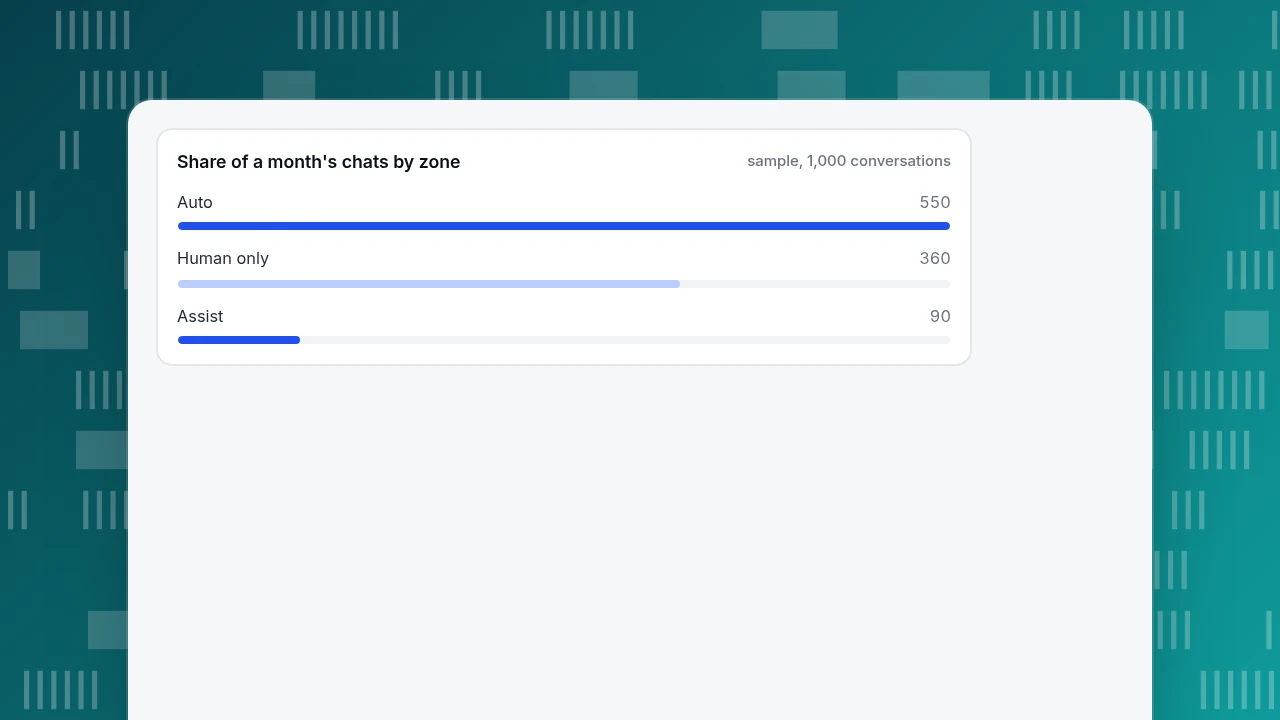
The auto zone holds 300 + 250 = 550 conversations, or 55% of the month. The other 450 stay with people, with the assist zone's 90 getting a head start.
Now the value. Suppose a person spends 6 minutes on such a conversation, and cleaning up a wrong answer costs 15 minutes. If the AI answers 92% of the auto zone correctly: 550 × 0.92 = 506 correct answers, and 44 wrong. Time saved is 506 × 6 ÷ 60 = 50.6 hours; cleanup is 44 × 15 ÷ 60 = 11.0 hours; net 39.6 hours.
That is a good number with a bad detail: 44 wrong answers in 550 is 8.0%.
Share of a month's chats by zone
sample, 1,000 conversationsHow many wrong answers can you accept? Set a budget before launch
Set the allowed wrong-answer rate per zone before the pilot, not after the first complaint:
| Zone | Maximum wrong-answer rate | Why |
|---|---|---|
| Auto, low risk | 5% | A wrong answer costs a few minutes of clean-up |
| Assist, medium risk | Human reviews every reply | A wrong promise costs money |
| Human only | Not applicable | The AI does not answer |
Against that rule, the first version fails: 8.0% is above 5%. The fix is the documents, not the model. After rewriting the answers that failed in the test, suppose accuracy reaches 96%: 550 × 0.96 = 528 correct, 22 wrong (4.0%, within budget), time saved 528 × 6 ÷ 60 = 52.8 hours, cleanup 22 × 15 ÷ 60 = 5.5 hours, net 47.3 hours. The version that passes is both safer and more valuable.
The limit is not only an internal choice. A tribunal in Moffatt v. Air Canada held a company responsible for incorrect information its website chatbot gave a customer. Transparency rules also exist: Article 50 of the EU AI Act sets duties to inform people when they interact with an AI system. This is general information, not legal advice; say plainly in the chat when an AI is answering.
How should the handoff to a person work?
The handoff is the safety net, so design it as carefully as the answers:
| Trigger | Example rule |
|---|---|
| No match in your material | The AI says it is passing the chat to a person, and does so |
| The visitor asks for a person | Immediate transfer; never argue |
| Sensitive wording | "Refund", "cancel", "complaint", "lawyer" route to the human-only zone |
| Too many turns | After about three AI turns without a resolution, hand over |
| Outside office hours | Collect an email and a question as an offline message |
Then check what the agent receives: the whole conversation, the reason for the handoff and the visitor's context. If the agent has to ask the visitor to repeat the problem, the handoff has failed, whatever the AI did well before it.
How do you launch AI live chat in five steps?
- Write or tidy the material for the auto zone first: one question, one answer, one date it was last checked.
- Test with 50 real questions from your history; count correct, handed off and wrong, and compare with the budget.
- Start narrow: let the AI answer only when no agent is online, then widen to first reply once the wrong-answer rate holds.
- Review every handoff weekly for the first month and fix the material behind each one.
- Re-measure monthly: share auto-answered, wrong-answer rate, handoffs by reason.
Common mistakes with AI live chat
- Switching on before writing the boundary. You learn the boundary from complaints.
- Counting order status as automatable. If the AI cannot read your orders, it cannot answer.
- Judging by correct answers, not wrong ones. In the example, 92% correct still failed a 5% budget.
- Hiding that it is AI. Be clear, for trust and for transparency rules.
- A handoff that loses context. Agents asking the visitor to start over wipes out the saving.
- Letting the material go stale. An outdated policy answer is a confident wrong answer.
How would this boundary be set up in TapCub?
Here is how the store in the example would put the zones into TapCub live chat. TapCub's AI only generates replies; it does not look up orders, change them or send emails, which is why order status stayed in the human zone.
- Write the auto zone as knowledge. In Live chat › Knowledge base, add Q&A entries for facts and policies: when a question matches, the answer is sent as written and no AI call is used. Add documents for how-to topics; they are split into passages of about 600 characters, searched by full-text index and drafted into an answer.
- Test before launch. The Playground in the knowledge base tests answers without using quota. Run your 50 questions there and count wrong answers against the budget.
- Choose the mode. Live chat › Chat settings › AI assistant offers three modes: off, only when all agents are offline, and AI first (which stops when an agent takes over, a person replies or the visitor asks for one). Start with the middle one.
- Control the handoff. When the material is not enough, the conversation goes to an agent in Live chat › Inbox, labelled with a reason such as no knowledge match, model could not answer, visitor asked or turn limit. Pin the most common Q&A as FAQ: opening one does not create a conversation or use quota, and only Not solved or a request for a person does.
- Measure. Live chat › Reports shows the knowledge base hit rate, resolution rate and first response (human replies only).
For how AI calls are counted, see how AI chat calls are counted; for setup, set up AI chat replies. TapCub does not decide your boundary; the zones are yours to set.
FAQ
What is AI live chat?
AI live chat is a website chat where an AI answers visitors first or alongside agents and hands the conversation to a person when it should. A human stays in the loop. The key design choice is which questions it answers alone and which go to people.
What questions should an AI chat answer on its own?
Questions that can be answered correctly from documents you already have, and where a wrong answer is cheap: opening hours, policies, shipping facts and how-to steps. Money decisions, complaints, legal, safety and anything needing a record lookup should go to a person.
How accurate does AI live chat need to be?
Set a limit on wrong answers per zone before launch. A reasonable limit for low-risk questions is at most 5% wrong. In the sample, 92% accuracy failed that limit with 8% wrong; after fixing the material, 96% passed with 4% wrong.
Do I have to tell visitors they are talking to an AI?
Often yes, and it is good practice regardless. Article 50 of the EU AI Act sets duties to inform people when they interact with an AI system, and other jurisdictions have disclosure rules. This is general information, not legal advice, so check your own requirements.
Can AI live chat look up orders or issue refunds?
Not unless it is connected to those systems and allowed to act. In TapCub, the AI only generates replies; it does not change orders, send email or call other systems, so order lookups and refunds belong to an agent.
Sources
- Civil Resolution Tribunal of British Columbia. Moffatt v. Air Canada, 2024 BCCRT 149 — a company was held responsible for its website chatbot's incorrect information. Verified 2026-11-19.
- European Union. Regulation (EU) 2024/1689 (AI Act) — Article 50 on transparency obligations for AI systems that interact with people. Verified 2026-11-19.
- National Institute of Standards and Technology. AI Risk Management Framework — a framework for mapping and managing AI risks. Verified 2026-11-19.
Was this article helpful?
We use your answers to fix and expand this page.
Couldn’t send. Please try again in a minute.
Thanks for the feedback. We’ll use it to improve this page.You’ve already sent feedback on this page. Thanks.

Product Experience Specialist
Writes about product experience, practical workflows, and growth, turning complex processes into clear steps for everyday decisions.