Try it on your own data
Every report in this article is in the free plan. One snippet for web and apps, up to 10 sites.
Start freeAI attribution means crediting visits and signups to the AI assistant that sent the person, using the referring host and UTM tags, while counting crawler reads separately because they show exposure, not visits. Some AI visits always land in direct, so report an observed number plus a suspected range instead of one exact figure.
What you will learn
- Keep human visits and crawler reads apart: in the sample, 4,510 answer-engine reads from one operator brought back 96 visitors
- Do not rank assistants on a handful of signups: 13 signups give a 4.3%–12.0% interval
- Report hidden direct visits as a range (180 observed, up to 580) and keep them out of the AI channel
What AI attribution means, and why it undercounts
AI attribution is crediting visits, signups and sales to the AI assistant that sent the person: ChatGPT, Perplexity, Gemini, Claude, Copilot and similar products. It has two halves that people often mix up. Human visits are people who click a link in an answer and land on your site. Crawler reads are programs that fetch your pages to train a model, build a search index or answer a question. Only the first half is attribution in the usual sense; the second half is exposure.
Expect an undercount. Some assistants send a referrer, some do not, and a browser can strip the referrer before it reaches you. A visit with no referrer is recorded as direct. So the honest result is a range: what you can see, and what you suspect is hiding in direct traffic. The rest of this article shows how to measure each part and keep them apart.
The four signals you can observe
| Signal | What it shows | What it misses |
|---|---|---|
| Referrer from an AI product | A person clicked a link and arrived; tells you which assistant | Visits where the referrer was stripped or never sent |
| UTM tag on the link | A named source and campaign, if the assistant or you added one | Links you do not control; answers that quote your URL without a tag |
| Crawler reads in server or bot data | Your content was read, by which operator and for what purpose | Whether any person saw it; most reads send nobody |
| Direct-traffic spike on deep pages | A hint that untagged AI visits exist | Proof: other causes (email, apps, bookmarks) look the same |
Use all four, in that order of confidence. Referrers and UTM tags prove a visit. Crawler data proves exposure. The direct-traffic signal only tells you where to look.
Read AI crawler data correctly: reads are not visits
The operators publish what their crawlers do, and the purposes differ, so group them by purpose before counting.
| Operator | Agent | Purpose (from the operator's documentation) | robots.txt |
|---|---|---|---|
| OpenAI | OAI-SearchBot | Surfaces sites in ChatGPT search features | Applies |
| OpenAI | GPTBot | Crawls content that may train generative AI models | Applies |
| OpenAI | ChatGPT-User | Visits a page when a user asks ChatGPT or a custom GPT a question | May not apply, because a user initiates it |
| Perplexity | PerplexityBot | Surfaces and links sites in Perplexity search results; not used for foundation-model training | Applies |
| Perplexity | Perplexity-User | Visits a page when a user asks a question | Generally ignores robots.txt, because a user triggers it |
Three consequences follow:
- A training crawler such as GPTBot can read thousands of pages and never send a visitor. Its reads measure exposure to training, not traffic.
- A search or answer agent (OAI-SearchBot, PerplexityBot) is the one whose reads can turn into citations and clicks.
- A user-triggered fetch (ChatGPT-User, Perplexity-User) means a person asked about your page at that moment. It is a stronger signal of interest than a scheduled crawl, even though it is not a visit to your site.
If you block crawlers in robots.txt, read the operator's page first: blocking a training agent does not hide you from the search agent, and the reverse. The details for individual bots are on the GPTBot and PerplexityBot pages.
Attribute visits by referrer, then compare them
Create a channel rule that maps the referring host of each AI product (chatgpt.com, perplexity.ai, gemini.google.com, claude.ai, copilot.microsoft.com) to one "AI assistant" channel, and keep the host as the source so you can split it. Browsers apply a referrer policy to what they send; the default in current browsers (strict-origin-when-cross-origin) still sends the origin for cross-site links, but a link with rel="noreferrer" or a stricter policy sends nothing. That is why a share of AI visits will always fall into direct.
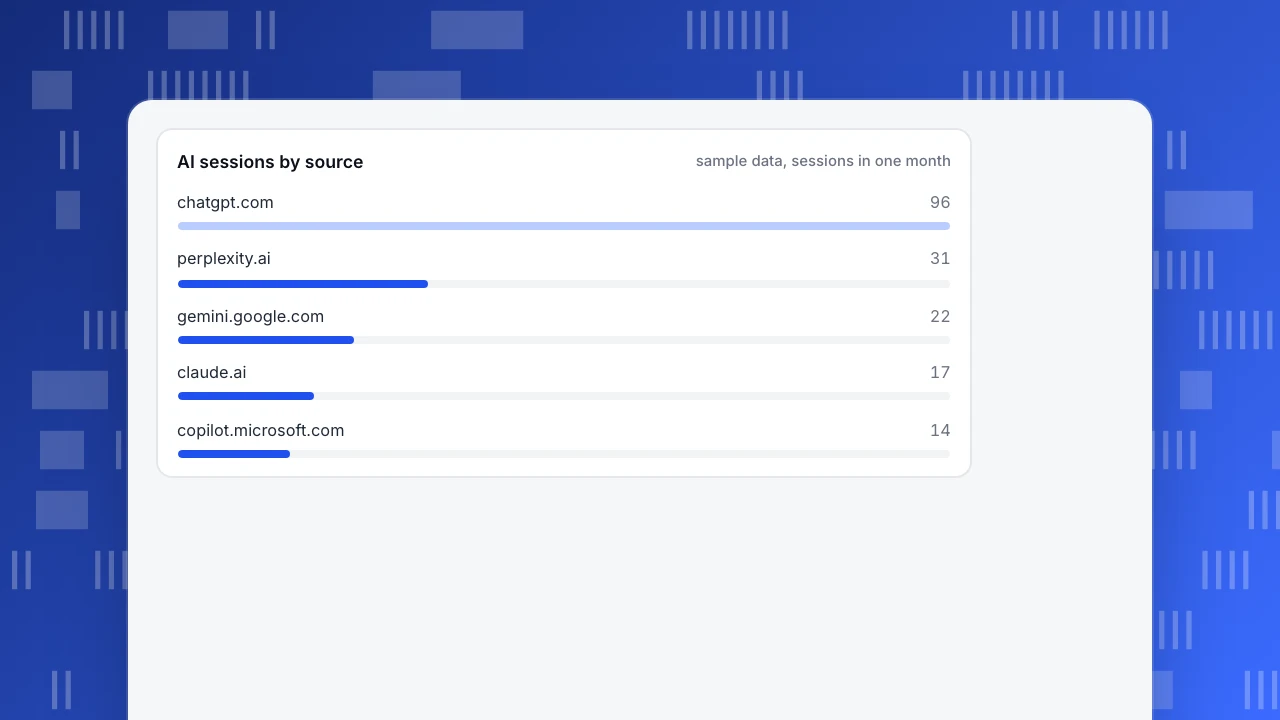
Sample data: one month, 24,000 human sessions.
| Source | Sessions | Signups | Signup rate |
|---|---|---|---|
| chatgpt.com | 96 | 7 | 7.3% |
| perplexity.ai | 31 | 3 | 9.7% |
| gemini.google.com | 22 | 1 | 4.5% |
| claude.ai | 17 | 2 | 11.8% |
| copilot.microsoft.com | 14 | 0 | 0.0% |
| AI total | 180 | 13 | 7.2% |
AI sources are 180 ÷ 24,000 = 0.75% of sessions. Compare with organic search in the same month: 9,600 sessions and 192 signups, a 2.0% rate.
AI sessions by source
sample data, sessions in one monthDo not over-read a small channel
AI visitors signed up at 7.2% against 2.0% for organic search. A two-proportion z-test on those numbers gives z = (0.0722 − 0.02) ÷ 0.0108 = 4.8, which is significant. But the 7.2% rests on 13 signups. A 95% Wilson interval for 13 of 180 runs from 4.3% to 12.0%, almost a threefold range.
The decision rule: report the rate with its interval, and only compare sources (ChatGPT 7.3% against Perplexity 9.7%) once each has at least 30 conversions. With 7 and 3 signups, the order of those two means nothing yet. Aggregate at the channel level until the counts grow.
Also remember who clicks. People who click through from an answer have usually already read a summary and chosen your page, so they arrive with intent. A higher rate than search is plausible; treat it as a hypothesis to retest next month, not a ranking of assistants.
Estimate the hidden part without inflating the number
Some AI visits arrive without a referrer. To size them, look at direct sessions that land on deep pages (a blog post or a pricing page), which people rarely type or bookmark. Sample data: direct sessions on deep pages usually run about 1,000 a month and this month show 1,400.
The extra 400 are candidates, not AI visits. Check three things before assigning any to AI:
- The spike starts on the same dates you were cited, or when a new answer began quoting your URL.
- The landing pages are the ones the assistants quote.
- No email send, app release or campaign explains it.
Report the result as a range: 180 observed AI sessions, and up to 580 if every extra direct session were AI. Keep the 400 out of the AI channel, so the figure you trend month to month stays defensible.
Compare crawler reads with the visitors they bring back
The useful ratio is reads per visitor: how many times an operator read your pages for each person it sent. Sample data for the same month:
| Operator | Training reads | Answer-engine reads | Visitors sent | Reads per visitor |
|---|---|---|---|---|
| OpenAI | 18,500 | 4,510 | 96 | 47 : 1 (answer engine only); 240 : 1 (all reads) |
| Perplexity | — | 1,900 | 31 | 61 : 1 |
OpenAI's answer-engine reads are OAI-SearchBot (4,200) plus ChatGPT-User (310). Divide by 96 visitors and you get about 47 reads for every visitor; with GPTBot's 18,500 training reads included, 23,010 ÷ 96 is about 240.
Watch the trend, not the level. If reads double and visitors stay flat, your content is being used but not cited. If visitors rise with reads flat, existing citations are getting clicked more.
| Signal | What it shows | What it misses |
|---|---|---|
| Referrer from an AI product | A person clicked and arrived; which assistant | Visits where the referrer was stripped |
| UTM tag on the link | A named source and campaign | Links you do not control |
| Crawler reads | Content was read, by whom and why | Whether any person saw it |
| Direct spike on deep pages | A hint that untagged visits exist | Proof of AI as the cause |
Use all four, in order of confidence: referrers and UTM prove a visit, crawler data proves exposure, the direct spike only says where to look.
Write the result as a range in your report
Put the numbers in one paragraph that a manager can read without the method. A template with the sample figures:
"In October, AI assistants sent 180 sessions (0.75% of human sessions) and 13 signups (7.2%, 95% interval 4.3% to 12.0%), against 2.0% for organic search. Another 400 direct sessions on deep pages were above normal and are not counted as AI. OpenAI's search and answer agents read our pages 4,510 times for 96 visitors."
Three habits keep the report honest: say which month and which sources are included; give the interval whenever the count is under 100 conversions; and name what is excluded. When the next month comes, change only the numbers, so the trend stays comparable.
Track AI attribution in TapCub
Take the sample month and set it up end to end.
- See the people. Open Web analytics › Sources and the AI sources tab. It counts human sessions that arrived from an AI product, using the referring host and any UTM, and it is separate from crawler reads. Source rules can be edited under Configuration › Web settings, and history can be recomputed.
- Compare conversion. The channel table has a conversions column, so you can put the AI channel next to organic search; use Web analytics › Goals to define the signup.
- See the crawlers. Web analytics › Bots has the tabs AI & agents, All bots and Visits. The AI content ledger lists reads per operator, with training crawlers and answer engines in separate columns, plus the human visitors brought back and the reads-to-visitor ratio.
- Mind the limits. With only the page script, crawlers that do not run JavaScript are invisible; send crawler hits through the server-side interface. Only Applebot is verified by DNS reverse lookup; other bots show as unverified.
- Name the person. If you call
tapcub.loginat signup, the signed-up person appears under All-platform analytics › Users › People, with their first source on the timeline.
TapCub does not tell you what an assistant said about you, and it does not guess which direct visits were AI. It measures what arrived and what read your pages.
FAQ
What is AI attribution?
AI attribution is assigning visits, signups and revenue to the AI assistant that referred the person. It is measured mostly from the referring host and UTM tags on clicks. Crawler reads are tracked separately because they show exposure, not visits.
How do I track traffic from ChatGPT?
Map chatgpt.com in your analytics channel rules to an AI channel and compare its conversion with other channels. Expect a gap: visits without a referrer land in direct. Check direct traffic to deep pages for spikes, and keep those out of the AI count.
Why is AI traffic showing as direct?
A visit is direct when no referrer arrives. A browser can drop it, a link can use rel="noreferrer", and an app can open links without one. That is why AI visits are best reported as an observed number with a suspected range above it.
Is AI crawler traffic the same as AI referral traffic?
No. A crawler read is a program fetching your page to train, index or answer. Referral traffic is a person clicking through. In the sample, 4,510 answer-engine reads from OpenAI produced 96 visitors.
Should I block AI crawlers to protect my traffic?
Blocking a training crawler such as GPTBot stops it using content for training; it does not affect the search agent, which has its own robots.txt rules. Decide per agent and per purpose, and watch the reads-per-visitor ratio before and after.
Sources
- OpenAI, Overview of OpenAI crawlers: OAI-SearchBot, GPTBot and ChatGPT-User, their purposes and robots.txt behaviour. Checked 2026-11-21.
- Perplexity, Perplexity crawlers: PerplexityBot and Perplexity-User. Checked 2026-11-21.
- MDN Web Docs, Referrer-Policy header: what browsers send as the referrer and the default policy. Checked 2026-11-21.
Was this article helpful?
We use your answers to fix and expand this page.
Couldn’t send. Please try again in a minute.
Thanks for the feedback. We’ll use it to improve this page.You’ve already sent feedback on this page. Thanks.

Customer Experience Consultant
Writes about live chat, visitor conversations, and self-service, sharing practical ways to make customer communication clearer and more effective.