Try it on your own data
Every report in this article is in the free plan. One snippet for web and apps, up to 10 sites.
Start freeHTTP/3 is HTTP carried over QUIC, a transport built on UDP with TLS 1.3 included, defined in RFC 9114. It saves one network round trip on each new connection and stops one lost packet stalling every request. In a simple model that is 20, 80 or 200 ms depending on distance, so the gain is largest for far-away and mobile visitors. Below: a comparison table, the arithmetic, and a DevTools check.
What you will learn
- HTTP/3 saves one round trip per new connection: 20, 80 or 200 ms at those round-trip times, up to 20% of the TTFB budget
- A first visit often shows h2 because browsers learn about HTTP/3 from Alt-Svc; reload once before judging
- Judge the switch by P75 TTFB before and after, split by country and device, not by one DevTools screenshot
What is HTTP/3?
HTTP/3 is the third major version of the protocol your browser uses to fetch web pages. Its standard, RFC 9114 (June 2022), describes it as a mapping of HTTP semantics over QUIC. The methods, status codes and headers are the same as before; what changes is the transport underneath. HTTP/1.1 and HTTP/2 run over TCP, while HTTP/3 runs over QUIC, which RFC 9000 defines as a transport that carries its packets in UDP datagrams and integrates the TLS 1.3 handshake.
Two properties of QUIC are the reason for the new version:
- A shorter start. QUIC combines the transport handshake and the cryptographic handshake, so a new connection needs fewer round trips before the first request can be sent.
- Streams that do not block each other. In HTTP/2 over TCP, one lost packet stalls every request on the connection, because TCP delivers bytes in order. RFC 9114 explains that HTTP/3 avoids this because QUIC provides reliability per stream.
For a site owner the practical question is not "is HTTP/3 better" but "how much of my page time is connection setup, and is it worth a switch on my CDN". The rest of this guide gives you the comparison, the arithmetic, and a five-minute way to verify what your own site uses.
HTTP/1.1 vs HTTP/2 vs HTTP/3
| HTTP/1.1 | HTTP/2 | HTTP/3 | |
|---|---|---|---|
| Transport | TCP | TCP | QUIC over UDP |
| Encryption | Optional (TLS) | Effectively TLS in browsers | TLS 1.3 built into QUIC, always on |
| Requests per connection | One at a time (browsers open several connections) | Many multiplexed streams | Many multiplexed streams |
| Header compression | None | HPACK | QPACK |
| Lost packet affects | The one connection | Every stream on the connection | Mainly the stream that lost data |
| Round trips before the first request (new connection) | TCP handshake, then TLS | TCP handshake, then TLS | One combined handshake |
| Announced to the browser by | Default | TLS negotiation (ALPN) | Alt-Svc header or a DNS HTTPS record |
| Browser label in DevTools | http/1.1 | h2 | h3 |
QPACK exists because HTTP/2's HPACK assumes headers arrive in order, which QUIC does not guarantee. You do not have to configure it; it comes with HTTP/3.
| Step | Where | What you should see |
|---|---|---|
| Show the Protocol column | DevTools › Network, right-click the table header | A Protocol column with values such as h2 and h3 |
| Reload twice | Same page, normal reload | The second load may switch from h2 to h3 |
| Check the header | curl -sI https://your-site | grep -i alt-svc | h3=":443" means HTTP/3 is announced |
| Force HTTP/3 | curl --http3 -I (needs a curl build with HTTP/3) | A response means the server speaks h3 |
| Judge the outcome | Real-user P75 TTFB before and after | A change that holds across two equal windows |
Chrome documents the Protocol column; Alt-Svc discovery is defined in RFC 9114 section 3.1. Checked 2026-11-20.
What HTTP/3 changes for page speed: a handshake worked example
The saving that is easiest to calculate is connection setup. Over TCP with TLS 1.3, the client needs one round trip for the TCP handshake and one for TLS before the request can go out. QUIC's combined handshake needs one. RFC 8446 describes TLS 1.3's full handshake as one round trip, and a resumed QUIC connection can send early data in the first flight (0-RTT).
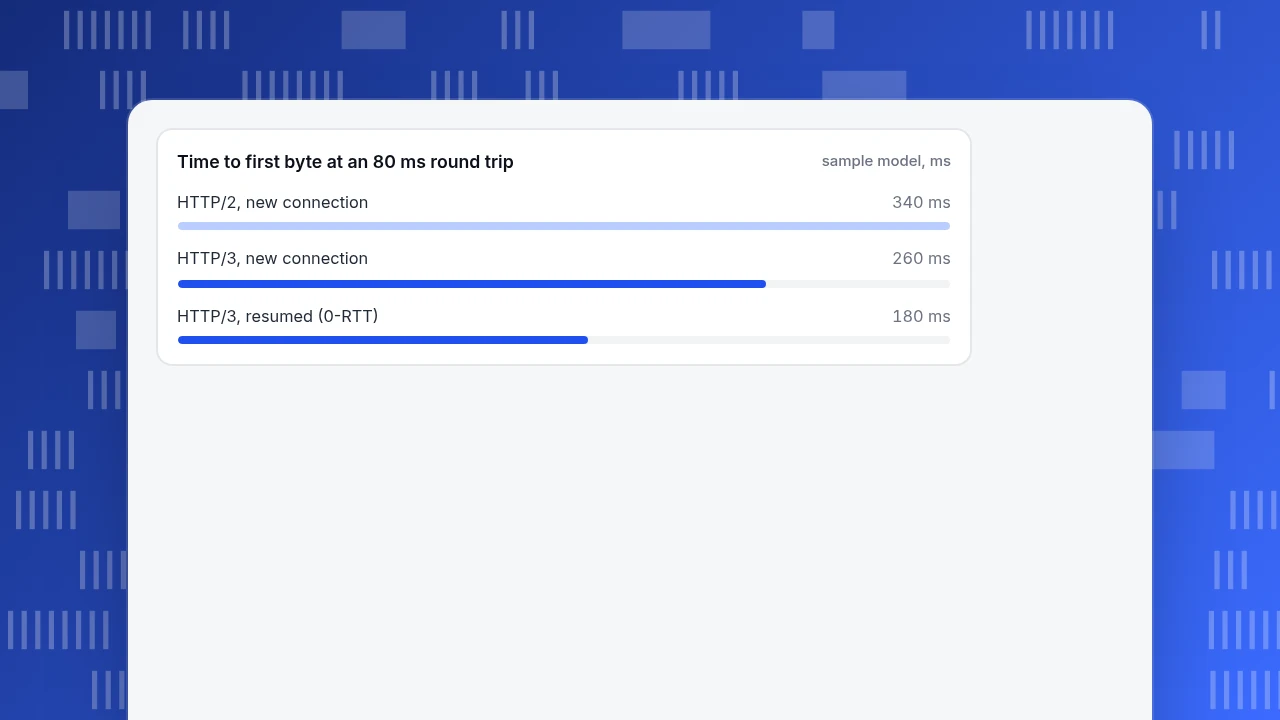
Sample data, with a simplified model: time to first byte (TTFB) = handshake round trips + 1 round trip for the request and response + 100 ms of server time. DNS, packet loss and TLS 1.2 are ignored.
| Network round trip | HTTP/2 over TCP + TLS 1.3 (2 + 1 trips) | HTTP/3 new connection (1 + 1 trips) | HTTP/3 resumed with 0-RTT (0 + 1 trip) |
|---|---|---|---|
| 20 ms (same region) | 160 ms | 140 ms | 120 ms |
| 80 ms (cross-continent) | 340 ms | 260 ms | 180 ms |
| 200 ms (slow mobile network) | 700 ms | 500 ms | 300 ms |
The saving is one round trip per new connection: 20, 80 or 200 ms depending on the network. To put it in proportion, web.dev's LCP guidance says TTFB should be about 40% of the 2.5-second LCP budget, which is 1,000 ms. An 80 ms saving is 8% of that TTFB budget (3.2% of the whole 2.5 seconds); at 200 ms round trips it is 20% of the TTFB budget. So the benefit grows with distance and with slow networks, and it is small for visitors who are already close to your server.
Three limits keep this honest:
- Only new connections gain. A visitor who already holds a warm connection to your origin gains nothing from the handshake saving.
- Early data has a replay risk. RFC 8446 warns there are no guarantees of non-replay between connections for 0-RTT data, so it is only safe for requests that can be repeated without harm, such as a plain GET of a page.
- The packet-loss benefit is separate. Independent streams help most on lossy links, and that effect does not appear in the table. Measure it on your own traffic instead of assuming it.
Time to first byte at an 80 ms round trip
sample model, msHow common is HTTP/3 in 2026?
Numbers vary by what is counted, so read the definition:
- The Web Almanac 2024 HTTP chapter found HTTP/3 on 7% of desktop and 9% of mobile home pages when counting the protocol actually used, with HTTP/2 on 71% and 70%. It adds that this under-counts support, which it estimates is closer to 30%, because browsers only try HTTP/3 after a server has announced it. About 85% of HTTP/3 responses came from a CDN.
- W3Techs reported that HTTP/3 was used by 41.2% of all websites in November 2026.
- On the browser side, Can I use showed about 95% of global browser usage supporting HTTP/3, with default support from Chrome 87, Edge 87, Firefox 88 and Safari 16.
The takeaway: nearly every visitor's browser can speak HTTP/3, so whether a visitor gets it is decided by your server or CDN, not by their browser.
How to check which HTTP version your site uses
You can verify this with browser DevTools in about two minutes.
- Open the Network panel. In Chrome, press F12 and open Network, then reload the page.
- Show the Protocol column. Right-click the header of the requests table and tick Protocol. Chrome's documentation describes it as the protocol of the request, for example
h2for HTTP/2 andh3for HTTP/3. - Reload a second time. On the very first visit a browser usually connects with HTTP/2 and learns about HTTP/3 from the
Alt-Svcresponse header; later requests may then switch toh3. If you see onlyh2once, reload and look again. - Check the main document, then the rest. Filter to Doc, then sort by Protocol. A page can mix protocols, because third-party hosts have their own settings.
- Check the header. Run
curl -sI https://your-site.example | grep -i alt-svc. A value such ash3=":443"means the server advertises HTTP/3 on UDP port 443. The advertisement can also come from a DNS HTTPS record, which the Web Almanac found on about 9% to 10% of home pages.
If your curl build includes HTTP/3, curl --http3 -I https://your-site.example forces an HTTP/3 request, which separates "the server does not support it" from "my browser chose HTTP/2".
Why you may see HTTP/2 even though HTTP/3 is on
This is the most common confusion, and it is expected behaviour:
- First visit. Per RFC 9114, a client discovers an HTTP/3 endpoint through
Alt-Svc(or a DNS HTTPS record), and the client "may" try it, it is not required to. - UDP is blocked. Some networks drop UDP on port 443. The RFC says clients should fall back to a TCP-based HTTP version, so the visitor still loads the page, only over HTTP/2.
- Racing. The Web Almanac notes that when a browser races connections, HTTP/2 can win even where HTTP/3 is available, and that a single page load can use both protocols on the same host.
- CPU cost. The Almanac also notes HTTP/3 uses more CPU than HTTP/2, which matters on low-end devices and busy servers.
So a mixed result in DevTools is not a failed deployment. Judge the switch by outcome metrics over weeks, not by one screenshot.
Should you enable HTTP/3?
Use these rules:
- If you use a CDN: turn it on if the CDN offers a switch; it is usually a setting, not a code change. The Almanac found about 85% of HTTP/3 responses came from CDNs, and that is where most sites will get it.
- If you run your own servers: only enable it if you can keep UDP 443 open end to end and your load balancer supports QUIC. Otherwise you gain nothing and add something to debug.
- If your audience is near your servers and on fast networks: expect a small effect, like the 20 ms row above, and do not prioritise it over images and JavaScript. The median mobile page weighs 2,311 KB with 558 KB of JavaScript (Web Almanac 2024), which usually costs far more than 80 ms.
- If your audience is far away or on mobile networks: the 80 to 200 ms rows are realistic, and the switch is cheap, so test it.
- If you enable early data (0-RTT): limit it to safe, repeatable requests.
For the wider picture of what actually moves page speed, see page speed and SEO and how to optimize website performance.
Measure the effect on real visitors in TapCub
TapCub does not report which HTTP version a visitor used, so you cannot filter by protocol. What it can show is whether the switch moved real-user timing, which is the number that matters.

- Mark the change. Add a date note on the day you enable HTTP/3 under Configuration › Annotations, so the chart shows the before and after.
- Read TTFB and load timing at P75. Open Monitoring › Performance. Time to first byte has a "good" line of 800 ms and "poor" above 1.8 seconds, and the load timing splits one load into backend (TTFB), network transfer and frontend render. Switch the card to P75 as web.dev does.
- Compare two equal windows. The Performance page has no previous-period comparison, so pick two ranges of 14 days (before and after), avoiding the change day, and note the P75 TTFB for each.
- Break down by country and device. The breakdown dimensions are page, country, device, browser and operating system. The model above predicts the biggest gain where round trips are longest, so check whether distant countries and mobile devices improved more than nearby desktop users.
- Decide. If P75 TTFB did not move and the far-away segments did not improve, keep HTTP/3 if it costs nothing and move on to the heavier items (images, JavaScript). If it improved, note the size, and re-check after a month.
A page needs enough samples; with few samples the percentiles jump, so do not read a difference from a day or two of data.
FAQ
Is HTTP/3 faster than HTTP/2?
It can be, mainly on new connections and lossy or high-latency networks, where QUIC saves one round trip and avoids stalls across streams. In the worked example it saves 20, 80 or 200 ms depending on the round trip. For visitors near your server on a fast connection the difference is small.
Does HTTP/3 use UDP?
Yes. HTTP/3 runs over QUIC, and QUIC packets are carried in UDP datagrams (RFC 9000). Browsers fall back to HTTP/2 over TCP if UDP is blocked, so your pages still load.
How do I know if a website uses HTTP/3?
Open DevTools, show the Protocol column in the Network panel and reload; h3 means HTTP/3. You can also check for an Alt-Svc: h3=... response header with curl. A first visit often shows h2, so reload once.
Do all browsers support HTTP/3?
Almost all. Can I use shows about 95% of global usage, with default support since Chrome 87, Edge 87, Firefox 88 and Safari 16. What decides whether a visitor gets HTTP/3 is whether your server or CDN announces it.
Is HTTP/3 good for SEO?
It is not a ranking switch. It helps only through faster loading for real users, which feeds Core Web Vitals such as LCP. Check your own data before expecting a result.
Sources
- M. Bishop (ed.), RFC 9114: HTTP/3, IETF, June 2022, checked 2026-11-20.
- IETF, RFC 9000: QUIC and RFC 8446: TLS 1.3, checked 2026-11-20.
- HTTP Archive, Web Almanac 2024: HTTP, checked 2026-11-20.
- Google, Optimize Largest Contentful Paint and Chrome for Developers, Network features reference, checked 2026-11-20.
- W3Techs, HTTP/3 usage, November 2026; Can I use, HTTP/3, checked 2026-11-20.
Was this article helpful?
We use your answers to fix and expand this page.
Couldn’t send. Please try again in a minute.
Thanks for the feedback. We’ll use it to improve this page.You’ve already sent feedback on this page. Thanks.

Data Engineer
Writes about event design, data quality, and collection workflows, with verifiable implementation methods for reliable analytics.