Try it on your own data
Every report in this article is in the free plan. One snippet for web and apps, up to 10 sites.
Start freeA good website help section lets a visitor find the answer in under a minute and hands them to a person when it is not there. Five layouts cover most cases, from a search-first hub to a chat-first pinned FAQ, and the numbers decide which works: in the sample month 89.5% of help visits ended without a contact but only 10.2% were confirmed helpful.
What you will learn
- Gartner's 2024 survey found only 14% of service issues fully resolved in self-service; the usual failure is not finding the content
- Five patterns: search-first hub, task grid, one-page FAQ, contextual help, chat-first with pinned FAQ; pick by how many questions you have
- Report the deflection estimate (89.5%) next to the confirmed-helpful share (10.2%); not contacting you is not the same as solved
What a website help section has to do
A help section exists to answer a customer's question before they write to you, and to hand them to a person cleanly when the answer is not there. Everything else, categories, article design, tone, is a means to those two jobs.
The bar is higher than most teams assume. In a 2024 Gartner survey of 5,728 customers, only 14% of customer service issues were fully resolved in self-service, and even for issues customers rated "very simple" the figure was 36%. The most common failure was content: in more than 43% of self-service cases the customer could not find content relevant to the issue. A help section with plenty of articles can still fail, because the customer never reaches the right one.
So this article judges examples by two questions: can a visitor find the answer in under a minute, and can you measure whether they did? The patterns below are described without brand names; the structure matters, not who built it. For a wider view of how a help section sits next to a help desk, see AI help desk.
The five parts every help section needs
Whatever the layout, a working help section has the same five parts, in this order from top to bottom:
- A search box, visible without scrolling. NN/g recommends a fixed-size search field be at least 27 characters wide so people can see and correct their whole query; the same group's older study of an e-commerce site found the first query succeeded 51% of the time, the second 32% and the third 18%, and that almost half the people whose first search failed gave up immediately. Make the first search count.
- Top-task links: the 6 to 8 questions that make up most of your contacts (track order, return an item, reset password, change plan). Pick them from your contact log, not from your org chart.
- Categories: 5 to 9 groups named by what the customer wants to do ("Returns and refunds"), not by your department ("Fulfilment").
- Article pages with one question each: the answer in the first two lines, steps below, a related-article list and a helpfulness vote.
- An escape route on every page: chat, a form or a phone number, with the opening hours. A section with no way out increases frustration; one with a clear way out makes the self-service attempt cheap for both sides.
Five patterns, with when each fits
These are the five layouts that cover most real help sections. None is better in the abstract; the right one depends on how many questions you have and how customers arrive.
| Pattern | Layout | Fits when | Main risk |
|---|---|---|---|
| Search-first hub | One wide search box, 6 to 8 top-task tiles below, categories under them | 100+ articles; varied products | Weak search makes the whole page weak |
| Task grid | 8 to 12 tiles by customer job (Orders, Returns, Account, Billing), each opening a short list | 30 to 100 articles; clear jobs | Tiles named after internal teams |
| One-page FAQ | A single page of 10 to 25 questions in groups, expanded with anchors | Fewer than 25 questions; one product | Gets long; anchors break when headings change |
| Contextual help | Short help text, a "what is this?" link or a side panel next to a form field or on checkout | Questions that arise at a step (shipping, tax, password rules) | Hidden content nobody can search |
| Chat-first with pinned FAQ | A chat bubble that opens on a short list of pinned questions, with a person behind it | Small team; most questions are repeats | Pinned list goes stale |
Search-first hub
The layout in text: top bar with the contact link; a large heading ("How can we help?"); a search field about 27 or more characters wide; below it a row of 6 to 8 tiles for the top tasks; below that the categories as a list with article counts; at the bottom, the escape route.
Measure: share of visits that use search, zero-result rate, and which queries have no result. This pattern lives or dies on search quality.
Task grid
The layout in text: no search box first, but a grid of tiles, each tile a verb ("Track an order", "Return or exchange", "Change my plan"). Clicking opens a page with 4 to 8 articles for that job.
Measure: tile click share and what share of tile visits ends in a contact. A tile with a high contact share is either badly named or leads to weak articles.
One-page FAQ
The layout in text: one page, 4 to 6 headings, 2 to 5 questions under each, each question an anchor so it can be linked from emails and the footer.
Measure: which anchors are opened or reached, and which questions are never touched. Cut those. Do not build FAQ markup for rich results: Google's documentation says the FAQ rich result is no longer shown in Search (documentation updated June 2026), so the page has to earn traffic as normal content.
Contextual help
The layout in text: beside the field that causes the question, one sentence and a link ("Why do we need a phone number?"), or a small panel that slides in on the checkout page.
Measure: contacts that start from that page. Put contextual help where the chat or contact starts are concentrated; the page list of where conversations begin tells you.
Chat-first with a pinned FAQ
The layout in text: a bubble; on opening, 4 to 6 pinned questions; clicking one shows the answer in the window; a "not solved" button hands the visitor to a person.
Measure: share of opened answers that do not turn into a conversation, and the share of "not solved" clicks per answer. A high "not solved" share on an answer means rewrite that answer.
How to measure a help section: five numbers
Pick the formula once, write it down, and use it every month.
| Metric | Formula | What it tells you |
|---|---|---|
| Contact rate after help | Help visits that start a contact ÷ help visits | How often the section fails to resolve |
| Deflection estimate | 1 − contact rate after help | Upper bound on visits that did not need a person |
| Confirmed helpful | "Yes" votes ÷ all votes | Quality of articles, among those who vote |
| Zero-result rate | Searches with 0 results ÷ all searches | Missing content or wrong words |
| Contacts per 1,000 site sessions | All contacts ÷ site sessions × 1,000 | Whether the whole site, not only help, creates contacts |
Worked example
Sample data: one month on a small store's site. 85,000 site sessions; 12,000 visits to help pages; 2,100 help searches, of which 340 returned no result; 7,800 article views with 1,560 helpfulness votes, of which 1,092 were "Yes"; 1,260 help visits followed by a chat or form contact; 2,400 contacts in total.
- Contact rate after help = 1,260 ÷ 12,000 = 10.5%
- Deflection estimate = 1 − 10.5% = 89.5% (10,740 visits ended without a contact)
- Confirmed helpful = 1,092 ÷ 1,560 = 70.0%
- Zero-result rate = 340 ÷ 2,100 = 16.2%
- Contacts per 1,000 sessions = 2,400 ÷ 85,000 × 1,000 = 28.2
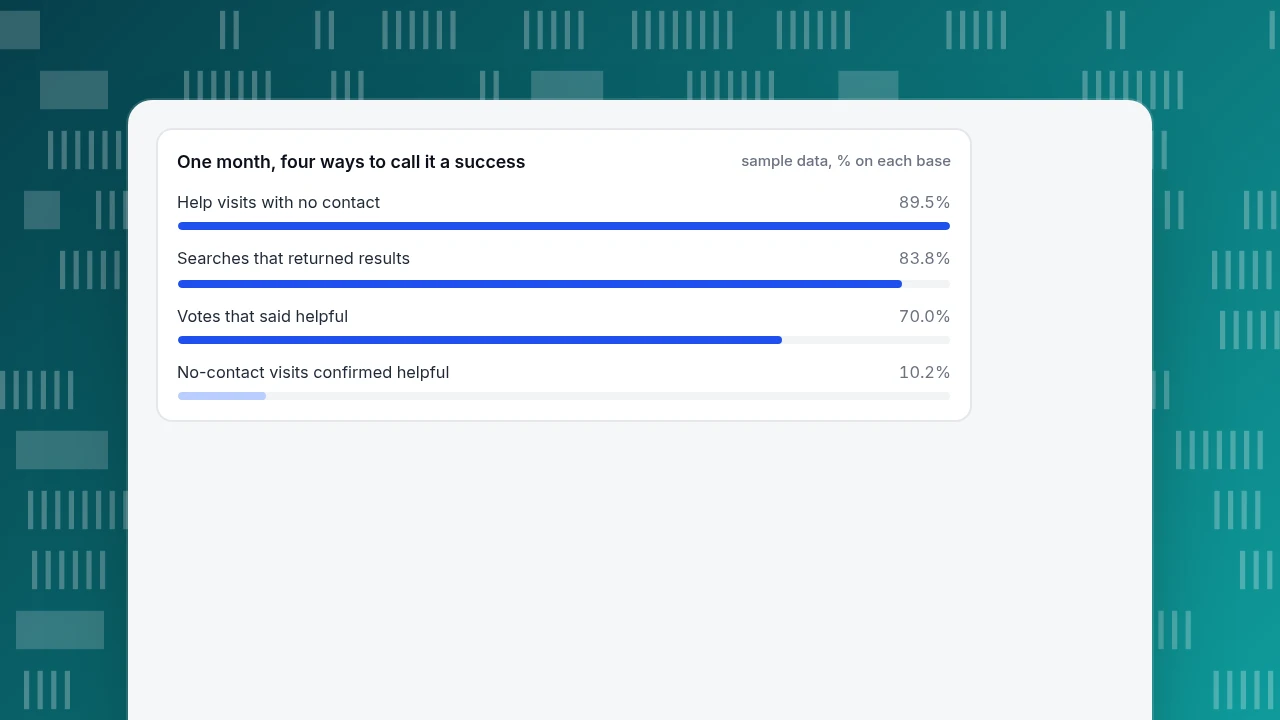
Read the 89.5% with care. It only means those visitors did not contact you in the same visit; they may have given up. Only 1,092 of the 10,740 are confirmed helpful by a vote, which is 10.2%. That gap between "did not contact" and "confirmed solved" is why Gartner's 14% figure is plausible for ordinary help sections. Report the deflection estimate and the confirmed number side by side and treat the true value as somewhere between them.
One month, four ways to call it a success
sample data, % on each baseWhat to fix first
Use the numbers to choose work in this order.
- Zero-result rate above 10% (16.2% here): list the top 20 zero-result queries each week. For each, either write the missing article or add the customer's wording to an existing one. This is the cheapest fix and usually the biggest.
- A page with a high contact rate after help: sort help pages by "visits followed by a contact" and rewrite the top five. A good article answers in the first two lines.
- Helpfulness below about 60% on a high-traffic article: the article exists and is found, but it does not solve the problem. Add the missing step, a screenshot or the edge case.
- Many visits, few votes: the vote buttons are hidden. Move them under the answer and make them one click.
- Contacts per 1,000 sessions rising while help traffic is flat: the problem is outside help, for example a confusing checkout. Find the page where conversations start and fix the page, not the article.
Retest after each change: re-measure the same metric the following month, and change one thing at a time.
| Number | Warning level | First action |
|---|---|---|
| Zero-result rate | Above 10% | Write or reword content for the top 20 zero-result queries |
| Contact rate after help, by page | A page well above the section average | Rewrite its first two lines and add the missing step |
| Helpful votes | Below about 60% on a high-traffic article | Add the missing step, screenshot or edge case |
| Votes per article view | Very few votes | Move the vote under the answer, one click |
| Contacts per 1,000 sessions | Rising while help traffic is flat | Fix the page where conversations start |
Thresholds are working rules, not benchmarks; compare month over month against your own numbers.
Mistakes that make help sections worse
- Organizing by your org chart. Customers do not know which team handles refunds. Name groups by the job.
- Hiding the contact route to push people toward articles. It raises abandonment and produces angrier contacts.
- Letting articles go stale. Add a "last reviewed" date and a review owner; an article about a pricing change that happened last year does more harm than none.
- Copying the FAQ into every product page. Two versions of one answer drift apart. Keep one source and link to it.
- Counting article views as success. A view is a visit, not a solved problem. Use the confirmed-helpful number.
If your help content is mostly short question-and-answer pairs, the focused version of this idea is covered in FAQ site; and if you want a chatbot to answer from the same material, see knowledge base chatbot.
Putting the chat-first pattern into practice in TapCub
TapCub does not host a help center website, so the full hub and the task grid stay on your own site or CMS. What it covers is the chat-first pattern and the measurement.
- Create the questions in Live chat › Knowledge base. A Q&A entry is sent as written when the question matches and does not use an AI call; pin the 4 to 6 that make up most contacts and they appear in the visitor-facing FAQ in the chat window.
- Opening a pinned answer does not create a conversation and does not use conversation quota; Not solved or a request for a person opens a conversation and passes it to an agent. That is the "escape route" on every answer, and the share of Not solved clicks tells you which answers to rewrite.
- Use Playground to test a question before publishing; it spends no quota and creates no conversation. After a month, open Draft inbox and generate Q&A drafts from conversations resolved in the last 30 days (one batch per site per 24 hours); approve the useful ones.
- To see where help fails, open Live chat › Reports: the knowledge base hit rate is the share of questions answered by a direct Q&A match or a retrieved answer, and the hot pages list shows the top 10 pages where chats started. On your help pages, Web analytics › Pages shows traffic per page.
- For help search on your own site, send a custom event such as
help_searchwith a numeric propertyresults, usingtapcub.track, and countresults = 0for the zero-result rate. Do not put the raw query text into properties; TapCub's documentation advises against raw input text in event properties.
TapCub's AI reply only drafts from the knowledge base; it does not change orders or send email. When the material is not enough, it hands off to a person.
FAQ
What should a website help section include?
A visible search box, 6 to 8 top-task links, 5 to 9 categories named by what the customer wants to do, article pages that answer in the first two lines, a helpfulness vote and a clear route to a person on every page.
How do you measure whether a help section works?
Track the contact rate after help (help visits that start a contact ÷ help visits), the zero-result rate for search, and the share of "Yes" votes. Report the deflection estimate alongside the confirmed-helpful share, because not contacting you does not prove the problem was solved.
What is a good deflection rate?
There is no reliable universal figure. Gartner's 2024 survey found only 14% of issues fully resolved in self-service, so a deflection estimate near 90% is almost certainly counting visitors who gave up. Compare month over month against your own confirmed-helpful number.
Should I use an FAQ page or a help center?
Under about 25 questions for one product, a single FAQ page is enough. Above that, or with several products, use a search-first hub or a task grid. Either way, give every page a route to a person.
Does FAQ schema still get rich results?
Google's documentation states the FAQ rich result is no longer shown in Search, with the documentation updated in June 2026. You can keep clear question headings for readers, but do not expect rich results from markup.
Sources
- Gartner, Survey finds only 14% of customer service issues are fully resolved in self-service, 19 August 2024
- Nielsen Norman Group, The magnifying-glass icon in search (text-entry area at least 27 characters wide), checked 22 November 2026
- Nielsen Norman Group, Search: visible and simple (Jakob Nielsen, May 2001: first query success 51%, second 32%, third 18%), checked 22 November 2026
- Google Search Central, FAQ structured data (FAQ rich result no longer shown in Search; updated June 2026), checked 22 November 2026
Was this article helpful?
We use your answers to fix and expand this page.
Couldn’t send. Please try again in a minute.
Thanks for the feedback. We’ll use it to improve this page.You’ve already sent feedback on this page. Thanks.

Product Analyst
Focuses on event analysis, conversion funnels, and retention, using clear metric definitions and structured analysis to explain product performance.