Try it on your own data
Every report in this article is in the free plan. One snippet for web and apps, up to 10 sites.
Start freeUGC videos are videos made by customers, fans or independent creators about a product, not by the brand's own team: reviews, unboxings, demos and hashtag clips. They are judged on completion and conversion. In the sample, the UGC video had 35.0% completion against 22.0% and 4.5% click-through against 3.0%, but both converted clickers at 10.0%, so the gain came before the click.
What you will learn
- UGC videos are made without the brand scripting them; paid creator-style videos are sponsored content and need disclosure
- Compare UGC and brand video on the same placement and period using plays, completion, click-through, clicker conversion and cost per order
- Do not compare viewers with non-viewers: in the sample the raw +200% shrinks to +66.7% against matched visitors
What are UGC videos?
UGC videos are videos made by customers, fans or independent creators about a product or brand, as opposed to videos your own team scripts and produces. Typical forms are product reviews, unboxings, how-to demos, testimonials and short clips made for a challenge or a hashtag. The broader concept is in the glossary entry on user-generated content; this article is about the video format and how to tell whether it performs.
One boundary matters for both measurement and law. A video a customer made unprompted is UGC. A video you paid a creator to make in a customer-like style is sponsored content that looks like UGC. You can measure both the same way, but the second needs disclosure (see the rules section below), and your numbers should say which kind you are reporting.
What types of UGC videos are there, and what job does each do?
Pick the type by the question a viewer has at that point in the journey, then choose the metric that tells you whether it answered.
| Type | Viewer's question | Where it fits | Metric to track |
|---|---|---|---|
| Unboxing | What do I actually get? | Product page | Completion rate, add-to-cart rate |
| Review or testimonial | Is it good, and for people like me? | Product and pricing pages | Click-through to product, conversion |
| How-to demo | Can I use it, and how? | Help pages, onboarding | Completion, support contacts |
| Challenge or hashtag clip | Is this popular and fun? | Social and campaign pages | Views, submissions, campaign conversion |
| Creator-style ad (sponsored) | Does someone like me use this? | Landing page after an ad | Click-through, cost per order |
On trust, Nielsen's 2021 Trust in Advertising study, which surveyed more than 40,000 consumers, found that 88% of global respondents trust recommendations from people they know more than any other channel. That figure is about personal recommendations and does not prove that stranger-made videos convert better, so treat it as a reason to test, not as a forecast.
| Type | Viewer's question | Metric to track |
|---|---|---|
| Unboxing | What do I actually get? | Completion rate, add-to-cart rate |
| Review or testimonial | Is it good, and for people like me? | Click-through to product, conversion |
| How-to demo | Can I use it, and how? | Completion, support contacts |
| Challenge or hashtag clip | Is this popular and fun? | Views, submissions, campaign conversion |
| Creator-style ad (sponsored) | Does someone like me use this? | Click-through, cost per order |
Choose the type by the question the viewer has at that point in the journey.
What should you ask creators and customers to include?
A short brief raises the share of usable clips without scripting them into sponsored content. Ask for five things: show the product in use, answer one specific question (size, setup time, durability), keep it between 20 and 60 seconds, add captions because many viewers watch without sound, and end with one clear next step such as a link. Then review each clip against a checklist: is the claim true, is anything private on screen, and has permission been recorded? Reject clips that fail the first two, whatever their view counts.
How do UGC videos compare with brand videos on completion and conversion?
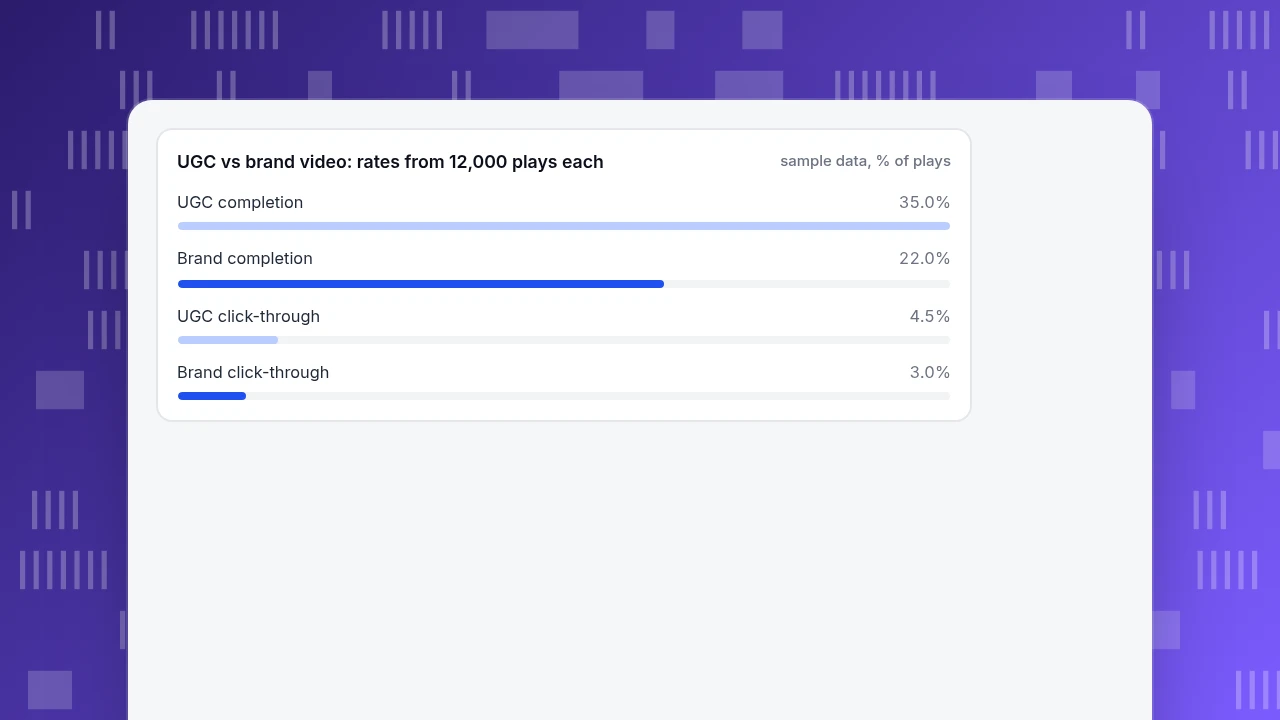
Compare them on the same placement over the same period, with the same four numbers. Sample data: a brand-made video and a UGC video each get 12,000 plays on a product page in the same month.
| Metric | Brand video | UGC video | How it is computed |
|---|---|---|---|
| Plays | 12,000 | 12,000 | Qualified plays |
| Completions | 2,640 | 4,200 | Reached the end |
| Completion rate | 22.0% | 35.0% | Completions ÷ plays |
| Clicks to product page | 360 | 540 | Link or button below the video |
| Click-through rate | 3.0% | 4.5% | Clicks ÷ plays |
| Orders from those clicks | 36 | 54 | Same session |
| Conversion of clickers | 10.0% | 10.0% | Orders ÷ clicks |
| Orders per 1,000 plays | 3.0 | 4.5 | Orders ÷ plays × 1,000 |
| Production cost | $4,000 | $1,200 | Studio versus six creators at $200 each |
| Production cost per order | $111.11 | $22.22 | Cost ÷ orders |
In this sample the UGC video wins on the funnel stage that precedes the click (completion and click-through) but not after it: once someone reaches the product page, conversion is identical at 10.0%. That is useful, because it tells you where the video helps. It also means that more watching did not make people more likely to buy; it made more people click.
Treat the cost row with care. Production cost excludes media spend, editing, moderation and the time to source creators. And the two videos probably reached somewhat different audiences. Swap their positions for a second month before you conclude anything.
UGC vs brand video: rates from 12,000 plays each
sample data, % of playsHow do you measure completion and conversion without fooling yourself?
Three rules cover most mistakes; the wider set of content KPIs is in content metrics.
1. Define a play before you count one. An autoplaying muted video gets a "play" the moment it loads. Count a qualified play: at least three seconds watched or a user-started play. Write the definition next to the number. YouTube's analytics help defines average view duration as the average minutes watched among those who stayed to watch, a reminder to say exactly what you are counting.
2. Pick a completion threshold and keep it. Completion rate = viewers who reached 95% or more of the runtime ÷ qualified plays. Change the threshold and last quarter's numbers stop being comparable. For long videos, also look at the retention curve to find the second where viewers leave.
3. Do not compare viewers with non-viewers. People who watch a video to the end were already more interested. Sample data: 4,200 completers convert at 6.0% (252 orders) and visitors who never watched convert at 2.0%, a raw gap of 6.0 ÷ 2.0 − 1 = 200%. But visitors who reached the same product page and did not watch convert at 3.6%. Against that matched group the lift is 6.0 ÷ 3.6 − 1 = 66.7%, and even that is an upper bound, because people who choose to watch still differ. The clean test is to show the video to some visitors and not to others.
Is the difference between two videos real or just noise?
Check the size of the sample before you declare a winner. At the usual 80% power and 5% significance, the number of qualified plays each video needs to detect the sample gaps above is:
- Completion, 22.0% against 35.0%: about 185 plays per video. Completion is easy to read from a small sample.
- Click-through, 3.0% against 4.5%: about 2,500 plays per video. At 12,000 plays each, this difference is safely detectable.
- Orders per play, 0.30% against 0.45%: about 26,000 plays per video. With 36 against 54 orders from 12,000 plays each, the z-statistic is about 1.9, just short of the 1.96 needed. So the order gap is suggestive, not proven.
That is the usual pattern: the earlier in the funnel, the faster the answer. Use completion and click-through to choose between videos quickly, and let orders accumulate for a quarter before you make a budget decision from them. If you cannot reach the sample size for orders, report the order counts as a direction and say so.
What must you check before you publish customers' videos?
- Permission. Get explicit, recorded permission to display and edit each video, in the contest terms or by message, including where and for how long you will use it.
- Disclose connections. Under 16 CFR 255.5, a connection that could affect how much weight audiences give an endorsement, such as payment, free products, affiliate links or prize entries, must be disclosed clearly and conspicuously where audiences would not expect it. The same section says a company's reposting of an endorsement needs its own disclosure.
- No fake reviews. The FTC rule on consumer reviews and testimonials (16 CFR Part 465) bans fake reviews and testimonials, buying reviews and review suppression; it took full effect on 21 October 2024 and the FTC can seek civil penalties. Do not script a video and present it as an independent customer's.
How do you measure UGC videos in TapCub?
Using the product-page example above, here is the measurement side in TapCub. TapCub does not host, edit or play video, and it does not run ads; it measures what visitors do on your pages.
- Send video events. From your page, send a custom event when a qualified play starts and another at your completion threshold, with a property for which video it was. Event naming rules are in the custom events guide of the documentation.
- Count clicks. Send an event for the click to the product page, or use the page-to-page path so the click shows up as a visit.
- Define the goal. In Web analytics › Goals set purchase as a goal; the same data appears in All-platform analytics › Business › Goals.
- Compare the videos. In All-platform analytics › Behavior › Event analysis chart the video events and break them down by the video property, so completion and click-through for each video sit side by side.
- Add campaign context. For videos shared outside your site, tag the links with a UTM campaign and read sessions and conversion by campaign in Web analytics › Sources. To add production or creator fees, import them as spend in All-platform analytics › Business › Channel ROI.
Bots and AI crawlers are counted separately, so automated page loads do not become plays or clicks.
FAQ
What are UGC videos?
Videos made by customers, fans or independent creators about a product or brand rather than by the brand's own team. Examples are reviews, unboxings, demos, testimonials and hashtag clips. Sponsored videos styled like them are a different category.
Do UGC videos convert better than brand videos?
Not automatically. In the sample, the UGC video won on completion (35.0% against 22.0%) and click-through (4.5% against 3.0%) but conversion after the click was the same at 10.0%. Test on your own page and swap placements.
What metrics should you track for UGC videos?
Qualified plays, completion rate, click-through rate to the product page, conversion of clickers, orders per 1,000 plays and production cost per order. Define a play and a completion threshold first and keep them fixed.
Do you need permission to use customers' videos?
Yes. Get clear, recorded permission for each use and each place you will show it. If a creator was paid or given a free product, the connection must be disclosed under 16 CFR 255.5 in the US.
How do you tell UGC from sponsored content?
If the creator was paid, given a free product or any other benefit, or you scripted the video, it is sponsored content. Report it separately and disclose it. UGC is made without that arrangement.
Sources
- Cornell Law School Legal Information Institute, 16 CFR 255.5, Disclosure of material connections (checked 2026-11-20).
- Federal Trade Commission, Trade Regulation Rule on the Use of Consumer Reviews and Testimonials, 16 CFR Part 465 (Federal Register, 22 August 2024; effective 21 October 2024).
- Nielsen, Beyond martech: building trust with consumers: 88% trust recommendations from people they know, 2021 Trust in Advertising study (checked 2026-11-20).
- YouTube Help, YouTube Analytics help: average view duration and audience retention definitions (checked 2026-11-20).
Was this article helpful?
We use your answers to fix and expand this page.
Couldn’t send. Please try again in a minute.
Thanks for the feedback. We’ll use it to improve this page.You’ve already sent feedback on this page. Thanks.

Product Experience Specialist
Explores usability, user journeys, and feature adoption through practical examples of onboarding and everyday product use.