Try it on your own data
Every report in this article is in the free plan. One snippet for web and apps, up to 10 sites.
Start freeSelf-hosted web analytics is rarely worth it unless a rule forces data onto servers you control or your volume makes the hosted price exceed your all-in cost. The server bill is small; the real cost is 3–10 hours a month of updates, backups, bot filtering and scaling. Below: the tasks, a cost model, storage and bot math, and when each choice wins.
What you will learn
- Self-hosting costs hours more than dollars: about 3–10 a month for a single server, plus lumpy scaling work
- At 1,000,000 pageviews a month the sample total is $220; if a hosted plan costs less at your volume, hosted wins
- Self-hosting moves security and bot filtering to you; it does not remove consent or minimisation duties
Is self-hosted web analytics worth it?
For most sites, no, and the reason is time rather than server cost. Running your own analytics means the server bill is small but the work never stops: updates, backups, bot filtering, storage growth and a dashboard that has to be up when someone needs it. Self-hosting is worth it when at least one of these is true:
- A rule forces the data to stay on infrastructure you control, for example a contract, an internal security policy or a data-residency requirement that a hosted service with regional storage cannot meet.
- You already operate servers and databases and the marginal work is a few hours a month, not a new skill.
- Volume is high and the hosted price is above your all-in cost (the break-even calculation below).
- You need raw event access that a hosted service does not give you.
If none applies, a hosted service is usually cheaper once you count your own hours. This article gives you the task list, a cost model with numbers you can replace, and decision rules. For the wider tool landscape see website traffic analysis tools and open source analytics.
What do you actually have to run?
"Self-hosted" sounds like one install. In practice it is a small system:
| Component | Job | What can go wrong |
|---|---|---|
| Script and collection endpoint | Receives every pageview and event | Ad blockers, downtime means lost data (no backfill) |
| Queue or buffer | Absorbs traffic spikes | Spike from a viral post or a bot wave drops events |
| Database | Stores events and builds reports | Disk fills; queries slow down as data grows |
| Dashboard and API | The part people look at | Auth, access control, accidental public exposure |
| Reverse proxy and TLS | Encrypted access, domain | Expired certificate stops collection |
| Geo-IP and device databases | Country and browser from IP and user agent | Outdated files, license terms |
| Bot filtering | Keeps machines out of human numbers | Lists age; new crawlers inflate counts |
| Backups and restore | Recovery after failure | A backup never tested is not a backup |
Data loss is the unusual part. A web server that is down shows an error; an analytics collector that is down silently creates a gap in your history that cannot be rebuilt.
What does ownership cost per month?
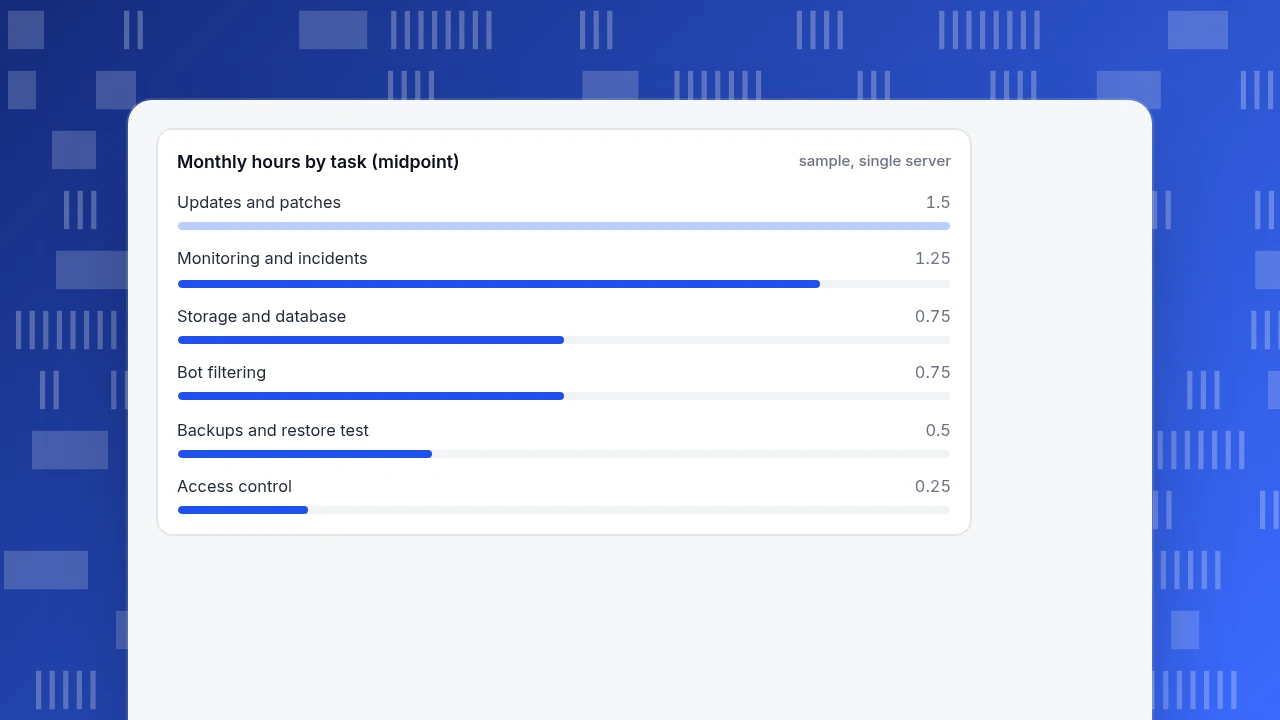
Rough monthly effort for a small team with one person who knows Linux. These are planning estimates for a single-server setup, not measurements; replace them with your own.
| Task | What it involves | Hours per month |
|---|---|---|
| Updates and security patches | Reading release notes, upgrading, testing the dashboard | 1–2 |
| Storage and database care | Watching disk, pruning or archiving, checking slow queries | 0.5–1 |
| Bot filtering upkeep | Updating lists, reviewing odd spikes | 0.5–1 |
| Backups and a restore test | Verifying backup jobs, restoring to a scratch server quarterly | 0.5 |
| Monitoring and incident response | Alert if collection stops, fix when it does | 0.5–2 |
| Access control and access reviews | Add or remove users, share links | 0.25 |
| Scaling work | Larger disk, more memory, moving to a bigger database | 0–4 (lumpy) |
The total is typically 3–10 hours a month at steady state, with an additional one-time setup of one to three days. The lumpy item matters: a traffic jump does not give you notice.
NIST's guide to enterprise patch management (SP 800-40 Rev. 4) treats patching as routine preventive maintenance that has to be planned, not an emergency chore. That is the right mental model for the first row of the table.
Monthly hours by task (midpoint)
sample, single serverWhat does the cost model look like?
Sample data with assumptions you should change: engineer time valued at $60 an hour, infrastructure sized to volume, hours per month taken from the table above.
| Monthly pageviews | Infrastructure (assumed) | Hours per month | Time cost at $60 | Total self-hosted | Per 1,000,000 pageviews |
|---|---|---|---|---|---|
| 100,000 | $10 | 2 | $120 | $130 | $1,300 |
| 1,000,000 | $40 | 3 | $180 | $220 | $220 |
| 10,000,000 | $160 | 6 | $360 | $520 | $52 |
How to read it: total = infrastructure + hours × rate. At 1,000,000 pageviews a month the self-hosted total is $40 + 3 × $60 = $220. If a hosted plan for your volume costs less than that, hosted is cheaper; if it costs more, self-hosting saves money, provided you really spend only three hours. The per-million figure falls fast with volume because your hours barely grow, which is why self-hosting makes economic sense mainly at high volume or when someone is already paid to run the stack.
Add the cost that is not in the table: if collection is down for six hours and you only notice a day later, that data is gone for good. Put a number on what a gap in your reports costs you before you decide the hosted price is "too high".
How much storage will it need?
Storage is the easiest cost to estimate. Sample data: assume 1.5 events per pageview (a pageview plus half an event, such as a click or goal) and 500 bytes stored per event after indexing.
| Monthly pageviews | Events per month | Raw storage per month | Storage after 24 months |
|---|---|---|---|
| 100,000 | 150,000 | 75 MB | 1.8 GB |
| 1,000,000 | 1,500,000 | 750 MB | 18 GB |
| 10,000,000 | 15,000,000 | 7.5 GB | 180 GB |
Check: 1,000,000 × 1.5 = 1,500,000 events; × 500 bytes = 750,000,000 bytes = 750 MB; × 24 months = 18,000 MB = 18 GB. Disk is cheap at this scale; the real cost is that queries over 180 GB need a database built for it, and a "simple" install on a small server stops being simple. Setting a retention period (for example, aggregate after 14 months and delete raw events) keeps volume flat. Event-level retention is also a privacy decision: Google Analytics 4, for comparison, offers 2 or 14 months for event-level data in its standard setting while aggregated reports are unaffected, which shows how common a bounded period is.
Who handles bots when you host?
You do. Imperva's 2025 Bad Bot Report states that automated traffic surpassed human activity, at 51% of all web traffic. Individual sites differ a lot, but a collector that counts every request will overstate your audience. Sample data: a site records 1,000,000 pageviews and later finds 30% came from bots. Human pageviews are 700,000, so the reported number was too high by 1,000,000 ÷ 700,000 − 1 = 42.9%.
Some hosted services filter known bots for you. For instance, Google Analytics states that traffic from known bots and spiders is automatically excluded, using Google research plus the International Spiders and Bots List maintained by the IAB, and that you cannot switch this off. Self-hosting means choosing and maintaining your own list, plus handling headless browsers that do not announce themselves. Budget for it in the table above, and see bot traffic for how to spot it.
Does self-hosting solve privacy and compliance?
It changes who is responsible; it does not remove the duty. Data on your server is still personal data if it relates to an identifiable person. Under the GDPR, Article 32 requires appropriate technical and organisational security for processing, and Article 5(1)(c) requires data minimisation. Self-hosting lets you answer "where is the data?" precisely, which some auditors like, but you now also own the security duties: access control, encryption, patching and breach response. A hosted vendor acting as your processor shares those duties under a contract (Article 28). Whether you need consent depends on what the tool stores on the device and your local law; see tracking web traffic without cookies for what changes with a cookieless setup.
What are the decision rules?
- If you have a hard residency or security rule that hosted regional storage cannot meet, self-host. Everything else is secondary.
- If nobody on the team operates servers today, do not start with analytics. The first outage will teach you the hours in the table.
- If the hosted price is below your self-hosted total at your volume, use hosted. Use the cost model with your own hourly rate.
- If you only want ownership of the data, check export first. A hosted service with raw export and deletion controls may give you what you need without the work.
- If you do self-host, schedule the restore test and the update window on the calendar before launch. Written as recurring tasks, they actually happen.
| Situation | Better fit | Why |
|---|---|---|
| Hard residency or security rule | Self-hosted | Data must stay on infrastructure you control |
| No one operates servers today | Hosted | The first outage teaches the monthly hours |
| Hosted price below your self-hosted total | Hosted | Compare using your own hourly rate |
| Only need ownership and export | Hosted with raw export | Gets control without the upkeep |
| High volume and an existing ops team | Self-hosted | Fixed hours spread over many pageviews |
Based on the sample cost model in this article; replace the assumptions with your own.
How does TapCub fit if you are comparing options?
TapCub is a hosted service, so the monthly task list above is mostly not yours. Taking the same table as a checklist:
- Bots. Recognised crawlers and AI crawlers are counted separately under Web analytics › Bots, so the visitor numbers on Web analytics › Overview are human. See are bots counted in visitors.
- Retention and privacy. Configuration › Privacy center holds the collection tier, region rules, retention and data-subject requests. By default the tool counts without cookies, stores data by region and does not keep IP addresses.
- Ownership of the data. All-platform analytics › Data › Data export creates asynchronous exports of event-level data inside the retention period, and the docs state that older detail is already deleted.
- Sharing without accounts. Configuration › Settings › Public sharing makes read-only links with an optional password.
What you give up compared with self-hosting is control of the server and the database. If a rule requires the data to sit on servers you operate, the first decision rule above applies.
FAQ
Is self-hosted web analytics free?
The software may be free to download, but running it is not: you pay for the server, storage, backups and, above all, your own time. In the sample model, one million pageviews a month costs about $220 all-in.
Is self-hosting analytics more private than a hosted service?
It keeps data on infrastructure you control, which helps with residency requirements. It does not remove privacy law: you remain responsible for the security of personal data and for the purpose and retention of what you collect.
How much traffic can a single server handle?
It depends on the software, the database and how many events each pageview creates. Test with a replay of your own traffic and treat spikes (a viral post, a bot wave) as the design case rather than the average month.
How do I filter bots in a self-hosted setup?
Combine a maintained list of known bot user agents, checks for requests that do not execute scripts or look like headless browsers, and a review of sudden spikes by country and page. Plan to update the rules monthly.
When should I move from self-hosted to hosted?
When incidents or maintenance take more than the hours you budgeted, when nobody on the team is willing to own it, or when the hosted price for your volume is lower than your self-hosted total.
Sources
- Imperva. 2025 Bad Bot Report. Automated traffic reported at 51% of all web traffic. Checked 2026-11-23.
- Google. Known bot-traffic exclusion, Analytics Help; and Data retention. Checked 2026-11-23.
- NIST. SP 800-40 Rev. 4, Guide to Enterprise Patch Management Planning, April 2022. Checked 2026-11-23.
- European Union. Regulation (EU) 2016/679 (GDPR). Articles 5(1)(c), 28 and 32.
Was this article helpful?
We use your answers to fix and expand this page.
Couldn’t send. Please try again in a minute.
Thanks for the feedback. We’ll use it to improve this page.You’ve already sent feedback on this page. Thanks.

Data Engineer
Writes about event design, data quality, and collection workflows, with verifiable implementation methods for reliable analytics.