Try it on your own data
Every report in this article is in the free plan. One snippet for web and apps, up to 10 sites.
Start freeYou can track web traffic without cookies: pageviews, sessions, sources and goals never needed one. Only recognising a returning visitor does, and server-side hashed IDs, login IDs or logs can do that with different accuracy. In the sample below the same 2,000 visits give 1,000, 1,300 or 1,600 unique visitors depending on how long the ID lasts.
What you will learn
- Cookies are only needed to recognise returning visitors; totals do not need them
- Accuracy depends on how long the ID survives, not on cookie versus no cookie
- A daily-rotating ID gave +60% unique visitors in the sample; a 7-day cookie gave +30%
What cookies do in traffic counting, and what you lose without them
Traffic tracking answers three different questions: how many pages were viewed, how many sessions happened, and how many different people came. Pageviews and sessions can be counted without remembering anyone. Only the third question, unique visitors, needs some way to recognise the same browser on a later visit. A cookie is the oldest way to do that: the site writes a random ID into the browser, and reads it back next time.
Dropping cookies therefore does not break traffic tracking. It changes one number: how well a returning visitor is recognised across days. Everything else (pageviews, sources, top pages, goals) works the same. The rest of this article compares the ways to get that one number, and shows with arithmetic what each costs in accuracy.
Six ways to track web traffic without cookies
| Method | How it recognises a return visit | What it gets wrong | Typical use |
|---|---|---|---|
| Server log analysis | IP address plus user agent in web-server logs | Counts every bot and file request; shared offices look like one visitor; no JavaScript events such as clicks | A quick check when no script is allowed |
| Cookieless hash ID | Server hashes IP, user agent and a secret salt into an anonymous ID; nothing is stored on the device | A new network or browser looks like a new person | Most privacy-first analytics tools |
| Daily-rotating hash | Same hash, but the salt changes every day | Cannot link two days, so no retention and no new-versus-returning | Strictest setting; daily counts only |
| First-party storage (cookie or localStorage) | A random ID kept in the browser | Safari deletes script-written storage after seven days without a visit; cleared by users | Classic analytics |
| Login ID | The account ID after sign-in | Anonymous visitors are invisible | Logged-in product areas, B2B |
| Browser fingerprinting | Combines device attributes into an ID | Reads device details the visitor did not choose to share; fragile after updates | Not recommended here |
Two things stand out. First, "cookieless" is not one method: storing an ID in localStorage is still storing something on the device. Second, the accuracy difference between the middle rows is about how long the ID survives, not whether you used a cookie.
A quick way to apply this: write down how long a visitor needs to stay recognisable for the question you are asking. A weekly newsletter signup needs a window of at least seven days; a same-day checkout analysis needs one day; a quarterly retention study needs ninety days or a login ID. If the method's window is shorter than your question, change the method or change the question.
| Method | Recognises a return visit by | Main accuracy risk |
|---|---|---|
| Server log analysis | IP address plus user agent | Bots and shared networks inflate or merge visitors |
| Cookieless hash ID | Server-side hash with a salt | New network or browser = new visitor |
| Daily-rotating hash | Same day only | No link across days; monthly uniques overcount |
| First-party storage | Random ID in the browser | Safari deletes it after 7 days without a visit |
| Login ID | Account ID | Anonymous visitors invisible |
Fingerprinting is left out on purpose. Which method needs consent depends on country, configuration and purpose.
Why cookie counts drift anyway
Cookie-based counting looks precise, but it is bounded by browser rules. In March 2020 WebKit announced that Safari's Intelligent Tracking Prevention deletes all of a site's script-writable storage after seven days of Safari use without the visitor interacting with that site, and that cookies for cross-site resources are blocked by default. A person who returns on day eight is a stranger to a script-written cookie.
That means the contrast people imagine ("cookies are accurate, cookieless is rough") is partly false. Both recognise visitors only within a window. Cookies fail on browser rules and cleared storage; hashed IDs fail on network or browser changes. What matters is which failure your audience triggers more often, and whether you can say how long the window is.
Worked example: the same 2,000 visits counted four ways
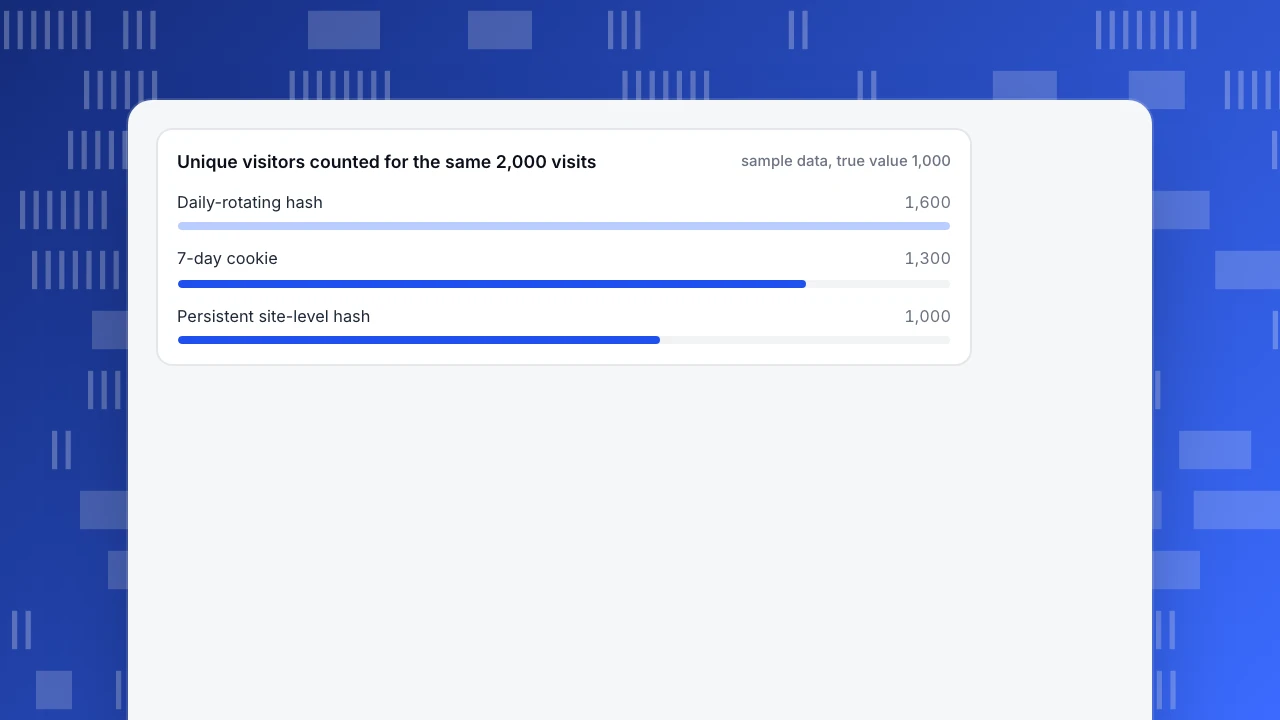
Sample data: 1,000 people each visit twice in 30 days. For 40% (400 people) the second visit is on the same day, for 30% (300 people) it is 2–6 days later, and for 30% (300 people) it is 8 or more days later. That is 2,000 visits and the true answer is 1,000 unique visitors.
| Method | Recognises the second visit when… | Count for the month | Error vs 1,000 |
|---|---|---|---|
| Persistent site-level hash ID | Same network and browser | 1,000 | 0% |
| Cookie that lives 7 days (the Safari case) | Gap is 7 days or less | 400 + 300 + 2 × 300 = 1,300 | +30% |
| Daily-rotating hash (sum of daily uniques) | Same day only | 400 + 2 × 600 = 1,600 | +60% |
Check the arithmetic: the daily-rotating method counts the 400 same-day people once and the other 600 people twice, so 400 + 1,200 = 1,600. The 7-day cookie counts 400 + 300 once and the 300 late returners twice, so 700 + 600 = 1,300. The sample ignores shared networks and device switching, which push the first row above or below 1,000 in real data.
Takeaway: the monthly "unique visitors" figure from a daily-rotating setup is really a sum of daily uniques, so do not compare it with a monthly figure from another tool. Compare like with like, or use pageviews and sessions for cross-tool checks.
Unique visitors counted for the same 2,000 visits
sample data, true value 1,000Does tracking without cookies mean no consent banner?
Not automatically. In the EU the ePrivacy rule (Article 5(3) of Directive 2002/58/EC) covers storing information on a device or reading what is stored there, not only cookies. France's regulator, CNIL, lists conditions under which audience measurement can run without consent: tell users the tool is used, give them a way to object, limit the purpose to audience measurement, do not cross-check the data against other processing, keep each tracer to a single site, truncate the last byte of the IP address, and limit the tracer's lifetime to 13 months. It also notes that most large audience-measurement offerings do not qualify.
Practical rule: if your method writes nothing to the device and cannot follow a person across sites, your risk is lower, but the answer still depends on the country, the tool's configuration and whether data is shared. Have the legal basis written down once; this article is not legal advice.
How to choose a method
Use these rules:
- If you only need totals by page and source, pageviews and sessions from a cookieless hash are enough; unique-visitor precision does not matter.
- If you need retention or returning visitors, use a site-level hash (or login ID), and accept that a new network looks like a new person.
- If your rules forbid linking days, use the daily-rotating setting and report daily counts only. Do not publish a monthly unique count from it.
- If most value sits behind login, track the account ID there and keep anonymous tracking for the public site.
- If you only have server logs, filter bots first; otherwise the count is inflated before any other issue appears.
Whatever you choose, run a two-week comparison against a second source (server logs, or a sampled cookie-based tool) and note the gap, using the same date range and time zone. A gap under about 10% for sessions is normal; a larger one usually means a filter or script-loading problem, not a counting-method problem.
What to check in the first two weeks after switching
Switching counting methods changes your history, so audit it before anyone reads a trend line. Sample data: the month before the switch shows 12,000 cookie-based unique visitors and the month after shows 10,200.
- Compute the drop. (10,200 − 12,000) ÷ 12,000 = −15%. Do not report this as lost traffic yet.
- Compare sessions and pageviews. If sessions moved by less than 3% while uniques fell 15%, the change is in how visitors are recognised, not in traffic.
- Split by browser. Safari and iOS traffic is the usual place where cookie counts were inflated by the seven-day rule; if Safari fell most and other browsers barely moved, that confirms it.
- Mark the date. Add an annotation on the chart at the switch and keep the old and new series separate in reports.
- Reset targets. Any goal written as "unique visitors per month" needs a new baseline from the new method.
A drop in uniques with flat sessions is the expected result of moving from an inflated count to a stricter one, not a loss of audience.
How to do it in TapCub
Take the 2,000-visit example above and run it in TapCub:
- Install the script. The site script writes no cookie and no local storage. The visitor ID is computed on the server from IP address and user agent with a secret salt, and the IP address is not stored.
- Pick the privacy preset. In balanced mode the salt is stable for the site, so the next visit is the same visitor and Web analytics › Audience can show new versus returning. In strict mode the salt rotates daily and those views are not offered, which is the third row of the table.
- Know the limits. A new network or browser becomes another visitor, as in any hash-based method. If visitors sign in, calling
tapcub.loginidentifies them across devices, and they then appear under All-platform analytics › Users › People. - Check consent settings. Configuration › Privacy center holds collection tiers and regional rules. TapCub does not decide your legal basis; whether consent is needed depends on configuration and local law.
- Keep bots out of the denominator. Recognised crawlers are counted separately in Web analytics › Bots, so they do not inflate visitors.
For the full mechanics, see how cookieless counting works, and for the general traffic-checking routine see how to check website traffic.
FAQ
Can you track website traffic without cookies?
Yes. Pageviews, sessions, sources and goals do not need a cookie. Only returning-visitor recognition does, and a server-side hashed ID, a login ID or server logs can supply it with different accuracy trade-offs.
How accurate is cookieless tracking?
It is accurate for pageviews and sessions. Unique-visitor counts depend on how long the ID lasts: in the sample above a persistent hash gives 1,000, a seven-day cookie 1,300 and a daily-rotating hash 1,600 for the same visits.
Is tracking without cookies GDPR compliant?
Not automatically. EU rules cover device storage and access, and consent can still be required depending on purpose, configuration and country. CNIL lists conditions for exemption, including a 13-month tracer lifetime and no cross-checking of data.
Does cookieless tracking work on Safari?
Yes, and it avoids one Safari problem: Safari deletes script-written storage after seven days without a visit, so cookie-based counts overstate uniques. A server-side ID is unaffected by that rule, though not by network changes.
Do server logs replace analytics?
For totals, partly. Logs count bots and file requests and cannot see clicks or scroll, so filter bots and treat the figures as a cross-check, not a replacement.
Sources
- WebKit, Full Third-Party Cookie Blocking and More (24 March 2020).
- CNIL, Sheet n°16: Use analytics on your websites and applications (11 June 2020).
- EUR-Lex, Directive 2002/58/EC (ePrivacy), Article 5(3).
Was this article helpful?
We use your answers to fix and expand this page.
Couldn’t send. Please try again in a minute.
Thanks for the feedback. We’ll use it to improve this page.You’ve already sent feedback on this page. Thanks.

Customer Experience Consultant
Writes about live chat, visitor conversations, and self-service, sharing practical ways to make customer communication clearer and more effective.