Try it on your own data
Every report in this article is in the free plan. One snippet for web and apps, up to 10 sites.
Start freePaid search optimization is the weekly routine of using your search terms report to stop wasted spend and fix what remains. Check conversion tracking, add negative keywords, compare terms with a target cost per conversion, fix pages, move budget and log changes. In the sample week, negating four terms cuts cost per conversion from $68.53 to $51.76, and a click-count rule says when a term has had enough clicks to judge.
What you will learn
- Judge a zero-conversion term after about 79 clicks at a 3.7% conversion rate, when luck explains zero under 5% of the time
- Pick negative match types deliberately: negatives do not match plurals or close variants, and a broad negative can block real buyers
- Log each change with an expected effect and wait one conversion cycle before reverting
What does paid search optimization involve, and why weekly?
Paid search optimization is the routine of using last week's data to decide what to stop paying for, what to pay more or less for, and what to fix. The unit of work is the search term, the words a person actually typed, not the keyword you bid on. Your keywords decide which searches you are eligible for; the search terms report shows which searches actually triggered your ads, with the clicks and cost each one drew.
A weekly cadence is a practical compromise: long enough to collect clicks per term, short enough to stop a leak before it costs a month of budget. This page runs a six-step routine on one sample week so each decision has a number behind it:
- Check that conversions are being recorded.
- Read the search terms report and add negative keywords.
- Compare keywords with the target cost per conversion and adjust bids.
- Fix ads and landing pages where clicks are cheap but conversions are rare.
- Move budget to what works.
- Log what you changed and wait before judging it.
For deeper background on analysing campaigns, see PPC analysis, and for what to put in the reporting side, PPC reports.
The sample week
Sample data: a store selling running shoes, one week of the search terms report for one campaign. The target cost per conversion is $60 (an assumption based on the store's margin). We recomputed every figure.
| Search term | Clicks | Cost | Conversions | Cost per click | Cost per conversion |
|---|---|---|---|---|---|
| running shoes | 420 | $1,050 | 21 | $2.50 | $50.00 |
| buy running shoes online | 180 | $468 | 12 | $2.60 | $39.00 |
| running shoes for flat feet | 95 | $230 | 6 | $2.42 | $38.33 |
| trail running shoes | 140 | $364 | 5 | $2.60 | $72.80 |
| used running shoes | 52 | $130 | 1 | $2.50 | $130.00 |
| running shoes repair | 60 | $162 | 0 | $2.70 | none |
| free running shoes | 75 | $210 | 0 | $2.80 | none |
| running shoes jobs | 44 | $119 | 0 | $2.70 | none |
| running shoe size chart | 110 | $264 | 0 | $2.40 | none |
| nike outlet running shoes | 30 | $87 | 0 | $2.90 | none |
| Total | 1,206 | $3,084 | 45 | $2.56 | $68.53 |
The campaign averages $68.53 per conversion against a $60 target, and five of ten terms spent money without a conversion. The next steps decide what to do with each row.
| Search term | Clicks | Decision |
|---|---|---|
| running shoes repair | 60 | Negative, broad: no buying intent |
| free running shoes | 75 | Negative, phrase: keeps free-shipping searches |
| running shoes jobs | 44 | Negative, broad: job seekers |
| running shoe size chart | 110 | Negative, phrase: 1.5% chance zero is luck |
| nike outlet running shoes | 30 | Keep watching: 32% chance zero is luck |
Sample data: campaign conversion rate 3.73%; a term needs about 79 clicks before zero conversions is unlikely by chance.
Step 1: confirm conversions are being recorded
Every later decision depends on the conversion column, so check it before you act. Compare the conversions the ad platform reports for the week with the orders or sign-ups in your own system. If the platform shows 45 and your orders from paid search show 38 or 52, find out why before changing anything: a tag that fires twice, a tag that misses mobile checkout, or conversions counted with a different window all move cost per conversion more than any bid change would.
Check three things: the count (platform vs your own records), the source (are paid-search orders marked as such, for example through UTM tags or click IDs), and whether the platform counts a conversion once or every time.
Step 2: read the search terms report and add negative keywords
Google describes the search terms report as showing how ads performed when triggered by actual searches on the Search Network. Its advice is to add a term as a negative keyword when it is not relevant enough to what you sell, and to pick the word that causes the mismatch. The report does not let you add them directly; you add negatives in the negative keyword lists.
Two classes of term in the sample need different handling.
Obvious mismatches: decide on intent. "Repair" (60 clicks, $162), "free running shoes" (75 clicks, $210) and "jobs" (44 clicks, $119) are searches by people who do not want to buy. No amount of data is needed. Add them now.
Everything else with zero conversions: decide on evidence. A term with no conversions might simply be unlucky. Use a rule: a term has had enough clicks to judge when the chance of zero conversions, at the campaign's own conversion rate, falls below 5%.
- Campaign conversion rate: 45 ÷ 1,206 = 3.73%.
- Chance of zero conversions in n clicks = (1 − 0.0373)ⁿ.
- That falls below 5% at about 79 clicks: ln(0.05) ÷ ln(1 − 0.0373) = 78.8.
Apply it: "running shoe size chart" has 110 clicks, and the chance of zero conversions by luck is 1.5%, so add it as a negative. "nike outlet running shoes" has 30 clicks and a 32% chance of zero by luck, so keep watching it. "used running shoes" (52 clicks, 1 conversion at $130) has too few clicks to judge either way.
Choose the match type deliberately. Google's negative keyword match types are:
- Broad: blocks the ad only when the search contains all the negative terms, in any order.
- Phrase: blocks it when the terms appear together in the same order, possibly with extra words.
- Exact: blocks it only when the search is exactly those terms.
Negatives do not match close variants or plurals, so add the singular and plural yourself. For the sample:
| Term | Add as negative | Match type | Why |
|---|---|---|---|
| repair | repair, repairs | Broad | No buying intent in any query containing it |
| free running shoes | free running shoes | Phrase | A broad "free" would also block "running shoes free shipping", which buyers do search |
| jobs | jobs, job | Broad | Job seekers |
| size chart | size chart | Phrase | Informational |
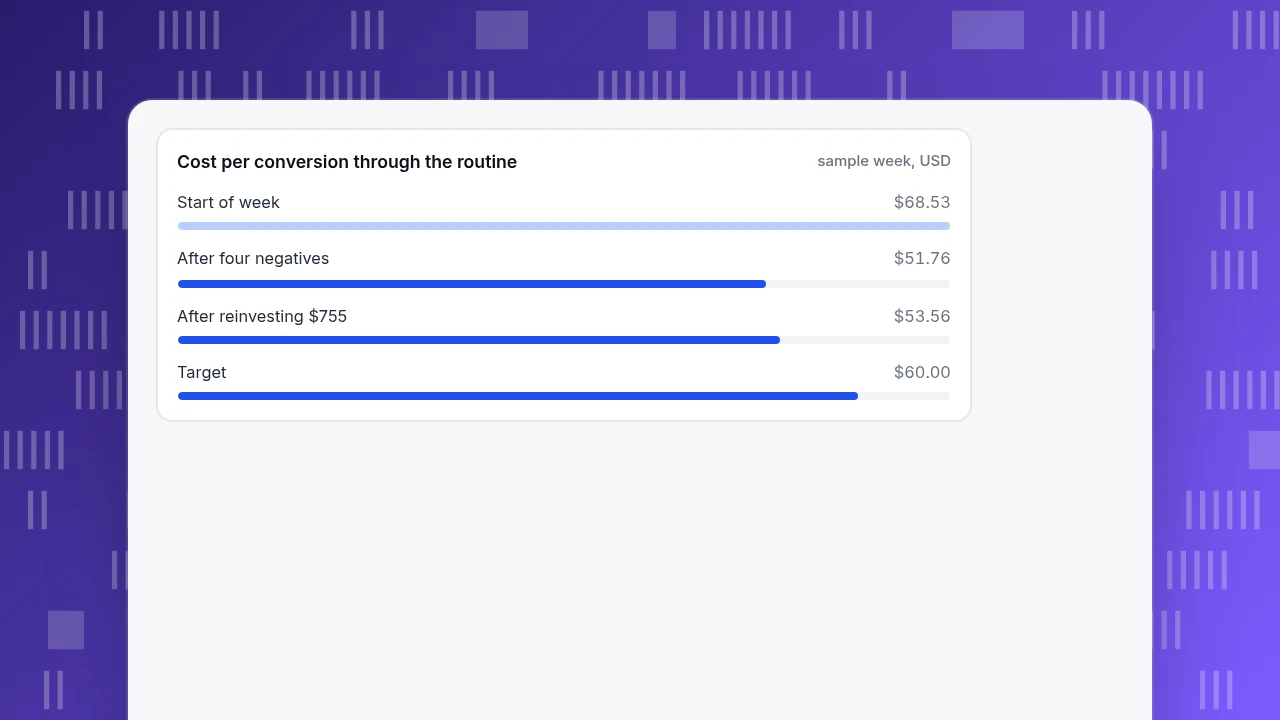
The result: negating four terms removes 289 clicks and $755 a week. Conversions in the sample do not change, so cost per conversion falls from $3,084 ÷ 45 = $68.53 to $2,329 ÷ 45 = $51.76, a 24.5% improvement, assuming those terms would not have converted in future weeks. Check the negatives monthly in the report for anything blocked that should not be.
Cost per conversion through the routine
sample week, USDStep 3: compare keywords with the target and adjust bids
Rank the remaining terms by cost per conversion against the $60 target:
- Below target ("running shoes for flat feet" $38.33, "buy running shoes online" $39.00, "running shoes" $50.00): hold or raise bids where there is room.
- Above target with enough data ("trail running shoes", 140 clicks, $72.80): lower the bid. To bring $72.80 to $60 at the same conversion rate, cut cost per click by 60 ÷ 72.80 = 17.6%, from $2.60 to about $2.14. Check that impressions and position do not collapse.
- Above target with too little data ("used running shoes", 52 clicks): leave it and re-check next week.
Change one thing at a time per campaign and keep the change small, so you can tell which change did what.
Step 4: fix ads and landing pages where clicks are cheap but conversions are rare
When a term has plenty of clicks and few conversions, the fault may be the ad or the page, not the bid. Google's Quality Score is a 1 to 10 keyword-level diagnostic built from three parts, expected click-through rate, ad relevance and landing page experience, each rated above average, average or below average. Google also says it is not an input in the ad auction, so use it to find what to improve rather than as a number to chase.
Apply it to "trail running shoes": if the three components show "below average" landing page experience, the ad is promising a trail category that the landing page buries in a general running page. Send that term to a trail-specific page and compare conversion rate next week.
Step 5: move budget to what works
Take the $755 freed in step 2 and put it back into the terms below target. If those terms can absorb it at the $60 target cost per conversion, the extra buys 755 ÷ 60 = 12.6 conversions. The week then runs 57.6 conversions from the same $3,084, at $3,084 ÷ 57.6 = $53.56 each (a sample assumption, since extra spend rarely buys at the same rate). Raise budgets in steps and measure the added cost per conversion. If a campaign is limited by budget while its terms are below target, that is the one to fund first.
Step 6: log changes and wait before judging them
Keep a one-line log per change: date, campaign, what changed, why, and the metric you expect to move. For automated bidding, give the system data before judging it. Google's Target ROAS documentation lists at least 15 conversions in the past 30 days at the conversion tracking level for Search and Shopping campaigns, and says a changed target needs one to two conversion cycles to take effect. The same logic applies to your own changes: wait for one conversion cycle before reverting.
A log entry for this week looks like:
| Date | Campaign | Change | Expected effect | Check on |
|---|---|---|---|---|
| Monday | Running shoes | Four negatives added, $755 a week excluded | Cost per conversion down to about $52 | Next Monday |
| Monday | Running shoes | "Trail running shoes" bid down 17.6% | Cost per conversion toward $60 | After two weeks |
How TapCub shows what happens after the click
TapCub does not manage ads or bids, and it does not import your search terms report. It shows what visitors from paid search do on your site, which is the check on steps 1 to 4.
- Check the source and conversions (step 1). In Web analytics › Sources, the Channels table has conversions per channel, and visits carrying click IDs such as
gclidare paid search by default. Compare them with the ad platform's count. - See the terms you tagged. In the UTM and Search terms tabs on the same page, paid terms come from
utm_term, so tag your ads with it and you can see visitors, sessions, bounce and duration per paid term. - Put spend next to purchases (step 5). In All-platform analytics › Business › Channel ROI, import daily spend with
paid_searchas the channel to see cost per click (spend ÷ sessions), cost per acquisition (spend ÷ purchases on the order ledger) and return on ad spend by campaign. These are session-based, so they will not equal the ad platform's own numbers. - Mark each change (step 6). Add an annotation under Configuration › Annotations on the day you change a bid or add negatives, and compare the weeks around it.
TapCub reports visits and purchases after the click; the bids and keywords themselves stay in your ad account.
FAQ
What is paid search optimization?
It is the routine of using your search terms, conversion and cost data to cut wasted spend, adjust bids and improve ads and landing pages. The weekly steps are checking conversion tracking, adding negative keywords, comparing terms with a target cost per conversion, fixing pages, moving budget and logging changes.
How often should you optimize paid search campaigns?
Review search terms weekly, because a week of clicks is often enough to spot wasted terms in a campaign of this size, and review bids and budgets weekly or fortnightly. Avoid changing the same setting every few days, since it makes the effect hard to read.
How many clicks before you add a negative keyword?
Add obvious mismatches such as jobs or free immediately. For other terms, wait until the chance of zero conversions by luck is below about 5% at your campaign's conversion rate, which is roughly 79 clicks at a 3.7% conversion rate.
Should I use broad, phrase or exact negative keywords?
Use broad for a word that never signals buying intent, phrase when the order matters, and exact for one specific query. Negatives do not match close variants or plurals, so list singular and plural forms and check that a broad negative does not block real buyers.
How long before changes show results?
Allow at least one conversion cycle, often one to two weeks, and longer for automated bidding such as Target ROAS, which Google says needs at least 15 conversions in the past 30 days. Judge by cost per conversion across the period, not by one day.
Sources
- Google Ads Help. About negative keywords — broad, phrase and exact negative match types, and that negatives do not match close variants or plurals. Checked 2026-11-20.
- Google Ads Help. About the search terms report — what the report shows and how to use it to add negative keywords. Checked 2026-11-20.
- Google Ads Help. About Quality Score — 1 to 10 keyword-level diagnostic, three components, and that it is not an auction input. Checked 2026-11-20.
- Google Ads Help. About Target ROAS bidding — at least 15 conversions in the past 30 days for Search and Shopping, and one to two conversion cycles after a target change. Checked 2026-11-20.
Was this article helpful?
We use your answers to fix and expand this page.
Couldn’t send. Please try again in a minute.
Thanks for the feedback. We’ll use it to improve this page.You’ve already sent feedback on this page. Thanks.

Product Analyst
Focuses on event analysis, conversion funnels, and retention, using clear metric definitions and structured analysis to explain product performance.