Try it on your own data
Every report in this article is in the free plan. One snippet for web and apps, up to 10 sites.
Start freeA page view is one page being loaded or recorded; a visit, usually called a session, is a group of one person's page views and actions cut off after about 30 minutes of inactivity. Page views are therefore never fewer than visits, and visitors are never more. Below, one 12-event journey is counted all three ways, and the rest explains why tools disagree and which number to use.
What you will learn
- Visitors ≤ visits ≤ page views: a visit holds at least one page view, and one person can make several visits
- A reload adds a page view but not a visit, and daily visitor counts do not add up across days
- Before comparing two tools, align the session timeout, new-visit triggers, page view trigger and visitor identity
What is the difference between a page view and a visit?
A page view is one page being loaded or recorded. A visit (most tools call it a session) is a group of those page views, and other interactions, by one person that belong together in time. Adobe's documentation says it plainly: visits count the sessions of visitors, and each visit includes at least one page view. So page views are always the larger number, or equal to it, and the two only match when everyone leaves after one page.
Google Analytics 4 draws the same line with events. Its page_view event fires when a page loads and when the active site changes the browser history state, and a session starts when a user opens the app or views a page or screen and no session is active. A session ends after 30 minutes of inactivity by default. "Page visit" is sometimes used as another word for visit or session; it is not a third metric.
| Term | What is counted | Goes up when | Smallest possible value |
|---|---|---|---|
| Page view | One page load or one in-page route change | The same person reads more pages, reloads, or goes back | 1 per visit |
| Visit or session | One run of activity cut by an idle timeout (30 minutes is the usual default) | The person comes back after the timeout, or arrives from a new source | 1 per person who showed up |
| Visitor | One distinct person or browser, as the tool identifies them | A new person arrives | 1 per person |
The relationship is a chain: visitors ≤ visits ≤ page views for any single period. The next section counts one real-looking journey all three ways, so you can see which number moves when.
One journey, counted three ways
Sample data: four people use a small site on Monday, 2 March, and one of them returns on Tuesday. Sessions end after 30 minutes without activity.
| Visitor | Time | Page | Note |
|---|---|---|---|
| A | Mon 09:00 | / | Starts session 1 |
| A | Mon 09:01 | /blog | |
| A | Mon 09:03 | /blog/post-1 | |
| A | Mon 10:00 | /pricing | 57 minutes idle, so session 2 |
| B | Mon 09:10 | / | Leaves at once |
| C | Mon 09:20 | /blog/post-1 | |
| C | Mon 09:21 | /pricing | |
| C | Mon 09:22 | /pricing | Reload |
| C | Mon 09:23 | /signup | |
| C | Tue 09:05 | / | Returns next day |
| D | Mon 11:00 | /pricing | |
| D | Mon 11:05 | /pricing/enterprise |
We recomputed the counts with a script that applies the 30-minute rule:
| Period | Page views | Visits | Visitors | Pages per visit | Single-page visits |
|---|---|---|---|---|---|
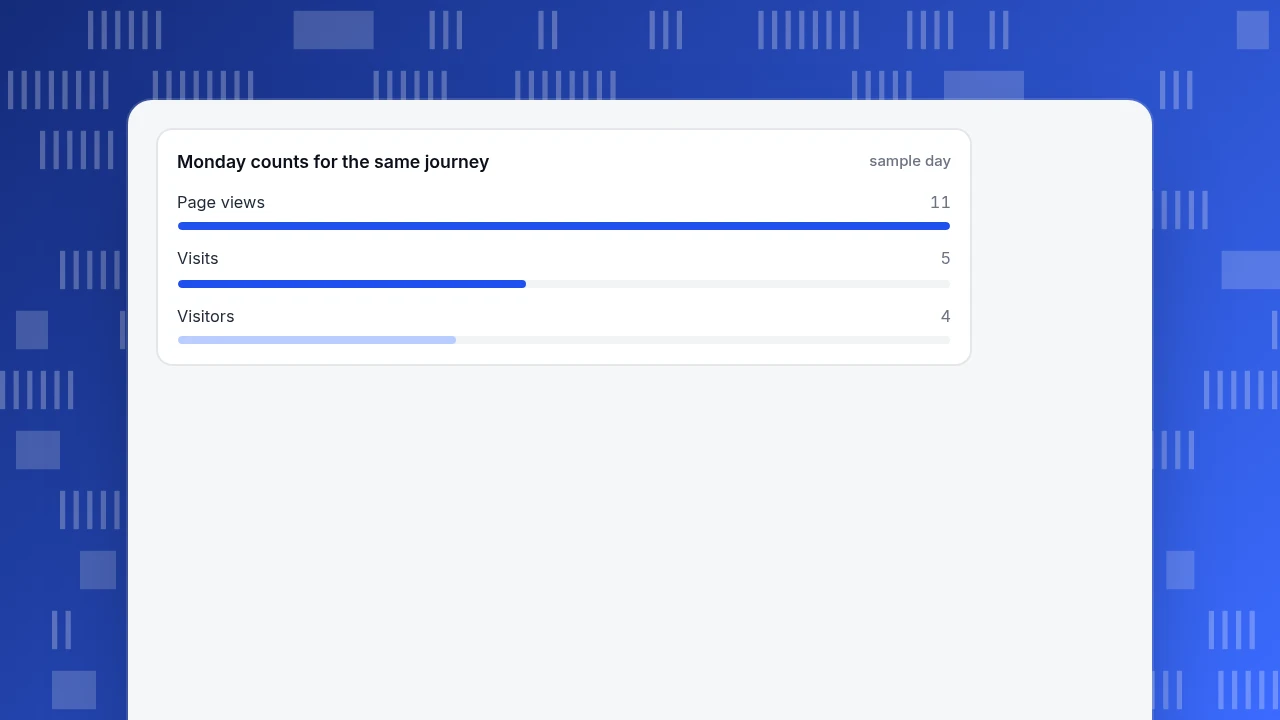
| Monday | 11 | 5 | 4 | 11 ÷ 5 = 2.2 | 2 of 5 (40%) |
| Tuesday | 1 | 1 | 1 | 1.0 | 1 of 1 |
| Monday plus Tuesday | 12 | 6 | 4 across both days (5 if you add the daily totals) | 12 ÷ 6 = 2.0 | 3 of 6 (50%) |
Three things to take from the table:
- One person, two visits. Visitor A came once in the morning and once at 10:00, but the 57-minute gap is longer than the timeout, so Monday has 5 visits for 4 people.
- A reload adds a page view, not a visit. Visitor C's second
/pricingrow raised Monday's page views from 10 to 11 and changed nothing else. Tools differ on whether a reload is counted at all (see the next section). - Visitors do not add across days. Visitor C shows up on both days. Add the daily visitor counts and you get 4 + 1 = 5, but only 4 distinct people came. Many tools show a "sum of daily visitors" in totals for exactly this reason.
Monday counts for the same journey
sample dayWhy the same traffic gives different counts in different tools
Page views are the easy one. The visit count is where tools disagree, because a visit is a rule rather than an observation.
- The idle timeout. GA4 defaults to 30 minutes of inactivity, and notes web timeouts can be changed. Change it to 15 and visitor A's journey above would still be two visits, but visitor C's would not (their longest gap is two minutes), so the totals only drift when gaps fall between the two settings.
- What triggers a new visit. Some tools also start a new visit when the traffic source changes mid-visit (for example when someone clicks a campaign link while a direct visit is still open), or at midnight. Others do not. Check the setting before comparing.
- What counts as a page view. In GA4 a
page_viewfires on a page load and on a history-state change, which is how single-page apps record route changes. A site that does not fire it on route changes under-counts page views; one that fires it on every state change over-counts. - Reloads and duplicates. Whether a reload or a quick repeat counts is a tool decision. Some collectors drop an identical page view from the same visitor within a short window.
- Visitor identity. A "visitor" depends on a cookie, a device id, a login id or a hash, and each has different failure modes. Two browsers equal two visitors until the tool can tell it is one person.
None of this makes one tool wrong. It means the first step of any comparison is to put the definitions side by side: timeout, new-visit triggers, page view trigger, identity. Then compare dates and filters.
Which number answers which question?
Pick the metric from the question, not from habit.
| Question | Use | Why |
|---|---|---|
| How much content was consumed? | Page views | Every page loaded counts, so it moves with depth |
| How many times did people come to the site? | Visits | Each return after the timeout is a new visit |
| How many people did we reach? | Visitors | Distinct people, but only inside one period |
| Is each visit going deeper? | Page views ÷ visits | The sample above gives 2.2 on Monday |
| Did visits end immediately? | Single-page visits ÷ visits | 40% on Monday in the sample |
| What share of traffic converted? | Conversions ÷ visitors or ÷ visits, stated | Pick one denominator and say which |
Two cautions follow. First, a rise in page views with flat visits usually means deeper visits, a navigation change, or a tracking change such as route-change events being switched on; it does not mean more people. Second, a rise in visits with flat visitors means the same people are coming back more often, or the timeout cut the same activity into more pieces.
| Question | Use |
|---|---|
| How much content was read? | Page views |
| How often did people come? | Visits (sessions) |
| How many people did we reach? | Visitors, for one stated period |
| Is each visit going deeper? | Page views ÷ visits |
| Did visits end at once? | Single-page visits ÷ visits |
Say which denominator a conversion rate uses: visitors or visits.
How to turn the ratio into a decision
Pages per visit and single-page visit share are the two numbers that fall straight out of page views and visits. Use them with a rule, not a feeling.
- Split by entry page or source first. A site-wide pages-per-visit of 2.2 hides a landing page where nearly every visit is one page and a blog post where the average is five. Compare within a source or entry page.
- Read single-page visits with the page's job. A single-page visit on a help article that answers the question is a good outcome. A single-page visit on a pricing page with no next click is a question about the page.
- Add a time or action test. Many tools call a visit "engaged" when it lasts at least 10 seconds, has two or more page views, or hits a key event. The share of engaged visits separates a quick answer from a bounce.
- Check tracking before reading a change. If page views jump on the day a framework or tag was changed and visits do not, test route-change tracking first.
In the sample: Monday's two single-page visits are visitor B (left at once) and visitor A's second visit (one page at 10:00). Only B is a clear bounce, because A already read three pages earlier. A visit-level count alone would have treated both the same; the visitor-level view shows A was engaged. That is the practical reason to keep both counts rather than choosing one.
How TapCub counts page views, visits and visitors
Take the Monday table above and run it through TapCub.
- Page views. TapCub's script records a page view on first load and on single-page-app route changes (
pushState,replaceState, back and forward). The same URL twice in a row is ignored, so visitor C's reload on/pricingwould not add a page view there, and the collector also keeps one page view when the same visitor repeats within 2 seconds. That is a different choice from a tool that counts every reload, and the reason a TapCub total can sit slightly below another tool's. - Visits. Web analytics › Overview shows sessions cut by the project's session rules: 30 minutes idle and 24 hours maximum by default. Idle can be set from 5 to 720 minutes. A visit that arrives from a different external site or UTM-tagged link mid-visit splits by default, and midnight splits are off unless you turn them on.
- Visitors. Visitors are deduplicated on the visitor id by default, and the Overview card and the data-report total add each day's visitors, so someone who came on three days counts three times. The data report also shows visitors deduplicated across the whole range for ranges up to 93 days. That is the 4 versus 5 in the table above.
- Ratios. Web analytics › Reports gives pages per session (page views ÷ sessions), bounce rate (a bounce is one page view and no custom event) and engaged rate (at least 10 seconds, or at least 2 page views, or a key event).
- Reconciling with another tool. Match the session timeout and the new-visit triggers first. If you cut your old tool at 15 minutes, do not compare it to the 30-minute default.
TapCub counts what its script and collector see; it does not decide what your content is worth. The decision still comes from the question you started with: pages per visit for depth, visits for return rate, visitors for reach.
FAQ
What is the difference between a page view and a visit?
A page view is one page loaded or recorded. A visit, or session, is a group of one person's page views and actions cut off after a period of inactivity, usually 30 minutes. One visit contains at least one page view, so page views are never lower than visits.
Is a page visit the same as a page view?
No. In most tools "page visit" is another name for a visit or session, which can contain many page views. Some articles use it for a single page view, so check the definition in the tool you are reading before comparing numbers.
Does a page reload count as a new visit?
No. A reload inside the timeout stays in the same visit. Whether it adds a page view depends on the tool: GA4 records a page_view each time the page loads, while some collectors ignore an identical page view repeated straight away.
Why do my visits and page views differ between two analytics tools?
Usually because of the session timeout, what starts a new visit (a changed source or midnight), what counts as a page view in a single-page app, and how visitors are identified. Align those four definitions first, then compare date ranges and filters.
Which is better to report, page views or visits?
Neither alone. Report visits for how often people come, page views per visit for depth, and visitors for reach, and say which period the visitor count covers. Page views on their own rise with reloads and tracking changes.
Sources
- Google. [[GA4] Sessions](https://support.google.com/analytics/answer/9191807) — a session starts when a user opens the app or views a page or screen, times out after 30 minutes of inactivity by default, and has no maximum length. Checked 2026-11-20.
- Google. [[GA4] Automatically collected events](https://support.google.com/analytics/answer/9234069) —
page_viewis collected each time the page loads or the browser history state is changed by the active site. Checked 2026-11-20. - Adobe. Page views — the page views metric and the comparison with visits, which count the sessions of visitors. Checked 2026-11-20.
Was this article helpful?
We use your answers to fix and expand this page.
Couldn’t send. Please try again in a minute.
Thanks for the feedback. We’ll use it to improve this page.You’ve already sent feedback on this page. Thanks.

Customer Experience Consultant
Writes about live chat, visitor conversations, and self-service, sharing practical ways to make customer communication clearer and more effective.