Try it on your own data
Every report in this article is in the free plan. One snippet for web and apps, up to 10 sites.
Start freeOpen source session replay gives you the code, not the finished service: you run storage, a player and masking checks yourself, and recordings are larger and more sensitive than ordinary analytics. Self-host when policy requires it or you are embedding replay in your own product; otherwise a hosted option at a 10% sample is usually cheaper once your hours are counted.
What you will learn
- Open source covers a library, a self-hosted platform and replay inside suites: they differ in what you still run
- Storage is the cheap part: 500,000 sessions at 10% and 200 KB add about 10 GB a month; operations and review time cost more
- Masking and retention duties are the same under every model; only who verifies them changes
What are open source session replay tools, and what do they actually give you?
Open source session replay tools record what a visitor did on a page and let you play it back like a video, with the code available to run on your own servers. Under the hood they are not videos. They store a snapshot of the page structure plus a stream of changes and inputs, then rebuild the page in a player. That design explains most of the trade-offs in this article: replay data is bigger and more sensitive than ordinary analytics, so running it yourself shifts storage, privacy and maintenance onto you.
"Open source" covers four different things, and mixing them up is the most common mistake in comparisons:
| Option | What you get | What you still build or run |
|---|---|---|
| Recording library only | Code that captures the page and events in the browser | Collector, storage, player, access control, retention |
| Self-hosted replay platform | Collector, storage, player and search in one install | Servers, upgrades, scaling, backups, masking review |
| Hosted replay service | Everything, maintained by a vendor | Contract, data processing terms, masking configuration |
| Replay inside an analytics suite | Replay linked to events, errors and funnels | Depends on the suite; some run hosted, some self-hosted |
For a comparison of replay products as products, see session replay tools. This article is about the open source versus hosted decision on setup cost, privacy and data volume. The basics of the technique are in the session replay glossary entry.
How does recording work, and why does it make so much data?
A recorder takes one full snapshot of the page's DOM, then watches for changes. The browser's MutationObserver interface "provides the ability to watch for changes being made to the DOM tree", so each insertion, removal or attribute change becomes a small event; mouse moves, scrolls, clicks and typing become events too. The player replays them in order on a rebuilt page.
Two things make volume grow:
- DOM size. The initial snapshot is as large as the page. Lighthouse starts warning when a page has more than 800 DOM nodes and treats more than 1,400 as excessive (web.dev), and busy product pages often go beyond that. Every mutation on a big tree is more data.
- Activity. Animated pages, live tickers and chat widgets that redraw constantly generate events even when the visitor does nothing.
The real-world page is heavy to begin with: HTTP Archive's 2024 Web Almanac reports a median page weight of 2,311 KB on mobile and 2,652 KB on desktop, with 66 and 71 requests. Recordings do not contain that weight (images and scripts are usually fetched again at playback), but it shows how large the structures being described are.
What does the data volume look like?
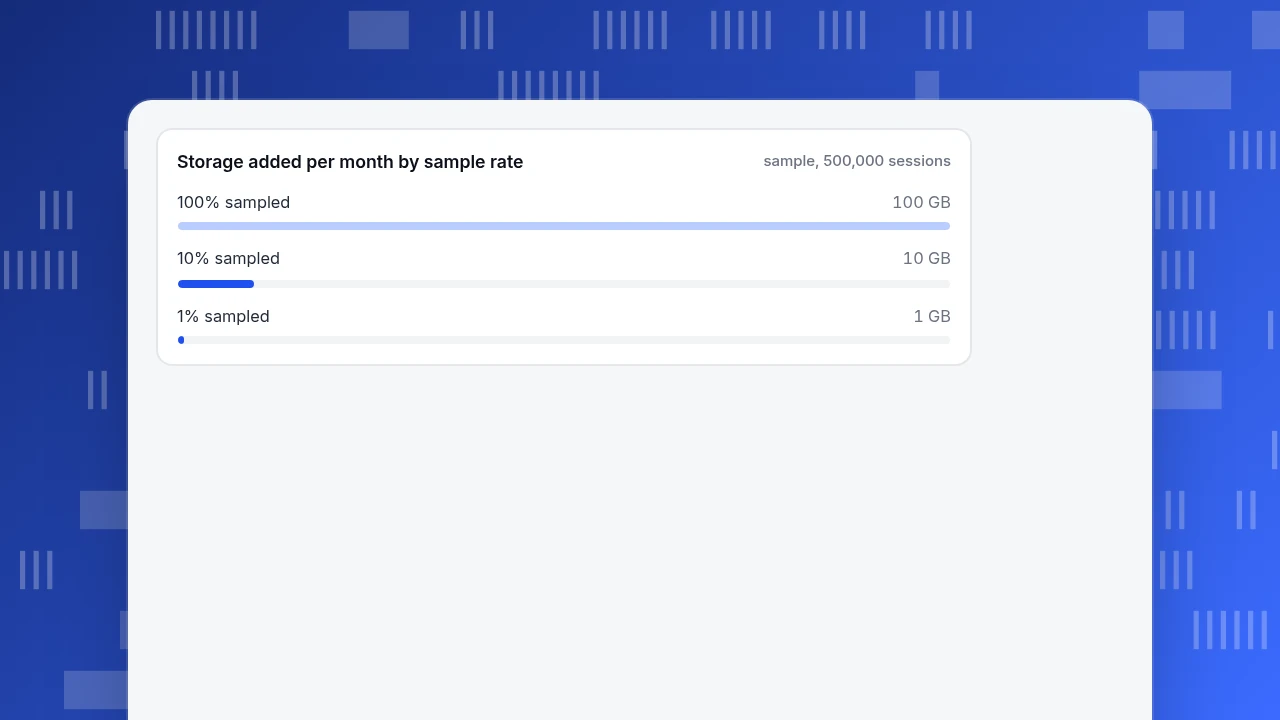
Sample data with assumptions to replace: 500,000 sessions a month, and an average compressed recording of 200 KB per recorded session. The sample rate is the share of sessions you record.
| Sample rate | Recorded sessions per month | Storage added per month | At $0.03 per GB-month (assumed) |
|---|---|---|---|
| 100% | 500,000 | 100 GB | $3.00 |
| 10% | 50,000 | 10 GB | $0.30 |
| 1% | 5,000 | 1 GB | $0.03 |
Check: 500,000 × 200 KB = 100,000,000 KB = 100 GB; at 10% it is 50,000 × 200 KB = 10 GB. If you keep recordings for 90 days instead of 30, steady-state storage is three times the monthly figure, so 30 GB at 10%.
The lesson is counter-intuitive: storage is the cheap part. The cost sits in ingestion at peak (a traffic spike multiplies concurrent uploads), in the database that makes recordings searchable by error or page, in the player's rebuild work, and in the time it takes people to find the sessions worth watching. Sample 10% or less, record only pages you need, and filter recordings by errors or rage clicks so the volume you store is the volume you review.
Storage added per month by sample rate
sample, 500,000 sessionsHow do privacy and masking differ between self-hosted and hosted?
Replay is the most privacy-sensitive analytics data you can collect because it can capture what is on the screen. The rules do not change by hosting model:
- Mask inputs by default. Typed values, especially passwords, card numbers, and identity or health forms, must never be stored. Block entire sections where in doubt.
- Be able to mask or block text for back-office or account pages where names and amounts appear on screen.
- Say it in the privacy notice and set a retention period. Under the GDPR the data you keep must be limited to what is necessary for the purpose (Article 5(1)(c)), and security of storage is on you (Article 32).
- Restrict access: who can open a recording is a permissions question, and recordings should not be shareable by a public link.
- Delete on request. If a person asks you to erase their data, recordings tied to their visitor id must go too.
Where hosting changes the picture is who verifies the controls. With a self-hosted library, masking is whatever your team configured and tested; a mistake that records a card field is yours. A hosted service documents its masking defaults and acts as your data processor under a contract (Article 28), but you still choose what to record. Either way, test it: open a recording of your checkout and sign-in pages and confirm the sensitive fields are blank.
How do effort and cost compare?
Sample hours for a team that already operates one web service. They are planning estimates, not measurements.
| Library only | Self-hosted platform | Hosted service | |
|---|---|---|---|
| Setup | 2–4 weeks (collector, storage, player, access control) | 2–5 days | Hours |
| Monthly upkeep | 6–12 hours | 4–8 hours | 0–1 hour (settings) |
| Storage and scale | You design it | You operate it | Vendor operates; plan limits apply |
| Masking control | Full, you code it | Configured per install | Configured in settings; vendor defaults |
| Playback features (search, filters) | You build them | Included | Included |
| Best when | You embed replay inside your own product | You must keep recordings on your servers | Replay is a tool, not a project |
Take the self-hosted platform row: at 6 hours a month and $60 an hour, upkeep is $360 a month before infrastructure. If a hosted plan covers your sessions for less than that, the economic case for self-hosting needs a rule-based reason, such as data residency, to justify it.
Before you commit to any option, ask five questions and write the answers down: where do recordings physically sit, who can open them, how long do they live, which fields are masked by default, and what happens to a recording when a visitor asks for deletion. If you cannot answer one of them for a self-hosted setup, that is the first task, not an afterthought.
| Option | Hosting | Privacy masking | Storage and scale | Effort |
|---|---|---|---|---|
| Recording library | Yours | You code it | You design it | Weeks to set up; 6–12 h a month |
| Self-hosted platform | Yours | Configured per install | You operate it | Days to set up; 4–8 h a month |
| Hosted service | Vendor | Settings and vendor defaults | Vendor operates | Hours to set up; 0–1 h a month |
| Replay in an analytics suite | Varies | Settings | Varies | Low if hosted |
Effort ranges are planning estimates for a team already operating a web service.
How should you choose?
- Need recordings on servers you control by policy? Pick a self-hosted platform, not a library. Plan the privacy review before the install.
- Building replay into your own product for your customers? Use a recording library and budget for months, not days.
- Just want to see why people drop off? Use hosted or a replay built into your analytics, record 10% or less, and filter by errors and rage clicks.
- Not sure you need replay at all? Start with heatmaps and funnels, which are lighter and carry less personal data, and add replay for specific pages. See heatmap tools.
Whichever you choose, set the sample rate, retention period and excluded pages on day one, before the first recording exists.
How does TapCub do session replay?
TapCub's replay is a hosted feature inside the analytics product, so you do not run storage or a player:
- Turn it on deliberately. Open All-platform analytics › Behavior › Session replay. It is off by default; an admin or owner enables it on the Settings tab and confirms that the privacy policy covers recording, that payment, ID and medical pages are excluded and that input masking stays on.
- Start with the defaults. The sample rate is 10% (above 10 shows a storage and performance warning), input values are masked, retention is 30 days (1–90), and up to 20 path prefixes can be excluded. Password fields, elements marked
data-tc-ignoreorwc-no-replay, and the support widget are never recorded. Each session is capped at 8 MB before compression. - Find the sessions worth watching. The list filters by errors, rage clicks, page and minimum duration, so you open problem sessions instead of random ones. Timelines list the page views, events and errors.
- Combine with heatmaps. Heatmaps under All-platform analytics › Behavior › Heatmaps show where many people click; replay shows one person's path.
Replay records web pages only, not apps or mini programs. If you prefer your own replay stack, TapCub lets you set a link template under Web analytics › Configuration › Web settings so that session details show Open replay pointing at your own service. It does not record support conversations.
FAQ
What is the best open source session replay tool?
There is no single best. A recording library suits teams building replay into their own product, a self-hosted platform suits teams that must keep recordings on their own servers, and a hosted service suits teams who want answers without running infrastructure. Choose on hosting, masking, storage and effort.
Is open source session replay free?
The code is free to download; running it is not. You pay for servers, storage, upgrades and the hours to review masking. In the sample, upkeep of a self-hosted platform is about $360 a month at 6 hours and $60 an hour.
How much storage does session replay need?
It depends on sessions, sample rate and page complexity. With 500,000 sessions a month, a 200 KB average recording and a 10% sample rate, the sample adds about 10 GB a month. Retention multiplies this.
Is session replay GDPR compliant?
It can be, if you minimise what you record, mask sensitive fields, state it in your privacy notice, set retention, restrict access and handle deletion requests. Recording screens without these controls is not compliant under any hosting model.
Can I record 100% of sessions?
You can, but it multiplies storage and review work without matching insight. Sampling around 10% and filtering recordings by errors or rage clicks usually finds the problems that matter.
Sources
- MDN Web Docs. MutationObserver. Checked 2026-11-23.
- Google. Avoid an excessive DOM size, web.dev. 800-node warning and 1,400-node excessive thresholds. Checked 2026-11-23.
- HTTP Archive. Web Almanac 2024: Page Weight. Median page weight and request counts, October 2024. Checked 2026-11-23.
- European Union. Regulation (EU) 2016/679 (GDPR). Articles 5(1)(c), 28 and 32.
Was this article helpful?
We use your answers to fix and expand this page.
Couldn’t send. Please try again in a minute.
Thanks for the feedback. We’ll use it to improve this page.You’ve already sent feedback on this page. Thanks.

Customer Experience Consultant
Writes about live chat, visitor conversations, and self-service, sharing practical ways to make customer communication clearer and more effective.