Try it on your own data
Every report in this article is in the free plan. One snippet for web and apps, up to 10 sites.
Start freeTo choose an app analytics tool, compare candidates on four points: how they collect data, whether they can receive install attribution, how they handle privacy and how pricing scales with your events. Features matter less than these. Below: the four kinds of tool, a worked pricing break-even, seven tests to run before committing and a plan for migrating without losing comparability.
What you will learn
- Four different jobs hide behind the label: store console, in-app analytics, attribution, crash reporting
- Pricing unit decides cost: in the sample the cheaper plan flips at 333 events per user per month
- Test the SDK on a real build, including offline events, identity merge and raw export, before you commit
What kinds of app analytics tools are there?
App analytics tools are software that records what happens in a mobile app (installs, sessions, screens, events, crashes) and turns it into reports. The label covers four different jobs, and most "which tool" arguments come from comparing tools that do different ones.
| Kind | Question it answers | Where its data comes from | Typical gap |
|---|---|---|---|
| Store console | How do people find and install the app in the store? | The store itself | Nothing about what happens inside the app |
| In-app analytics (SDK) | What do people do after opening it? | An SDK you ship inside the app | Does not know which ad led to the install |
| Attribution | Which campaign produced this install? | A measurement SDK plus ad-network signals | Thin on in-app behavior |
| Crash and performance | Why did it break or run slowly? | A stability SDK | Not a behavior or marketing tool |
The store consoles from Apple and Google are free and show impressions, downloads and store-side conversion. The other three need an SDK and a decision. This guide is about the second kind, with attribution and stability as neighbors, because that is where most teams choose.
For what to measure once a tool is in place, see mobile app KPIs; for the definition, mobile app analytics. For the web side of the same decision, web analytics tools covers site measurement.
The short version of choosing: compare tools on four points — collection, attribution, privacy and cost — and let the two that matter most to your business decide.
| Criterion | What to ask | Deal-breaker if |
|---|---|---|
| Collection | Which platforms, events and raw export does it offer? | No event-level export and no way to merge a user across devices |
| Attribution | Can it receive install postbacks and join them to later events? | You run install ads and cannot compare retention by campaign |
| Privacy | Which identifiers does the SDK read, and can consent control collection? | It reads the advertising ID and you cannot switch that off |
| Cost | What is the unit, and what is the bill at 3 times your volume? | The bill grows faster than your users do |
Run all four with two or three finalists; a deal-breaker removes a tool, the rest rank them.
How does the tool collect data, and what should you check?
Collection decides what questions you will ever be able to answer, because data not collected cannot be analyzed later. Check these:
- Platform coverage. Does one SDK cover iOS, Android and any cross-platform framework or other store you ship on? Separate SDKs usually mean separate event models.
- Event model. Can you send custom events with properties, and are common ones (app start, screen view, crash) collected automatically? Too little automatic collection means more code; too much means noise and cost.
- Raw data access. Can you export event-level data, or only look at the vendor's reports? An export to a data warehouse is the escape hatch if the tool's reports ever fall short. Google's Firebase documentation describes one such route, a daily and streaming export of raw events to BigQuery, and notes that data from before the link was made cannot be imported.
- Identity. Does the tool keep an anonymous device ID, a user ID after login, or both, and can it join them? Without that join, one person on two devices counts as two.
- Offline behavior. Does the SDK queue events when the phone has no signal and send them later with their original time? Missing this undercounts people who use the app on trains or in basements.
- Weight. SDK size and startup cost count too; ask what it adds to the app and whether it can be initialized after the first screen.
Do you need install attribution, and where does it come from?
Attribution answers which campaign an install came from. It matters only if you spend on app-install ads. Organic-only apps can skip this and read channel data from the store.
If you do spend, the rule is simple: in-app analytics tools generally do not decide which ad produced an install; an attribution service does, and the analytics tool receives that result. Ask three questions:
- Can the tool receive attribution postbacks, as an install event with source and campaign fields?
- Can it join those fields with later events, so you can compare day-7 retention or revenue by campaign?
- Does it make clear which numbers came from the attribution service and which it computed itself?
On iOS, how much the platform lets you connect depends on user consent. Apple's App Tracking Transparency framework requires an app to ask permission before tracking users across other companies' apps and websites or accessing the device advertising identifier. A tool that promises "full user-level attribution on iOS" needs checking against that rule, and against the percentage of users who say yes.
What privacy questions should you ask before choosing?
Privacy is a selection criterion because it changes both what you can collect and what you must disclose.
- Identifiers. Does the SDK read the device advertising identifier, or does it use its own app-scoped ID? Reading the advertising ID triggers the permission prompt on iOS; an app-scoped ID does not.
- Disclosure. Apple's App Store privacy details and Google Play's Data safety section both require you to declare what the app and its SDKs collect. Every SDK you add has to be listed accurately, so ask the vendor for its data collection list.
- Region and retention. Where is data stored, and how long is raw data kept? Can you delete one person's data on request?
- Consent control. Can you stop collection until the user agrees, then start it, without shipping a new build?
- Sub-processors. Who else receives the data?
None of this is legal advice; it is the list of questions your own counsel will ask. The practical effect is that an SDK collecting less by default is easier to disclose.
How should you compare what tools cost?
Pricing is where the same app can cost four times more on one plan than another, because tools bill on different units: monthly active users (MAU), events, seats or data volume. The right comparison is your own volume under each unit.
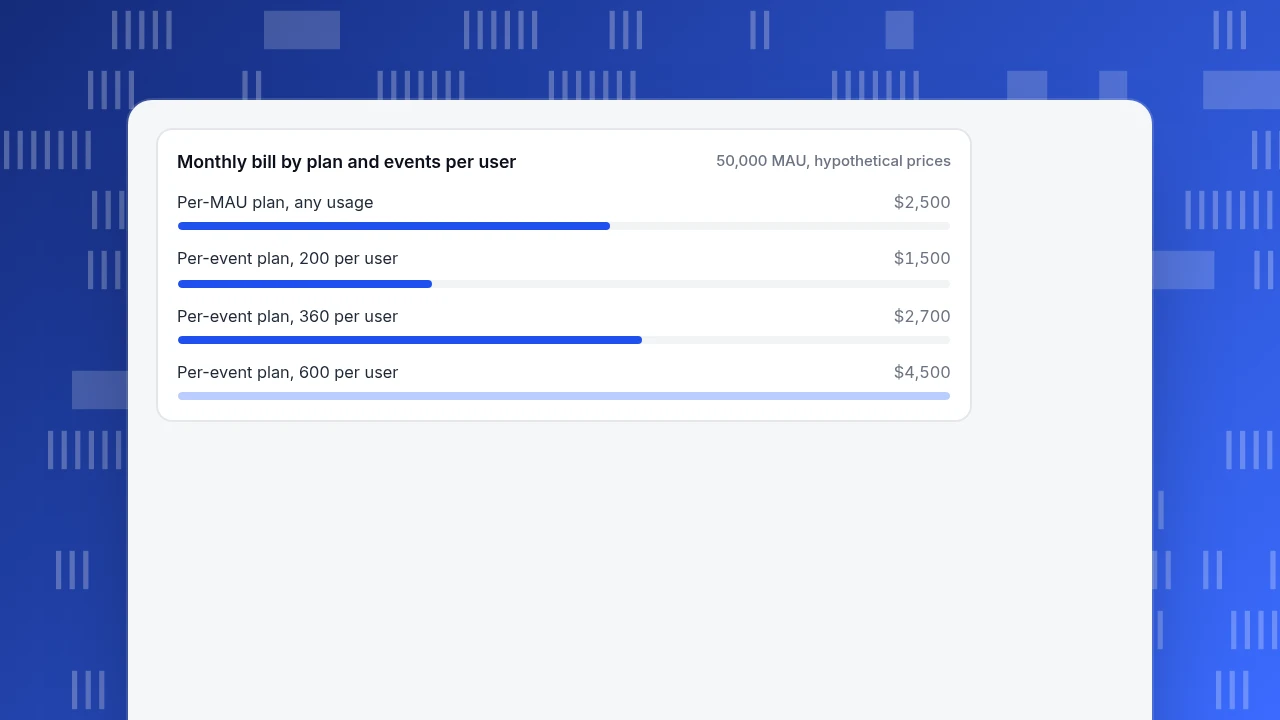
Sample data with hypothetical unit prices (not any vendor's real prices): an app with 50,000 MAU. Users are active on 12 days a month and send 30 events on each active day. Events per month = 50,000 × 12 × 30 = 18,000,000, or 360 per user.
| Plan | Unit price | Cost at 50,000 MAU and 18M events |
|---|---|---|
| Plan A: per MAU | $0.05 per MAU | 50,000 × $0.05 = $2,500 |
| Plan B: per event | $150 per million events | 18 × $150 = $2,700 |
The two are close, and the winner flips with user behavior. Break-even is where the two plans cost the same: $0.05 ÷ ($150 ÷ 1,000,000) = 333 events per user per month. At 200 events per user, Plan B costs 50,000 × 200 ÷ 1,000,000 × $150 = $1,500, cheaper than A. At 600, it costs $4,500, almost double. If you plan to add automatic screen and tap tracking, your events per user can multiply without a single new user.
Total cost is more than the plan price:
- Developer time to instrument events and keep the plan current.
- Export or warehouse costs if you pipe raw data out.
- Overage rules. What happens at the limit: a bill, throttled reports, or dropped events?
- Exit cost. If history cannot be exported, switching later means starting from zero.
Monthly bill by plan and events per user
50,000 MAU, hypothetical pricesWhat should you test before committing?
A short checklist turns the four criteria into pass or fail. Run it with the two or three finalists.
- Install the SDK in a test build and confirm app-start, screen and a custom event arrive in the tool within minutes.
- Send one event with a property and filter a report by it.
- Identify a test user on two devices and check that they merge.
- Switch to airplane mode, send events, reconnect and look at the event times.
- Ask for the data collection list and compare it to what you will declare to the stores.
- Run the cost sheet at your current volume and at 3 times that.
- Export raw data for one day and open it.
Anything that fails step 1 to 3 is a deal-breaker; the others rank the finalists.
How do you migrate from one app analytics tool to another?
Switching tools usually fails on naming, not code. Do it in four steps:
- Write a tracking plan with every event name, properties and the screen or action that fires it. Keep the old names where you can.
- Run both SDKs for two to four weeks, long enough for a full monthly cycle in the metrics you care about.
- Compare active users, new users and key-event counts between the two. Expect differences from definitions (what counts as a session or a new user); decide on a conversion factor rather than chasing equality.
- Cut over reports and alerts, and keep the old tool read-only until the next quarter closes. Historical data rarely transfers one-to-one, so export what you need first.
What mistakes do teams make when choosing an app analytics tool?
- Choosing by feature list. Features you never switch on do not matter; the four criteria cover what you will use.
- Ignoring the event volume. Pricing that looks cheap at 10,000 MAU can be expensive at 100,000 with automatic collection on.
- Assuming one tool does everything. A behavior tool does not decide ad attribution; a store console does not show in-app behavior.
- Skipping the privacy list. A late discovery that an SDK collects the advertising ID can force a new consent flow and a release.
- No exit plan. Without a raw export you cannot leave without losing history.
How does TapCub fit among these tools?
TapCub's app analytics belongs to the in-app kind, with a stability report and a way to receive attribution results. Here is how each criterion maps.
- Collection. Register the app and install the SDK under App analytics › Configuration › SDK code. Native SDKs ship for Android, iOS and HarmonyOS, with cross-platform options described in the documentation. Check App analytics › Overview › Realtime to confirm an app-start event arrives. App, web and mini program data share one project and one event and user model.
- Attribution. TapCub does not match clicks to installs and is not an attribution provider. It receives the result from your attribution service as an install event and groups installs by source and campaign in App analytics › Quality & attribution › Attribution; spend and return by channel are in All-platform analytics › Business › Channel ROI.
- Privacy. Configuration › Privacy center sets the collection tier, consent rules by region, address truncation, retention and data-subject requests.
- Reports and export. App analytics › Users › Versions and channel reports compare versions and channels; App analytics › Quality & attribution › Stability covers crashes. Raw event data leaves through an asynchronous export in All-platform analytics › Data › Data export.
FAQ
What are the best app analytics tools?
There is no single best one; it depends on what you need to answer. Choose on four points: how it collects data, whether it can receive attribution, what it does about privacy and how its pricing scales with your events. A store console is free for store-side data and worth using next to any in-app tool.
What is the difference between app analytics and attribution?
App analytics records what people do inside the app. Attribution decides which campaign produced an install. The first answers "do they come back?"; the second answers "which ad worked?". Many apps need both, with the attribution result flowing into the analytics tool so retention and revenue can be compared by campaign.
Are free app analytics tools enough?
Often, for early stages, if they offer event-level export and clear data collection. Check what happens when volume grows: some free tiers have export or sampling limits, and the tool may be tied to a larger ad platform. Compare against the cost sheet at 3 times your volume.
How long does it take to switch app analytics tools?
Plan on a month for the build and parallel run, plus a few weeks of comparing numbers. The code is quick; agreeing on definitions and mapping event names takes the time. Keep the old tool read-only for a quarter so history stays available.
Do app analytics tools need user consent?
It depends on what the SDK collects, where your users are and the law that applies to you. On iOS, reading the advertising identifier for tracking needs the permission prompt. For anything else, ask the vendor for its data collection list and take it to your counsel; this guide is not legal advice.
Sources
- Apple. App Tracking Transparency — an app must request permission to track users across other companies' apps and websites. Checked 2026-11-19.
- Apple. User privacy and data use — App Store privacy disclosure and tracking requirements. Checked 2026-11-19.
- Google Play Console Help. Provide information for Google Play's Data safety section — developers declare what the app and its SDKs collect. Checked 2026-11-19.
- Firebase Help. Link BigQuery to Firebase — raw event export, and data before the link is not imported. Checked 2026-11-19.
Was this article helpful?
We use your answers to fix and expand this page.
Couldn’t send. Please try again in a minute.
Thanks for the feedback. We’ll use it to improve this page.You’ve already sent feedback on this page. Thanks.

Data Engineer
Writes about event design, data quality, and collection workflows, with verifiable implementation methods for reliable analytics.