Try it on your own data
Every report in this article is in the free plan. One snippet for web and apps, up to 10 sites.
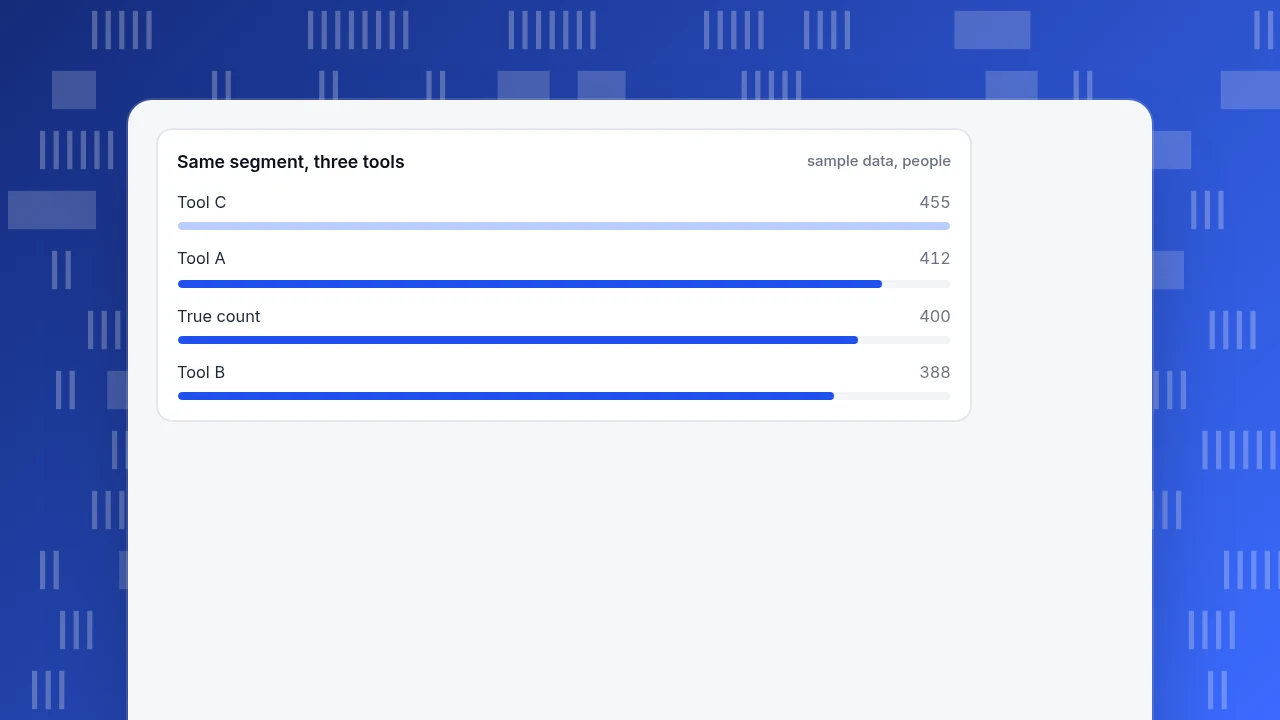
Start freeMarketing segmentation software puts people into groups by behavior, purchases or attributes and keeps them current. It can only segment on data it receives, so choose by data inputs first and features second, then test each candidate by building the same segment and comparing the count with a source of truth. In the sample, tools returned 412, 388 and 455 against a true 400; only +13.75% needed investigation.
What you will learn
- List your data inputs before comparing features; a tool cannot segment on data it never receives
- Ask for limits and privacy controls in writing: segment caps, membership length, removal from all segments
- Reconcile a countable segment in every candidate with a tolerance set in advance, such as plus or minus 5%
What is marketing segmentation software?
Marketing segmentation software turns data about people into named groups you can act on: "bought in the last 30 days and did not refund", "visited pricing twice this month", "has not been back in 60 days". It does five things, in this order:
- Collects or imports data about behavior, purchases and attributes.
- Resolves identity, so that data from one person (or account) ends up in one place.
- Evaluates rules that put people into segments and keeps them current.
- Hands the segment on, as an export, a webhook or a filter in analysis.
- Shows how the segment performs, so you can tell whether it was worth defining.
The point of this page is that a tool can only segment on data it actually receives, so choose by data inputs first and by features second. A feature list that includes "behavioral segmentation" means nothing if your behavioral data never reaches the tool. Below is a matrix by data input, a feature checklist, a privacy check, and a way to test any candidate by building the same segment in each and comparing the counts. If you need examples of segments worth building, see market segmentation examples and customer segmentation analysis; for a view of the product landscape, see audience segmentation tools. This page is about the selection method.
Which data inputs does your segmentation depend on?
List the data you have before you look at any product.
| Data input | Segments it makes possible | Needs a known identity? | Question to ask a tool |
|---|---|---|---|
| Page and session behavior | Visited pricing, read docs, came from a channel | No for counts; yes for individual profiles | Does it segment anonymous visitors, or only identified people? |
| Custom events | Used a feature, started checkout | Same as above | Can a rule combine "did" and "did not" within a time window? |
| Orders and revenue | Buyers, high spenders, repeat buyers, RFM | Yes (order is tied to a customer id) | Can it import orders, and how often? |
| Logged-in attributes | Plan, country, role, sign-up date | Yes | Where do attributes come from, and can they be edited? |
| CRM or list import | Lists you already own | Yes | Static list or does it update? |
| Campaign and cost data | Acquired through campaign X, cost per segment | Not necessarily | Can spend be attached by channel or campaign? |
| Survey or preference data | Stated interests | Yes | Is it stored as a property you can filter on? |
If most of your data is the first two rows (anonymous browsing) and your product has few logins, a tool that segments only identified people will give you small segments. If most of your value sits in orders, import quality and refresh frequency matter more than clever rule logic.
| Data input | Segments it makes possible | Needs a known identity? |
|---|---|---|
| Page and session behavior | Visited pricing, came from a channel | Counts no, profiles yes |
| Custom events | Used a feature, started checkout | Same as above |
| Orders and revenue | Buyers, repeat buyers, RFM | Yes |
| Logged-in attributes | Plan, country, role | Yes |
| CRM or list import | Lists you already own | Yes |
| Campaign and cost data | Acquired through campaign X | Not necessarily |
If most of your data is anonymous browsing, check how a tool treats anonymous visitors.
What belongs on the feature checklist?
Twelve items cover most of the difference between tools. Score each yes, partly or no.
| Feature | Why it matters |
|---|---|
| Rule logic: did, did not, within a window, at least N times | Without "did not" you cannot build lapsed or non-buyer segments |
| Identity choice: person, device, visitor or account | Decides what the count means |
| Refresh mode: daily, manual, or real time | A stale segment sends yesterday's message |
| Size history | A segment that doubled overnight is a data problem, not a success |
| Joiners and leavers log | Lets you audit why someone entered a segment |
| Static lists and imports | Needed for lists that come from outside |
| Use in analysis (funnels, retention) as a cohort | Otherwise you rebuild the rule on every chart |
| RFM or other scoring models | Common for retention work |
| Export, webhook or API | Needed to act on the segment elsewhere |
| Limits | Maximum segments, membership length, anonymous handling |
| Permissions | Who may edit a segment others rely on |
| Privacy controls | Consent, retention and deletion requests |
Limits deserve a look because they are invisible in demos. As an example, Google's Analytics help says a standard property is limited to 100 audiences (400 for 360 properties) and that membership duration is capped at 540 days. Neither is a flaw; both would stop a team that wanted 300 small segments or a two-year lookback. Ask for the limits in writing.
What do privacy rules mean for segmentation tools?
Segmentation on personal data is profiling in the legal sense. The General Data Protection Regulation defines profiling in Article 4(4) as automated processing of personal data to evaluate personal aspects of a person, and Article 21(2) gives people a right to object at any time to processing for direct marketing, which includes profiling related to it; after an objection, Article 21(3) says the data may no longer be processed for that purpose. Practical checks for any tool:
- Can you remove one person from every segment and stop them rejoining?
- Does the tool respect consent state, so that people who declined are not profiled?
- Where is data stored, and for how long?
- Can you export or delete one person's data on request?
Ask the vendor to show these in the product, not in a policy PDF. If they cannot demonstrate removal and export, the segments will be a liability the first time someone asks.
How do you test candidates with the same segment?
Build one segment in each candidate from the same data, and compare the counts with a source of truth.
- Choose a segment you can count independently. For example "bought in the last 30 days and did not refund", countable from your order system.
- Record the true number. Sample data: your order system says 400 people.
- Build the segment in each tool with its own rule builder, importing the same orders. Note how long it takes.
- Compare counts and define a tolerance before you look, for example plus or minus 5%.
| Candidate | Count | Difference from 400 | Result |
|---|---|---|---|
| Tool A | 412 | +3.0% | Within tolerance |
| Tool B | 388 | −3.0% | Within tolerance |
| Tool C | 455 | +13.75% | Investigate: probably counts refunded orders or duplicates people |
Tool C is not necessarily worse, but it has told you something: its definition of the segment is different from yours. Find out whether the difference comes from timezone, duplicate identities, refunds or the refresh schedule. A tool that cannot explain a 13.75% gap will produce the same kind of gap in every segment you build.
Add three more checks: time the refresh (does the segment update when you say it does), check that changing a rule shows a preview count before saving, and confirm that exporting returns the same people as the screen.
Same segment, three tools
sample data, peopleHow big does a segment need to be before you act on it?
A small segment gives a noisy conversion rate, and a tool that happily builds 40-person segments invites over-reading. The margin of error on a rate p measured on n people is about 1.96 × √(p × (1 − p) ÷ n). Sample data: a segment whose true conversion rate is 5%.
| Segment size | Margin of error on a 5% rate | Reading |
|---|---|---|
| 50 | ±6.0 points | The range includes 0%; do not compare |
| 100 | ±4.3 points | Directional at best |
| 400 | ±2.1 points | Usable for a first decision |
| 1,000 | ±1.4 points | Good enough to compare with other segments |
A practical rule: do not compare two segments on conversion unless each has at least a few hundred people, and merge or widen a segment whose size trend swings by more than a few percent a day. Check whether the tool shows the member count before you save a rule and keeps a size history, because those are the two features that let you apply this rule.
How do you build segments from behavior data in TapCub?
TapCub is an analytics product, so its segments are built on the behavior and order data it collects. Here is how the inputs above map.
- Use behavior and events. In All-platform analytics › Users › Segments & tags, a rule segment combines conditions: did, did not, a property, first seen, active, in another segment, a sequence, a tag, a random bucket or a preference, each with a time window. It refreshes daily or on demand, shows a 30-day size trend and records who joined and left. Step by step: create user segments.
- Choose the identity. A segment can count people, devices, visitors or accounts. Anonymous visitors have no profile, so they never become members of a person segment; people appear after login with
tapcub.login. With identified mode off, a person-scoped segment has no members. - Add other kinds. Static segments are a pasted list of ids or emails and change only when you import; live segments add people at collection time ("just did an event", "visited a page", "arrived from a channel"); RFM takes a transaction event and an amount property and maps people into 10 buckets, recording moves between buckets.
- Use the segment in analysis. Analyze applies a segment as a cohort, so a funnel or retention chart can compare it with everyone else. View users opens the member list.
- Hand it on. If a webhook is configured, TapCub emits membership changes. TapCub does not send the message and does not score leads; it is the place the segment is defined and measured.
- Check privacy. Configuration › Privacy center holds consent tiers, retention and data-subject requests.
FAQ
What is marketing segmentation software?
It is software that puts people into groups by behavior, purchases or attributes, keeps those groups current and lets you use them in analysis or outreach. The key question is which data it receives, since it can only segment on data that reaches it.
What features should segmentation software have?
At minimum: did and did not rules with time windows, a choice of identity (person, device, account), a clear refresh schedule, size history, a joiner and leaver log, static list import, use as a cohort in analysis, and export or webhook. Ask for limits and privacy controls in writing.
How do I compare segmentation tools fairly?
Build the same segment in each from the same data and compare the count with a source of truth. In the sample, tools gave 412, 388 and 455 against a true 400, and only the last, at +13.75%, needed investigation.
Can segmentation software work with anonymous visitors?
Some can segment anonymous behavior for counts, but they cannot build individual profiles. Person-level segments need a known identity such as a login. If most of your traffic is anonymous, check how a tool treats it before you buy.
Is customer segmentation subject to GDPR?
When it uses personal data to evaluate aspects of a person, it falls under the GDPR definition of profiling. People can object to profiling for direct marketing at any time (Article 21), so choose a tool that can remove a person from all segments and honor consent state.
Sources
- Google, Analytics Help: Audience limits and membership duration — 100 audiences per standard property, 400 per 360 property, 540-day maximum membership duration.
- European Union, Regulation (EU) 2016/679 (GDPR), Articles 4(4) and 21(2)–(3) — definition of profiling and the right to object to direct marketing.
Was this article helpful?
We use your answers to fix and expand this page.
Couldn’t send. Please try again in a minute.
Thanks for the feedback. We’ll use it to improve this page.You’ve already sent feedback on this page. Thanks.

Data Analyst
Explores traffic sources, conversion funnels, and retention, using clear metric definitions and concrete examples to explain what the numbers mean.